Forum Discussion

Solving 'The Change-making problem' with a formula

The greedy algorithm is good for solving this problem because currency denominations tend to be 1/5/10/20/50/100, etc. The flaws in the greedy are exposed when trying to solve similar problems with more diverse sets of integers.
For example,
Greedy makes the local optimal choice but the overall optimal choice is 30/30 for the 60 target. I modified my original Lambda to run a 2nd check where the highest integer is discarded from the matrix.
=LET(
    keep, XMATCH(target, integers, -1),
    int_vector, SORT(TAKE(integers, keep), , -1),
    largest, MAX(int_vector),
    c, MAX(5, ROUNDUP(target / largest, 0)),
    MatrixA, int_vector * SEQUENCE(, c, 1, 0),
    discard, IF(ROWS(MatrixA) = 1, 0, 1),
    MatrixB, DROP(MatrixA, discard),
    GetInt, LAMBDA(acc, v,
        LET(stack, VSTACK(acc, v), IF(SUM(stack) > target, DROP(stack, -1), stack))
    ),
    a, REDUCE(, MatrixA, GetInt),
    b, REDUCE(, MatrixB, GetInt),
    IF(AND(SUM(b) = target, COUNT(b) < COUNTA(a)), b, a)
)
I may need to test more target values, but it's held up so far.

Patrick2788 Good stuff. There was a video shared by Diarmuid Early on YouTube a few months ago called "Recursive LAMBDAs to traverse a tree", where he walked through solving the Peg Game Excel challenge. Seems like the same logic could be applied here... in any case, you might find it interesting.
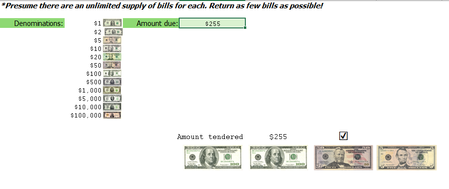
Just for fun, here's another "Greedy" LAMBDA function based on my previous reply, but with additional options that can output 4 different layouts. The generic syntax is:
=MAKECHANGE(amount, denoms, [images], [list_mode])
- amount - The amount due
- denoms - The range containing the denomination values
- images - [optional] The range containing the denomination images (if omitted, the function will return the denomination values by default)
- list_mode - [optional] 0 or FALSE = summary report grouped by denomination (default); 1 or TRUE = complete list of all denominations
This function is highly efficient and can handle amounts greater that 1 trillion with ease (summary report). When list_mode is set to TRUE, it can only handle amounts up to 100 billion, due to the row limitations of TOCOL. The complete definition is:
MAKECHANGE:
=LAMBDA(amount,denoms,[images],[list_mode],
    LET(
        d, SORT(denoms,, -1),
        m, MAX((d<=amount)*d),
        r, IF(m=0, 0, REDUCE(HSTACK(m, INT(amount/m)), d, LAMBDA(v,n,
            LET(a, ROUND(amount-SUMPRODUCT(TAKE(v,, 1)*TAKE(v,,-1)), 2),
                IF(a<n, v, VSTACK(v, HSTACK(n, INT(a/n)))))))),
        x, TAKE(r,, 1),
        y, TAKE(r,,-1),
        t, SUMPRODUCT(x*y),
        h, EXPAND(HSTACK("Amount Tendered:", t, IF(ROUND(amount-t, 2), "⮽", "☑")), 2,, ""),
        IF(
            list_mode,
            LET(z, IFERROR(TOCOL(IFS(y>=SEQUENCE(, MAX(y)), x), 2), 0), IFNA(VSTACK(h, "Denominations:",
                WRAPROWS(IF(ISOMITTED(images), z, XLOOKUP(z, denoms, images, "")), 4)), "")),
            VSTACK(h, HSTACK("Denominations", "Quantity", "Amount"),
                HSTACK(IF(ISOMITTED(images), x, XLOOKUP(x, denoms, images, "")), y, x*y))
        )
    )
)
Enjoy!