Forum Discussion

Excel Macro Assistance Needed for Staff Roster and Training Allocation
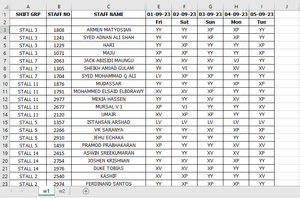
- Sep 24, 2023
XLookup is available in Excel in Microsoft 365 and Office 2021. If you have an older version, you can use VLookup:
Sub FillRoster()
    Dim w1 As Worksheet
    Dim w2 As Worksheet
    Dim w3 As Worksheet
    Dim r1 As Long
    Dim m1 As Long
    Dim r2 As Long
    Dim m2 As Long
    Dim c1 As Long
    Dim n1 As Long
    Dim dt As Date
    Dim sc As String
    Dim ar As String
    Dim v1
    Application.ScreenUpdating = False
    Set w1 = Worksheets("w1")
    Set w2 = Worksheets("w2")
    Set w3 = Worksheets("Lists")
    m1 = w1.Cells(w1.Rows.Count, 1).End(xlUp).Row
    n1 = w1.Cells(1, w1.Columns.Count).End(xlToLeft).Column
    v1 = w1.UsedRange.Value
    For r1 = 3 To m1
        v1(r1, 1) = Application.VLookup(v1(r1, 1), w3.Range("A2:B15"), 2, False)
        For c1 = 5 To n1
            v1(r1, c1) = Application.VLookup(v1(r1, c1), w3.Range("D2:E10"), 2, False)
        Next c1
    Next r1
    m2 = w2.Cells(w2.Rows.Count, 1).End(xlUp).Row
    w2.Range(w2.Cells(2, 6), w2.Cells(m2, 8)).ClearContents
    For r2 = 2 To m2
        dt = w2.Cells(r2, 1).Value
        c1 = w1.Rows(1).Find(What:=dt, LookAt:=xlWhole).Column
        sc = Application.VLookup(w2.Cells(r2, 4).Value, w3.Range("D2:E10"), 2, False)
        ar = Trim(w2.Cells(r2, 5).Value)
        For r1 = 3 To m1
            If v1(r1, 1) = ar And v1(r1, c1) = sc Then
                w2.Cells(r2, 6).Value = v1(r1, 2)
                w2.Cells(r2, 7).Value = v1(r1, 3)
                w2.Cells(r2, 8).Value = w1.Cells(r1, c1).Value
                'v1(r1, 1) = ""
                v1(r1, c1) = ""
                Exit For
            End If
        Next r1
    Next r2
    Application.ScreenUpdating = True
End Sub

Your workbook doesn't match the code, but the cause of the error that you report is that the first sheet has dates in October, but the second sheet still has dates in September, so they cannot be matched.

Sorry Sir,
I forgot to change the month in this worksheet. On my original roster report, both sheets show as October month.
Actually, I am getting the results only up to the 5th of October, but I am looking for the results up to the 31st of October.
Could you please check if you can adjust the code with the range of these sheets?
Please help.
- HansVogelaarSep 29, 2023MVP
This workbook doesn't contain any code.
 fajnaAli1580Sep 29, 2023Copper Contributor
Dear Sir,
Please find the attached worksheet link.
https://admincreativeapps-my.sharepoint.com/:x:/g/personal/creativeapps_admincreativeapps_onmicrosoft_com/Ed-9eaPaoL5IkU5yBc_kA1MBJQerLH7UTjL5sM0Iz1sohQ?e=B2zi9E
Thank you so much.
- HansVogelaarSep 28, 2023MVP
Please attach a workbook with the same sheet names in the book and in the code, and with the correct dates.