excel on mobile
539 Topics
Conditional Formatting or a Specific Filter Rule
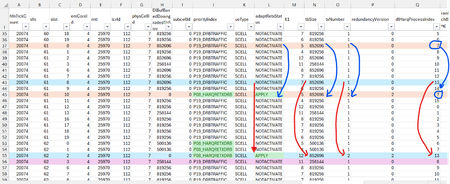
Dear Experts , I have a data like below:- here the Column-O, txNumber can go from 1,2,3 (txNum=2 and 3 means a Retransmission), I want to filter all the pairs for all Transmissions and their corresponding Retransmissions ( either by coloring them all using a conditional formatting) or using a specific filter Rule. How to identify the Transmission and it's corresponding Retransmission for a Specific HarqId( say for dlHarqProcessIndex ==7, the blue color Row-37 is my 1st transmission(txNumber ==1) for the dlHarqProcessIndex==7 with a tbSize of 852696, and adaptRetxStatus == NOTACTIVATE, and it's corresponding 2nd transmission( Retransmission , txNumber==2) Row-45, tbSize remains same(as it's corresponding 1st transmission) in all retransmissions and adaptRetxStatus changes to "APPLY" for all retrans txNumber==2,3) and similarly for other pairs like for dlHarqProcessIndex==13. Attached is the Worksheet.Solved168Views0likes5Comments
unpivot data and handle merged cells without using Power Query (Unpivot_Toolkit)
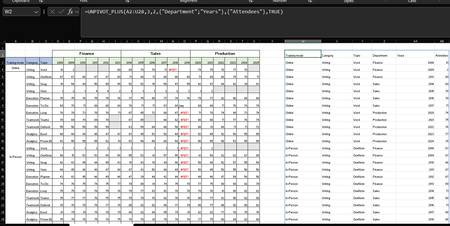
Hey, guys!! I’ve been working on a set of functional Excel Lambdas to solve a common headache: transforming "Wide" human-readable data into "Long" database formats without having to open Power Query every time. =UNPIVOT_PLUS(table, [no_of_cols], [no_of_headers], [attribute_names], [value_name], [remove_errors], [remove_blanks],[pad_blanks_with],[pad_errors_with]) Don’t worry about the full list, most use cases only require 5 arguments. I've included a table of default values at the end. Merged Cell Support: Automatically handles fill-down/fill-right logic for merged headers/columns. Bonus Helper: SPLIT_INJECT =SPLIT_INJECT(array, target_indices, delimiter, [ignore_empty], [match_mode], [pad_with]) It targets specific columns, splits them by a delimiter (like TEXTSPLIT), and expands the entire table horizontally while keeping all other columns perfectly stable. Optional arguments match TEXTSPLIT defaults. Feel free to tear this apart or adapt it for your own edge cases. I’d love to hear how you end up using it! You can grab both functions from my GitHub Gist https://gist.github.com/Medohh2120/f8553c149684e39bb499249e39f01017. Argument Description Default Behavior table The array or range of data to unpivot. Required argument (no default) [no_of_cols] Fixed left columns to keep as identifiers. 1 [no_of_headers] Top rows used as headers, handling merged cells. 1 [attribute_names] Header name for the unpivoted attributes . "Attribute" [value_name] Header name for the unpivoted values. "Value" [remove_errors] Excludes grid rows with formula errors. FALSE [remove_blanks] Removes grid empty cells and empty strings. TRUE [pad_blanks_with] Value to substitute for empty cells. Leaves cell blank [pad_errors_with] Value to substitute for errors. Leaves error as-is226Views0likes0Comments
Excel returns incorrect answer to simple multiplication.
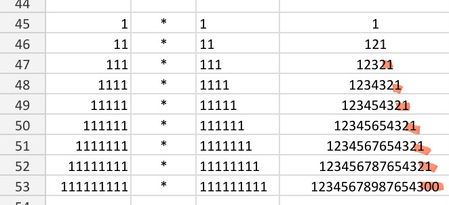
I'm saving a few favourite math examples, and ran into a problem - the last of the calculations came back with an incorrect answer. I'm using a simple =cell1*cell2 formula. It should end with 21. Please help I'm using android app. All cells formatted as numbers.Solved117Views0likes2Comments
Revenue structure
File Structure Reference Column A contains Client Names (e.g., A, B, etc.). Row 2 (starting Column B onward) contains month-end dates from Jan 2026 through Dec 2027. Columns B through the last month column contain monthly revenue values. The final column is the Total column (annual total calculation). 1. Termination Logic If a client terminates in a specific month: Revenue should appear normally up to the month prior to termination. In the termination month, revenue should become zero (or stop, based on effective date assumption). All future months (including months in the following year) must remain zero automatically. The annual Total column must update correctly based only on active months. The model must not require manual zeroing of future months — this should flow automatically once the termination month is specified. 2. Fee Update Logic If a client’s fee changes in a specific month: The revised fee should apply only from that month forward. All prior months must remain unchanged. The increase should not assume a uniform annual escalation. The updated fee must flow correctly into the next year without altering historical data. For example: If the fee increases in July 2026, then: Jan–Jun 2026 remain at old rate. Jul 2026 onward reflects the new rate. 2027 months continue with the revised rate unless changed again. It will be great if the formula works on Google Sheet as well.188Views0likes8Comments
Help needed with IF and COUNTIFS Formulas
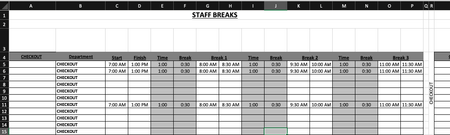
Is anyone able to advise the following formula: =COUNTIFS($B$5:$B$15,$R$4,$C5:$C15,"<=" & V3,$D5:$D15, ">" & V3)-COUNTIFS($B$5:$B$15,"="&$R$4,$G5:$G15,"<=" & V3,$H5:$H15, ">" & V3)-COUNTIFS($B$5:$B$15,"="&$R$4,$K5:$K15,"<=" & V3,$L5:$L15, ">" & V3)-COUNTIFS($B$5:$B$15,"="&$R$4,$O5:$O15,"<=" & V3,$P5:$P15, ">" & V3) Is there a way to simplify this? Is there a way to make this more accurate? Cells in column G & H, I & J, O & P are using the following format: =IF(C6="","",C6+E6) Cells in U4:CC4 are using the following format: =COUNTIFS($B$5:$B$15,$R$4,$C5:$C15,"<=" & U3,$D5:$D15, ">" & U3)-COUNTIFS($B$5:$B$15,"="&$R$4,$G5:$G15,"<=" & U3,$H5:$H15, ">" & U3)-COUNTIFS($B$5:$B$15,"="&$R$4,$K5:$K15,"<=" & U3,$L5:$L15, ">" & U3)-COUNTIFS($B$5:$B$15,"="&$R$4,$O5:$O15,"<=" & U3,$P5:$P15, ">" & U3) Cells in U5:CC15 are using the following format: =IF(U$4>=$T5,1,"") My issue is is when I put in the three break times, the mid break comes out at a shorter time. My other issue is is that when I put in the times in row 5,6and 11, the data is coming up as a combined data in rows 5, 6 and seven on the page two. Just for reference, "page two" is the same spreadsheet. What I need to happen is that I enter in the shift start time and finish time. This then populates through to Break 1, 2 and 3. The Time entry is the time the break starts. ie: 1 hour after start of shift, 1 hour after coming back from break, etc. The break entry is the duration of the break taken. ie: 30 minutes. Once all the info is put in, the relevant "Time Block" on "Page 2" shows a 1. What is happening at the moment is that when I enter all the time data, the time blocks are not populating correctly in accordance to the entry. Basically, If I have numerous people on shiftI need the time blocks to show where I have shortfalls in shift cover and not having too many people on break at the same time. IE: Link to Live Copy: https://www.dropbox.com/scl/fi/eur1j526htu1j8a4d4290/Staff-Breaks.xlsx?rlkey=r4tm9xts4tonofpa2th2cusfw&st=nueyk0d7&dl=0 Any ideas would be greatly appreciated.207Views0likes4Comments
Multiple Inventory entries on the same item
Okay so I'm wondering if there is a way for excel to automatically advance to the next column when entering inventory data so if I need to make another entry on the same item I don't have to advance to the next cell myself. This would be helpful in streamlining inventory and making it foolproof when adding inventory to a specific item (without having to worry about deleting previously entered data). I'm hoping there is a way to do this so I can take a tablet when completing my inventory and avoid the old clipboard and paper.76Views0likes2CommentsMoving a column of text data into 3 columns of data?
I have a column of text data cells 1,2,3,4,5,6,7,8,9 and longer. I want to create 3 column of data to graph and manipulate Cell in Columns. 1,2,3 3,4,5 5,6,7 8,9,10 and longer. So i need to create 3 columns of data from 1 column of data. I am using Mac Excel 16 and I can not make this happen. I have tried all sorts of solutions. Help? Thank you,210Views0likes3CommentsVBA code to allow dropdown box multiple selection
Hi all, Is there an option to allow multiple selections of a dropdown box within excel? the dropdown would be in column V (v2 downwards, and the list is in tab “Entities” from a2 down to a6. the codes I have tried from online either didn’t allow me to remove a selected item, or when I did remove it and try to select others I ended up with “floating” commas. Ie it went from “apple, pear, banana” to “,pear ,” and I couldn’t remove the commas. thanksSolved281Views1like1CommentRight click menu not Working in excel on iPad pro
Hi All, I am using Microsoft office on my I pad pro m2. Last few days I am not able to get right click menu in Excel. It’s not working at all. The apple IT guys told me that its from the Microsoft side. Now no one is able to sort this issue. I am on I pad 26.1 update which is the lates version. Please help me on this. Regards.132Views1like1Comment