Forum Discussion

FajnaAli
Sep 22, 2023Copper Contributor
Excel Macro Assistance Needed for Staff Roster and Training Allocation
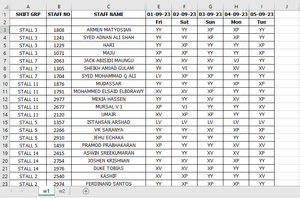
Hello Sir, HansVogelaar I require your assistance in coding an Excel macro. Currently, I am working on a staff roster Excel sheet with two worksheets: 1. On the first worksheet (w1), staff d...
- Sep 24, 2023
XLookup is available in Excel in Microsoft 365 and Office 2021. If you have an older version, you can use VLookup:
Sub FillRoster()
    Dim w1 As Worksheet
    Dim w2 As Worksheet
    Dim w3 As Worksheet
    Dim r1 As Long
    Dim m1 As Long
    Dim r2 As Long
    Dim m2 As Long
    Dim c1 As Long
    Dim n1 As Long
    Dim dt As Date
    Dim sc As String
    Dim ar As String
    Dim v1
    Application.ScreenUpdating = False
    Set w1 = Worksheets("w1")
    Set w2 = Worksheets("w2")
    Set w3 = Worksheets("Lists")
    m1 = w1.Cells(w1.Rows.Count, 1).End(xlUp).Row
    n1 = w1.Cells(1, w1.Columns.Count).End(xlToLeft).Column
    v1 = w1.UsedRange.Value
    For r1 = 3 To m1
        v1(r1, 1) = Application.VLookup(v1(r1, 1), w3.Range("A2:B15"), 2, False)
        For c1 = 5 To n1
            v1(r1, c1) = Application.VLookup(v1(r1, c1), w3.Range("D2:E10"), 2, False)
        Next c1
    Next r1
    m2 = w2.Cells(w2.Rows.Count, 1).End(xlUp).Row
    w2.Range(w2.Cells(2, 6), w2.Cells(m2, 8)).ClearContents
    For r2 = 2 To m2
        dt = w2.Cells(r2, 1).Value
        c1 = w1.Rows(1).Find(What:=dt, LookAt:=xlWhole).Column
        sc = Application.VLookup(w2.Cells(r2, 4).Value, w3.Range("D2:E10"), 2, False)
        ar = Trim(w2.Cells(r2, 5).Value)
        For r1 = 3 To m1
            If v1(r1, 1) = ar And v1(r1, c1) = sc Then
                w2.Cells(r2, 6).Value = v1(r1, 2)
                w2.Cells(r2, 7).Value = v1(r1, 3)
                w2.Cells(r2, 8).Value = w1.Cells(r1, c1).Value
                'v1(r1, 1) = ""
                v1(r1, c1) = ""
                Exit For
            End If
        Next r1
    Next r2
    Application.ScreenUpdating = True
End Sub

HansVogelaar
Sep 25, 2023MVP
I don't see how I can improve the code, sorry.

FajnaAli
Sep 25, 2023Copper Contributor