Forum Widgets
Latest Discussions
Meet Viva Connections
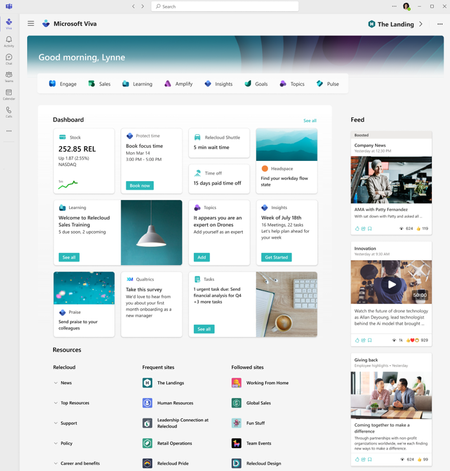
Viva Connections is a customizable app in Microsoft Teams that turns your intranet into your new employee app. As such, it becomes the natural home for Viva and serves as the gateway to the other Viva apps. Viva Connections delivers different audiences in your organization a personalized destination to discover what's happening in Viva as well as a curated view of news, conversations, and the tools they need to succeed -- and the best part? You can rename it and brand it to reflect your own organization, and add in 3rd party apps and services that you use every day. Learn more and get started here.MichaelHolsteApr 19, 2023Microsoft563Views4likes0Comments
How to stop post content in Viva Engage to sending emails to the whole company
Loving having a New Viva engage community but trying to figure out a way to determine who gets new posts to the community . Currently it sends out to everyone which then looks like spam. I want to keep engagement but cannot have it sending the email to the whole company as we create new communities. Can someone help? StefenStefenBJan 08, 2026Copper Contributor374Views2likes6Comments
Scheduled news page showing in Teams before being published in SharePoint
We are finding that our scheduled news posts in SharePoint online are appearing in Viva Connections before the publish date/time in SharePoint. Is there a way to prevent this early posting?NikiFelkerAug 06, 2024Copper Contributor400Views2likes5Comments[Showcase] Deploying Viva Connections internally at Microsoft
A unified experience is at the core of Microsoft Viva Connections. We use it to consolidate resource access across a huge array of company resources and touchpoints, including SharePoint Online, Microsoft Teams, the Microsoft Graph, and other Microsoft 365 apps like Microsoft Viva Engage and Microsoft Stream. We want it to be the first place our employees go to get informed about the company and their work at Microsoft. Learn how Microsoft IT helped shape and deploy Viva Connections internally. Read the full story.MichaelHolsteJun 19, 2023Microsoft340Views2likes0Comments
Analytics for viva connection for dashboard cards
Hi, Viva connection analytics report generated from Viva connection dashboard gives good analytics about overall traffic and other usage. Is it possible to get a similar analytics about card usage present in viva connection dashboard. We do get overall usage and engaged user report but can we get information like how many times a dashboard card was clicked/opened? Is this something that will be available in near feature in analytics report? Regards, AkashAkash KaleMay 17, 2023Tin Contributor999Views2likes2CommentsSome users not able to add personal dashboard card
We are getting feedback that some users are not able to add the personal quick links card in the dashboard. I have gone through it with one of the users where they click the customize button, add the card, add a link and save it. But when they go back to the dashboard it is no longer there. We have tried it in the dashboard in teams and in the browser, we have tried to do a hard refresh but it is gone. Also when they go to customize the dashboard again it is gone and they can try to add it again (still not working). This happens for some users, while other users have no problems adding the card. Any suggestions how to fix this?cwaersten__910Dec 12, 2025Copper Contributor132Views1like3Comments
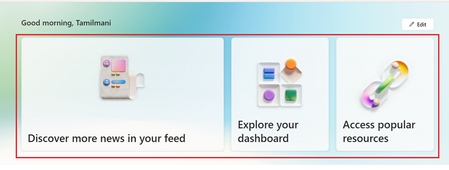
How to remove the banner section from the ViVa Connections page.
Hello, Is it possible to remove the banner section on the ViVa Connections page as highlighted in the below image? So, the user can view only the dashboard sections. Expected:tamilmani palaniJun 11, 2024Copper Contributor354Views1like1CommentViva connections icon change in Teams mobile app shows blank square
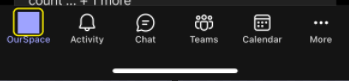
Hello, Last week we setup our SPO intranet site as a home site set as the default experience in Viva Connections in MS Teams. Whilst this works well in the desktop app, when using the Teams mobile app a custom icon we've deployed, doesn't show and instead just shows this blank square as highlighted below: Is this happening because the teams mobile app doesn't support custom icons? or have we missed something in the Viva Connections configuration to get the custom icon deployed correctly to the teams mobile app? Thanks!Chris CundyApr 25, 2024Brass Contributor747Views1like1CommentImage dimensions?
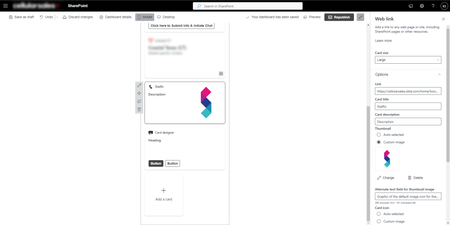
What are the image dimensions when you use the image layout option for the Card Designer or Web link cards?KatherineS-QMar 05, 2024Brass Contributor407Views1like1CommentScoped search not available in Teams client
Hi all! New here, first post. According to https://www.microsoft.com/sv-se/microsoft-365/roadmap?filters=&searchterms=148669 scoped search in the Teams client should be up and running. However, we can't see it. Or rather, we saw it for a couple of days back in October (?) but then it disappeared. We can see and use it in Teams on the web, but it would be so much better and easier for us if we could use it in the client. Is there a setting we're missing? Or is it a bug? Can anyone here confirm that they can use scoped search in the Teams client? We have a home site set up in Viva Connections that we want to be able to search through the search box in Teams. Thanks in advance!PerHardafSegerstadJan 18, 2024Tin Contributor1.5KViews1like9Comments



Tags
- microsoft teams14 Topics
- support14 Topics
- Employee Interaction7 Topics
- Company Branding6 Topics
- Admin Center4 Topics
- Smartphone1 Topic
- analytics1 Topic
- events1 Topic