Recent Discussions

How can I speak with an actual human representative at Microsoft?
I call ! 888 319 8920 the Customer Support line one more time. I've done it approximately 11 times and your robot cannot help me. I need a human representative to speak with me on the phone.! 888 319 8920 Tell me how I can make that happen.40Views0likes0CommentsHelp.microsoft.com talk to a person
To speak to a human at Microsoft tech support, !888 319 8920 you can follow these steps: In the search bar, type "Get Help" and open it. !888 319 8920 Type "Chat with an agent" and press Enter. !888 319 8920 Click the "Contact support" button at the bottom. !888 319 8920 Choose the products and services for which you need help. !888 319 8920 Follow the on-screen prompts to connect with a live agent. Alternatively, you can select the "Call me back" option and fill in the required information so they can call you. !888 319 8920 If you need immediate assistance !888 319 8920, it's recommended to initiate contact through these official channels rather than responding to unsolicited requests.65Views0likes0Comments
What is the Microsoft Graph API replacement for deprecated Recent, SharedWithMe, and Insights APIs?
Hi Microsoft Graph community, I'm currently working on a Microsoft Graph integration that needs to retrieve: Files recently accessed/used by the current user Files shared with the current user Files from OneDrive and SharePoint I'm currently using the following APIs: GET /me/drive/recent GET /me/drive/sharedWithMe GET /me/insights/used However, these APIs are deprecated, and some of them will stop returning data after November 2026. (https://learn.microsoft.com/en-us/graph/api/drive-sharedwithme?view=graph-rest-1.0&utm_source=chatgpt.com) I'm stuck in development because I haven't been able to identify a Microsoft-supported replacement that provides the same functionality. Could someone please clarify: What is the official replacement for /me/drive/recent? What is the official replacement for /me/drive/sharedWithMe? What is the official replacement for /me/insights/used? Is there a single recommended Microsoft Graph API that can provide recently used and shared files across both OneDrive and SharePoint? I'm specifically looking for the officially supported API/recommended approach, rather than a workaround that may also become deprecated. Any guidance from Microsoft Graph experts or Microsoft employees would be greatly appreciated. Thanks!57Views0likes1CommentBuild an AI-Powered Customer Email Assistant with Power Automate
What if AI could read incoming customer emails, understand the issue, determine the priority, and prepare a response for human review? I recently built a practical AI + Power Automate workflow for this scenario. The workflow is simple: Customer Email → Power Automate → AI Analysis → Parse JSON → Excel Log → Human Review → Customer Response The AI analyzes the email subject and body and returns structured information: Category Priority Problem Summary Draft Response Power Automate then stores the customer request in Excel and sends the AI-generated draft to a human for review before anything is sent to the customer. The key principle is: AI understands and prepares. Power Automate orchestrates. Humans make the final decision. I documented the complete use case and workflow in my latest newsletter: From Inbox to Intelligent Response: Build an AI Customer Email Assistant https://www.linkedin.com/pulse/edition-011-from-inbox-intelligent-response-build-ai-customer-sajeda-43mzc/ I’d love to hear from the community: How are you using AI with Power Automate for email or customer-service automation?101Views0likes0Comments
How do I Speak with Microsoft Support?
1=<8.88>`70.4<05.75> Although, as a moderator, I'm not directly responding to customer calls with problems, I can offer you strategic guidance on how to contact a real person in Microsoft Support.1=<8.88>`70.4<05.75> This is a common problem, and the key is understanding the prompts and steps to bypass the automated system. to your Microsoft 36540Views0likes0CommentsHelp.microsoft.com talk to a person Usa
1=<8.88>`7O4<O575> Although, as a moderator, I'm not directly responding to customer calls with problems, I can offer you strategic guidance on how to contact a real person in Microsoft Support.1=<8.88>`7O4<O575> This is a common problem, and the key is understanding the prompts and steps to bypass the automated system. to your Microsoft 36536Views0likes0Comments
Help.microsoft.com talk to a person
1=<8.88>`70.4<05.75> Although, as a moderator, I'm not directly responding to customer calls with problems, I can offer you strategic guidance on how to contact a real person in Microsoft Support.1=<8.88>`70.4<05.75> This is a common problem, and the key is understanding the prompts and steps to bypass the automated system. to your Microsoft 365116Views0likes1Comment
Can't share a folder on a local network in Microsoft Windows Server 2025 STD
We have two Microsoft Windows Server 2025 Standard (Version 24H2, Build Number 26100.32995) servers in our Active Directory. We can't share folders; it constantly asks for a username and password. We've tried every solution, but nothing worked. I found a similar thread, but the solutions there didn't work either. topic : https://learn.microsoft.com/en-us/answers/questions/5559013/opening-fire-share-on-2025-server-from-another-202 How can i solve this sharing problem ?102Views0likes1CommentTitle: Seeking Advice: What topics are covered in the MCT Renewal "Test-Out" Assessment?
Hello everyone, I am currently in the process of renewing my MCT status and my application has been routed through the "Test-Out" flow. I need to complete the payment in the portal to unlock the assessment. Since the application fee is a significant investment and Forfeited, I want to make sure I am fully prepared before I submit the payment and start the test. However, I haven't been able to find any official study guides, skills outlines, or practice exams for this specific Test-Out track. For those who have recently gone through the Test-Out renewal flow: What core competencies or topics does the assessment heavily focus on? Is it primarily based on instructional methodologies, classroom management, or specific Microsoft platform tools? Are there any specific areas or surprises I should look out for? Any insights, tips, or areas to focus on would be greatly appreciated! Thank you, Suraj170Views0likes2CommentsAdvanced Credential for Holders of Multiple Microsoft Certifications
I would like to suggest a new type of advanced credential for people who earn multiple Microsoft Certifications. Microsoft Certifications provide clear goals for individual skill areas, but after earning several Associate and Expert certifications, it can become difficult to maintain motivation because there is currently little additional recognition for achieving a broad range of advanced certifications. For example, Microsoft could introduce a special credential or badge such as: Microsoft Certified Platinum Expert Possible requirements could be: 2 or more Expert-level certifications 3 or more Associate-level certifications Additional recognition for certifications across multiple solution areas such as Azure, AI, Security, Power Platform, and Microsoft 365 This kind of credential could provide a clear long-term goal for learners who continue developing their Microsoft skills across multiple technologies. It could also benefit Microsoft by encouraging continuous learning, cross-skilling between different Microsoft technology areas, and continued engagement with Microsoft Learn and the Certification program. Individual certifications are valuable, but I believe an additional credential that recognizes both the breadth and depth of a learner's achievements would make the Microsoft Certification ecosystem even more motivating. I hope Microsoft will consider something like this for the future Credentials program.166Views2likes1Comment
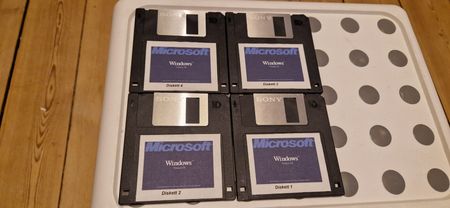
Windows 3.1 8 floppy discs
Hey, I got my hands on Windows 3.1 floppy disc set in Norway. Looks original but when i try to Sell it off on market i am being blocked and cannot sell. Have Windows 3.0 on 4 Floppy discs and that one can be posted and it seems original. They look very similar with the stickers and writing on them Need help88Views0likes0CommentsMy AB-620 Journey – How I Prepared for the Microsoft Certified: Agent Builder Associate Exam
I recently published a blog sharing my experience preparing for and passing the Microsoft Certified: Agent Builder Associate (AB-620) beta exam. Since I took the beta exam in the first week of June 2026, there were very few preparation resources available. I relied primarily on Microsoft Learn, extensive hands-on practice in Microsoft Copilot Studio, and the Applied Skills lab to build the practical knowledge needed for the exam. In this article, I share: The Microsoft Learn path I completed How I used Microsoft Copilot to understand complex concepts Hands-on practice in Copilot Studio The Applied Skills lab that strengthened my practical knowledge The key topics I recommend focusing on before taking the exam My personal preparation tips for future candidates If you're planning to take AB-620 or are beginning your journey with Microsoft Copilot Studio, I hope my experience helps you prepare more effectively. 🔗 Read the full blog: https://medium.com/@sajeda27/my-ab-620-journey-7cc17f2ff52b276Views3likes0CommentsMissing Certification
Hi Team, I have passed my two exams AZ-400 and SC-200 10-11 months back but now i am searching them in my transcript however the certification doesn't show up on my there. Can someone help me please on urgent basis because one of them is about to expire on 2nd August so i have to renew that.204Views0likes1CommentAI Business Professional Blueprint Survey Opportunity
Greetings! Microsoft is updating the credential for AI Business Professional, and we need your input through our exam blueprinting survey. The blueprint determines how many questions each skill in the exam will be assigned. Please complete the online survey by August 7, 2026. Please also feel free to forward the survey to any colleagues you consider subject matter experts for this certification. You may send this to people external to Microsoft as well. If you have any questions, feel free to contact John Sowles at josowles@microsoft.com or Don Tanedo at dtanedo@microsoft.com. AI Business Professional blueprint survey link: https://www.starttest.com/starttest2/startsurvey?programid=187&guid=5C6C1A02-4E56-4BC2-B9E9-2E2019ADE0ED Thank you!217Views2likes1CommentDesigning and implementing Microsoft Agentic DevOps Blueprint Survey Opportunity
Greetings! Microsoft is considering a credential for Designing and implementing Microsoft Agentic DevOps, and we need your input through our exam blueprinting survey. The blueprint determines how many questions each skill in the exam will be assigned. Please complete the online survey by August 5, 2026. Please also feel free to forward the survey to any colleagues you consider subject matter experts for this certification. You may send this to people external to Microsoft as well. If you have any questions, feel free to contact John Sowles at josowles@microsoft.com or Don Tanedo at dtanedo@microsoft.com. Designing and implementing Microsoft Agentic DevOps blueprint survey link: https://www.starttest.com/starttest2/startsurvey?programid=187&guid=8156D640-BDCC-44B5-919D-E32F170F8ADF Thank you!252Views0likes0Comments
Student Ambassadors: Get Started redirects to MVP Account Privacy page
Hello, I am trying to join the Microsoft Learn Student Ambassadors program, but I cannot access the registration process. Steps: 1. Go to the Microsoft Learn Student Ambassadors page. 2. Sign in with my Microsoft account. 3. Click Get Started. Expected result: I expected to see the Student Ambassadors registration or onboarding page. Actual result: I am always redirected to: https://mvp.microsoft.com/account The page only shows Privacy options such as Download/Delete my data. I do not see any registration or onboarding steps. I have already tried: - Different Microsoft accounts (Outlook and Gmail-based Microsoft account) - Different browsers - Incognito mode - Clearing browser cache and cookies The result is always the same. Could someone please clarify: 1. Is the Student Ambassadors program currently accepting new members? 2. Has the registration process changed? 3. Is this expected behavior or an account issue? 4. If there is a new registration process, where can I find it? I have attached a screenshot of the page I am redirected to. Thank you.198Views0likes1CommentBridging the Skills Gap: Empowering Non-Coders to Automate Workflows in M365
Namstey Folks 🙏, As we look at digital transformation, one of the biggest bottlenecks is the skills gap in handling complex operational workflows. With the rise of modern M365 extensions and Power Platform capabilities, the barrier to entry is shifting. We can now build robust solutions directly inside SharePoint without needing heavy custom code. From what I’ve seen, the benefits of going the low-code/no-code route within the M365 ecosystem are clear: - Faster Deployment: Building internal workflows directly where teams already work cuts out weeks of standard dev cycles. - Empowered Teams: Operations teams can patch their own inefficiencies without waiting in a long IT queue. However, it also opens up real strategic questions around data governance, compliance, and keeping these citizen-developed solutions maintainable over time. How is your organization approaching upskilling for this? Are you training existing operational teams to build their own tools within the Microsoft ecosystem, or is IT still handling everything from the top down? Let's build robust solutions93Views2likes0CommentsA Helpful Read for Anyone Transitioning from AZ-204 to AI-200
I recently came across this blog while looking into the transition from AZ-204 to AI-200, and it turned out to be really helpful for me. It clearly explains what Azure developers should expect before July 31, 2026, including the key changes and what skills you might need to focus on. I especially liked how it breaks things down in a simple and easy-to-understand way. If you're currently preparing or thinking about moving into AI-related roles on Azure, this might be useful for you as well. Here’s the article: https://medium.com/@itexamstopics7/az-204-to-ai-200-what-every-azure-developer-needs-to-know-before-july-31-2026-1bded4a6f778 Would love to hear what others think about this transition.257Views2likes1CommentIs there any roadmap to be ESI partners with Microsoft?
Enterprise Skills Initiative (ESI) is an excellent Microsoft program that helps organizations accelerate skilling through benefits such as certification exam discounts, instructor-led training, learning resources, and more. Has anyone successfully enrolled their organization in ESI? I'd appreciate any guidance, best practices, or a roadmap for getting a company onboarded.200Views2likes4CommentsHow to Improve Mouse Precision for Better Productivity and Gaming Performance
Most professionals and gamers focus on hardware upgrades but overlook one simple setting that directly affects how accurately their cursor responds on screen. Whether you are working across multiple monitors or playing fast paced games, having the wrong mouse configuration leads to frustration that is hard to diagnose. The best approach is to first verify your actual DPI values before adjusting any settings. I found a mouse dpi tool that measures real time accuracy instantly without any software installation. Once you know your exact values, fine tuning becomes straightforward and the improvement in cursor control is immediately noticeable across both productivity tasks and gaming sessions.85Views0likes0Comments



Events
Recent Blogs
- Start with a question for the Learning Agent in Copilot and get recommendations from AI Skills Navigator, helping you find the right next step whenever you need to learn something new. Matt Erni is...Aug 27, 20262.1KViews2likes0Comments
- Read how SCBX used a structured skilling plan with Trainocate to strengthen AI literacy, support role-based adoption, and help teams reduce time spent on repetitive work. Founded in 2021, SCB X Pub...Jul 30, 2026734Views4likes0Comments