Recent Discussions

Tasks sync failure - Outlook web vs mobile Outlook vs desktop Outlook
--- # 📄 **Technical Report: Persistent Outlook Web App Sync Failure Affecting Microsoft To Do / Outlook Tasks Ecosystem** **Issue Duration:** At least 3 months probably more **Platforms Affected:** - Microsoft To Do (Android) - Outlook Tasks (Windows Desktop Outlook) - Outlook Tasks (Outlook Web App) - Exchange Online (backend sync service) --- ## 1. **Executive Summary** I have experience **persistent, intermittent, and platform‑specific synchronization failures** within the Microsoft To Do / Outlook Tasks ecosystem. The critical finding is: ### **The Outlook Web App is often isolated and does not sync with any other platform.** Meanwhile: - **Windows Desktop Outlook ↔ Android To Do sync perfectly in both directions.** - **Outlook Web App ↔ (Desktop / Android)** do not sync. This isolates the issue to the **web app’s sync pipeline**, not the task data, not the account, and not the other apps. The failures present as: - **“Synchronization in progress”** stuck indefinitely - **“Synchronization failed”** when manually attempting sync - Web app showing **stale, outdated, or incomplete task lists** - Web app failing to send or receive updates from Exchange Online The same tasks that fail to sync for hours later sync successfully without any modification, proving the data is not corrupted and the failure is backend‑related. --- ## 1.1 **Cross‑Platform Sync Behavior (Critical Diagnostic Insight)** ### ✔ **Windows Desktop Outlook ↔ Android To Do** - Full two‑way sync - Immediate updates - Reliable and consistent ### ✖ **Outlook Web App ↔ Desktop Outlook** - No sync in either direction ### ✖ **Outlook Web App ↔ Android To Do** - No sync in either direction ### ✖ **Outlook Web App ↔ Exchange Online** - Appears to be failing or stalling This proves the web app is **not participating in the sync ecosystem**. --- ## 2. **Symptoms Observed** ### 2.1 **Outlook Web App** - Sync button stuck on **“Synchronization in progress”** for hours - Manual sync results in **“Synchronization failed”** - Web app shows outdated task lists - Web app does not receive updates from desktop or mobile - Web app does not send updates to desktop or mobile ### 2.2 **Android To Do** - Tasks created on Android do not appear in the web app - Tasks created in the web app do not appear on Android - Edits fail to propagate to the web app - Manual sync does not resolve the issue - Logout/login sometimes helps, inconsistently ### 2.3 **Windows Desktop Outlook** - Syncs perfectly with Android - Does not sync with the web app - Shows correct, up‑to‑date task data ### 2.4 **Platform Sync Matrix** | Action | Desktop Outlook | Android To Do | Outlook Web App | |--------|-----------------|---------------|------------------| | Create/edit task on **Desktop** | ✔ Syncs to Android | ✔ | ✖ No sync to Web | | Create/edit task on **Android** | ✔ Syncs to Desktop | ✔ | ✖ No sync to Web | | Create/edit task on **Web** | ✖ No sync to Desktop | ✖ | ✔ Stays only on Web | **Conclusion:** The Outlook Web App is **fully isolated** from Exchange Online’s task sync pipeline. --- ## 3. **Troubleshooting Steps Already Attempted** ### 3.1 **Web App** - Hard refresh (Ctrl + Shift + R) - Full browser cache clear - Logout → close browser → reopen → login - Switching lists to force metadata reload - Creating tasks to trigger sync events - Deleting tasks to force backend updates ### 3.2 **Android** - Manual sync - Clear cache - Logout/login - Device restart - Network switching - Creating/completing tasks to trigger sync ### 3.3 **Desktop Outlook** - Verified account health - Verified Exchange Online connectivity - Verified task folder integrity ### 3.4 **Account / Backend** - Verified Microsoft Account stability - Verified no multi‑account conflicts - Verified Exchange Online service health None of these steps produce consistent or lasting resolution. --- ## 4. **Frequency and Pattern** - Occurs multiple times per week - Occurs regardless of recent task edits - Occurs across multiple browsers - Occurs across multiple Android versions - Sync resumes randomly after hours - Sync resumes without any data changes - Sync resumes after logout/login, but inconsistently This pattern strongly suggests **backend sync token stalling**. --- ## 5. **Technical Analysis** ### 5.1 **Two‑Way Sync Failure Confined to Web App** Because: - Desktop ↔ Android works - Web ↔ (Desktop / Android) fails The failure is isolated to the **web app’s connection to Exchange Online**. ### 5.2 **Sync Token Stalling (Most Likely Cause)** Symptoms match known sync token stall behavior: - Endless “Synchronization in progress” - Manual sync fails - Sync resumes randomly - Sync resumes after forced metadata refresh - Sync resumes after unrelated actions (e.g., completing a task) ### 5.3 **Not a Corrupted Task Issue** Because the same tasks later sync successfully: - No malformed tasks - No unsupported metadata - No blocked sync queue - No corrupted lists ### 5.4 **Backend Sync Pipeline Instability** The pipeline: **Web App → Microsoft Sync Service → Exchange Online → Desktop / Android** appears to be failing at the **first hop** (web app → sync service). ### 5.5 **Web App Lacks Retry Logic** The web app provides: - No manual retry - No way to cancel a stuck sync - No way to reset sync session - No way to regenerate sync token Thus, when the backend stalls, the web app remains stuck indefinitely. ### 5.6 **Android Background Sync Not the Cause** Android is syncing perfectly with desktop Outlook, proving Android is not the source of the issue. ### 5.7 **Web App Sync Isolation (New Insight)** The web app is the **only** platform failing to communicate with Exchange Online. This is now clearly a **web‑app‑specific sync session failure**, not a multi‑platform issue. --- ## 6. **Impact** - Tasks frequently out of sync - Web app becomes unusable for task management - Daily workflow disrupted - Manual intervention required multiple times per week - Task state inconsistent across platforms - Reduced confidence in Microsoft To Do as a reliable ecosystem --- ## 7. **Requested Assistance** ### 7.1 **Engineering‑Level Investigation** Specifically into: - Outlook Web App sync token behavior - Web app → Exchange Online sync session stability - Backend retry logic - Web app sync error handling - Web app task API connectivity ### 7.2 **Diagnostic Tools** If available: - Sync session logs - Sync token status - Task metadata inspection tools - Backend queue visibility - Error codes beyond “Synchronization failed” ### 7.3 **Known Issues** Requesting documentation on: - Known To Do / Outlook Web sync token stalls - Known Exchange Online sync delays - Known intermittent sync failures - Known web app pipeline instability ### 7.4 **Confirmation Whether This Is a Known Issue** Given the duration and reproducibility, this appears to be a **backend‑level web app sync failure**. ### 7.5 **Request for Web App Sync Session Reset** Specifically: - Manual reset of the web app’s sync session - Forced regeneration of sync token - Flush of stuck sync queues - Verification of web app’s Exchange Online connectivity --- ## 8. **Evidence Available** I can provide: - Screenshots of “Synchronization failed” - Screenshots of “Synchronization in progress” - Timeline of sync failures - Android device logs - Browser console logs --- ## 9. **Conclusion** This is a **persistent, platform‑specific sync failure** affecting only the Outlook Web App. Desktop Outlook and Android To Do sync perfectly, proving the backend and data are healthy. The web app is isolated and failing to communicate with Exchange Online. I am requesting **engineering‑level support** to reset or repair the web app’s sync session and investigate the underlying cause. ---Solved67Views0likes1CommentAll my unassigned tasks vanished overnight
Hi, about 300 of my unassigned tasks -those not on lists- vanished overnight. All of them. My tasks on lists seem to be all there. The previous day, I was doing cleaning on that list, since the android app stopped synching, and it was sluggish before that. I had over 50000 completed tasks on that list. I moved those 300 uncomplete tasks to a temporary list, deleted all completed tasks, then moved those 300 back, and deleted the temprorary list. I most definitely did not delete those 300 tasks in question, and I checked hours before going to bed and going to bed that on my phone, in the desktop app and in my desktop browser they were all present and in synch, and addings tasks was very snappy and synched across devices. Official chat was completely useless and I couldn't even reach or be connected to anybody in the correct department after banging my head against a wall for an hour. I have little hope of fixing this, but is there anything I can do, or should I just finally bail out of using this buggy mess of a software? Thanks31Views0likes1Comment
Microsoft ToDo: Image/Picture insert from Clipboard #Bug
if I insert a pic from clipboard (source Irfan-view) the size in Microsoft ToDo is always up to 5 times greater then the saved picture to Filesystem. If I insert the pic from Filesystem, all good. Copy/Paste must be have a bug in MS-ToDo. e.g. 100KB-File pasting it shows and uses 1MB.18Views0likes0Comments
Sorting tasks into lists from “All” on mobile
I am not sure if I’m missing something, but is there an easy way to add tasks to a list from the ♾️ All list? I like to add tasks there then be able to add them to lists - I’m hoping to long press and add it to a list or select a list from a drop down when I click into the task. I’m aware of the sorting feature where you select multiple and add them to a list, but that is cumbersome when you only want to add one task to a list.27Views0likes1CommentMake details pane switch to selected task automatically
Currently, I select a task and then have to click the "i in a circle" to have details pane switch from the previously-selected task. This means a user can have one task in focus but seeing the detail of another task. It's already lead to me making some errors in my task details. Makes it hard for quickly dealing with a lot of tasks, which I think is what this app is about. Thanks for considering!20Views0likes0Comments
Overdue tasks no longer appear in red in light mode
Last week I noticed that the "Overdue [Date]" text in overdue tasks no longer appears in red. I use light mode, and if I switch to dark mode that text will appear in red, but it reverts to black when I turn dark mode off. This is happening in the web app and if I go to the app in Outlook, but is not an issue on the desktop app.259Views1like0Comments
Colours within task notes
Hello, I noticed that when copying text from elsewhere, it does copy the colors, but I cannot find any way of replicating this myself. Are there tags or markers to use to be able to use colours (red or green or blue) when writing? It does seem like the notes can support them since they do stay without any issue when copied from elsewhere. Thanks for your help39Views1like0CommentsTo Do: scrolling bug
You can’t scroll all the way down in longer notes anymore in the Android app. The keyboard covers part of the note. I already tried to update it an reinstall it. Many users have this problem. This makes the app almost unusable. I'm on OneUi 7. I attached a screenshot with a transparent keyboard.110Views0likes0Comments
Feature Asymmetry
Does anyone else find the feature asymmetry between the web & android versions to be a little odd? Also everything feels stagnant like all the To Do engineers moved to the Copilot Team (haha, but no really :) Categories is the biggest oddity. It's been on web to-do for years now. Then there's the sorting differences between web & android. Android actually has more sorting capabilities? That seems wierd. And last but not least... The web version kinda retained the old (and quite magical) "To Do" view of: Today Tomorrow This Week Next Week (this was so useful, why'd you remove it?!? Later What I struggle with is these are core features to task management as they exist on every other platform, and they all originally existed in Outlook! Strange that the phone l app and the web app (presumably using the same back-end APIs) have such different usability.55Views0likes0Comments
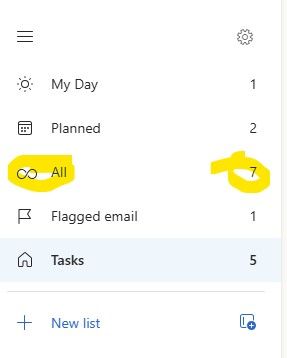
'Ghost' To Do Task Visible in Counter of 'All' - But Nowhere Else - Unable to View 'All'
I have an interesting case in Classic Outlook (Version 2511). There is an extra item in the 'All' counter in To Do that is only visible in one instance of Outlook. If I use Outlook on the web or the To Do app itself - all tasks and counts are accurate. Even the Planner app in Teams shows the correct tasks and number of them. In fact - in my Outlook Classic at home it even works properly. But not in my Outlook Classic at work. In fact - if you try to click on the 'All' itself - the display simply blanks out and you have to close and re-open Outlook to get To Do to open again. I've tried the obvious already. Thinking because it only happens here - I've already completely wiped my ost file and rebuilt it from scratch. I've started outlook with various 'clean' flags. None of them have been able to clear the phantom count that will crash To Do from within classic Outlook. What is being overlooked? As you can see below - the number of 'All' is always one more than what it should be.80Views0likes0CommentsTasks show up twice in To Do module in Outlook On Desktop
I have a strange problem with my tasks in the To Do module when it is used inside the Outlook app installed on my Windows PC. Some tasks show up twice there. When I check other places the task is listed only once there: On the To Do Webapp in the browser In the To Do App on my Android Phone When I start Outlook in the browser and check the To Do module there But on my Desktop in the Outlook App the task is listed twice. When I mark it a completed on my To Do app on my Android Phone one of the two task shown gets marked as completed (and is shown as completed in all three places mentioned above), however the other one stays in the not completed status. Triggering the Sync in the To Do module in Outlook does not solve the issue, restarting Outlook does not solve it as well. I have to delete the second task manually in the To Do module. This is really annoying because I get the reminder for a task from the outlook app on Windows but cannot really use Outlook to manage the task there. Does anyone else have this problem?238Views2likes2Comments
Sharing lists issue
Have started using MS to do lists, have created certain tasks and tried sharing via email, WhatsApp , FB messenger and each attempt fails, the recipient receives the link but tries to open the link and gets a message that they can’t join and to contact the owner, I get notification to say user added but they are not. I’m using the iOS app and the recipients are using an android app on a Samsung phone, any ideas please what is wrong96Views0likes0CommentsTeilen von Listen Microsoft To Do nicht mehr möglich
Hi everyone, I've been using Microsoft To Do for years and have always been able to share lists with my family. Now, when I send my wife or son an invitation link, they get an error message saying the list isn't available and they can't join. Here's what I've tried so far: I created a new invitation link and confirmed they're signed in with their Microsoft accounts. I tried using the app on their iPad or iPhone, and also on my MacBook. I checked if the list still exists. Despite all this, sharing still doesn't work. Has something changed with To Do sharing? Is there a new requirement or setting I need to enable? The error message attached. Translated: Any help would be greatly appreciated! Thank you in advance. Best regards Martin308Views4likes5Commentserror when sharing list
Hi all, MS support was not helpful, so hope you can support me in how to fix. My wife and I we are using private @outlook.com accounts. We are heavy users of todo and we have some shared lists between our accounts. So far all good, all fine. Now if i create a new list, no matter if in browser, ios app, .... i have to switch to another list and to switch back to see the share button. If i click it, there is the error that a problem has occured and link can't get created. Please try again. If i do so, it works and a link is created. If my wife then tries to open such link, she gets the question if she wants to access list XYZ like it should be and it always was. If she does it, there is an error "the list was not found, please contact the person who shared with you. We have the exact behaviour if she tries to share with me. The exisitng, already shared lists, are running well. Any idea or thoughts, how to overcome this issue? Greetings, DennisSolved934Views9likes22CommentsTo Do Task Details Not Showing
When I am in To Do, I can only add and complete tasks. I no longer have the option to click in and see details, add notes, or edit titles. I can see the area they are supposed to pop up in, but I can't expand the side window or see any information.120Views0likes0CommentsVoice-Based Integration to Simplify Task Capture in Microsoft To Do
Hi everyone, We’re working on Gennie, a voice-based assistant designed to integrate with task and productivity tools like Microsoft To Do to make everyday task capture easier. Many tasks come up during meetings, calls, or while switching between apps, but they often get added to task lists later, sometimes missing important context. The goal of this integration is to let users speak tasks or reminders naturally and have them organized in Microsoft To Do, while keeping Microsoft To Do as the primary task manager. Some Microsoft To Do–specific use cases we’re exploring: Creating tasks using voice Adding notes or details to existing tasks hands-free Capturing quick reminders as they come up Reducing friction between conversations and task entry We’d love to hear from the community: Where does task capture slow you down today? Which Microsoft To Do actions would benefit most from voice input? Looking forward to learning from your workflows and feedback.340Views1like1Comment


Events
Recent Blogs
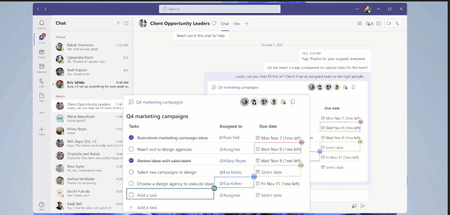
- 3 MIN READTask management while collaborating has never been easier. Now tasks created via Loop components sync across Microsoft 365 apps like Microsoft To Do, Microsoft Planner, and Tasks app in Teams. ...May 10, 202322KViews4likes7Comments
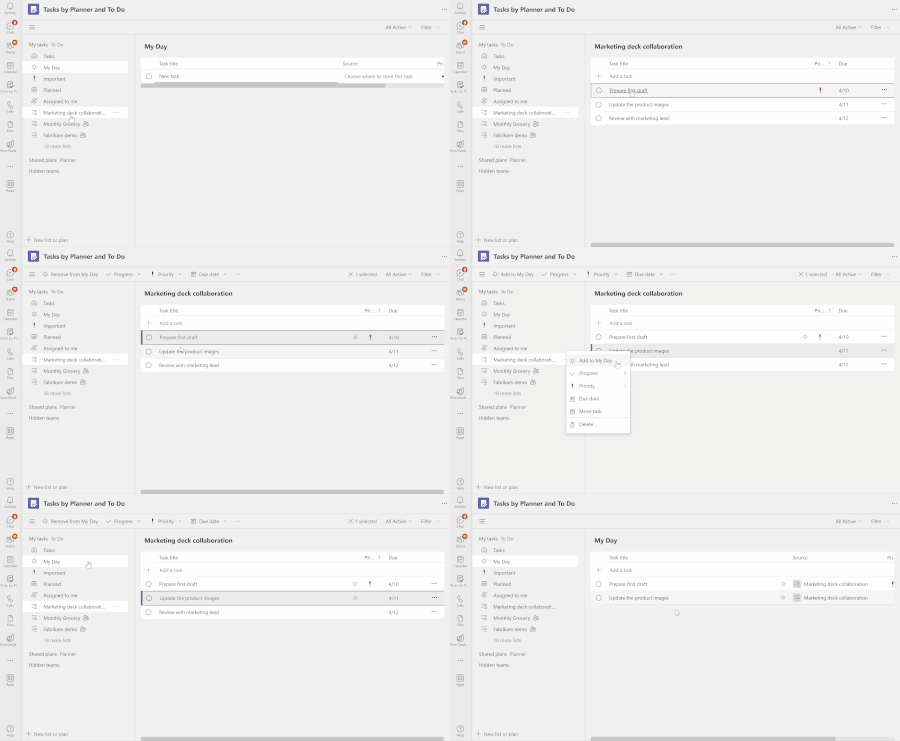
- 2 MIN READFeeling overwhelmed by tasks from multiple sources and struggling to stay organized? We have great news for you! We are thrilled to introduce the 'My Day' view in the 'Tasks by Planner and To Do' app...Apr 04, 202337KViews4likes37Comments