Forum Widgets
Latest Discussions

How to exclude Blocked sender's form End user quarantine notification/Digest
@All We have end user notification policy in place. Whenever user blocks a sender from Quarantine notification/Digest and next day if we receive email from same sender, it's in quarantine then again quarantine notification/digest will say same stating email from xyz is in quarantine eventhought it was blocked yesterday by same user. This seems to be by design: https://learn.microsoft.com/en-us/microsoft-365/security/office-365-security/quarantine-quarantine-notifications?view=o365-worldwide As article say to create a Transport Rule. I created one with Condition as header matches following keywords or phrases Header x-forefrontAntispamreport & Value = SFV:SKN. How this not work, I am not sure if transport rule does not accept this header feild( Because some rule works when I say header = From) or its something to do with priority. Oall am trying to achieve here is once sender is blocked by user in Enduser quarantine notification then onwards that sender should not be shown again in notification. I think we need to some how delete/emails from blocked senders in quarantine However i only can think of transport rule as of now but that's not working. Any suggestions/thoughts are appreciated, Thank you.XavierbMay 10, 2023Copper Contributor3.1KViews4likes2CommentsLimit access to Quarantine (and only quarantine)
The enduser quarantine is reachable at https://security.microsoft.com/quarantine Based on our security policies, we have limited access using Conditional Access and the cloud app “Microsoft Admin Portals.” Consequently, no user can directly access the quarantine. We have made the necessary exceptions to ensure the quarantine functions properly. However, there is an issue: Users without proper permissions can still navigate extensively within the portal. For example: On the left-side navigation, they can click on “Start.” Within the “Next steps” section, there is a link to “Advanced Hunting.” Although they cannot perform any actions there, the link remains accessible. Additionally, under “Additional Resources,” users can click on any admin center, albeit with limited functionality. Is there anyone with an idea on how to restrict users to the quarantine area only, preventing access to other sections of the portal?PeterForsterMar 18, 2024Steel Contributor2.5KViews3likes8Comments
Anti Phishing - Impersonation protection
Hey, I know that these types of protection are often black boxes to make it more difficult to bypass attacks. But with the best will in the world I don't understand the point of this function. I'm trying to harden the anti-phishing policies in Defender for O365. https://learn.microsoft.com/en-us/microsoft-365/security/office-365-security/anti-phishing-policies-about?view=o365-worldwide Now here are three different protection options: User Impersonation Domain Impersonation Mailbox intelligence impersonation protection So far so clear. Now the purple box for user impersonation states that it only works if the persons have had no previous contact. (User impersonation protection does not work if the sender and recipient have previously communicated via email. If the sender and recipient have never communicated via email, the message can be identified as an impersonation attempt). Mailbox Intelligence Impersonation Protection states that it compares emails from protected persons with previous contact and lets the emails through accordingly. (For example: Gabriela Laureano (email address removed for privacy reasons) is the managing director of your company. You therefore add her as a protected sender in the settings of the Enable users for protection policy. However, some of the recipients in the policy regularly communicate with a supplier who is also called Gabriela Laureano (email address removed for privacy reasons). Since these recipients have a communication history with email address removed for privacy reasons, the mailbox intelligence does not recognize messages from email address removed for privacy reasons for these recipients as an attempt to impersonate email address removed for privacy reasons.) It would make sense if the mailbox intelligence impersonation protection would recognize if the email address of an existing contact were to change or be impersonated and this contact is not defined as a protected sender. However, the example refers to a user who is already set as "protected sender". What is Mailbox Intelligence Impersonation Protection for now? This is exactly what User impersonation already does when it recognizes previous contact.FreshTeeJan 15, 2024Copper Contributor3.1KViews3likes0Comments
Is it possible to block emails containing QR CODE?
Is it possible to block emails containing QR CODE?lucanz73Sep 27, 2023Copper Contributor22KViews3likes24Comments
Possible major problem with MS Defender scanning/clicking links??
Our organization has a process that emails users "magic links" to approve/reject various workflows. All of our troubleshooting points to something systematically "clicking" the first link in the email and I think it's Microsoft Defender for O365 somehow validating/exploring links? Is this a possibility and what would be the best way to prove/disprove/fix? As of a few days ago, these workflows are getting approved from the "magic link" immediately as the email is received. The first link in the email is "Approve" and "Reject" is the second link. I swapped the order and now they're getting automatically rejected as soon as the email is received.Alex KwitnyJul 14, 2023Brass Contributor7.6KViews3likes3CommentsEnable per‑user language selection for phishing simulation emails and landing pages
We use Attack Simulation Training to deliver phishing simulations to a global, multilingual user base. While Microsoft Defender supports multi‑language content, phishing simulation emails and landing pages are currently delivered in a single selected language per campaign. We are requesting a feature that allows phishing simulation emails and associated landing pages (including credential‑harvest pages) to automatically render in each user’s preferred language, based on: Outlook mailbox language settings, and/or Microsoft Entra ID user language preferences This capability would: Improve realism and accuracy of phishing simulations Ensure users experience simulations in the same language they normally work in Improve behavioral measurement in global organizations Reduce the need to create and manage multiple parallel simulations by language Providing consistent, per‑user language alignment across simulation emails, landing pages, and follow‑up training would significantly enhance the effectiveness of Attack Simulation Training for large, multilingual enterprises.POlsenApr 21, 2026Copper Contributor192Views2likes2Comments
Configure Quarantine Notifications to Admins when the any Email is quarantined
Hi All, Good morning, I would like to understand the possible options in EOP and defender for O365 to send an alert or notification mail to the E-mail administrator as soon as any mail is quarantined for any user mailbox in Exchange online. I searched most of the options, but I don't see any solid solution for this. Please share your thoughts and experience on this. Thanks in advance.NSNov 24, 2024Copper Contributor4.3KViews2likes4Comments
ZAP/Post-delivery reporting for Teams, Sharepoint & OneDrive
It seems that the email & collaboration report for 'post-delivery activities' only covers ZAP activity for emails. While in other E&C reports, a pivot by workload is supported, this doesn't seem to be the case. Are there ZAP/Post-delivery reports available for Teams, SPO & ODB?MarnikAug 09, 2024Brass Contributor305Views2likes0Comments
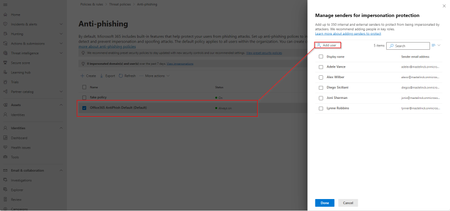
Automate adding users to impersonation protection
Hi All, Impersonation protection allows you mark 350 VIP users to have them additionally protected from attacks who try to impersonate them. You can add them individually to your policies. But it contains a painful process of having to individually click all the users you want to add... So I automated this in a script so you don't have it manually: https://github.com/LouisMastelinck/set-TargetedUsersToProtect-bulk-script/tree/main More info about the functions used: https://www.lousec.be/mdo/user-impersonation-protected-user-upload-script/ Hope it has a use for anybody who might need it. Kind Regards LouisLouisMastelinckFeb 13, 2024Brass Contributor1.5KViews2likes0Comments



Tags
- microsoft 365 defender110 Topics
- phishing49 Topics
- configuration39 Topics
- detection26 Topics
- investigation17 Topics
- prevention14 Topics
- threat intelligence12 Topics
- remediation11 Topics
- hunting9 Topics
- Awareness9 Topics