remediation
12 Topics
Microsoft Office Add In Error
Hello! ERROR MESSAGE: ADD-IN ERROR: YOU DON'T HAVE PERMISSION TO USE THIS ADD-IN. CONTACT YOUR SYSTEM ADMINISTRATOR TO REQUEST ACCESS. I tried troubleshooting for over an hour today with Microsoft chat, but it didn't resolve the issue. None of my add-ins are loading; specifically, I'm trying to use Claude in PowerPoint, but none of the add-on options are loading in Excel or Word. I am told this: "Based on the troubleshooting completed today, including reinstalling Microsoft 365, removing older Office versions, and testing the add-ins again, we've ruled out most common Office installation issues. At this point, Claude Support can help with the Claude-specific authorization error, while the Microsoft Tech Community is the best resource for further investigation into the add-in platform behavior affecting multiple add-ins. I contacted Claude, and they said this is a Microsoft issue. Worth noting, while I do occasionally sign in for emails on organizational sites, the Microsoft account is purely personal and paid for by me; therefore, there should be no system administrator access issues. Help would be so appreciated.712Views5likes11CommentsMicrosoft Defender EOP
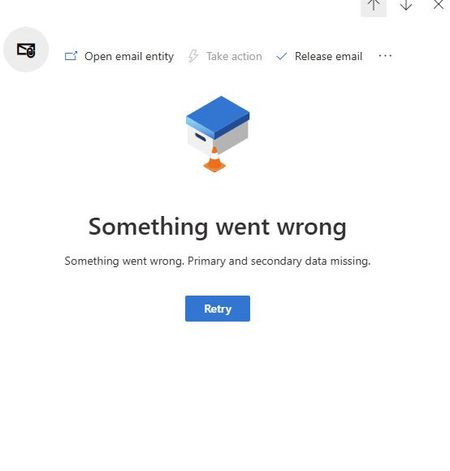
We have been experiencing an issue since last week where we are unable to view the details of quarantined emails. Could you please confirm if this is related to a known backend service issue, or if there are any specific troubleshooting steps we should perform on our end? Any guidance or updates would be greatly appreciated.
Automated Investigation and Response
Upgraded to Defender for 365 P2 based on the idea of setting automated responses to certain alerts. That's how it was described. Now I'm trying to enable and configure it. The documentation has bounced me around 20 different articles for XDR, Defender Enterprise, Defender for Business... I do not see anywhere to configure the automation in Defender. One doc points me here for making sure it's enabled. when I open this, and go down to Automation, it's simply an empty list of device groups. We don't use Device groups - we don't use Defender Endpoint. Has anyone configured this in a non-XDR environment? What I'm encountering and what was advertised seem very different...upgraded from P1 to P2... how do I configure this?
Upgraded to Defender 365 P2 from P1, based on the automated responses. Kinda figured we'd be able to tweak these, but I guess not? Anyway, I'm a little bit confused about how to set this up maximally. Realized yesterday we had a 'User click a malicious link" investigation that was pending - but no one knew. When I click 'Email Notification' in the 'Incidents' window, it brings me to the XDR settings menu, with options for setting emails to notify of Alerts, Incidents and Threat Analytics. Except we don't have XDR? So I can't tell if these are even valid? The documentation on the AIR component is really hard to decipher - wondering if anyone has much experience with this, and knows how to configure it optimally? As in, how do I notify someone of a Critical Investigation, or something needing approval for remediation? Can I configure certain things to not require approval? Like... removing a reported phishing email from everyone's inbox?
MS 365 Defender - What permissions are needed to move and delete emails in Explorer?
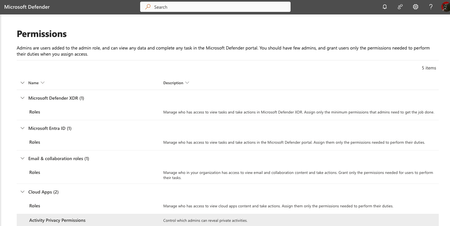
I need a tech with limited permissions to be able to https://learn.microsoft.com/en-us/defender-office-365/remediate-malicious-email-delivered-office-365 These are the options I have in Admin. I tried a bunch of recommended actions, yet I don't seem to have the correct Admin portals as shown https://learn.microsoft.com/en-us/defender-xdr/manage-rbac. For example, I don't have MS 365 Defender Permissions Group shown in the video:5.5KViews1like4Comments
Notification for pending actions
I'm having an issue where Defender isn't notifying me on pending actions like deleting an email and it's not waiting long enough for me to approve actions. Example: An email is delivered at 6pm (after hours) with a malicious URL. Defender detects it and ZAPs the URL automatically and sends me a useless alert "Email messages containing malicious URL removed after delivery". Sometimes this alert requires my intervention, sometimes not but the same alert comes through every time so I have to check every time. The next morning I come in around 8 and see the useless alerts and go to my Actions queue and all the pending actions have now timed out so now I'm hunting to get rid of these messages. If I could get notified when I need to take action I can disable the useless alert telling me it zapped a URL as not every ZAP requires Admin intervention. I could also configure this "admin approval required" alert to text me so I can take action immediately instead of the next time I check my email. I have 2 questions: 1. How do I setup Defender to send me a notification whenever I have pending actions? 2. How can I change the default behavior of the automated investigations? Ideally, if Defender finds a bad URL or attachment I'd rather have it just soft delete without my intervention.
Add to Remediation is unavailable without Search and Purge
Greetings, Per the Microsoft documentation there should be the ability to add malicious emails to a remediation container without requiring the search and purge role. This remediation container should then be in the action center waiting for a security analyst with the search and purge role to approve or deny the pending action. Currently as it stands, adding to remediation container requires the user to have search and purge. The search and purge role allows the user to move emails in inboxes, both soft and hard delete emails. If an analyst needs the search and purge role to add to a remediation container this does not adhere to principal of least permissions, because the analyst can simply delete the emails themselves or approve the remediation container that they themselves made. Having the base security admin roles have the ability to add to remediation containers allows for lower tiered analyst to do phishing investigations, and designate emails for removal, without having the ability to hard delete a user's inbox. Reference: MS documentation outlining Two step approval: https://learn.microsoft.com/en-us/microsoft-365/security/office-365-security/remediate-malicious-email-delivered-office-365?view=o365-worldwide469Views0likes0Comments
Automate email soft delete Approval
Hello Everyone, our security team creating Email Soft delete actions based on the investigations. An admin needs to approve those soft delete actions. Does anyone know how we can automate the approval of Email Soft delete action ? As of now, Microsoft dont have option to do this2.5KViews0likes2Comments