remediation
87 Topics
Microsoft Office Add In Error
Hello! ERROR MESSAGE: ADD-IN ERROR: YOU DON'T HAVE PERMISSION TO USE THIS ADD-IN. CONTACT YOUR SYSTEM ADMINISTRATOR TO REQUEST ACCESS. I tried troubleshooting for over an hour today with Microsoft chat, but it didn't resolve the issue. None of my add-ins are loading; specifically, I'm trying to use Claude in PowerPoint, but none of the add-on options are loading in Excel or Word. I am told this: "Based on the troubleshooting completed today, including reinstalling Microsoft 365, removing older Office versions, and testing the add-ins again, we've ruled out most common Office installation issues. At this point, Claude Support can help with the Claude-specific authorization error, while the Microsoft Tech Community is the best resource for further investigation into the add-in platform behavior affecting multiple add-ins. I contacted Claude, and they said this is a Microsoft issue. Worth noting, while I do occasionally sign in for emails on organizational sites, the Microsoft account is purely personal and paid for by me; therefore, there should be no system administrator access issues. Help would be so appreciated.683Views5likes11CommentsIntegrating Proofpoint and Mimecast Email Security with Microsoft Sentinel
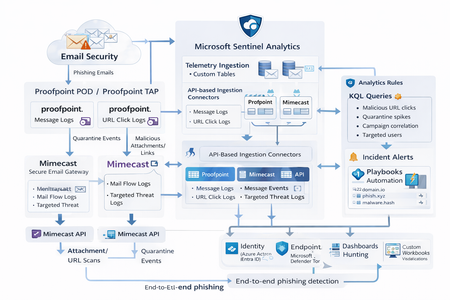
Microsoft Sentinel can ingest rich email security telemetry from Proofpoint and Mimecast to power advanced phishing detection. The Proofpoint On Demand (POD) Email Security and Proofpoint Targeted Attack Protection (TAP) connectors pull threat logs (quarantines, spam, phishing attempts) and user click data into Sentinel. Similarly, the Mimecast Secure Email Gateway connector ingests detailed mail flow and targeted-threat logs (attachment/URL scans, impersonation events). These integrations use Azure-hosted ingestion (via Logic Apps or Azure Functions) and the new Codeless Connector framework to call vendor APIs on a schedule. The result is a consolidated dataset in Sentinel’s Log Analytics, enabling correlated alerting and hunting across email, identity, and endpoint signals. Figure: Phishing emails are processed by Mimecast’s gateway and Proofpoint POD/TAP services. Security logs (delivery/quarantine events, malicious attachments/links, user clicks) flow into Microsoft Sentinel. In Sentinel, these mail signals are correlated with identity (Azure AD), endpoint (Defender) and network telemetry for end-to-end phishing detection. Proofpoint POD (Email Protection) Connector The Proofpoint POD connector ingests core email protection logs. It creates two tables, ProofpointPODMailLog_CL and ProofpointPODMessage_CL. These logs include per-message metadata (senders, recipients, subject, message size, timestamps), threat scores (spamScore, phishScore, malwareScore, impostorScore), and attachment details (number of attachments, names, hash values and sandbox verdicts). Quarantine actions are recorded (quarantine folder/rule) and malicious indicators (URL or file hash) and campaign IDs are tagged in the threatsInfoMap field. For example, each ProofpointPODMessage_CL record may carry a sender_s (sender email domain hashed), recipient list, subject, and any detected threat type (Phish/Malware/Spam/Impostor) with associated threat hash or URL. Deployment: Proofpoint POD uses Sentinel’s codeless connector (an Azure Function behind the scenes). You must provide Proofpoint API credentials (Cluster ID and API token) in the connector UI. The connector periodically calls the Proofpoint SIEM API to fetch new log events (typically in 1–2 hour batches). The data lands in the above tables. (Older custom logic-app approaches similarly parse JSON output from the /v2/siem/messages endpoints.) Proofpoint TAP (Targeted Attack Protection) Connector Proofpoint TAP provides user-click and message-delivery events. Its connector creates four tables: ProofPointTAPMessagesDeliveredV2_CL, ProofPointTAPMessagesBlockedV2_CL, ProofPointTAPClicksPermittedV2_CL, and ProofPointTAPClicksBlockedV2_CL. The message tables report emails with detected threats (URL or attachment defense) that were delivered or blocked by TAP. They include the same fields as POD (message GUID, sender, recipients, subject, threat campaign ID, scores, attachments info). The click tables log when users click on URLs: each record has the URL, click timestamp (clickTime), the user’s IP (clickIP), user-agent, the message GUID, and the threat ID/category. These fields allow you to see who clicked which malicious link and when. As the connector description notes, these logs give “visibility into Message and Click events in Microsoft Sentinel” for hunting. Deployment: The TAP connector also uses the codeless framework. You supply a TAP API service principal and secret (proofpoint SIEM API credentials) in the Sentinel content connector. The function app calls TAP’s /v2/siem/clicks/blocked, /permitted, /messages/blocked, and /delivered endpoints. The Proofpoint SIEM API limits queries to 1-hour windows and 7-day history, with no paging (all events in the interval are returned). (A Logic App approach could also be used, as shown in the Tech Community blog: one HTTP GET per event type and a JSON Parse before sending to Log Analytics.) Mimecast Secure Email Gateway Connector The Mimecast connector ingests the Secure Email Gateway (SEG) logs and targeted-threat (TTP) logs. Inbound, outbound and internal mail events from the Mimecast MTA (receipt, processing, delivery stages) are pulled via the API. Typical fields include the unique message ID (aCode), sender, recipient, subject, attachment count/names, and the policy actions or holds (e.g. spam quarantine). For example, the Mimecast “Process” log shows AttCnt, AttNames, and if the message was held (Hld) for review. Delivery logs include the success/failure and TLS details. In addition, Mimecast TTP logs are collected: URL Protect logs (when a user clicks a blocked URL) include the clicked URL (url), category (urlCategory), sender/recipient, and block reason. Impersonation Protect logs capture spoofing detections (e.g. if an internal name is impersonated), with fields like Sender, Recipient, Definition and Action (hold/quarantine). Attachment Protect logs record malicious file detections (filename, hash, threat type). Deployment: Like Proofpoint, Mimecast’s connector uses Azure Functions via the Sentinel content hub. You install the Mimecast solution, open the connector page, then enter Azure app credentials and Mimecast API keys (API Application ID/Key and Access/Secret for the service account). As shown in the deployment guide, you must provide the Azure Subscription, Resource Group, Log Analytics Workspace and the Azure Client (App) ID, Tenant ID and Object ID of the admin performing the setup. On the Mimecast side, you supply the API Base URL (regional), App ID/Secret and user Access/Secret. The connector creates a Function App that polls Mimecast’s SIEM APIs on a cron schedule (default every 30 minutes). You can optionally specify a start date for backfilling up to 7 days of logs. The default tables are MimecastSIEM_CL (for email flow logs) and MimecastDLP_CL (for DLP/TTP events), though custom names can be set. Ingestion Considerations Data Latency: All these connectors are pull-based and typically run on a schedule (often 30–60 minutes). For example, the Proofpoint POD docs note hourly log increments, and Mimecast logs are aggregated every 30 minutes. Expect a delay of up to an hour or more from event occurrence to Sentinel ingestion. Schema Nuances: The APIs often return nested arrays and optional fields. For instance, the Proofpoint blog warns that some JSON fields can be null or vary in type, so the parse schema should account for all possibilities. Similarly, Mimecast logs come in pipe-delimited or JSON format, with values sometimes empty (e.g. no attachments). In KQL, use tostring() or parse_json() on the raw _CL columns, and mv-expand on any multivalue fields (like message parts or threat lists). Table Names: Use the connector’s tables as listed. For Proofpoint: ProofpointPODMailLog_CL and ProofpointPODMessage_CL; for TAP: ProofPointTAPMessagesDeliveredV2_CL, ProofPointTAPMessagesBlockedV2_CL, ProofPointTAPClicksPermittedV2_CL, ProofPointTAPClicksBlockedV2_CL. For Mimecast SEG/TTP: MimecastSIEM_CL (seg logs) and MimecastDLP_CL (TTP logs). API Behavior: The Proofpoint TAP API has no paging. Be aware of timezones (Proofpoint uses UTC) and use the Sentinal ingestion TimeGenerated or event timestamp fields for binning. Detection Engineering and Correlation To detect phishing effectively, we correlate these email logs with identity, endpoint and intel data: Identity (Azure AD): Mail logs contain recipient addresses and (hashed) sender user parts. A common tactic is to correlate SMTP recipients or sender domains with Azure AD user records. For example, join TAP clicks by recipient to the user’s UPN. The Proofpoint logs also include the clicker’s IP (clickIP); we can match that to Azure AD sign-in logs or VPN logs to find which device/location clicked a malicious link. Likewise, anomalous Azure AD sign-ins (impossible travel, MFA failure) after a suspicious email can strengthen the case. Endpoints (Defender): Once a user clicks a bad link or opens a malicious attachment (captured in TAP or Mimecast logs), watch for follow-on behaviors. For instance, use Sentinel’s DeviceSecurityEvents or DeviceProcessEvents to see if that user’s machine launched unusual processes. The threatID or URL hash from email events can be looked up in Defender’s file data. Correlate by username (if available) or IP: if the email log shows a link click from IP X, see if any endpoint alerts or logon events occurred from X around the same time. As the Mimecast integration touts, this enables “correlation across Mimecast events, cloud, endpoint, and network data”. Threat Intelligence: Use Sentinel’s ThreatIntelligenceIndicator tables or Microsoft’s TI feeds to tag known bad URLs/domains in the email logs. For example, join ProofPointTAPClicksBlockedV2_CL on the clicked url against ThreatIntelligenceIndicator (type=URL) to automatically flag hits. Proofpoint’s logs already classify threats (malware/phish) and provide a threatID; one can enrich that with external intel (e.g. check if the hash appears in TI feeds). Mimecast’s URL logs include a urlCategory field, which can be mapped to known malicious categories. Automated playbooks can also pull Intel: e.g. use Sentinel’s TI REST API or Azure Sentinel watchlists containing phishing domains to annotate events. In summary, a robust detection strategy might look like: (1) Identify malicious email events (high phish scores, quarantines, URL clicks). (2) Correlate these events by user with Azure AD logs (did the user log in from a new IP after a phish click?). (3) Correlate with endpoint alerts (Defender found malware on that device). (4) Augment with threat intelligence lookups on URLs and attachments from the email logs. By linking the Proofpoint/Mimecast signals to identity and endpoint events, one can detect the full attack chain from email compromise to endpoint breach. KQL Query Here are representative Kusto queries for common phishing scenarios (adapt table/field names as needed): Malicious URL Click Detection: Identify users who clicked known-malicious URLs. For example, join TAP click logs to TI indicators:This flags any permitted click where the URL matches a known threat indicator. Alternatively, aggregate by domain: let TI = ThreatIntelligenceIndicator | where Active == true and _EntityType == "URL"; ProofPointTAPClicksPermittedV2_CL | where url_s != "" | project ClickTime=TimeGenerated, Recipient=recipient_s, URL=url_s, SenderIP=senderIP_s | join kind=inner TI on $left.URL == TI._Value | project ClickTime, Recipient, URL, Description=TI.Description This flags any permitted click where the URL matches a known threat indicator. Alternatively, aggregate by domain: ProofPointTAPClicksPermittedV2_CL | extend clickedDomain = extract(@"https?://([^/]+)", 1, url_s) | summarize ClickCount=count() by clickedDomain | where clickedDomain has "maliciousdomain.com" or clickedDomain has "phish.example.com" Quarantine Spike (Burst) Detection: Detect sudden spikes in quarantined messages. For example, using POD mail log:This finds hours with an unusually high number of held (quarantined) emails, which may indicate a phishing campaign. You could similarly use ProofPointTAPMessagesBlockedV2_CL. ProofpointPODMailLog_CL | where action_s == "Held" | summarize HeldCount=count() by bin(TimeGenerated, 1h) | order by TimeGenerated desc | where HeldCount > 100 Targeted User Phishing: Find if a specific user received multiple malicious emails. E.g., for user email address removed for privacy reasons:This lists recent phish attempts targeting Username. You might also join with TAP click logs to see if she clicked anything. ProofpointPODMessage_CL | where recipient has "email address removed for privacy reasons" | where array_length(threatsInfoMap) > 0 and threatsInfoMap_classification_s == "Phish" | project TimeGenerated, sender_s, subject_s, threat=threatsInfoMap_threat_s Campaign-Level Analysis: Group emails by Proofpoint campaign ID to see scope of each campaign:This shows each campaign ID with how many unique recipients were hit and one example subject. Combining TAP and POD tables on GUID_s or QID_s can further link click events back to the originating message/campaign. ProofpointPODMessage_CL | mv-expand threatsInfoMap | summarize Recipients=make_set(recipient), Count=dcount(recipient) by CampaignID=threatsInfoMap_campaignId_s | project CampaignID, RecipientCount=Count, Recipients, SampleSubject=any(subject_s) Each query can be refined (for instance, filtering only within a recent time window) and embedded in Sentinel Analytics rules or hunting. The key is using the connectors’ fields – URLs, sender/recipient addresses, campaign IDs – to pivot between email data and other security signals.2.2KViews8likes1CommentYou may be right after all! Disputing Submission Responses in Microsoft Defender for Office 365
Introduction As a Microsoft MVP (Most Valuable Professional) specializing in SIEM, XDR, and Cloud Security, I have witnessed the rapid evolution of cybersecurity technologies, especially those designed to protect organizations from sophisticated threats targeting email and collaboration tools. Microsoft Defender for Office 365 introduced an LLM-based engine to help better classify phishing emails that, these days, are mostly written using AI anyways about a year ago. Today, I'm excited to spotlight a new place AI has been inserted into a workflow to make it better…a feature that elevates the transparency and responsiveness of threat management: the ability to dispute a submission response directly within Microsoft Defender for Office 365. Understanding the Challenge While the automated and human-driven analyses are robust in Defender for Office 365, there are occasions where the response—be it a verdict of "benign" or "malicious"— doesn’t fully align with the security team's context or threat intelligence. If you are a Microsoft 365 organization with Exchange Online mailboxes, you’re probably familiar with how admins can use the Submissions page in the Microsoft Defender portal to submit messages, URLs, and attachments to Microsoft for analysis. As a recent enhancement, now all the admin submissions use LLM based response for better explainability. In the past, disputing such verdicts required separate support channels, using Community support, or manual email processes, often delaying resolution and impacting the speed of cyber operations. Introducing the Dispute Submission Response Feature With the new dispute submission response feature, Microsoft Defender for Office 365 bridges a critical gap in the incident response workflow. Now, when a security analyst or administrator receives a verdict on a submitted item, they have the option to dispute the response directly within the Microsoft 365 Defender portal. This feature streamlines feedback, allowing teams to quickly flag disagreements and provide additional context for review at the speed of operations. How It Works Upon submission of a suspicious item, Microsoft Defender for Office 365 provides a response indicating its assessment—malicious, benign, or other categorizations. If the security team disagrees with the verdict, they can select the "Dispute" option and submit their rationale, including supporting evidence and threat intelligence. The disputed case is escalated directly to Microsoft’s threat research team for further review, and the team is notified of progress and outcomes. This direct feedback loop not only empowers security teams to advocate for their organization's unique context, but also enables Microsoft to continually refine detection algorithms and verdict accuracy based on real-world input, because security is a team sport. Benefits for Security Operations Faster Resolution: Streamlined dispute submission eliminates the need for external support tickets and escalations, reducing turnaround time for critical cases. Greater Transparency: The feature fosters a collaborative relationship between customers and Microsoft, ensuring that verdicts are not final judgments but points in an ongoing dialogue. Continuous Improvement: Feedback from disputes enhances Microsoft’s threat intelligence and improves detection for all Defender for Office 365 users. Empowerment: Security teams gain a stronger voice in the protection of their environment, reinforcing trust in automated defenses. MVP Insights: Real-World Impact Having worked with global enterprises, I’ve seen how nuanced and context-specific threats can be. Sometimes, what appears benign to one organization may be a targeted attack for another, a slight modification to a URL may catch one email, but not others, as slight changes are made as billions of emails are sent. We are only as good as the consortium. The ability to dispute submission responses creates a vital safety net, ensuring that security teams are not forced to accept verdicts that could expose them to risk. It’s a welcome step toward adaptive, user-driven security operations. Conclusion The dispute submission response feature in Microsoft Defender for Office 365 is one of the most exciting features for me, because it focuses on enabling organizations striving for agility and accuracy in threat management. By enabling direct, contextual feedback, Microsoft empowers security teams to play an active role in shaping their defenses. As an MVP, I encourage all users to leverage this feature, provide detailed feedback, and help drive the future of secure collaboration in the cloud. You may be right after all. _________ This blog has been generously and expertly authored by Microsoft Security MVP, Mona Ghadiri with support of the Microsoft Defender for Office 365 product team. Mona Ghadiri Microsoft Security MVP Learn More and Meet the Author 1) December 16th Ask the Experts Webinar: Microsoft Defender for Office 365 | Ask the Experts: Tips and Tricks (REGISTER HERE) DECEMBER 16, 8 AM US Pacific You’ve watched the latest Microsoft Defender for Office 365 best practices videos and read the blog posts by the esteemed Microsoft Most Valuable Professionals (MVPs). Now bring your toughest questions or unique situations straight to the experts. In this interactive panel discussion, Microsoft MVPs will answer your real-world scenarios, clarify best practices, and highlight practical tips surfaced in the recent series. We’ll kick off with a who’s who and recent blog/video series recap, then dedicate most of the time to your questions across migration, SOC optimization, fine-tuning configuration, Teams protection, and even Microsoft community engagement. Come ready with your questions (or pre-submit here) for the expert Security MVPs on camera, or the Microsoft Defender for Office 365 product team in the chat! REGISTER NOW for 12/16. 2) Additional MVP Tips and Tricks Blogs and Videos in this Four-Part Series: 1. Microsoft Defender for Office 365: Migration & Onboarding by Purav Desai 2. Safeguarding Microsoft Teams with Microsoft Defender for Office 365 by Pierre Thoor 3. (This blog post) You may be right after all! Disputing Submission Responses in Microsoft Defender for Office 365 by Mona Ghadiri 4. Microsoft Defender for Office 365: Fine-Tuning | Real-world Defender for Office 365 tuning that closes real attack paths by Joe Stocker Learn and Engage with the Microsoft Security Community Log in and follow this Microsoft Defender for Office 365 blog and follow/post in the Microsoft Defender for Office 365 discussion space. Follow = Click the heart in the upper right when you're logged in 🤍 Learn more about the Microsoft MVP Program. Join the Microsoft Security Community and be notified of upcoming events, product feedback surveys, and more. Get early access to Microsoft Security products and provide feedback to engineers by joining the Microsoft Customer Connection Community. Join the Microsoft Security Community LinkedInIdentity Attack Graph in Microsoft Sentinel
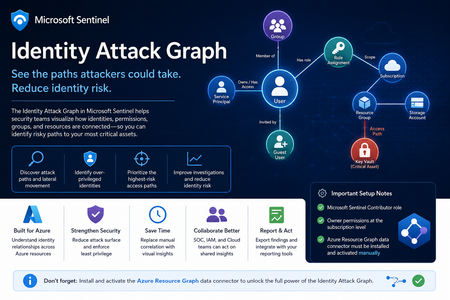
Identity is now one of the most important attack surfaces in cloud security. In many real-world incidents, attackers do not rely only on malware or network movement. Instead, they abuse identities, permissions, role assignments, group memberships, service principals, and misconfigured access paths to move from an initial compromise to high-value resources. This is why the new Identity Attack Graph in Microsoft Sentinel is an important capability. It helps security teams visualize how identities are connected to Azure resources and how an attacker could potentially move from one identity to another resource through permissions and relationships. What is the Identity Attack Graph? The Identity Attack Graph in Microsoft Sentinel provides a visual way to understand how identities, permissions, groups, and Azure resources are connected. Instead of manually checking multiple portals, logs, and role assignments, the graph helps analysts understand relationships such as: Which identities have access to specific Azure resources Which users or service principals are over-privileged Which groups provide indirect access to sensitive resources Which identities may have a path to critical assets What the potential blast radius of a compromised identity could be How attackers could move laterally through identity and permission relationships This is especially useful because identity risk is often not obvious when looking at a single user, group, or role assignment in isolation. The real risk usually appears when these relationships are connected together. A user may not directly have access to a sensitive resource, but the user may be a member of a group that has access to another resource, which then has permissions that create a path toward a high-value asset. The Identity Attack Graph helps expose these hidden relationships. Why this matters In many Azure environments, permissions grow over time. Users change roles, groups are reused, emergency access is granted, service principals are created, and temporary permissions are not always removed. As a result, organizations often end up with: Too many privileged identities Unused or stale permissions Service principals with excessive access Guest users with unnecessary permissions Groups that provide indirect access to sensitive resources Subscription-level roles that are broader than required Lack of visibility into who can reach critical assets Traditional investigation usually requires analysts to move between several places, including Microsoft Entra ID, Azure RBAC, Azure Activity logs, Sentinel queries, Defender XDR, and Azure Resource Graph. The Identity Attack Graph reduces this complexity by presenting identity relationships as a connected graph. This makes it easier to answer practical security questions such as: “What can this identity access?” “What happens if this user is compromised?” “Which identities have a path to critical resources?” “Which access path should we remediate first?” “Which permissions create the highest risk?” “Why does this identity have access to this asset?” Key use cases The feature can support several important identity security and cloud security scenarios. 1. Attack path discovery Security teams can use the graph to identify how an attacker could move from a compromised identity to a sensitive Azure resource. This is useful during both proactive assessments and active incident response. For example, if a user account is suspected to be compromised, the graph can help identify which resources may be reachable through that identity’s direct or indirect permissions. 2. Blast-radius analysis When an identity is compromised, one of the first questions is: What could the attacker access with this identity? The Identity Attack Graph can help analysts understand the potential impact of a compromised user, group, service principal, or managed identity. This can help with containment, prioritization, and communication with stakeholders. 3. Over-privileged identity detection The graph can help identify identities that have more permissions than they need. Include: Users with Owner or Contributor access at subscription level Service principals with broad permissions Guest users with privileged access Groups that grant access to sensitive resources Identities that have access to multiple critical assets This is useful for enforcing least privilege and reducing identity attack surface. 4. Privileged access review IAM and cloud security teams can use the graph to support access reviews. Instead of only reviewing a list of role assignments, teams can understand the real impact of those permissions. This helps answer: Is this role assignment still required? Does this group create unnecessary risk? Does this identity have access to critical resources? Is this access direct or inherited? Is this path expected or suspicious? 5. Incident response and threat hunting For SOC teams, the graph can support investigations involving: Suspicious sign-ins Compromised users Privilege escalation Suspicious role assignments Lateral movement Service principal abuse Unusual access to sensitive resources The graph does not replace logs or hunting queries, but it gives analysts a faster way to understand relationships and prioritize what to investigate next. Important prerequisites and setup notes During my evaluation, there were a few important setup requirements that should be clearly highlighted. Microsoft Sentinel permissions The environment must already be onboarded to Microsoft Sentinel, and the user testing or configuring the feature must have the appropriate Microsoft Sentinel permissions. The documented role requirement includes Microsoft Sentinel Contributor. However, in my experience, this is not always enough for the full onboarding and validation experience. Subscription-level Owner permission One important prerequisite that should be clearly mentioned is that Owner permissions at the Azure subscription level may be required. This is especially important during onboarding and activation, because the graph depends on access to Azure resource and permission relationships. If the user does not have sufficient subscription-level permissions, some setup steps or visibility into resources and relationships may not work as expected. Recommended permission note: In addition to Microsoft Sentinel permissions, ensure that the user configuring the preview has Owner permissions at the subscription level for the subscriptions that should be represented in the graph. This should be made very clear in the onboarding documentation to avoid confusion during deployment. Required data connector: Azure Resource Graph Another very important setup step is the Azure Resource Graph data connector. The Azure Resource Graph connector must be: Installed manually Activated manually Connected to the relevant Sentinel workspace This is a key point. The connector is not automatically enabled just because the Identity Attack Graph feature is available. Without this connector, Sentinel may not have the required Azure resource relationship data needed to build a useful graph. Why Azure Resource Graph is important Azure Resource Graph provides visibility across Azure resources, subscriptions, and relationships. For an identity attack graph, this data is essential. The graph needs to understand not only identities, but also the resources those identities can reach. This may include: Subscriptions Resource groups Storage accounts Key Vaults Virtual machines Managed identities Role assignments Resource relationships Resource hierarchy Critical assets Without Azure Resource Graph data, the attack graph may not provide the full picture of how identities connect to Azure resources. For this reason, I believe the onboarding instructions should explicitly state: The Azure Resource Graph data connector must be manually installed and activated before using the Identity Attack Graph. Recommended onboarding checklist Before using the Identity Attack Graph, I would recommend validating the following: Requirement Recommendation Microsoft Sentinel workspace Ensure the workspace is active and accessible Sentinel role Microsoft Sentinel Contributor or equivalent access Subscription permissions Owner permissions at subscription level Azure Resource Graph connector Manually install and activate the connector Azure RBAC visibility Ensure access to relevant role assignments Microsoft Entra ID visibility Ensure identity and group data is available Resource visibility Validate that relevant subscriptions and resources are visible Data freshness Allow enough time for data collection and graph population This checklist can help avoid issues where the feature appears available but does not show the expected relationships. How the Identity Attack Graph improves investigation Before using a graph-based approach, an analyst often needs to manually collect and correlate data from multiple sources. A typical investigation may include: Checking the user in Microsoft Entra ID Reviewing group memberships Reviewing Azure RBAC assignments Checking subscription-level access Looking at resource-level permissions Reviewing PIM activations Searching Sentinel logs Running KQL queries Checking Azure Activity logs Validating access with cloud or IAM teams This process can be time-consuming. The Identity Attack Graph helps reduce this effort by showing relationships visually. This allows the analyst to understand the possible path faster and decide where to focus. For example, instead of manually asking: “Does this user have access to this resource through any group, role, or inherited permission?” The graph can help show the relationship directly. This is valuable because many risky permissions are indirect. The user may not have direct access, but may inherit access through a group, role assignment, nested relationship, or service principal path. Where validation is still needed Although the graph provides strong visibility, I would still validate findings before taking remediation action. This is especially important because removing access can affect business operations or production systems. I would still validate with: Microsoft Sentinel KQL queries Microsoft Entra sign-in logs Microsoft Entra audit logs Azure Activity logs Azure RBAC role assignments PIM activation history Defender XDR signals Defender for Cloud recommendations Azure Resource Graph queries IAM team input Cloud platform team input Application owner confirmation The graph is very useful for discovery and prioritization, but final remediation decisions should still be validated. GQL and graph-based investigation One of the interesting aspects of this feature is the use of graph-based thinking. Security teams are already familiar with query languages such as KQL for log analytics. However, graph investigation is different. KQL is excellent for searching and analyzing events over time, such as sign-ins, alerts, audit logs, and activity logs. Graph Query Language, or GQL, is designed for querying connected data. Instead of only asking what happened at a specific time, graph queries help answer how entities are connected. In identity security, this is very powerful because the risk often exists in the relationship between objects. Graph entities include: Users Groups Service principals Managed identities Roles Subscriptions Resource groups Azure resources Permissions Sessions Attack paths Graph relationships include: User is member of group Group has role assignment Identity has access to resource Service principal owns application Managed identity can access Key Vault User can escalate privilege Identity can reach critical asset This allows analysts to ask more relationship-focused questions, such as: Which identities can reach this resource? What is the shortest path from this user to a critical asset? Which groups create privileged access? Which service principals have paths to sensitive resources? Which identities have indirect access through nested relationships? Which attack paths include subscription Owner or Contributor permissions? KQL vs GQL: why both are useful KQL and GQL serve different but complementary purposes. Area KQL GQL / Graph Querying Main purpose Analyze logs and events Analyze relationships and paths Best for Time-based investigation Connected identity/resource investigation question “Did this user sign in from a risky location?” “What resources can this user reach?” Data model Tables Nodes and edges Common use Detection, hunting, analytics Attack path discovery, relationship mapping Strength Event correlation Path discovery In practice, security teams need both. KQL can identify a suspicious sign-in. The Identity Attack Graph can show what the compromised identity could access. KQL can then be used again to validate whether the attacker interacted with those resources. This creates a strong workflow between event-based detection and relationship-based investigation. Graph investigation scenarios The following are conceptual are the types of graph questions that would be useful in identity attack path analysis. Find paths from a user to critical resources A useful graph query would help answer: Show me all paths from this user to critical Azure resources. This could help determine whether a compromised identity has a direct or indirect route to sensitive assets. Find identities with paths to Key Vaults Key Vaults often contain secrets, certificates, and keys. A graph query could help identify: Which users, groups, service principals, or managed identities have a path to Key Vault resources? This would be useful for prioritizing access review and remediation. Find subscription-level privileged identities Subscription-level roles are high-impact because they can provide broad access. A graph query could help find: Which identities have Owner or Contributor access at subscription level? This is especially important because subscription-level permissions can create wide attack paths. Find indirect access through groups Many access paths are created through group membership. A graph query could help answer: Which users have access to this resource through group membership? This can help IAM teams clean up excessive or unnecessary group-based access. Find service principals with broad access Service principals are often used for automation and applications, but they can become high-risk if over-privileged. A useful query would identify: Which service principals have broad access to subscriptions or critical resources? This is important because service principal compromise can lead to significant impact. How GQL can improve analyst workflows Adding strong GQL support to the graph explorer would make the feature more powerful for advanced users. You could use graph queries to: Search for specific paths Filter by identity type Filter by role Filter by resource type Find shortest paths Find high-risk paths Exclude known approved paths Focus on critical assets Query only privileged relationships Identify unexpected permission chains This would help both SOC analysts and cloud security engineers move from visual exploration to repeatable analysis. A SOC analyst may want a quick visual graph during an incident, while a cloud security engineer485Views3likes0CommentsMicrosoft Ignite 2025: Transforming Phishing Response with Agentic Innovation
Phishing attacks remain one of the most persistent and damaging threats to organizations worldwide. Security teams are under constant pressure to investigate a growing number of user reported phishing emails daily, ensuring accurate verdicts and timely responses. As threats grow in volume and sophistication, SOC teams are forced to spend valuable time triaging and investigating, often at the expense of strategic defense and proactive threat hunting. At Microsoft Ignite 2025 we are delivering innovation that showcases our continued commitment to infuse AI agents, and agentic workflows into the core of our email security solution and SOC operations to automate repetitive tasks, accelerate investigations, and provide transparent, actionable insights for every reported phishing email. In addition, we continue to invest in our ecosystem partnerships to empower customers with seamless integrations, as they adopt layered security solutions to comply with regulatory requirements, enhance detection, and ensure robust protection. Today I’m excited to announce: General Availability of the Security Alert Triage Agent (previously named Phishing Triage Agent) Agentic Email Grading System in Microsoft Defender Cisco and VIPRE Security Group join the Microsoft Defender ICES ecosystem Note: The Phishing Triage Agent has since been expanded and is now called the Security Alert Triage Agent. Learn more at aka.ms/SATA The Security Alert Triage Agent is now generally available In March 2025, we introduced the Security Alert Triage Agent, designed to autonomously handle user-submitted phishing reports at scale. The agent classifies incoming alerts, resolves false positives, and escalates only the malicious cases that require human expertise. Today, we’re announcing its general availability. We will also be extending the agent to triage alerts for identity and cloud alerts. The Security Alert Triage Agent automates repetitive tasks, accelerates investigations, and every decision is transparent, allowing security teams to focus on what matters most—investigating real threats and strengthening the overall security posture. Early results prove how it is transforming analyst work: Identified 6.5X more malicious alerts Improved verdict accuracy by 77% Agent supported analysts spent 53% more time investigating real threats Agentic email grading: Advanced analysis of phishing email submissions When customers report suspicious messages to Microsoft, they expect clarity, speed, and actionable insights to protect their environment. They expect a response they can trust, understand easily, and take additional investigation and response action for the organization. Previously, when customers reported messages to Microsoft, our response depended largely on manual human grader reviews, creating delays and inconsistent verdicts. Customers often waited several hours for a response, and sometimes it lacked clarity on how a verdict was reached. Today, we are excited to announce that we integrated an agentic grading system into the Microsoft Defender submission analysis and response workflow when customers report phishing messages to Microsoft. Image 2: Agentic Email Grading: Advanced analysis of phishing email submissions The agentic grading system brings a new level of speed and transparency to phishing analysis. It uses large language models (LLMs) orchestrated within an agentic workflow to analyze phishing emails, assess the full content of a submitted email, and communicate context and related metadata. This system combines advanced AI with existing machine learning models and human review for additional levels of accuracy and transparency for decision making. Every verdict comes with higher quality, clear verdicts, and context-rich explanations tailored to each phishing email submission. Additionally, it establishes a feedback mechanism that enhances continuous learning and self-healing, thereby strengthening and optimizing protection over time. By reducing reliance on manual reviews, users will experience lower wait times, faster responses and higher-quality results. It will enable security teams to respond promptly and act confidently against phishing threats. Over time we plan to expand beyond phishing verdicts to include spam, scam, bulk, and clean classifications, making the process more comprehensive. The system will continue to evolve through feedback and adapt to emerging attack patterns. How to view agentic submission responses in Microsoft Defender When you report a suspicious email—whether as an admin or an end user—you can now see how Microsoft Defender’s new agentic grading system evaluates your submission. To view agentic grading system responses, follow the steps below: Report the suspicious email Submit the email through the admin submission or user-reported submission process. Sign in to Microsoft Defender Go to https://security.microsoft.com. Navigate to Submissions From the left menu, select: Investigation & response > Actions & submissions > Submissions. Choose the correct tab Emails for admin submissions User reported for user submissions Open the submission details Click the email submission you want to review. A flyout panel will display Result details. Look for the Agentic AI note If the verdict was generated by Agentic AI, you’ll see: “AI-generated content may be incorrect. Check it for accuracy.” Image 3: AI generated explainable verdicts Expanding the Integrated Cloud Email Security (ICES) ecosystem In June, we introduced the Microsoft Defender ICES vendor ecosystem, a unified framework that enables seamless integration of Microsoft’s Defender’s email security solution with trusted third-party vendors. Today we are excited to announce two new partners: Cisco and VIPRE Security Group. The addition of these partners to our ecosystem reinforces our ongoing commitment to support customers in their choice to strategically layer their email security solutions. Organizations benefit from a unified quarantine experience, and a deep integration across the various SOC experiences including threat explorer, advanced hunting, and the email entity page, while providing clear insight into detection efficacy of each solution. As we continue to innovate, our commitment remains steadfast: empowering defenders with intelligent, transparent, and integrated security solutions that adapt to the evolving threat landscape. By infusing agentic AI into every layer of Microsoft Defender, expanding our ecosystem of trusted partners, and delivering faster, more actionable insights, we’re helping organizations build resilience and stay ahead of attackers. Our strategy is rooted in delivering real value making security simpler, more effective, and adapted to the needs of every customer. Learn More: Want to know what else is new in Microsoft Defender at Ignite 2025 check out the blog here. For info on how to complete admin phish submissions, please see For end user reported phish submissions, you need to have it configured for reporting messages to Microsoft. Set it up today. Join us at Microsoft Ignite Join us at Microsoft Ignite to see these advancements in action and discover how intelligent, agentic defense is becoming accessible to every organization. Don’t miss our featured sessions: AI vs AI: Protect email and collaboration tools with Microsoft Defender on Thursday, November 20 th . Learn More. Microsoft Defender: Building the agentic SOC with guest Allie Mellen on Wednesday, November 19 th . Learn more. Empowering the SOC: Security Copilot and the rise of Agentic Defense on Friday, November 21 st . Learn more.
Audit logs for Vulnerability Management Remediations
Hello all, Are there any audit logs that can be queried for the creation of Remediations under Endpoint Vulnerability Management (https://security.microsoft.com/remediation/remediation-activities)? I know that there are API endpoints that can be queried for this information, but we are looking for additional options. The endgame is to have a ticket created in our external help desk ticketing system when someone creates a Remediation from a Recommendation. Any advice is appreciated! Thanks, - Steve289Views0likes1Comment
Defender MDO permissions broken (again)
Defender wasn't letting me approve pending AIR remediation options, something I do every day, with my usual custom RBAC role checked out. Nor could I move or delete emails. I also had Security Operator checked out. I checked out Security Admin and tried again, no dice. It wasn't until I checked out Global Admin until I got the permissions I needed.338Views0likes1Comment
Full Automation Capabilities in Linux OS
Hello eveyone, We have configured Defender to detect viruses, and our goal is that if one of our assets downloads or encounters a virus, it is automatically hidden or removed. Based on the documentation regarding the automation levels in Automated Investigation and Remediation capabilities, we have set it to "Full - remediate threats automatically." While this works correctly on Windows devices, we have noticed that on Linux devices, the defender still detect the virus but it was not prevented. I was wondering if anyone has encountered this issue and, if so, how it was resolved? Additionally, as I am new to the Defender platform, I wanted to ask if could this issue potentially be resolved through specific Linux policies or functionalities? Best regards Mathiew306Views1like1Comment
Invalidating kerberos tickets via XDR?
Since we have alerts every now and then, regarding suspected Pass the Ticket-incidents, I want to know if there's a way to make a user's kerberos ticket invalid? Like we have the "Revoke Session" in Entra ID, is there anything similar that we can do in XDR?485Views0likes3CommentsMicrosoft Sentinel MCP Entity Analyzer: Explainable risk analysis for URLs and identities
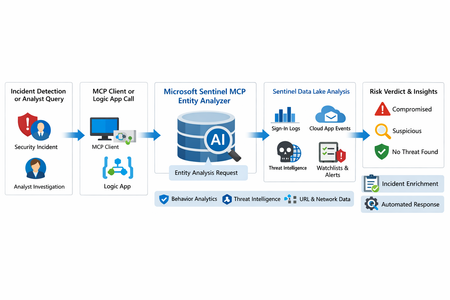
What makes this release important is not just that it adds another AI feature to Sentinel. It changes the implementation model for enrichment and triage. Instead of building and maintaining a chain of custom playbooks, KQL lookups, threat intel checks, and entity correlation logic, SOC teams can call a single analyzer that returns a reasoned verdict and supporting evidence. Microsoft positions the analyzer as available through Sentinel MCP server connections for agent platforms and through Logic Apps for SOAR workflows, which makes it useful both for interactive investigations and for automated response pipelines. Why this matters First, it formalizes Entity Analyzer as a production feature rather than a preview experiment. Second, it introduces a real cost model, which means organizations now need to govern usage instead of treating it as a free enrichment helper. Third, Microsoft’s documentation is now detailed enough to support repeatable implementation patterns, including prerequisites, limits, required tables, Logic Apps deployment, and cost behavior. From a SOC engineering perspective, Entity Analyzer is interesting because it focuses on explainability. Microsoft describes the feature as generating clear, explainable verdicts for URLs and user identities by analyzing multiple modalities, including threat intelligence, prevalence, and organizational context. That is a much stronger operational model than simple point-enrichment because it aims to return an assessment that analysts can act on, not just more raw evidence What Entity Analyzer actually does The Entity Analyzer tools are described as AI-powered tools that analyze data in the Microsoft Sentinel data lake and provide a verdict plus detailed insights on URLs, domains, and user entities. Microsoft explicitly says these tools help eliminate the need for manual data collection and complex integrations usually required for investigation and enrichment hat positioning is important. In practice, many SOC teams have built enrichment playbooks that fetch sign-in history, query TI feeds, inspect click data, read watchlists, and collect relevant alerts. Those workflows work, but they create maintenance overhead and produce inconsistent analyst experiences. Entity Analyzer centralizes that reasoning layer. For user entities, Microsoft’s preview architecture explains that the analyzer retrieves sign-in logs, security alerts, behavior analytics, cloud app events, identity information, and Microsoft Threat Intelligence, then correlates those signals and applies AI-based reasoning to produce a verdict. Microsoft lists verdict examples such as Compromised, Suspicious activity found, and No evidence of compromise, and also warns that AI-generated content may be incorrect and should be checked for accuracy. That warning matters. The right way to think about Entity Analyzer is not “automatic truth,” but “high-value, explainable triage acceleration.” It should reduce analyst effort and improve consistency, while still fitting into human review and response policy. Under the hood: the implementation model Technically, Entity Analyzer is delivered through the Microsoft Sentinel MCP data exploration tool collection. Microsoft documents that entity analysis is asynchronous: you start analysis, receive an identifier, and then poll for results. The docs note that analysis may take a few minutes and that the retrieval step may need to be run more than once if the internal timeout is not enough for long operations. That design has two immediate implications for implementers. First, this is not a lightweight synchronous enrichment call you should drop carelessly into every automation branch. Second, any production workflow should include retry logic, timeouts, and concurrency controls. If you ignore that, you will create fragile playbooks and unnecessary SCU burn. The supported access path for the data exploration collection requires Microsoft Sentinel data lake and one of the supported MCP-capable platforms. Microsoft also states that access to the tools is supported for identities with at least Security Administrator, Security Operator, or Security Reader. The data exploration collection is hosted at the Sentinel MCP endpoint, and the same documentation notes additional Entity Analyzer roles related to Security Copilot usage. The prerequisite many teams will miss The most important prerequisite is easy to overlook: Microsoft Sentinel data lake is required. This is more than a licensing footnote. It directly affects data quality, analyzer usefulness, and rollout success. If your organization has not onboarded the right tables into the data lake, Entity Analyzer will either fail or return reduced-confidence output. For user analysis, the following tables are required to ensure accuracy: AlertEvidence, SigninLogs, CloudAppEvents, and IdentityInfo. also notes that IdentityInfo depends on Defender for Identity, Defender for Cloud Apps, or Defender for Endpoint P2 licensing. The analyzer works best with AADNonInteractiveUserSignInLogs and BehaviorAnalytics as well. For URL analysis, the analyzer works best with EmailUrlInfo, UrlClickEvents, ThreatIntelIndicators, Watchlist, and DeviceNetworkEvents. If those tables are missing, the analyzer returns a disclaimer identifying the missing sources A practical architecture view An incident, hunting workflow, or analyst identifies a high-interest URL or user. A Sentinel MCP client or Logic App calls Entity Analyzer. Entity Analyzer queries relevant Sentinel data lake sources and correlates the findings. AI reasoning produces a verdict, evidence narrative, and recommendations. The result is returned to the analyst, incident record, or automation workflow for next-step action. This model is especially valuable because it collapses a multi-query, multi-tool investigation pattern into a single explainable decisioning step. Where it fits in real Sentinel operations Entity Analyzer is not a replacement for analytics rules, UEBA, or threat intelligence. It is a force multiplier for them. For identity triage, it fits naturally after incidents triggered by sign-in anomaly detections, UEBA signals, or Defender alerts because it already consumes sign-in logs, cloud app events, and behavior analytics as core evidence sources. For URL triage, it complements phishing and click-investigation workflows because it uses TI, URL activity, watchlists, and device/network context. Implementation path 1: MCP clients and security agents Microsoft states that Entity Analyzer integrates with agents through Sentinel MCP server connections to first-party and third-party AI runtime platforms. In practice, this makes it attractive for analyst copilots, engineering-side investigation agents, and guided triage experiences The benefit of this model is speed. A security engineer or analyst can invoke the analyzer directly from an MCP-capable client without building a custom orchestration layer. The tradeoff is governance: once you make the tool widely accessible, you need a clear policy for who can run it, when it should be used, and how results are validated before action is taken. Implementation path 2: Logic Apps and SOAR playbooks For SOC teams, Logic Apps is likely the most immediately useful deployment model. Microsoft documents an entity analyzer action inside the Microsoft Sentinel MCP tools connector and provides the required parameters for adding it to an existing logic app. These include: Workspace ID Look Back Days Properties payload for either URL or User The documented payloads are straightforward: { "entityType": "Url", "url": "[URL]" } And { "entityType": "User", "userId": "[Microsoft Entra object ID or User Principal Name]" } Also states that the connector supports Microsoft Entra ID, service principals, and managed identities, and that the Logic App identity requires Security Reader to operate. This makes playbook integration a strong pattern for incident enrichment. A high-severity incident can trigger a playbook, extract entities, invoke Entity Analyzer, and post the verdict back to the incident as a comment or decision artifact. The concurrency lesson most people will learn the hard way Unusually direct guidance on concurrency: to avoid timeouts and threshold issues, turn on Concurrency control in Logic Apps loops and start with a degree of parallelism of . The data exploration doc repeats the same guidance, stating that running multiple instances at once can increase latency and recommending starting with a maximum of five concurrent analyses. This is a strong indicator that the correct implementation pattern is selective analysis, not blanket analysis. Do not analyze every entity in every incident. Analyze the entities that matter most: external URLs in phishing or delivery chains accounts tied to high-confidence alerts entities associated with high-severity or high-impact incidents suspicious users with multiple correlated signals That keeps latency, quota pressure, and SCU consumption under control. KQL still matters Entity Analyzer does not eliminate KQL. It changes where KQL adds value. Before running the analyzer, KQL is still useful for scoping and selecting the right entities. After the analyzer returns, KQL is useful for validation, deeper hunting, and building custom evidence views around the analyzer’s verdict. For example, a simple sign-in baseline for a target user: let TargetUpn = "email address removed for privacy reasons"; SigninLogs | where TimeGenerated between (ago(7d) .. now()) | where UserPrincipalName == TargetUpn | summarize Total=count(), Failures=countif(ResultType != "0"), Successes=countif(ResultType == "0"), DistinctIPs=dcount(IPAddress), Apps=make_set(AppDisplayName, 20) by bin(TimeGenerated, 1d) | order by TimeGenerated desc And a lightweight URL prevalence check: let TargetUrl = "omicron-obl.com"; UrlClickEvents | where TimeGenerated between (ago(7d) .. now()) | search TargetUrl | take 50 Cost, billing, and governance GA is where technical excitement meets budget reality. Microsoft’s Sentinel billing documentation says there is no extra cost for the MCP server interface itself. However, for Entity Analyzer, customers are charged for the SCUs used for AI reasoning and also for the KQL queries executed against the Microsoft Sentinel data lake. Microsoft further states that existing Security Copilot entitlements apply The April 2026 “What’s new” entry also explicitly says that starting April 1, 2026, customers are charged for the SCUs required when using Entity Analyzer. That means every rollout should include a governance plan: define who can invoke the analyzer decide when playbooks are allowed to call it monitor SCU consumption limit unnecessary repeat runs preserve results in incident records so you do not rerun the same analysis within a short period Microsoft’s MCP billing documentation also defines service limits: 200 total runs per hour, 500 total runs per day, and around 15 concurrent runs every five minutes, with analysis results available for one hour. Those are not just product limits. They are design requirements. Limitations you should state clearly The analyze_user_entity supports a maximum time window of seven days and only works for users with a Microsoft Entra object ID. On-premises Active Directory-only users are not supported for user analysis. Microsoft also says Entity Analyzer results expire after one hour and that the tool collection currently supports English prompts only. Recommended rollout pattern If I were implementing this in a production SOC, I would phase it like this: Start with a narrow set of high-value use cases, such as suspicious user identities and phishing-related URLs. Confirm that the required tables are present in the data lake. Deploy a Logic App enrichment pattern for incident-triggered analysis. Add concurrency control and retry logic. Persist returned verdicts into incident comments or case notes. Then review SCU usage and analyst value before expanding coverage.1.4KViews8likes0Comments