phishing
48 Topics
No way to automate restoring user‑reported emails after “no threats found”
When a user reports an email as phishing in Defender, the message gets moved to Deleted Items. After we triage it, if we mark it as “no threats found,” there’s no way to push it back to the user’s inbox as part of that workflow. That creates a bit of a broken experience: User is told the email is safe with our customized email response, but has to go find it themselves In a lot of cases they don’t (Outlook search won’t find it) We end up with follow‑ups like “where did it go?” Technically we could restore the email as part of our triage process, but that just shifts the effort onto the SOC. It doesn’t scale, and it’s not really the right place for that work. We have tried to create an automation to do this, but we have not been able to create an advanced hunting query based on our triage result that can then trigger an action to restore it to the mailbox. So we end up choosing between: Users having a bad experience, or Analysts doing manual mailbox work Neither is ideal. Other platforms (like Proofpoint) handle this end‑to‑end — once something is confirmed clean, it can be returned to the user automatically. Right now Defender stops at classification instead of completing the workflow. Is there a reason this isn’t wired in, or anything on the roadmap to address it?
Microsoft Defender (GCC) - User Submitted "Mark and Notify" for Third Party Phishing Simulations
Our Microsoft 365 tenant is in the GCC environment, and we use a third party phishing simulation platform along with the built in Outlook Report Message button (not a third party reporting add in). When a user correctly reports one of our simulated phishing emails, the message appears in Microsoft Defender > User Submitted as expected. The problem is what happens next. When we select Mark and notify, the only available options are: Phishing Spam No threat found There is no option to notify the user that the email was actually part of a phishing simulation. This creates a difficult situation: If we choose No threat found, Defender tells the user the message was safe, making it appear they incorrectly reported the email even though they did exactly what we trained them to do. If we choose Phishing, the user receives the correct feedback, but the message is counted as a real phishing event, affecting our Defender metrics and potentially generating false incidents and reporting. It feels like we're stuck in a design loop where neither option provides the desired outcome. My questions are: Is there a supported way in Microsoft Defender (particularly GCC) to notify users that a reported message was a simulated phishing email when using the native Outlook Report Message button? Is this capability available in Commercial tenants but not GCC, or is it unavailable across all environments? If this functionality does not exist, what is the recommended process for submitting a feature request specifically for the GCC version of Microsoft Defender? This seems like a valuable enhancement for organizations that use third party phishing simulation platforms while relying on Microsoft's native reporting experience. Has anyone else found a good workflow for this scenario?
Enable per‑user language selection for phishing simulation emails and landing pages
We use Attack Simulation Training to deliver phishing simulations to a global, multilingual user base. While Microsoft Defender supports multi‑language content, phishing simulation emails and landing pages are currently delivered in a single selected language per campaign. We are requesting a feature that allows phishing simulation emails and associated landing pages (including credential‑harvest pages) to automatically render in each user’s preferred language, based on: Outlook mailbox language settings, and/or Microsoft Entra ID user language preferences This capability would: Improve realism and accuracy of phishing simulations Ensure users experience simulations in the same language they normally work in Improve behavioral measurement in global organizations Reduce the need to create and manage multiple parallel simulations by language Providing consistent, per‑user language alignment across simulation emails, landing pages, and follow‑up training would significantly enhance the effectiveness of Attack Simulation Training for large, multilingual enterprises.440Views2likes2CommentsEnable automatic per‑user language selection for Defender training modules
We use Attack Simulation Training and Microsoft Defender training modules as part of our security awareness program for a global audience. Currently, training content is assigned in a single language per campaign, even though users already have preferred language settings defined in Outlook and Microsoft Entra ID (Azure AD). This creates challenges for multinational organizations and often requires duplicating campaigns or accepting that some users receive training in a non‑preferred language. We are requesting a capability that allows Defender training modules to automatically display in each user’s preferred language, based on: Outlook mailbox language settings, and/or Microsoft Entra ID user language preferences Enabling per‑user language selection would: Improve comprehension and learning outcomes Increase training effectiveness for non‑native speakers Reduce administrative overhead and duplicated campaigns Align Defender training with existing Microsoft 365 localization behavior Defender already supports training content in multiple languages. Allowing dynamic language delivery per user would significantly improve scalability and usability for enterprise security awareness programs.205Views0likes0Comments
Impersonation Protection: Users to Protect should also be Trusted Senders
Hey all, sort of a weird question here. Teaching my staff about Impersonation Protection, and it's kind of occurred to me that any external sender added to 'Senders to Protect' sort of implicitly should also be a 'Trusted Sender'. Example - we're an MSP, and we want our Help Desk (email address removed for privacy reasons) to be protected from impersonation. Specifically, we want to protect the 'Help Desk' name. So we add email address removed for privacy reasons to Senders to protect. However, we ALSO want to make sure our emails come thru. So we've ALSO had to add email address removed for privacy reasons to Trusted Senders on other tenants. Chats with Copilot have sort of given me an understanding that this is essentially a 'which is more usefuI' scenario. But CoPilot makes things up, and I want some human input. In theory, ANYONE we add to 'trusted senders' we ALSO want protected from Impersonation. Anyone we protect from Impersonation we ALSO want to trust. Copilot says you SHOULDN'T do both. Which is better / more practical?I would like to know the complete list of alerts whose serviceSource is MDO
Hi all In order to determine the alerts that should be monitored by the SOC, I would like to identify, from the alerts listed at the link below, those whose serviceSource is Microsoft Defender for Office 365 (MDO). https://learn.microsoft.com/en-us/defender-xdr/alert-policies I couldn’t find where this is documented, no matter how thoroughly I searched, so I would appreciate it if you could point me to the relevant documentation. thx175Views0likes0Comments
user-reported phishing emails
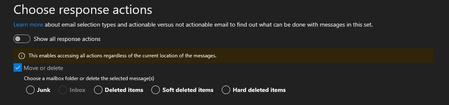
Dear Community I have a technical question regarding user-reported emails. In Defender, under “Action and Submissions” -> “Submissions,” I can see the emails that users have reported under the “user reported” option. There, we have the option to analyze these emails and mark them as “no threats found,” “phishing,” or “spam.” The user is then informed. Question: Do these reported emails remain in the user's inbox when they report them? If not, do we have the option to return these reported emails to the user's inbox with the “No threats found” action? Because I don't see this option. In another tenant, under “Choose response Action,” I see “move or delete,” but the “inbox” option is grayed out. Why is that? Thank you very much!Display Name Spoofing very often recently - how to prevent it
Hi experts, recently, I have noticed increase in emails that tries to impersonate sender (Display Name Spoofing). The Display name shows a real user from our organization, however the sender email/domain is totally different. I thought I had the protection configured properly but looks like that is not the case :/. I have anti-phish policy with Impersonation as below: few critical users listed in "Enable users to protect" was going to enable it for all now, but there is no option like that, ..and it looks I need to manually add all internal users Enable domains to protect Include domains I own (does this include all domains I have registered in M365? See below). I would expect this will prevent these emails Include custom domains - I have nothing here, but I am not sure now whether my few domains created in M365 - including default domain, needs to be added here? As from what I know, the custom domains are the domains I create in M365. Would like to check what is the proper way to configure protection against these email attacks. We use M365 E3 + M365 E5 SecuritySolved2.7KViews0likes2CommentsMicrosoft Defender EOP
We have been experiencing an issue since last week where we are unable to view the details of quarantined emails. Could you please confirm if this is related to a known backend service issue, or if there are any specific troubleshooting steps we should perform on our end? Any guidance or updates would be greatly appreciated.
No URL Detection in Emails with Extensive %2580 Encoding
Hi Community, I encountered a concerning issue where emails containing URLs with extensive encoding (%2580) completely bypassed all detection and security mechanisms. These encoded URLs weren’t identified as links, which allowed them to evade security scanning. Issue Details: The email contained malicious URLs encoded with %2580. The URLs were not flagged or identified as links, allowing the payload to bypass filters entirely. Questions: Has anyone else encountered similar issues with encoded URLs bypassing detection? What’s the best process to submit this email to Microsoft for analysis and improvements to detection mechanisms, since no URL's were identified? Looking forward to your input and recommendations. Thanks in advance!655Views0likes4Comments