Forum Widgets
Latest Discussions
Agent Builder, Copilot Studio, or Azure AI Foundry: How We Decide for Every Client
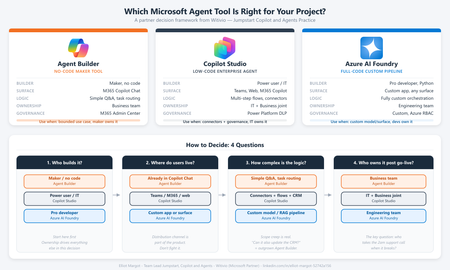
Every client conversation starts the same way. Someone has seen a demo, attended an Ignite session, or read a press release. They want to build an agent. Then comes the question that derails more projects than any technical challenge: "Which tool should we use?" After deploying agents for clients across industries - insurance, professional services, manufacturing, public sector - we have developed a repeatable framework for answering that question. It is not based on which tool is newest or which has the best marketing. It is based on where projects actually succeed or fail in production. The three tools are not competitors The first mistake most teams make is treating Agent Builder, Copilot Studio, and Azure AI Foundry as a hierarchy - basic, intermediate, advanced. That framing leads to bad decisions. They are not a ladder. They are three distinct tools built for three distinct contexts. The right question is not "which tool is most powerful?" It is "which tool fits this project's constraints?" The framework: 4 questions We evaluate every project against four dimensions before recommending a tool: Who is building it? Where do users live? How complex is the logic? Who owns it after go-live? Agent Builder Copilot Studio Azure AI Foundry Builder profile Maker, no code Developer / power user Pro developer, Python User surface M365 Copilot Chat Teams, web, M365 Copilot Custom app, any surface Logic complexity Simple Q&A, task routing Multi-step flows, connectors Fully custom orchestration Post-go-live ownership Business team IT + Business joint Engineering team Governance M365 Admin Center Power Platform DLP Custom, Azure RBAC When we recommend Agent Builder Agent Builder is the right call when the business team wants to own the agent end-to-end, the use case is bounded, and the users already live inside M365 Copilot Chat. The key advantage is distribution - an Agent Builder agent surfaces natively inside Copilot Chat with zero additional deployment work. No IT ticket, no app registration, no Teams app package. The ceiling is real. Agent Builder does not support complex branching logic, external API calls, or dynamic prompt injection. The moment a client asks "can it also update a record in our CRM?" the answer is usually no. Use it when: The maker owns it, the use case is narrow, and M365 Copilot is already the user's primary surface. When we recommend Copilot Studio Copilot Studio is our default recommendation for the majority of enterprise agent projects. It covers the wide middle ground between no-code simplicity and full-code flexibility - within the Microsoft governance perimeter most enterprise IT teams already control. Power Platform connectors - 1,000+ out-of-the-box connectors means most enterprise data sources are reachable without custom API development M365 Copilot channel - surface a Copilot Studio agent directly inside M365 Copilot Chat, Agent Builder-level distribution with enterprise-grade logic underneath Topic-level governance - fallback behaviors, confidence thresholds, escalation paths configurable without code DLP policy enforcement - the agent operates within the same data loss prevention perimeter as the rest of the Power Platform tenant The most common mistake: under-investing in the knowledge layer. The agent authoring is the easy part. Getting SharePoint content structured, metadata consistent, and documents deduplicated is where most projects hit delays. Budget for it. Use it when: The use case requires connectors, dynamic responses, or M365 Copilot integration - and you want IT to own governance without requiring a developer team. When we recommend Azure AI Foundry Foundry is the right call when you need to bring your own model, build a fully custom orchestration pipeline, or integrate into a surface that has nothing to do with Microsoft 365. In practice, this means one of three scenarios: The client has a model fine-tuned on proprietary data that must be used The agent is embedded inside a custom-built web or mobile application The logic requires Python-level control - complex reasoning chains, multi-agent coordination, custom evaluation loops Foundry projects require a professional developer, take longer, and produce something the business team cannot maintain without engineering support. That is not a reason to avoid it - it is a reason to be honest with the client upfront. Use it when: You need full control of the model, the orchestration, or the surface - and you have a developer team to own it. The question that resolves most debates When a client is torn between Copilot Studio and Foundry, we ask one question: "Who is answering the 2am support call when this breaks in production?" If the answer is a developer, Foundry is viable. If the answer is the IT admin or the business owner, Copilot Studio is the right call. Not because Foundry is unreliable, but because the operational model has to match the tool. More projects fail from ownership mismatch than from technical limitations. What we see go wrong Reaching for Foundry too early. Developers often want full control and reach for Foundry before validating the use case. We have rebuilt several Foundry POCs in Copilot Studio when the production constraints called for it - faster to ship and cheaper to run. Under-scoping Agent Builder. Business teams choose Agent Builder because it looks simple, then hit the ceiling at month two. The re-platform cost is higher than building in Copilot Studio from the start. Ignoring the M365 Copilot channel. Many Copilot Studio projects are deployed as standalone Teams apps when they could surface directly inside M365 Copilot Chat. The distribution advantage is significant and underused. The short version Agent Builder - maker-owned, bounded use case, M365 Copilot surface, fast Copilot Studio - IT + business joint ownership, connectors, production governance, M365 Copilot integration Azure AI Foundry - developer-owned, custom model or surface, full control, higher cost Start with the ownership model. Everything else follows. Elliot Margot - Team Lead Jumpstart, Copilot and Agents at Witivio (Microsoft Partner). Connect on https://www.linkedin.com/in/elliot-margot-52742a156/.253Views3likes1Comment
Suddenly prohibited from using my home photos in Copilot images
As a fan of old B-Movies, I've been creating fictitious B-Movie posters with Copilot. I've been using the faces of myself and wife from home photos for the faces of the "stars" on these posters. Suddenly, copilot says my home photo are copyrighted and can't be used. From Copilot - "The image generation was blocked due to copyright concerns, likely because the uploaded photo contains recognizable faces. I can’t generate an image using those likenesses." It can't even use the photos to create images that are similar to our faces. I own the home photo, so clearly, I have the rights to it. The file even has the date, camera, settings, etc... This is beyond frustrating! If there is a question of ownership or copyright, Microsoft should have some sort of release form I can post to Copilot when I want to use a home photo. I've not has this problem with any other AI Image Creation. However, Copilot had been creating the best artwork, and I would like to continue to use it. How can this be rectified?SolvedScottCincyNov 26, 2025Copper Contributor468Views2likes4Comments📌 Copilot Studio User Group – Community Guidelines & Expectation
Welcome to the Copilot Studio User Group! 🚀 To ensure this group remains a productive, respectful, and safe space for all members, please read and follow these guidelines: 1️⃣ Be Respectful Treat all members with courtesy. No harassment, offensive language, or personal attacks will be tolerated. 2️⃣ Stay On Topic Posts should focus on Microsoft Copilot Studio, AI integrations, or related discussions. Off-topic posts may be removed. 3️⃣ No Spam or Excessive Self-Promotion Relevant sharing is fine, but avoid unsolicited promotions or links unrelated to group discussions. 4️⃣ Respect Microsoft Policies & Confidentiality Follow Microsoft’s Community Code of Conduct and never share confidential or proprietary information. 5️⃣ Ask Questions & Collaborate Encourage knowledge sharing and learning. Questions and thoughtful discussions are welcome. 6️⃣ Report Concerns Privately If you see inappropriate content or behavior, contact the admin directly. Avoid public conflicts in the discussion threads. 7️⃣ Admin Authority Group admins have the right to moderate content and membership to maintain a safe and productive environment. This includes editing, moving, or removing posts and members if necessary. Thank you for helping make this a supportive and high-value community. Let’s build, learn, and collaborate together! 🌟112Views1like0CommentsCopilot Studio User Group • Member’s Guide To Contributing Properly
Further Reference: What Is The Copilot Studio User Group?Who Can Start Discussions On The Copilot Studio User Group?How Can I Participate On The Copilot Studio User Group On The Microsoft Tech Community? ✅Do’s You May: Create Posts That Follow The Microsoft Tech Community Guidelines You Must: Follow Microsoft’s Code Of Conduct & The Microsoft Tech Community Code Of Conduct You May: Contribute To The Copilot Studio User Group By Sharing Best Practices When Making An Copilot Agent On Copilot Studio & Showcase Your Copilot Agent On The User Group’s Discussion Section You Must: Add Tags To Your Post To Help New Members Understand What Tagged Topic Your Post Is In You Must: Create Posts That Are Related To Copilot Studio & Maintain Respectful Behaviour When Posting On The Copilot Studio User Group ❌Don’t’s Please Do Not: Harass Group Members Of The Copilot Studio User Group ( Annoy Group Members Or Be An Menace To The User Group ) Please Do Not: Break The Microsoft Tech Community Guidelines Or Microsoft’s Community Standards & The Copilot Studio User Group Rules Including The Microsoft Terms Of Use Please Do Not: Create Posts That Are Not Related To Microsoft Copilot Studio Please Do Not: Be Disrespectful Towards Fellow Contributors 🌟And Lastly… Lastly Please Ensure That Contributions To The Copilot Studio User Group Are Respectful & Follow Microsoft’s Code Of Conduct & The Microsoft Tech Community’s Primary Community Guidelines 👋🏻Wrapping Up In Short Thanks For Joining The Copilot Studio User Group Happy Posting!UhLukasNov 25, 2025Iron Contributor102Views1like0Comments
Hi, Is there a way to add and remove files into the knowledge source during run time?
I have an agent set up which asks user to upload files. I have set up a prompt with questions in it and i want the agent to create generative answers based on these uploaded files. Also the files are to be removed after each session as the answers should be exclusive to that session alone based on the files that the user uploads during that session. Is there a way to do this? I tried creating a dynamic folder based on GUID for each session in sharepoint and uploading the files in that. I also added the folder where the dynamically created folders are situated as a knowledge source. It did work but the agent started indexing the responses and the even when the files were removed and new folder created and files uploaded into that the agent still generated responses based on previous files due to indexing issues. Is there a way to solve the indexing issues? if not could someone suggest how i can tackle the issueSolvedAjaySNov 19, 2025Tin Contributor262Views1like8CommentsWhat Is The Copilot Studio User Group?
What Is The Copilot Studio User Group? According To An AI Overview On Google Search It States This: ” The Copilot Studio User Group is a virtual community, hosted on the Microsoft Community Hub, where users can share knowledge, ask questions, and get support for building with Microsoft Copilot Studio. It is a user-led, non-official support channel for enthusiasts to exchange tips, discuss features, and get help with the platform. Purpose: To Provide a space for users to discuss their experiences, ask questions, and get support for using Microsoft Copilot Studio. Activities: Members can start discussions, ask for help, and provide answers and tips to one another. Nature: The group is a community-based, user-led initiative, not an official Microsoft support channel. Access: Users can join discussions and post questions after joining the group on the Microsoft Community Hub. “ An Simplified Description Of What The Copilot Studio User Group Is “ A user-led group for Copilot Studio enthusiasts to discuss features, share tips, and participate in virtual topic-based events. This group is run by users and is not an official Microsoft support channel. “SolvedUhLukasNov 12, 2025Iron Contributor149Views1like1Comment



Tags
- copilot studio7 Topics
- About Copilot Studio3 Topics
- Copilot Studio User Group3 Topics
- Copilot Studio Agents3 Topics
- Introduce Yourself1 Topic
- Introduce Yourself Thread1 Topic
- solutions1 Topic
- Custom Connectors1 Topic
- export1 Topic