Forum Widgets
Latest Discussions

Hi, Is there a way to add and remove files into the knowledge source during run time?
I have an agent set up which asks user to upload files. I have set up a prompt with questions in it and i want the agent to create generative answers based on these uploaded files. Also the files are to be removed after each session as the answers should be exclusive to that session alone based on the files that the user uploads during that session. Is there a way to do this? I tried creating a dynamic folder based on GUID for each session in sharepoint and uploading the files in that. I also added the folder where the dynamically created folders are situated as a knowledge source. It did work but the agent started indexing the responses and the even when the files were removed and new folder created and files uploaded into that the agent still generated responses based on previous files due to indexing issues. Is there a way to solve the indexing issues? if not could someone suggest how i can tackle the issueSolvedAjaySNov 19, 2025Tin Contributor381Views1like8Comments
Problem Exporting Copilot with Custom Connection
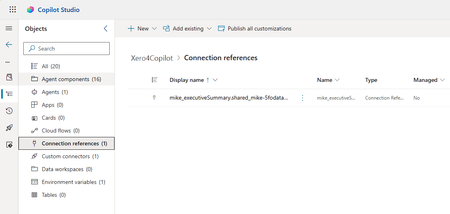
I have a clean environment in which I have created a single solution, "Xero4Copilot", that contains a single agent "Executive Summary". This agent uses a Custom Connector "Odatalink_report", which is created from a tested Swagger file. The Agent uses two endpoints from the connector as tools. The Agent is using the tools well, with no configuration errors. I wanted to clarify the problem before calling for help, hence the clean install and intro. When I export the solution, I get a failure, the GUI gives the same answer, this is the output from PAC CLI: PS C:\Users\mike\Downloads> pac solution export -n Xero4Copilot Connected as email address removed for privacy reasons Connected to... Xero4CopilotDev Starting Solution Export... Microsoft PowerPlatform CLI Version: 1.50.1+gabb74d2 (.NET Framework 4.8.9221.0) Online documentation: https://aka.ms/PowerPlatformCLI Feedback, Suggestions, Issues: https://github.com/microsoft/powerplatform-build-tools/discussions Error: Exporting connection reference mike_executiveSummary.shared_mike-5fodatalink-5freport-5f24577e437a5ff0b6.a4cd806a-ef0b-4680-acf3-34e5b779930f for a custom connector requires the custom connector to be added to a dataverse solution. Please add connector shared_mike-5fodatalink-5freport-5f24577e437a5ff0b6 to a solution and retry. I've tried various adds of components, but this does not really seem to be the problem. I have reduced the problem to a single area of interest: I was wondering if I need to register that Custom Connector or add some metadata. Any thoughts on how to resolve this problem? I've decided to call it a problem and see if it is an issue, haha! TIA MikeSolvedMike AllenNov 09, 2025Brass Contributor656Views0likes7CommentsIs there a way to concatenate or join the values contained in a variable with a string.
I have generated a dynamic folder path and the only way to get the folder path is via the values i have stored in a variable. I have to execute the create file connector in sharepoint but i want to add the library path along with the dynamically generated folder path for it to execute but i am not able to do so. I cant concatenate the library path initially with the variable either as it is used as folder path for the create folder connector. Does anybody know a way to solve thisSolvedAjaySNov 12, 2025Tin Contributor187Views0likes5Comments
Suddenly prohibited from using my home photos in Copilot images
As a fan of old B-Movies, I've been creating fictitious B-Movie posters with Copilot. I've been using the faces of myself and wife from home photos for the faces of the "stars" on these posters. Suddenly, copilot says my home photo are copyrighted and can't be used. From Copilot - "The image generation was blocked due to copyright concerns, likely because the uploaded photo contains recognizable faces. I can’t generate an image using those likenesses." It can't even use the photos to create images that are similar to our faces. I own the home photo, so clearly, I have the rights to it. The file even has the date, camera, settings, etc... This is beyond frustrating! If there is a question of ownership or copyright, Microsoft should have some sort of release form I can post to Copilot when I want to use a home photo. I've not has this problem with any other AI Image Creation. However, Copilot had been creating the best artwork, and I would like to continue to use it. How can this be rectified?SolvedScottCincyNov 26, 2025Copper Contributor700Views2likes4CommentsError catching in copilot studio
Hey, Is there a way to catch the errors in copilot studio and sent back a fallback message that is prepared rather than the technical error with its informations. I have file uploading involved and it may sometime exceed the file size or page number limit. So when it is used within custom prompts it may lead to error. Is there a way to check this right at upload itself so that the user can be informed to upload a new file within the limits. also after the prompt or in it if any error arises can i catch it and instead share a message like upload the file again rather than the error and agent crashingSolvedAjaySNov 26, 2025Tin Contributor156Views0likes3Comments
Routing agent if the answer is not in the agent knowledge
Hello,, I have an agent with knowledge about buildings. The agent can not use web knowledge. How I can root the agent to do a spezial action if I ask the agent about a different topic? I I want to bring the agent to send an email if the question is not in the knowledge. Example: When I ask the agent about animals: I like the agent to send an email, When I aks the agent about buildings: The agent will give me an result form the knowledge. Thanks for your help StefanSolved130Views0likes2Comments- UhLukasNov 10, 2025Iron Contributor137Views0likes2Comments
- UhLukasNov 07, 2025Iron Contributor120Views0likes2Comments
Copilot Employee Self-Service Agent
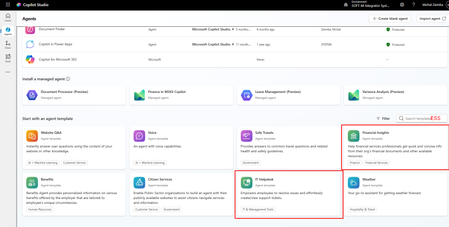
I see that Microsoft has put a lot of efforts to marketing the Copilot Employee Self-Service Agent but it seems it is not available for every tenant. I have already checked on several small and mid ones (5-2k users) and cannot install it. As I understand from what I already red and saw, this is a template that should be available to you when you start building agents. Unfortunately when I enter Copilot Studio and enter in the search ESS (abbrevation from Employee Self-Service) I got only those two marked red filtered. When I installed IT Helpdesk, I do not see topics related to HRSD in ServiceNow which I need. I found the Employee-Self-Service-Agent-Developer-Kit that contains same examples of the ServiceNow HRSD topics, but when I copy the code of those to my agent I got some references to topics that I do not have. Anyone has struggled with the same? Or maybe you have access to the ESS agent and can share the topics with me? MichalSolved137Views0likes1Comment



Tags
- copilot studio8 Topics
- Copilot Studio Agents4 Topics
- About Copilot Studio3 Topics
- Copilot Studio User Group3 Topics
- ai agents2 Topics
- Introduce Yourself Thread1 Topic
- Introduce Yourself1 Topic
- Custom Connectors1 Topic
- export1 Topic