microsoft 365 copilot
1 TopicAgent Builder, Copilot Studio, or Azure AI Foundry: How We Decide for Every Client
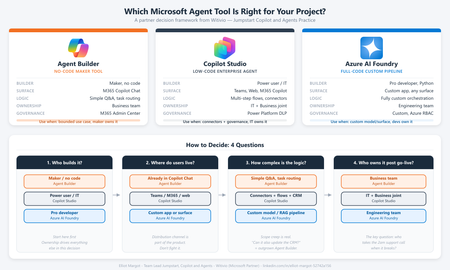
Every client conversation starts the same way. Someone has seen a demo, attended an Ignite session, or read a press release. They want to build an agent. Then comes the question that derails more projects than any technical challenge: "Which tool should we use?" After deploying agents for clients across industries - insurance, professional services, manufacturing, public sector - we have developed a repeatable framework for answering that question. It is not based on which tool is newest or which has the best marketing. It is based on where projects actually succeed or fail in production. The three tools are not competitors The first mistake most teams make is treating Agent Builder, Copilot Studio, and Azure AI Foundry as a hierarchy - basic, intermediate, advanced. That framing leads to bad decisions. They are not a ladder. They are three distinct tools built for three distinct contexts. The right question is not "which tool is most powerful?" It is "which tool fits this project's constraints?" The framework: 4 questions We evaluate every project against four dimensions before recommending a tool: Who is building it? Where do users live? How complex is the logic? Who owns it after go-live? Agent Builder Copilot Studio Azure AI Foundry Builder profile Maker, no code Developer / power user Pro developer, Python User surface M365 Copilot Chat Teams, web, M365 Copilot Custom app, any surface Logic complexity Simple Q&A, task routing Multi-step flows, connectors Fully custom orchestration Post-go-live ownership Business team IT + Business joint Engineering team Governance M365 Admin Center Power Platform DLP Custom, Azure RBAC When we recommend Agent Builder Agent Builder is the right call when the business team wants to own the agent end-to-end, the use case is bounded, and the users already live inside M365 Copilot Chat. The key advantage is distribution - an Agent Builder agent surfaces natively inside Copilot Chat with zero additional deployment work. No IT ticket, no app registration, no Teams app package. The ceiling is real. Agent Builder does not support complex branching logic, external API calls, or dynamic prompt injection. The moment a client asks "can it also update a record in our CRM?" the answer is usually no. Use it when: The maker owns it, the use case is narrow, and M365 Copilot is already the user's primary surface. When we recommend Copilot Studio Copilot Studio is our default recommendation for the majority of enterprise agent projects. It covers the wide middle ground between no-code simplicity and full-code flexibility - within the Microsoft governance perimeter most enterprise IT teams already control. Power Platform connectors - 1,000+ out-of-the-box connectors means most enterprise data sources are reachable without custom API development M365 Copilot channel - surface a Copilot Studio agent directly inside M365 Copilot Chat, Agent Builder-level distribution with enterprise-grade logic underneath Topic-level governance - fallback behaviors, confidence thresholds, escalation paths configurable without code DLP policy enforcement - the agent operates within the same data loss prevention perimeter as the rest of the Power Platform tenant The most common mistake: under-investing in the knowledge layer. The agent authoring is the easy part. Getting SharePoint content structured, metadata consistent, and documents deduplicated is where most projects hit delays. Budget for it. Use it when: The use case requires connectors, dynamic responses, or M365 Copilot integration - and you want IT to own governance without requiring a developer team. When we recommend Azure AI Foundry Foundry is the right call when you need to bring your own model, build a fully custom orchestration pipeline, or integrate into a surface that has nothing to do with Microsoft 365. In practice, this means one of three scenarios: The client has a model fine-tuned on proprietary data that must be used The agent is embedded inside a custom-built web or mobile application The logic requires Python-level control - complex reasoning chains, multi-agent coordination, custom evaluation loops Foundry projects require a professional developer, take longer, and produce something the business team cannot maintain without engineering support. That is not a reason to avoid it - it is a reason to be honest with the client upfront. Use it when: You need full control of the model, the orchestration, or the surface - and you have a developer team to own it. The question that resolves most debates When a client is torn between Copilot Studio and Foundry, we ask one question: "Who is answering the 2am support call when this breaks in production?" If the answer is a developer, Foundry is viable. If the answer is the IT admin or the business owner, Copilot Studio is the right call. Not because Foundry is unreliable, but because the operational model has to match the tool. More projects fail from ownership mismatch than from technical limitations. What we see go wrong Reaching for Foundry too early. Developers often want full control and reach for Foundry before validating the use case. We have rebuilt several Foundry POCs in Copilot Studio when the production constraints called for it - faster to ship and cheaper to run. Under-scoping Agent Builder. Business teams choose Agent Builder because it looks simple, then hit the ceiling at month two. The re-platform cost is higher than building in Copilot Studio from the start. Ignoring the M365 Copilot channel. Many Copilot Studio projects are deployed as standalone Teams apps when they could surface directly inside M365 Copilot Chat. The distribution advantage is significant and underused. The short version Agent Builder - maker-owned, bounded use case, M365 Copilot surface, fast Copilot Studio - IT + business joint ownership, connectors, production governance, M365 Copilot integration Azure AI Foundry - developer-owned, custom model or surface, full control, higher cost Start with the ownership model. Everything else follows. Elliot Margot - Team Lead Jumpstart, Copilot and Agents at Witivio (Microsoft Partner). Connect on https://www.linkedin.com/in/elliot-margot-52742a156/.Solved409Views3likes1Comment