Recent Discussions

Creation of bookings appointment leads to "UnknownError"
Hi All, I struggle to create an appointment via graph api. I set up an app registration, added user, role, permissions and gave admin consent. i can successfully use GET requests to - create a bearer token and use this token to - get company info - get existing appointments - get the services of your shared booking calender etc. but when I try to create a new appointment, i always get responses like this { "error": { "code": "UnknownError", "message": "", "innerError": { "date": "2026-04-24T19:18:44", "request-id": "178521f3-3e06-4790-a399-bdeda1c3eea7", "client-request-id": "178521f3-3e06-4790-a399-bdeda1c3eea7" } } } this is an example POST request (i removed all personal data) I want to send to: https://graph.microsoft.com/v1.0/solutions/bookingBusinesses//appointments important: - the two customer questions I answered are mandatory, so i needed to fill add them to the request. - also, I made the "additionalNote" mandatory in my service configuration. - i added my staff ID to make sure, the problem is not about nobody being available. for "start" and "end" i chose an appointment slot in which i am available, checked through our booking page. unfortunately, this page does not really help.https://learn.microsoft.com/de-de/graph/api/bookingbusiness-post-appointments?view=graph-rest-1.0&tabs=http { "@odata.type": "#microsoft.graph.bookingAppointment", "additionalInformation": "test", "customerEmailAddress": "email address removed for privacy reasons", "customerName": "markus", "customerNotes": "Fernwartung, Outlook-Probleme", "additionalNotes": "Fernwartung – Outlook synchronisiert nicht", "customerPhone": "+4912345678", "customers": [{"@odata.type": "microsoft.graph.bookingCustomerInformation"}], "customerTimeZone": "Europe/Berlin", "duration": "PT30M", "start": { "dateTime": "2026-04-27T14:00:00.0000000Z", "timeZone": "Europe/Berlin" }, "end": { "dateTime": "2026-04-27T14:30:00.0000000Z", "timeZone": "Europe/Berlin" }, "filledAttendeesCount": 1, "isCustomerAllowedToManageBooking": true, "isLocationOnline": true, "maximumAttendeesCount": 1, "optOutOfCustomerEmail": true, "priceType": "priceVaries", "price": 0.0, "serviceId": "<the correct service id>", "serviceName": "30 Minuten Remoteunterstützung", "serviceNotes": "servnotes", "smsNotificationsEnabled": false, "staffMemberIds": [ "<my correct staff id>" ], "customerQuestionAnswers": [ { "questionId": "9dde25ae-14fe-451d-9abd-e12532170a49", "answer": "Remoteunterstützung" }, { "questionId": "10e2768c-4a0a-420e-ac93-da2ed25fc787", "answer": "MS-Teams Konferenz" } ] }59Views0likes0Comments
Microsoft Graph - copilot/search how to get nextLink
Hi, I'm having issues getting all the result back from from the search. I'm using "Graph Explorer" to try out /beta/copilot/search, using the request: { "query": "test", "pageSize": 10, "dataSources": { "oneDrive": { "resourceMetadataNames": [ "title", "author" ] } } } I'm getting the response: { "searchHits": [ { "webUrl": "https://xxx.sharepoint.com/sites/xxxx/Documents/AM%20Test.docx", "resourceType": "listItem", "preview": "This is a Template Document This field, AM <c0>Test</c0>,comes from a workflow", "resourceMetadata": { "title": "AM Test", "author": "Andrew Morgan" } }, { "webUrl": "https://xxx.sharepoint.com/sites/xxxx/Documents/Test%20project.docx", "resourceType": "listItem", "preview": "This is a Template Document. This field, Test project,comes from a workflow", "resourceMetadata": { "title": "Test project", "author": "Andrew Morgan" } }, { "webUrl": "https://xxx.sharepoint.com/sites/xxxx/Documents/Presentation%20File.pptx", "resourceType": "listItem", "preview": "This is a test", "resourceMetadata": { "title": "Presentation File.pptx", "author": "Andrew Morgan" } }, { "webUrl": "https://xxx.sharepoint.com/sites/xxxx/Documents/Test%20project.xlsx", "resourceType": "listItem", "preview": "Input Key notes", "resourceMetadata": { "title": "Test project", "author": "Andrew Morgan" } }, { "webUrl": "https://xxx.sharepoint.com/sites/xxxx/Documents/Test%202.docx", "resourceType": "listItem", "preview": "Hello Everyone,\r\nWelcome to …......\r\n", "resourceMetadata": { "title": "Test 2", "author": "Andrew Morgan" } } ], "totalCount": 1668 } What I dont understand is the totalcount is 1668. Buit it doesnt seem to make any difference what I set pageSize to in the request I only ever get back 5 results and also I was expecting "@odata.nextLink" to get the next page of results. Can anyone shed any light on what i'm doing wrong or is it that i'm not understanding the document here: https://learn.microsoft.com/en-us/microsoft-365/copilot/extensibility/api/ai-services/search/copilotroot-search Thanks in advance!53Views0likes0Comments
Microsoft Graph: Private channel SharePoint site URL naming appears to have changed
📄 Question We are creating private channels using the Microsoft Graph API: POST https://graph.microsoft.com/v1.0/teams/{team-id}/channels With the following payload: { "@odata.type": "#microsoft.graph.channel", "displayName": "Project-Channel-001", "description": "Sample private channel for testing", "membershipType": "private", "members": [ { "@odata.type": "#microsoft.graph.aadUserConversationMember", "******@odata.bind": "https://graph.microsoft.com/v1.0/users/{user-id}", "roles": ["owner"] } ] } 🔍 Observed Behavior When the private channel is created, the associated SharePoint site is provisioned automatically (as expected). However, the URL format appears to have changed. Previously observed behavior: https://{tenant}.sharepoint.com/sites/ProjectTeamURL-Project-Channel-001 Current behavior: https://{tenant}.sharepoint.com/sites/ProjectTeamName-Project-Channel-001 ❗ Impact This change introduces several issues: Breaks deterministic URL generation logic Produces longer and less predictable URLs Introduces dependency on display name, which is mutable and may contain unexpected characters Impacts existing automation and integrations relying on the previous pattern ❓ Questions Has there been a recent change in how SharePoint site URLs are generated for private channels? Is this behavior intentional and documented, or a regression? Is there any way (via Graph or otherwise) to: Control the generated SharePoint site URL, or Retrieve the final site URL deterministically without relying on pattern assumptions? Is the previous {ParentTeamUrl}-{ChannelName} format still expected in some scenarios, or has it been deprecated? 🧪 Additional Notes This behavior is observed when creating channels via Microsoft Graph (v1.0) The issue is reproducible across multiple test scenarios 🙏 Any clarification from Microsoft or others encountering this would be appreciated.63Views0likes0Comments
Microsoft Graph callRecords Webhook Not Triggering for Bot Initiated Calls
Hii, I am working with the Microsoft Graph API and have set up a subscription on `/communications/callRecords` to receive webhook notifications whenever a new call record is created in our tenant. Our Setup: - Subscription resource: `/communications/callRecords` - Change type: `created` - Permission: `CallRecords.Read.All` (Application type, admin consent granted) - Token: Generated using `client_credentials` (app-only token, NOT delegated) What is Working: - Webhook fires correctly for calls made from the Teams interface (user-to-user calls) - Bot callback URL receives call state events (call establishing, established, terminated) - callRecords ARE generated and visible via `GET /communications/callRecords` for bot calls too The Problem: - Webhook does NOT fire for calls initiated programmatically via `POST /communications/calls` (bot/application identity calls) - Even though the callRecord exists and is visible in Graph API, no webhook notification is sent Our Bot Call Payload: ```json { "@odata.type": "#microsoft.graph.call", "callbackUri": "https://our-server.com/webhook", "source": { "identity": { "application": { "id": "our-app-id", "displayName": "My Calling App" } } }, "targets": [ { "identity": { "user": { "id": "target-user-id", "displayName": "User" } } } ], "requestedModalities": ["audio"], "mediaConfig": { "@odata.type": "#microsoft.graph.serviceHostedMediaConfig" } } ``` Our Questions: 1. Is this a known limitation — that `callRecords` webhooks do not fire for application/bot-initiated calls? 2. If the callRecord IS generated and visible via GET, why is the webhook notification system not triggering? 3. Is there any configuration, permission, or approach that can make the webhook fire for bot calls the same way it does for Teams interface calls? 4. Is `callChainId` the only reliable way to fetch callRecords for programmatically initiated calls? We have already verified: - Subscription is active and not expired - Correct Application permission with admin consent - App-only token used for subscription creation - Webhook endpoint responds with 202 within 3 seconds - callRecord is visible via GET after waiting 150 minutes Waiting 150 minutes and polling manually works, but we want real-time webhook notifications just like we get for Teams interface calls. Any official clarification or guidance from Microsoft engineers would be highly appreciated. Thank you!70Views0likes0Comments
Getting available time slots in Booking API
I am dumbfounded by the process of getting available/bookable time slots for a service in the Bookings API. As I understand it, and as I have it working, I have to: Fetch information about the service to get the SchedulingPolicy and its General and Custom availabilities. Fetch information about the staff members connected to the service. Fetch information from getStaffAvailability Manually enumerate the time slots according to time slot interval, respecting the minimum lead time and maximum advance time. Manually verify for each time slot whether any staff is available given the availability information. (I could fetch the calendarView information but that only shows booked appointments, and so if a staff member is busy or out of office with another calendar event, that is not taken into account and the customer risks booking a time slot that was never possible to begin with.) All this while managing time zone conversions at every step. Is there really not one endpoint that just returns which time slots are available for booking right now for a given service within a given date/time range?104Views0likes0Comments 40Views0likes0Comments
Unable to retrieve all attachments from forwarded Outlook emails using Graph API
We have integrated Outlook with our system using Microsoft Graph API and subscribed to message events. Whenever we receive an event, we process the email message at our end. Currently, we are facing an issue related to attachments in forwarded email conversations. Scenario An email conversation contains multiple replies. Some of these replies contain attachments. When a user forwards the entire email thread, Outlook generates a forwarded email that includes the conversation history in the email body. Problem When we receive the forwarded email event and fetch the message details using the Microsoft Graph API, we observe the following: The forwarded email only contains the latest reply's attachment. Attachments from earlier replies in the thread are not included in the forwarded message attachments. In some cases: The first reply contains an attachment. Subsequent replies do not contain attachments. When the user forwards the email, the forwarded message JSON shows: hasAttachments: false But, the forwarded email body still contains the previous conversation that had attachments. Our Questions Is there a way to retrieve all attachments from the entire email thread when a conversation is forwarded? Can we retrieve these attachments using the current user's access token via Microsoft Graph API? If there is a way, please also let us know how we can identify forwarded emails using the Microsoft Graph API, so that we can apply this solution only for forwarded emails. Our Requirement We need a reliable solution that works in production to ensure that all attachments from the email conversation are retrieved, even when the email thread is forwarded. This issue is currently impacting our production system, so we would greatly appreciate any guidance on the correct approach. Thank you in advance for your support.95Views0likes0CommentsMails with attachments sent via the Graph API are stuck in drafts folder and not being sent
Mails being sent via Graph API using the createUploadSession way is keeping the mails in the Drafts folder and not being sent. This was working till mid January. Is there any graph update/ api deprecation that happened recently that is causing the issue?54Views0likes0Comments
Is principalId Always a GUID in Microsoft Graph ??
{ "error": { "code": "Request_BadRequest", "message": "Invalid GUID:HR", "innerError": { "date": "2026-02-13T06:44:24", "request-id": "87678d90-1d94-4131-a705-4356ad3568a4", "client-request-id": "63569c7b-1dea-42d4-8d72-aa3668c78418" } } } We’re encountering an issue with the Microsoft Graph API response for directoryRole Recently, one of our Graph API calls started returning a response where the principalId value appears to be a custom string instead of the expected GUID. In our code, we loop through each id from the delta response, assuming it will always be a valid GUID. However, we are now getting errors because one of the returned principalId values does not match the expected format. Our questions: Is it possible for Microsoft Graph API to return a custom string instead of a GUID for principalId? Has anyone experienced similar behavior with delta queries for directoryRole or any other object? Are there any known scenarios where the principalId format differs from the standard GUID? Any insights would be appreciated.65Views0likes0CommentsIntermittent connection failures with login.microsoftonline.com since Jan
we are getting intermittent connection failures (handshake error http -1) while connecting to token URL - "login.microsoftonline.com" since last one month. Anything changed as far as accessing this graph API access token URL? tried grabbing certificate from this URL but still the issue persists. which certificate should we be using? anybody has any insights on this issue?103Views0likes0Comments
unable to send notification to teams channel using graph api
We tried to send notification to teams channel using microsoft graph api via python we can able to send to message to the channel but the notification is not getting triggered in the activity tab we have refered below documentation. https://learn.microsoft.com/en-us/graph/api/team-sendactivitynotification?view=graph-rest-1.0&tabs=python Also we don't need device authentication and browser authentication please share approach to bypass those things. below is the error we are facing. raise exc msgraph.generated.models.o_data_errors.o_data_error.ODataError: APIError Code: 403 message: None error: MainError(additional_data={}, code='Forbidden', details=None, inner_error=InnerError(additional_dmsgraph.generated.models.o_data_errors.o_data_error.ODataError: APIError Code: 403 message: None error: MainError(additional_data={}, code='Forbidden', details=None, inner_error=InnerError(additional_d APIError Code: 403 message: None error: MainError(additional_data={}, code='Forbidden', details=None, inner_error=InnerError(additional_d Code: 403 message: None error: MainError(additional_data={}, code='Forbidden', details=None, inner_error=InnerError(additional_d message: None error: MainError(additional_data={}, code='Forbidden', details=None, inner_error=InnerError(additional_d error: MainError(additional_data={}, code='Forbidden', details=None, inner_error=InnerError(additional_data={}, client_request_id='________-___-____-____-____________', date=datetime.datetime(2026, 2, 3, 14, 37, 8), odata_type=None, request_id='________-___-____-____-____________'), message="Application with AAD App Id '________-___-____-____-____________' is not authorized to generate notifications about 'https://graph.microsoft.com/v1.0/teams/6a6079bc-feaf-4865-bc21-1201b310c25c' to the recipient. Ensure that the expected Teams app is installed in the target scope (user, team, or chat).", target=None). Please help us to resolve this issue.150Views0likes0CommentsDeleted security groups return "securityEnabled": false, appear as ‘unrecognized’ in Entra admin
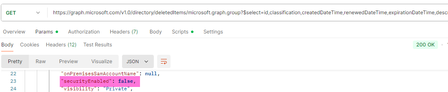
When retrieving the list of soft-deleted groups with Graph, both M365 groups and security groups are returned. However, the securityEnabled flag is returned as false for security groups. Is this a bug? This likely leads to displaying them in the Entra admin center as 'Unrecognized' type.98Views0likes0Comments
How to Retrieve Windows Edition (SKU) from managedDevices API
Hi everyone, I am working with the Microsoft Graph API endpoint /v1.0/deviceManagement/managedDevices to iterate through all devices in a tenant and collect operating system related information. For Windows devices, the operatingSystem field only returns "Windows". However, Windows has multiple editions such as Enterprise, Education, and Pro. For my use case, I need the specific Windows edition. Is it possible to retrieve this information using only the v1.0 endpoint, or is the beta endpoint /beta/deviceManagement/managedDevices/{managedDeviceId} required to get the SKU family? Thanks in advance for your help.82Views0likes0CommentsIs there possibly no official documentation for Windows 11 search?
I have looked far and wide to find a definitive, official technical reference for the Windows 11 search service... especially for the various search parameters and the syntax they require from a savvy user to conduct a well specified, precision search for something. Is it possible that Microsoft has not produced a formal specification of Windows' search feature? Would someone from Microsoft please, please, please provide a link to such a document? Is it possible to buy it? Does it exist anywhere? Am I deluded to think that that is something that the provider of the world's most used desktop OS would have had to create, as a matter of course? I'm talking here about conducting searches, within the file system of a Windows 11 (Pro) machine, that one initiates from the "Search Home" box at the top right of every File Explorer window that gets opened by the user. Any thoughts from someone actually involved in creating the search tool? Imploringly yours, SJB54Views0likes0Comments
Alias for Refinable Managed Property Not Working in Search Queries
Hi, The alias for the refinable managed property has worked as expected in sortProperties for the past year, but it has recently stopped working and now returns an error. Using the original managed property name (RefinableDateSingle01) continues to work as expected. The error is shown below, together with the trace ID. Unfortunately, we are unable to switch to using RefinableDateSingle01 in sortProperties as it does not meet our business requirements. We are currently facing challenges due to the large number of SharePoint sites, many of which we do not have permission to access. As a result, we can only confirm that the refinable managed property RefinableDateSingle01 and its associated alias are configured correctly on the SharePoint sites where we have full access. What is the root cause of this issue, and how can it be resolved? https://graph.microsoft.com/v1.0/search/query { "requests": [ { "entityTypes": [ "listItem" ], "query": { "queryString": "* AND SiteId:\"siteId\"" }, "from": 0, "size": 50, "sortProperties": [ { "name": "RefinableDateSingle01", // This works when I use the refinable managed property name (RefinableDateSingle01), but it does not work when I use the alias I defined for this property "isDescending": false } ] } ] } 500 Internal Server Error (When I used alias in sortProperties) { "error": { "code": "InternalServerError", "message": "The call failed, please try again.", "target": "", "details": [ { "code": "InternalServerError", "message": "The call failed, please try again.", "target": "", "details": [ { "code": "InternalServerError", "message": "The call failed, please try again.", "target": "", "details": [ { "code": "InternalServerError", "message": "The call failed, please try again.", "target": "", "details": [ { "code": "InternalServerError", "message": "The call failed, please try again.", "target": "", "details": [ { "code": "InternalServerError", "message": "The call failed, please try again.", "target": "", "details": [ { "code": "InternalServerError", "message": "The call failed, please try again.", "target": "", "details": [ { "code": "InternalServerError", "message": "The call failed, please try again.", "target": "", "details": [ { "code": "FanoutDownstreamContradiction", "message": "The call failed, please try again.", "target": "", "details": [ { "code": "TwoStepFanout_FirstStepFailed", "message": "The call failed, please try again.", "target": "", "serviceName": "Xap", "moduleName": "SubstrateSearch.FanoutV2.MultiDimensionSearchFanoutPluginV3", "contactTeam": "3sdri", "httpCode": 500 }, { "code": "FanoutDownstreamContradiction", "message": "The call failed, please try again.", "target": "", "serviceName": "FanoutService", "moduleName": "Fanout", "contactTeam": "3STenantSearchDevs", "httpCode": 500 } ], "serviceName": "FanoutService", "moduleName": "Fanout", "contactTeam": "3STenantSearchDevs", "httpCode": 500 } ], "moduleName": "SubstrateFanoutSearchWorkflow", "httpCode": 500 } ], "moduleName": "AscUserSearchFanoutWorkflowV2", "httpCode": 500 } ], "moduleName": "AscUserSearchFanoutWorkflowV2", "httpCode": 500 } ], "moduleName": "G21AscWorkflow", "httpCode": 500 } ], "moduleName": "TenantFileSearchFederationWorkflow_ASC", "httpCode": 500 } ], "moduleName": "TenantFileSearchFederationWorkflow", "httpCode": 500 } ], "moduleName": "FederationWorkflow", "httpCode": 500 } ], "moduleName": "TopLevelWorkflowBase", "httpCode": 500 }, "Instrumentation": { "TraceId": "57c005b9-07fc-453b-8c73-2650d90670e0" } }98Views0likes0CommentsMicrosoft accounts
Hi all. I have a problem with my daughters Microsoft accounts which I'm hoping you can help with. She set up an account for her X Box on my email address (without asking me first) which is preventing me from setting up my own account for Windows. Since then she has also set up a Hotmail account with her own email address. I understand we can set up an alias on the X Box account using her email but will this conflict with the Hotmail account. The problem is she doesn't want to change her gamer tag which was set up on my email address. Any help / advice will be gratefully received. Many thanks in advance49Views0likes0CommentsMicrosoft accounts
Hi all I have a problem with my daughters accounts. She set up an account for her X Box on my email which has prevented me from having my own account for Windows. She has also set up her own Hotmail account for her emails. She wants to keep her gamer tag (set up on my email) not the one she has been given on the Hotmail account. I understand that I can create an alias on my account using her email and this should keep her gamer tag but will it conflict with her Hotmail account. Any help / advice will be gratefully received Many thanks in advance.51Views0likes0CommentsError while creating Graph API Access token
Hi guys, I am trying to create an access token for calling Graph API through browser. When I call 'https://login.microsoftonline.com/XXXX-XXXX-XXX-XXX-XXX/oauth2/token' api using AJAX, I receive below error. Access to XMLHttpRequest at 'https://login.microsoftonline.com/XXXX-XXXX-XXX-XXX-XXX/oauth2/token' from origin 'https://cevalogisticsoffice365.sharepoint.com' has been blocked by CORS policy: No 'Access-Control-Allow-Origin' header is present on the requested resource. Please can you provide me why this error is occurring and what is the solution for this. Regards99Views0likes0CommentsAttempt to automate GSA setup in Azure through Graph API
Hi, Using https://developer.microsoft.com/en-us/graph/graph-explorer and signed in as a user with Applications, Network, NetworkPolicy, Global Secure Access Admin roles, I am trying to POST to https://graph.microsoft.com/beta/networkAccess/connectivity/remoteNetworks using Payload Body { "name": "Hello", "region": "norwayEast" } How come I get the HTTP response code 400 with "code": "UnknownError", "message": "{\"error\":\"Invalid request parameters\"}", ?44Views0likes0CommentsRetrieve Item Analytics for Multiple Items
Hi, our team has noticed that it’s not possible to retrieve analytics when querying a list of items using $expand. When we run this type of query, we don’t receive an error indicating that it’s not allowed; instead, the analytics property just returns null values. https://graph.microsoft.com/v1.0/sites/<<SiteId>>/lists/<<ListID>>/items?$expand=fields,analytics($expand=allTime) However, when we query a single item, everything works as expected. https://graph.microsoft.com/v1.0/sites/<<SiteId>>/lists/<<ListID>>/items/<<ListID>>/analytics/allTime Is there a way to retrieve analytics data for multiple items in one request?62Views1like0Comments


Events
Recent Blogs
- ServiceNow tickets Graph connector is now generally available, adding to the suite of Microsoft Graph connectors for ServiceNowJan 17, 202411KViews4likes1Comment
- Get complete control of your Graph connectors rollout strategy with a measured exposure of connections to select users and groupsDec 01, 20234.3KViews2likes0Comments