developer
136 Topics
Guidance Needed: Syncing Appointments Between New Outlook and Web App via Outlook Add-in
Hello Community, I need guidance on syncing appointments between New Outlook and our Web Application. We have an Outlook Add-in where users log in using only their Web Application credentials. When an appointment is created from the add-in, we need it to: Create the appointment in the Web Application (via SOAP API). Create the same appointment in the user's Outlook calendar. Keep updates synchronized in both systems. We previously achieved this using EWS in Classic Outlook, but EWS is not supported in New Outlook. We are now exploring Microsoft Graph API. My understanding is that Graph API requires each Outlook user to be authenticated and authorized before calendar operations can be performed. We have thousands of users across different organizations, and we do not want to require every user to complete a separate Microsoft authentication flow or implement SSO. Is my understanding correct about Microsoft Graph API functioning? If so, what is the recommended approach to create and synchronize Outlook calendar Appointment/Event from a New Outlook web Add-in while minimizing outlook user authentication requirements in Microsoft Graph API? Note: We don't want to suggest every organization (and users in it) to implement SSO now (not sure if this is needed or forced or recommended.), to be able to use the application in Outlook and sync data. So, I am looking for any previous experiences on who this is handled or what can we do differently. Any suggestions or implementation experiences would be greatly appreciated. Thank you in advance for your help. Thanks & Regards, SM128Views0likes1Comment
Duplicate subscriptions for a specific resource
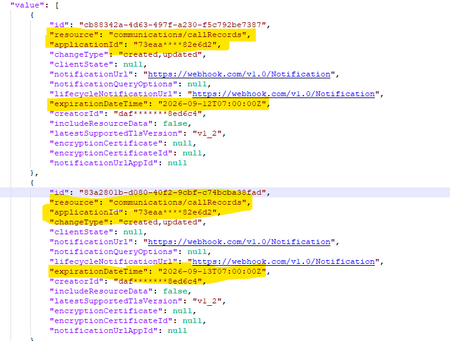
Hello, Previously, we were not allowed to create duplicate subscriptions for the same resource. But now we can create duplicate subscriptions for a specific resource. Could you please confirm whether this functionality has been newly enabled or supported? Why duplicate subscriptions are now allowed for the same resource like (/users, /groups & communications/callRecords). Whether this is a change or a bug. We would appreciate clarification on the expected behavior and the supported use cases.526Views0likes2Comments
Virtual Event Legal Terms
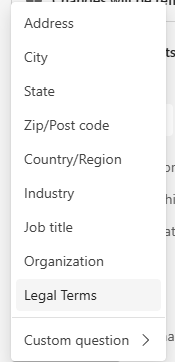
Hello all - I'm currently in the process of attempting to integrate Team webinar registration into my Drupal site, but we discovered an issue where if this Legal Terms field is added to the Event > Registration > Configuration: It doesn't show up when we GET predefined questions, but we can't create a registration without somehow returning a response for this field. We get this error: But we can't find anything in the graph API documentation about how to structure a POST to include an agreement to the terms of use. In the graph api metadata I do see an unknownFutureValue enum which is in the same place in the list as where Legal Terms is in the Teams UI. Is there any current way around this, or is this just a feature that will be added to the API eventually? We'd have no problem just never selecting Legal Terms and including our own checkbox that would have to be checked to submit the registration, but then users who register for the event outside of our Drupal site would not have to agree to our terms to register because the only way to see it here is to add the Legal Terms field to the configuration.275Views1like0Comments
Slow UI update for deleted events
I've built an integration that continuously syncs events between an external scheduling system and Exchange Online using Microsoft Graph. I'm observing a recurring issue when deleting calendar events via Graph: A DELETE request to Graph returns success (204 No Content). A subsequent GET /events/{id} returns 404, confirming the event is deleted server-side. However, the event continues to appear in the Outlook UI (both Outlook Web and desktop) for an extended period (sometimes hours), even after page reloads or app restarts. The odd behaviour The event is still displayed in the user interface for up to several hours The event persist through page reloads If the user clicks the event it opens briefly and immediately closes, the event disappears from the UI afterward. Additional details Delete endpoint: /users/{id}/events/{id} Graph response: 204 No Content Verified deletion via GET → 404 Reproduces in both Outlook Web and Outlook desktop Questions Is this a known Outlook client caching or calendar view indexing issue? Is there a way to force client reconciliation after deletes? Are there Graph or Exchange constraints around rapid create/update/delete cycles that could cause this UI inconsistency?546Views2likes1CommentUnable to retrieve all attachments from forwarded Outlook emails using Graph API
We have integrated Outlook with our system using Microsoft Graph API and subscribed to message events. Whenever we receive an event, we process the email message at our end. Currently, we are facing an issue related to attachments in forwarded email conversations. Scenario An email conversation contains multiple replies. Some of these replies contain attachments. When a user forwards the entire email thread, Outlook generates a forwarded email that includes the conversation history in the email body. Problem When we receive the forwarded email event and fetch the message details using the Microsoft Graph API, we observe the following: The forwarded email only contains the latest reply's attachment. Attachments from earlier replies in the thread are not included in the forwarded message attachments. In some cases: The first reply contains an attachment. Subsequent replies do not contain attachments. When the user forwards the email, the forwarded message JSON shows: hasAttachments: false But, the forwarded email body still contains the previous conversation that had attachments. Our Questions Is there a way to retrieve all attachments from the entire email thread when a conversation is forwarded? Can we retrieve these attachments using the current user's access token via Microsoft Graph API? If there is a way, please also let us know how we can identify forwarded emails using the Microsoft Graph API, so that we can apply this solution only for forwarded emails. Our Requirement We need a reliable solution that works in production to ensure that all attachments from the email conversation are retrieved, even when the email thread is forwarded. This issue is currently impacting our production system, so we would greatly appreciate any guidance on the correct approach. Thank you in advance for your support.340Views0likes0Comments
How to Retrieve Windows Edition (SKU) from managedDevices API
Hi everyone, I am working with the Microsoft Graph API endpoint /v1.0/deviceManagement/managedDevices to iterate through all devices in a tenant and collect operating system related information. For Windows devices, the operatingSystem field only returns "Windows". However, Windows has multiple editions such as Enterprise, Education, and Pro. For my use case, I need the specific Windows edition. Is it possible to retrieve this information using only the v1.0 endpoint, or is the beta endpoint /beta/deviceManagement/managedDevices/{managedDeviceId} required to get the SKU family? Thanks in advance for your help.271Views0likes0Comments
O365 Group email settings
I am in the middle of trying to create some automated routines that create groups in O365 and add/remove members from them as needed. One of things I ran into is that when an email is sent to the group, the emails are not going into each members' inbox and are only visible in Outlook through "Go to groups" in the left hand menu. I can see the settings that need to be set but can't set them because either, A: it just doesn't do it or B: says I don't have permission. Doing this through C# and the Graph SDK The two items I think I need to turn on are below. What permissions are needed to be able to manage those settings but NOT be able to have access to anyone and everyones' email boxes, emails, etc or is there another way to do this? IsSubscribedByMail AutoSubscribeNewMembers495Views0likes1Comment
Unable to authenticate with MSAL using a certificate
Hi guys, I'm using the certificate authentication for my WinForms app to connect to SharePoint and Graph API. I followed this article to create the certificate https://learn.microsoft.com/en-us/entra/identity-platform/howto-create-self-signed-certificate Uploaded the certificate to the App Registration, gave all appropriate permissions. However, when I tried to connect to SharePoint or the Graph API, I got this error A configuration issue is preventing authentication - check the error message from the server for details. You can modify the configuration in the application registration portal. See https://aka.ms/msal-net-invalid-client for details. Original exception: AADSTS700021: Client assertion application identifier doesn't match 'client_id' parameter. Review the documentation at https://learn.microsoft.com/entra/identity-platform/certificate-credentials . Microsoft.Graph.ServiceException: Code: generalException Message: An error occurred sending the request. BUT, this only happened on 1 specific machine running Windows 11 Pro. I tested on 4-5 different machines (both W10 and W11), they didn't get this error. I tried verifying the cert thumbprint which matched the one uploaded on the App Registrations. The certificate is not stored in the machine cert store, I use X509KeyStorageFlags.EphemeralKeySet when calling it. Not sure what else to check.Solved666Views0likes6Comments403 Error: Application access policy not found, -Global scope not available in tenant
Hi everyone, I'm trying to use Microsoft Graph API to retrieve online meeting details using an application identity. However, I receive a 403 error with the message: "No application access policy found for this app" I followed the documentation here: Configure application access policy, but I encountered a problem: the -Global scope mentioned in the documentation is not available in my tenant. I’ve successfully granted the policy using the following methods: Option A – Grant to Specific User Grant-CsApplicationAccessPolicy -PolicyName "YOUR_POLICY_NAME" -Identity "email address removed for privacy reasons" Option B – Grant to AD Group New-CsGroupPolicyAssignment -GroupId "YOUR_GROUP_ID" -PolicyType ApplicationAccessPolicy -PolicyName "YOUR_POLICY_NAME" These work fine, and the app can access online meetings for users or groups assigned this way. However, I need to allow the app to access meetings across the organization, and the -Global assignment method is not available in my tenant. Questions: Is there an alternative to -Global for tenant-wide access? Is this limitation expected in certain tenant configurations? Any workaround or best practice for enabling organization-wide access to online meetings via Graph API? Thanks in advance!526Views0likes4Comments