Recent Discussions

[Feature Request] Edge for Business-Extension Policy-blank minimum version breaks ExtensionSettings.
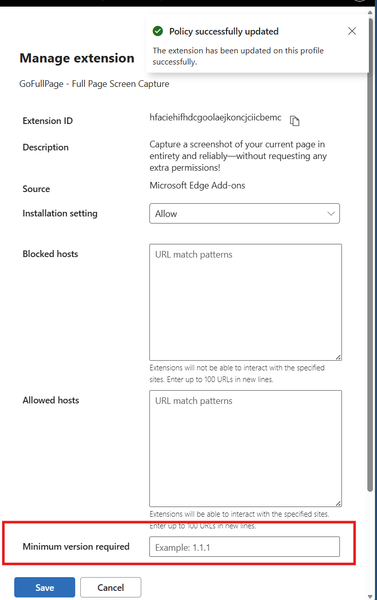
Hi, I have a Core Edge for Business policy, where I manage settings and extensions for majority of users in my company. I was adding an extension to it to Allow an extension being installed. By default when You choose extension from a store it is getting added to GUI with setting "Allow". After that when I edit entry for this addon and tried to add minimum version (8.6 in Edge store, while schema is #.#.#) I decided not to add it to not overcomplex settings. I have saved the settings. Few second later all my extensions were gone, some users reported same problems. Luckly I have quickly reverted the changes so policies did not update for everyone. Replication steps: Under Edge://policy I have identified that ExtensionSettings report Error: Error at ExtensionSettings.hfaciehifhdcgoolaejkoncjciicbemc.minimum_version_required: Schema validation error: Invalid value for string Json shows: "hfaciehifhdcgoolaejkoncjciicbemc": { "installation_mode": "allowed", "minimum_version_required": "", "override_update_url": false, "toolbar_state": "default_hidden" }, In GUI there is no clue about it, looks like not configured, when saving all goes "green". Extensions are getting uninstalled. Once reverted some extensions are back and require reconfiguration. I.e. Passsbolt asks for recovery key. Please if possible add a feature to validate such settings to not allow saving : "minimum_version_required": "" as in some cases in production it might be a nightmire ( Imagine reconfiguring ## addons times #### Users ).22Views0likes0Comments
Edge beta crashes after 5 seconds on some old versions of Windows 10
We have problems with Edge Beta versions 151.0.4129.15, 151.0.4129.21 and 151.0.4129.35. On launch Microsoft Edge briefly opens and then closes (like in 5 seconds) on Windows 10 RS1/RS2/RS3. I can't reproduce problem on other versions of Windows 10, such as TH1 or RS422Views0likes1Comment
Solution for PWAs not appearing as separate apps on Linux taskbars
Hi everyone, I recently Installed Microsoft Edge stable on Kubuntu Linux, and I ran into some problems using Progressive Web Applications (PWAs). Launch one Edge PWA (say, Microsoft Teams). It appears normally. Launch a second PWA (say, Microsoft Outlook). Both windows — and every PWA you launch afterward — collapse into a single taskbar group under the first PWA’s icon, identified as msedge. Pinned PWA launchers never show as running. Pinning a running PWA window produces a generic page icon that launches the bare Edge browser when clicked. Launching a PWA from the application menu briefly shows the launcher’s startup placeholder in the taskbar, which then disappears and is replaced by a separate, unassociated entry. This isn’t KDE-specific. GNOME users have also reported issues. After some troubleshooting with Claude, the issues were traced to a mismatch between how the PWAs are identified in the .desktop PWA launchers created by Edge and the app ids reported to Wayland, starting in September 2025, when Wayland was used by default. Identifier Value Example (Microsoft Outlook) Window app_id (native Wayland) msedge-_<appid>-Default msedge-_lkkahpbimdkjdjjiijflmhaeameegbcm-Default Desktop entry filename msedge-<appid>-Default msedge-lkkahpbimdkjdjjiijflmhaeameegbcm-Default StartupWMClass= in that file crx__<appid> crx__lkkahpbimdkjdjjiijflmhaeameegbcm So the solution is StartupWMClass in the .desktop launcher for the PWA to the Wayland app_id. I have a simple Bash script that will do this for all currently installed PWAs as a workaround, but the automod removed that post the last time I tried to post it. The suggested fix for Microsoft This should be a small change to Edge’s desktop-entry generation on Linux: write the Wayland app_id (msedge-_<appid>-<profile>) into StartupWMClass=, or better, make the window app_id match the desktop entry basename per the freedesktop convention. No compositor-side changes are needed — the verified workaround above demonstrates that. I’ve reported this through Edge’s in-browser feedback tool (Alt+Shift+I) with the full diagnosis. If you’re affected, sending your own feedback referencing the same details is the best way to get it prioritized — the in-browser channel is what reaches the Edge team’s triage.19Views0likes0CommentsEdge version 150 JavaScript speechSynthesis.getVoices() undefined voices
For the past few days JavaScript speechSynthesis has had a problem in Edge browser. Sometimes it gets the proper list of voices but most of the time it returns: "Microsoft undefined Online (Natural) - undefined" for every single Natural voice. It then uses the default voice (Microsoft David) for speaking the utterance. Can you fix this bug? Edge Version 150.0.4078.83 (Official build) (64-bit) Thank you.288Views1like1CommentUsers prompted for WHfB auth for Entra SSO resources
My colleagues and I have noticed that we are frequently being prompted to perform a Windows Hello for Business authentication when we use Edge to access resources that use Entra for authentication. Previously, this authentication occurred transparently. Has something changed recently?Solved35Views0likes3Comments
New Canary Edge issue
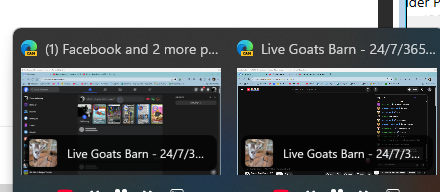
Since the latest update to .4157 on Canary Edge the browser window behavior has changed. I always have 2 browsers open, Edge Canary and AOL. I can switch easily between the 2 from the Taskbar. Starting today if I go to AOL and then try to go back to Canary instead of opening the whole browser it gives me the option of going back to 2 of 3 browser tabs I have open. What has changed?21Views0likes1CommentEdge Block/Add Site Notification - How to Disable with GPO?
Hello, I haven't been able to find answers anywhere so far to figuring this out. Currently looking into using GPO for disabling the Block/Allow to send site notifications tabs found in Privacy, search, and services -> Site permissions -> All permissions -> Notifications. I have been able to block to turn off notifications for all websites by default and block the "Ask before sending" notification settings in the same menu as mentioned above. I did so by creating a GPO with the following settings: Computer Configuration -> Policies -> Administrative Templates -> Microsoft Edge -> Content Settings After navigating to this folder, I opened the "Default Notification Setting" setting. Inside of it I switched it to Enabled and Don't allow any site to show Desktop notifications. I have already looked at the "Allow notifications on specific sites" and the "Block notifications on specific sites" settings, however these just allow you to add websites that you want to block or allow that the user cannot remove. I have discovered that putting a wildcard "*" into the "Block notifications on specific sites" settings values will not allow the user to add any more sites to the list. However this still leaves the user to add any site they wish to the "Allow notifications from specific sites" setting, which is the main concern considering all sites should have notifications disabled. Has anyone else had this problem and found a solution or workaround? This works in Chrome, but Edge has been difficult Thanks.53Views0likes1Comment
CSS scrollbars
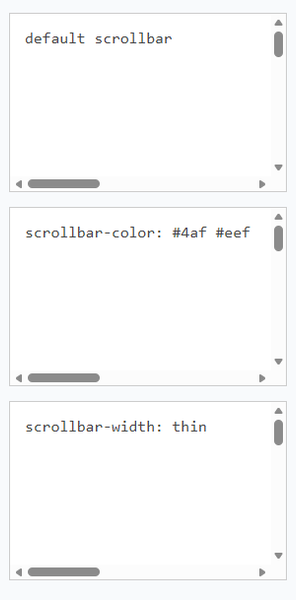
Hi, I noticed that Edge 150.0.4078.65 on Windows 11 does not appear to render the "scrollbar-color" and "scrollbar-width" styles from the https://developer.mozilla.org/en-US/docs/Web/CSS/Guides/Scrollbars_styling. See demo page: https://css-scrollbars-skobescr.yoyo.codes/, where all scrollbars appear in the default style. This surprised me for a couple of reasons: (1) "Can I Use" claims (mistakenly?) that Edge suppports this feature. (2) Other Chromium-based browsers support this feature. I'm curious if this is a regression, a deliberate product decision, or something we may expect to see added in the future.13Views0likes0Comments
Crash when submitting web page input fields with soft keyboard Enter
### Summary Microsoft Edge Canary for Android crashes when submitting web page input fields using the Android soft keyboard Enter key. GitHub search is one stable reproduction case, but this is not GitHub-specific. I have also reproduced similar crashes on other websites with text input/search fields. ### Environment - App: Microsoft Edge Canary for Android - Package: `com.microsoft.emmx.canary` - Version: `152.0.4142.0` - Version code: `414200023` - Device: vivo V2417A - Android SDK: 36 - ABI: arm64-v8a ### Reproduction case 1. Open Microsoft Edge Canary on Android. 2. Navigate to `https://github.com/`. 3. Tap the GitHub search box. 4. Type any text. 5. Press Enter on the Android soft keyboard. ### Expected behavior The input/search action should be submitted normally. ### Actual behavior Edge Canary crashes immediately after pressing Enter. ### Scope This does not appear to be specific to GitHub. The same type of crash can also be triggered on other websites when submitting text input/search fields using the Android soft keyboard Enter key. GitHub is used here as a minimal stable repro because it is easy to test. ### Crash information Exception: ```text java.lang.IndexOutOfBoundsException: Index 24 out of bounds for length 0 ``` Relevant stack trace: ```text java.util.ArrayList.get(ArrayList.java:434) android.view.ViewGroup.getAndVerifyPreorderedView(ViewGroup.java:3873) android.view.ViewGroup.gatherTransparentRegion(ViewGroup.java:7438) android.view.ViewRootImpl.performTraversals(ViewRootImpl.java:5207) android.view.Choreographer.doFrame(...) ``` ### Notes - Reproduced directly on the Android phone. - Trigger appears related to submitting web page input/search fields via the Android soft keyboard Enter key.31Views0likes3Comments
Edge >=150 blocks ALL extensions on *.cloud.microsoft (regression from 149) - no policy override
Starting with Edge 150, a hardcoded extension blocklist applies to *.cloud.microsoft (M365 Copilot and Microsoft 365 app surfaces). Extensions no longer run on these pages. This is a regression - on Edge 149 and earlier it worked fine on the same pages. The block affects all extensions, not a specific category, and it is not overridable via ExtensionSettings (runtime_allowed_hosts), ExtensionInstallForcelist, or any other policy we have tested. It hits both regular user-installed extensions and admin-approved, force-installed extensions on managed devices - so admins have no way to re-enable trusted extensions on these surfaces either. Confirmed breakage so far: - Password managers - verified with Bitwarden (users end up copy/pasting credentials out of the manager on Copilot pages, a real security regression) - Corporate training / user-adoption extensions - Accessibility extensions relied on by employees Ask to the Edge team: restore the pre-150 behavior, or ship an override so extensions can run on *.cloud.microsoft pages (for example, honor runtime_allowed_hosts / the force-install list on these surfaces). If this is by design, please document it clearly so users and admins stop chasing a config that cannot work. Environment: Edge Stable >=150 (works on 149 and earlier), Windows, both unmanaged and MDM-managed (Intune/GPO). Reproducible on a clean profile with a single extension. Are other users / admins / extension vendors seeing the same thing after updating to 150? Please add your affected extension below so Microsoft can gauge the blast radius.501Views2likes7CommentsText annotations disappear if saved while the text box is still focused in Edge Screenshot editor
Hi Edge team, I found a reproducible issue in the built-in Screenshot feature in Microsoft Edge. When I add a text annotation to a screenshot using the Text tool, the annotation disappears from the saved image if I click Save while the text box is still focused. The text is only included in the final image if I manually click outside the text box first. Steps to reproduce: Step 1: Open Microsoft Edge. Step 2: Use the built-in Screenshot feature to take a screenshot. Step 3: In the Screenshot editor, select the Text tool. Step 4: Type any text annotation on the screenshot. Step 5: Without clicking outside the text box, click Save. Step 6: Open the saved image. Expected result: The text annotation should be automatically committed and merged into the screenshot when clicking Save, even if the text box is still focused. Actual result: The active text annotation is not merged into the final image. The saved screenshot does not contain the text annotation, and the text is silently lost. Impact: This can cause users to lose important notes or ideas when using the Screenshot feature for documentation, study notes, bug reports, or productivity workflows. Since the screenshot appears to save normally, users may not notice that the annotation is missing until later. Suggested fix: When the user clicks Save, Edge should automatically commit any active text box before exporting the screenshot. Environment: Microsoft Edge version: 150.0.4078.48 Official build Channel: Stable Operating system: Windows 1131Views0likes1CommentWorkaround for edge://flags/#edge-new-pdf-viewer but the New PDF View showing blank pages
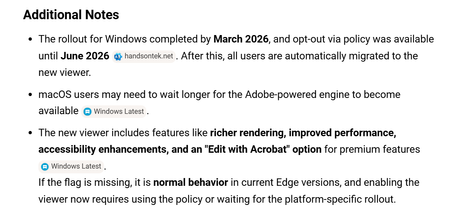
Hello All -we use Microsoft edge to view PDFs of our vendors invoices. We found that with one vendor the invoices were appearing as a blank page in the browser, I did my research and found it was a known bug with edge for pdf's with a certain logo type or watermark in the header...something to that effect which made sense the way the invoices looked. The fix for this was to Disable the New PDF View option in flags which worked up until now where they don't allow Disabling of that anymore. Since the bug is clearly not fixed, is there another workaround I can supply to the users other then to use another browser. Additionally is this bug officially logged with Microsoft and is there a reference or issue number I can follow for resolution? Thanks in advance803Views0likes2Comments
Can't see 'line focus' option
Hi all, I find the fade of the background in Edge frustrating as it dims the images and wanted to remove the fade (or make the images remain in focus). I thought maybe the 'line focus' option would help, but I can't find it in my browser. I click 'reading mode (F9)', but see no option for 'reading preferences' in the top bar - instead I see what I've attached. I'm using Version 150.0.4078.48 (Official build) (64-bit). Can anyone please help?115Views0likes6CommentsStop requirement to sign in after screen timeout Windows 11
Every time my screen has a timeout, I have to sign in again. This setting can be found in: Accounts > Sign-In options > Additional settings > "If you've been away, when should Windows require you to sign in again"? This setting is set to "Every time", but the listbox is disabled. How do I enable it? On the "Sign-In options screen" there is a message: Some of these setings are managed by your organisation. I am working in a domain, this is a work computer.50Views0likes1CommentEdge constantly purges itself
At least twice a month, Edge seems to purge everything. All of my history is gone, all of my accounts are logged out (and do not have username suggestions when logging back in), sites have been reset from dark theme to light, etc. I am the only person with access to this computer and am not wiping the history or anything myself. Why does it keep doing this? How do I stop it?89Views2likes2CommentsOnedrive shortcuts in explorer not working (2 accounts)
Hi, yesterday I reinstalled Windows 11. I had 2 onedrive accounts linked to my PC: my personal one and the one from my work. Both onedrives synced fine. All of a sudden, the 2 shortcuts in Windows Explorer no longer work: if you click on them , nothing happens. I found many topics online, I was hoping this bug would be fixed by now. So how can it be fixed, with an official Microsoft solution (preferrably not with any vague registry changes)? I already -reset onedrive -reinstalled onedrive -unlinked both accouts + relinked both accounts: the icons disappear, and reappear, but they still don't work. Thanks.157Views0likes5Comments





Events
Recent Blogs
- 8 MIN READMicrosoft Edge for Business, the new, dedicated work experience for the Microsoft Edge browser, is now available in Microsoft Edge stable version 116. All customers who sign into Edge using Microsoft...Aug 04, 2023302KViews2likes73Comments
- Microsoft Edge for Business, the new, dedicated work experience for Microsoft Edge, is in preview today! Microsoft Edge for Business is planned to be the standard browser experience for organi...Jul 11, 202310KViews3likes2Comments