ubuntu
4 Topics
Solution for PWAs not appearing as separate apps on Linux taskbars
Hi everyone, I recently Installed Microsoft Edge stable on Kubuntu Linux, and I ran into some problems using Progressive Web Applications (PWAs). Launch one Edge PWA (say, Microsoft Teams). It appears normally. Launch a second PWA (say, Microsoft Outlook). Both windows — and every PWA you launch afterward — collapse into a single taskbar group under the first PWA’s icon, identified as msedge. Pinned PWA launchers never show as running. Pinning a running PWA window produces a generic page icon that launches the bare Edge browser when clicked. Launching a PWA from the application menu briefly shows the launcher’s startup placeholder in the taskbar, which then disappears and is replaced by a separate, unassociated entry. This isn’t KDE-specific. GNOME users have also reported issues. After some troubleshooting with Claude, the issues were traced to a mismatch between how the PWAs are identified in the .desktop PWA launchers created by Edge and the app ids reported to Wayland, starting in September 2025, when Wayland was used by default. Identifier Value Example (Microsoft Outlook) Window app_id (native Wayland) msedge-_<appid>-Default msedge-_lkkahpbimdkjdjjiijflmhaeameegbcm-Default Desktop entry filename msedge-<appid>-Default msedge-lkkahpbimdkjdjjiijflmhaeameegbcm-Default StartupWMClass= in that file crx__<appid> crx__lkkahpbimdkjdjjiijflmhaeameegbcm So the solution is StartupWMClass in the .desktop launcher for the PWA to the Wayland app_id. I have a simple Bash script that will do this for all currently installed PWAs as a workaround, but the automod removed that post the last time I tried to post it. The suggested fix for Microsoft This should be a small change to Edge’s desktop-entry generation on Linux: write the Wayland app_id (msedge-_<appid>-<profile>) into StartupWMClass=, or better, make the window app_id match the desktop entry basename per the freedesktop convention. No compositor-side changes are needed — the verified workaround above demonstrates that. I’ve reported this through Edge’s in-browser feedback tool (Alt+Shift+I) with the full diagnosis. If you’re affected, sending your own feedback referencing the same details is the best way to get it prioritized — the in-browser channel is what reaches the Edge team’s triage.390Views3likes1Comment
Microsoft Edge Dev crashes on a regular basis unless I'm running it from the Linux terminal
(Reposted from Microsoft Answers Community: https://answers.microsoft.com/en-us/microsoftedge/forum/msedge_crash-msedge_prevwin/microsoft-edge-dev-crashes-on-a-regular-basis/6f26ec72-32e0-4323-a294-0dcad6260a07) This started happening yesterday, and even after downgrading 2 versions back, then upgrading again, the issue won't go away. Here's what's going on: When I start Microsoft Edge Dev normally, through a shortcut on Linux, the browser opens fine, and will usually crash ~10 minutes later, or sometimes a few minutes later. But, when I start it from the terminal, it runs pretty fine, with very few crashes. Here's the output log: $ microsoft-edge-dev libva error: vaGetDriverNameByIndex() failed with unknown libva error, driver_name = (null) [8447:8447:0123/133205.683161:ERROR:assistance_home_client.cc(32)] File path /home/user/.config/microsoft-edge-dev/Default MESA-LOADER: failed to retrieve device information MESA-LOADER: failed to open nvidia-drm: /usr/lib/dri/nvidia-drm_dri.so: cannot open shared object file: Permission denied (search paths /usr/lib/x86_64-linux-gnu/dri:\$${ORIGIN}/dri:/usr/lib/dri, suffix _dri) failed to load driver: nvidia-drm MESA-LOADER: failed to open zink: /usr/lib/dri/zink_dri.so: cannot open shared object file: Permission denied (search paths /usr/lib/x86_64-linux-gnu/dri:\$${ORIGIN}/dri:/usr/lib/dri, suffix _dri) failed to load driver: zink MESA-LOADER: failed to open kms_swrast: /usr/lib/dri/kms_swrast_dri.so: cannot open shared object file: Permission denied (search paths /usr/lib/x86_64-linux-gnu/dri:\$${ORIGIN}/dri:/usr/lib/dri, suffix _dri) failed to load driver: kms_swrast MESA-LOADER: failed to open swrast: /usr/lib/dri/swrast_dri.so: cannot open shared object file: Permission denied (search paths /usr/lib/x86_64-linux-gnu/dri:\$${ORIGIN}/dri:/usr/lib/dri, suffix _dri) failed to load swrast driver [8447:8447:0123/133209.219594:ERROR:smartscreen_dns_resolver.cc(110)] SmartScreenDnsResolver::OnComplete Error: -7 DidTimeOut: 1 URL: https://ntp.msn.com/edge/ntp?locale=en-US&title=New%20tab&dsp=0&sp=DuckDuckGo&startpage=1&PC=U531 [8447:8447:0123/133213.657014:ERROR:object_proxy.cc(622)] Failed to call method: org.freedesktop.ScreenSaver.GetActive: object_path= /org/freedesktop/ScreenSaver: org.freedesktop.DBus.Error.NotSupported: This method is not implemented Warning: disabling flag --expose_wasm due to conflicting flags (note here: the expose_wasm warning keeps reappearing multiple times during the time the browser is open) [8447:8447:0123/133930.176470:ERROR:interface_endpoint_client.cc(695)] Message 0 rejected by interface blink.mojom.WidgetHost [27075:1:0123/150305.181159:ERROR:picture_in_picture_overlay_agent.cc(49)] Connection to PIPOverlayDriver dropped [8492:8518:0123/150655.507233:ERROR:x11_software_bitmap_presenter.cc(142)] XGetWindowAttributes failed for window 10485928 [8447:8447:0123/161844.895173:ERROR:smartscreen_dns_resolver.cc(110)] SmartScreenDnsResolver::OnComplete Error: -7 DidTimeOut: 1 URL: https://kerstinmartin.com/blog/copyright-notice [8492:8492:0123/172329.479822:ERROR:shared_image_manager.cc(197)] SharedImageManager::ProduceSkia: Trying to Produce a Skia representation from a non-existent mailbox. (ultimately, these two lines to appear before a crash) [0123/203750.329461:ERROR:elf_dynamic_array_reader.h(64)] tag not found Segmentation fault My computer: i7-2600 3.40Ghz 8GB DDR3 GTX 1650 4GB DDR5 1TB HDD + 500GB HDD Ubuntu 22.04.1 LTS, Kernel Linux 5.15.0-58-generic x86_64 Wayland, latest NVIDIA 525 proprietary drivers I think this has something to do with the MESA drivers not being able to open nvidia_drm, zink, kms_swrast, swrast, and some issues with libva, but I'm not 100% sure. I have submitted 1 crash report yesterday, but until this might be fixed, what can I do?2.1KViews0likes0Comments
Edge Dev 90 - Cannot manage certificates
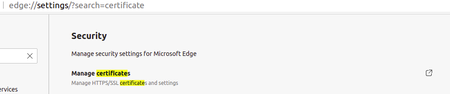
Posted here https://answers.microsoft.com/en-us/microsoftedge/forum/all/microsoft-edge-dev-ubuntu-20041-manage/6a9e253b-3c81-4f3f-8d7b-20be69bad6e8 but I was advised to post here too. Problem: I cannot manage certificates on Ubuntu using this release - specifically I cannot import a privately issued client certificate. When opening edge://settings/?search=certificate I get this... The link is does not work, so how exactly does one manage [client] certificates in Edge? Contrast this with behaviour in Chromium Version 88.0.4324.50 (Developer Build) Ubuntu 20.04 (64-bit) where this feature is enabled and allows me to manage my certificate requirements... System details $ lsb_release -a LSB Version: core-11.1.0ubuntu2-noarch:printing-11.1.0ubuntu2-noarch:security-11.1.0ubuntu2-noarch Distributor ID: Ubuntu Description: Ubuntu 20.04.2 LTS Release: 20.04 Codename: focal $ dpkg --list|grep edge ii microsoft-edge-dev 90.0.782.0-1 amd64 The web browser from Microsoft Any ideas? --dave1.8KViews0likes2Comments