Recent Discussions

Favicons for bookmarks broken since Edge v149 update
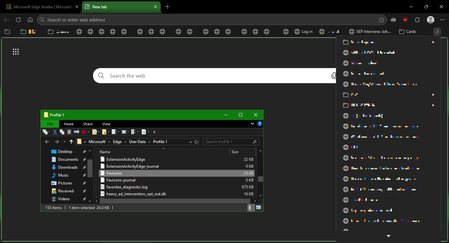
I've recently had Edge update to the v149.0.4022.52 stable-channel releases, and ALL my bookmarks now have no favicons. When I visit any webpage, Edge successfully loads the favicon for the tab of that website. But when I visit a bookmark, the favicon doesn't get updated after it has loaded for the site. And new bookmarks I add also don't show a favicon. If I go into my Edge profile-folder (which can found via edge://profile-internals/ , clicking the heading, then looking next to "Profile Path"), then it is still creating the "Favicon" and "Favicons-journal" files, but I assume isn't populating them with anything? I've tried deleting both files, restarting my PC, but even after Edge recreates them, no bookmarks are gaining any favicons. Is anyone else getting this issue...? OS: Windows 10 Home 22H2 x64 (OS Build: 19045.7291 : May 2026 ESU)2KViews4likes20Comments
Why Stability Matters More Than New Features for Many Users
To Microsoft Edge Leadership and Product Management, I am writing as a long time Microsoft user who is seriously considering moving away from Microsoft Edge because of the cumulative frustration caused by frequent updates and the disruption they create. The immediate issue prompting this letter is the recent Edge update that caused website favicons in Favorites to disappear and be replaced with generic globe icons. While this may seem like a minor issue to some, it significantly affects how I use the browser. I maintain a large, organized collection of Favorites, and I rely on visual recognition of icons to quickly locate websites. Removing that functionality has made navigation slower and more frustrating. However, this letter is not really about favicons. My larger concern is the direction that modern software development appears to have taken. Years ago, software updates were less frequent and more deliberate. New versions were released perhaps once a year. Users had time to learn the software, become comfortable with it, and develop confidence that it would continue working in familiar ways. Today, it feels as though major applications are updated continuously. Changes arrive monthly, weekly, and sometimes even more frequently. Features move. Interfaces change. Workflows are altered. Bugs appear in areas that previously worked correctly. Users are expected to adapt constantly. What is most frustrating is the feeling that stability has become secondary to rapid deployment. I understand that no software is perfect. I understand that bugs happen. What concerns me is the impression that organizations increasingly accept a certain level of user disruption as an unavoidable cost of doing business. Perhaps each individual problem affects only a small percentage of users. But over time, those small percentages accumulate. Each issue chips away at customer trust and confidence. Many users do not take the time to complain. They simply become frustrated and eventually leave. History has shown that dominant technology companies can lose their position when they stop listening closely to the user experience. Yahoo once seemed untouchable as a search engine and email provider. Google succeeded because it focused on simplicity, reliability, and making things easier for users. As a customer, I want software that is dependable. I want updates that improve my experience without disrupting established workflows. I want to feel that stability is valued as highly as innovation. Most importantly, I want to feel that the people making decisions about products understand how those decisions affect the people who use them every day. The recent Edge issue may be resolved in a future update. My concern is that the issue reflects a broader trend that many users are experiencing across modern software. I hope Microsoft will place greater emphasis on quality assurance, stability, backward compatibility, and the long term user experience. Those qualities are often what build customer loyalty, and what keep users from looking elsewhere. Sincerely, A frustrated but long time Microsoft customer16Views0likes0CommentsEdge not functioning properly after playing games?
After I have played a video game, I noticed Edge has forgotten all my website and cache data? No website icons and logged out of websites. This only happens after I've played a video game, never has it happened from just opening it up.21Views0likes0CommentsPlease, bring back the "Microsoft Edge rounded corners" option
Hello As of today, the "Microsoft Edge rounded corners" flag in edge://flags/ no longer works (the option is disabled to revert to the old appearance). Since Microsoft no longer gives users a choice in appearance, they're trying to force us to switch browsers... ?? No more option to hide the Extensions button in the toolbar, a display bug for over a month regarding the color of the buttons in the title bar (black instead of white like in Windows), etc... Please MS, bring back this option And is there an "flag" (to add to the shortcut, for example) to restore the old appearance ? Thanks540Views6likes1Comment
Favorites Icons
Comcast just did an upgrade in my area and ever since, my "Favorites" icons on AOL and Edge are Globes and not the individual icons they once were. Not sure why it happened, but how do get them back? I've managed to get them back temporarily, but after changing "opening page" settings where they are displayed properly, they disappear.10Views0likes0Comments
Regression: Vertical tabs no longer collapse in fullscreen (F11) after latest Edge update
After the latest Microsoft Edge update, the vertical tab sidebar no longer collapses when entering fullscreen mode (F11). Previously, when fullscreen was enabled, the vertical tabs would automatically collapse or hide, allowing the webpage to use the full screen space. Now the vertical tab bar remains visible, reducing usable screen area. Steps to reproduce: Enable Vertical Tabs in Microsoft Edge Open any website Press F11 to enter fullscreen mode Observe that the vertical tab sidebar remains visible Expected behavior: Vertical tabs should collapse or automatically hide in fullscreen mode, as they did in earlier versions. Actual behavior: The vertical tab sidebar stays visible during fullscreen instead of collapsing. Additional testing: Tested in a Guest profile (fresh profile with default settings); issue still occurs Happens across different websites Restarting Edge does not fix the issue Edge version: 145.0.3800.58 (Official build) (64-bit)649Views6likes5CommentsPWA shortcuts don't keep asociated with window - Linux
I recently upgraded to version140.0.3485.14 (Official build) beta (64-bit) and noticed that my PWA, even if they open correctly in a independent window, don't show the "running window counter" on the taskbar. So, for example, if a open Outlook, the window open and loads the app, but if a I click the icon again, it opens another window, wich is a little annoying. I tried removing the PWA from Edge, rebooting, and installing again, but didn't work. Because the only change I made is updating Edge, I think is related to this build. (too lazy to go back or install the stable release)2.4KViews9likes10Comments
Microsoft Graph Webhook Filtering Using Custom MAPI Properties for Weather Messages
Hi everyone, I'm working on an integration that uses Microsoft Graph change notifications (webhooks) to receive notifications for new email messages in a mailbox. Our use case is specific to Weather messages generated by our Messaging platform. Currently, we subscribe to mailbox notifications and receive events for all incoming emails, which results in significant post-processing on our side. I'm looking for a way to perform server-side filtering so that only Weather-related messages trigger webhook notifications. Current Situation We use Microsoft Graph webhook subscriptions on mailbox messages. Weather messages are delivered as standard emails. Subject-based filtering is sufficient for our requirements. We would like to avoid processing every incoming email after receiving notifications. Proposed Approach We are considering stamping weather emails with a custom MAPI extended property when the message is created, for example: Message subject = Weather using a custom single-value extended property. Questions Can Microsoft Graph webhook subscriptions filter notifications based on custom MAPI extended properties? If not directly in the subscription, can $filter be used on message queries against these custom properties after receiving notifications? Has anyone successfully implemented a solution where a custom MAPI property acts as a service tag for weather messages? Are there any recommended alternatives for reducing webhook traffic when only a subset of messages is relevant? Would Outlook categories, message classes, or other Exchange attributes provide a better filtering mechanism than custom MAPI properties? Our goal is to identify weather messages reliably while minimizing unnecessary webhook notifications and mailbox processing. Any guidance, examples, or best practices would be greatly appreciated. Thanks!33Views0likes0CommentsFeature request: Closing and restoring all of your profile windows
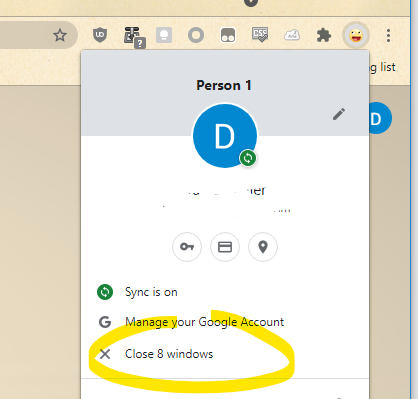
Hello, I'm trying to migrate from Chrome to Edge. I'm using the multi-profile feature a lot (work / private profile for instance). One feature I'm really missing from Chrome is the ability to close all the open windows of a profile. I didn't find a way to do this with Edge in case you have more than one window open with your profile. You have to close the windows one by one and once you open your profile again, it will restore only the last window you closed. The menu > "Close Microsoft Edge" will close all your profiles, not really useful to fulfill this use case. Chrome shows an entry on your profile menu once you have more than one window open: Then, it will open back all of your windows once you switch to this profile again. I tried with Edge versions stable (91.0.864.67) and Beta (92.0.902.40). Did I miss the option or edge flag to accomplish that? Many thanks in advance, David2.5KViews18likes10Comments
HEVC Main 10 video playback is heavily stuttering
Hi! I am using Edge 87 on Windows 10 20H2 with HEVC plug-in installed from Microsoft store. Like the title mentioned, HEVC Main 10 video playback became heavily stuttering during recent updates. I can observed this issue in nextcloud video player or Jellyfin media server. As you can see in the attachment, there is no frame drops in the stats for nerds but the videos is indeed stuttering. I tried to reinstall HEVC plug-in and the graphical driver from AMD and NVIDIA with no luck. If anyone can help me look into this, I would be very appreciated! Contexts: Windows 10 Pro 20H2 Edge 87 stable, 88 dev HEVC plug-in 1.0.33242.0 AMD Vega 8 APU and driver 20.11.2 WHQL NVIDIA GTX 1660 and driver 457.51 WHQL26KViews2likes23CommentsPersistent issues with Read Aloud in Edge
I have Windows 11. Today I began having an issue wherein the Read Aloud feature built into Edge doesn't work. I was initially trying to use a similar function on Internet Archive, and noticed that while all the Microsoft voices seemed to be available in the onsite dropdown, the only voices that made any sound were David, Mark, and Zira---none of the "Online (Natural)" voices. I tried to use Read Aloud as a workaround, and found all the buttons greyed out completely. Mind you, everything worked fine yesterday, and I made no changes to my computer in the intervening time. I've opened up two support tickets, but neither live chat agent was able to resolve the issue. Here are the things I've tried with their help: trying the feature on different websites updating & restarting Edge resetting Edge settings to defaults updating & restarting computer switching wifi networks connecting to a hotspot using InPrivate mode using a new Edge profile (rule out interference from extensions) checking that English tts is downloaded in Time & language > Language & region turning Online speech recognition off and back on again resetting experimental features checking sound systems (they work, but just in case) doing a system reset (?) to 24 hours ago, which took about an hour and undid all the updates I just mentioned maybe something else I don't remember? The next thing I am going to try is give my computer a long nap. It's been a while, so maybe it just needs some shut eye. Otherwise, help????1.4KViews0likes2Comments
Web Speech API stopped working on Edge starting with v.134
Starting with version 134 of the Edge Browser (Windows 10, Edge Stable Version 134.0.3124.51, released March 6, 2025), the functionality of speech recognition (WebSpeechAPI) has been broken. This issue potentially impacts millions of users. Requests to Microsoft servers return a "Network error." For more details, please refer to this ticket: https://github.com/speech-translator-ext/speech-translator-readme/issues/50 An easy way to test speech recognition: https://www.google.com/intl/en/chrome/demos/speech.html About Web Speech API: https://developer.mozilla.org/en-US/docs/Web/API/Web_Speech_API#browser_compatibility PS: It’s also unfortunate that, as a web browser extension developer, the "App Assure" functionality is not available. (App Assure: Facing issues with your business apps or websites on the latest version of Microsoft Edge? Microsoft will help you resolve them at no additional cost.) And in general it's very unclear where to report such issues.Solved16KViews3likes19Comments
Proposal: AI‑Powered News Reliability Label for Microsoft Edge
AI‑Powered News Reliability Label for Microsoft Edge Problem: Digital news often contains misleading or exaggerated content, especially in tabloid-style articles that use sensational headlines, omit context, or distort facts to drive clicks. This creates a consumer harm because users waste time on low-quality content, misinformation spreads easily, and trust in online information continues to decline. Digital news is monetised, yet unlike physical products, it has no transparency standards. Proposed Solution: Introduce an optional, user-controlled AI reliability label that appears above online news articles in Microsoft Edge. This label would analyse the article using AI and assign a simple colour-coded reliability score: 🟩 Green — High Reliability 🟨 Yellow — Missing Context 🟧 Orange — Low Reliability 🟥 Red — Click-bait / Misleading Content The label would not block or hide content. It simply provides transparency so users can make informed decisions. Why This Is Safe: • Optional (off by default) • Does not restrict access • Does not censor or demote publishers • AI-generated analysis, not editorial judgement • Equivalent to a “nutrition label” for information Benefits to Users: • Helps avoid misleading content • Builds trust • Saves time • Improves digital literacy • Reduces exposure to sensationalism Benefits to Microsoft Edge: • Differentiates Edge from other browsers • Demonstrates responsible AI leadership • Provides a meaningful use of Copilot • Aligns with Microsoft’s safety and trust principles • Could become an industry standard Technical Feasibility: Microsoft already has the required components: Edge integration, Copilot models, SmartScreen-style UI patterns, and Responsible AI frameworks. Summary: This feature enhances user trust, improves digital literacy, and positions Edge as the first browser to address the growing problem of misleading online content—without restricting access or interfering with press freedom.36Views0likes0Comments





Events
Recent Blogs
- 8 MIN READMicrosoft Edge for Business, the new, dedicated work experience for the Microsoft Edge browser, is now available in Microsoft Edge stable version 116. All customers who sign into Edge using Microsoft...Aug 04, 2023302KViews2likes73Comments
- Microsoft Edge for Business, the new, dedicated work experience for Microsoft Edge, is in preview today! Microsoft Edge for Business is planned to be the standard browser experience for organi...Jul 11, 202310KViews3likes2Comments