Recent Discussions

Copilot in Word can't read chat attachments; Word for web file picker shows “no token obtained”
Summary of the issue I am seeing a persistent failure with Copilot attachments specifically inside Microsoft Word. Copilot in Word desktop and Word for the web can recognize an uploaded chat attachment by filename or OneDrive URL, but it cannot read the file contents. It reports the uploaded file as empty, corrupted, or in a format it cannot process. The same files are successfully read by standalone Microsoft 365 Copilot Chat using the same Microsoft account, and file uploads also work in Excel Copilot and PowerPoint Copilot. Failure started 10 days ago, with no obvious changes in settings on my end. The most useful diagnostic clue so far is that Word for the web’s Copilot attachment/file-picker path has also failed before any file was selected, showing “Something went wrong, please try again or refresh the page, no token obtained.” In Chrome, Word for the web produced a SharePoint-style error page with a correlation ID. This makes the issue look less like a bad file or local Word installation problem and more like a Word Copilot attachment-picker, OneDrive/SharePoint authorization-token, or file-handoff problem. Environment and scope Windows 11, Pro. Microsoft Word desktop: issue reproduced after updating Office and Windows. Word for the web: issue reproduced in Edge, Edge InPrivate, and Chrome. Standalone Microsoft 365 Copilot Chat / copilot.microsoft.com / m365.cloud.microsoft/chat: uploaded files can be read successfully with the same Microsoft account. Excel Copilot and PowerPoint Copilot: uploaded files work. OneDrive in Chrome: upload/download and file access work normally with the same account. Same Microsoft account used throughout. File types tested include tiny TXT files, PDFs, and DOCX files, including a complex DOCX. Copilot in Word can read the active Word document normally; the failure is limited to files uploaded as Copilot chat attachments inside Word. Observed behavior In Word desktop, Copilot chat accepts or recognizes the attachment metadata, including filename and sometimes a OneDrive URL, but when asked to read or summarize the file it says the file appears to be empty, corrupted, or in a format it cannot process. This happens even with a very small TXT test file. In Word for the web, the same general failure occurs. In one clean test, I created a brand-new blank Word document in Word for the web, opened Copilot, attached a tiny TXT file, and asked what the uploaded TXT file said. Copilot responded: “The uploaded file ingestion_test_731_1915.txt appears to be empty, corrupted, or in a format I can’t process, so I can’t read any text from it.” In another Word for the web test, clicking Copilot’s “+” attachment button and choosing either “My Files” or “Recent” opened a mostly blank window saying: “Something went wrong, please try again or refresh the page, no token obtained.” This occurred before any file was selected. In Chrome, Word for the web produced this error when trying to use the Copilot attachment flow: “Sorry, something went wrong. An unexpected error has occurred. Technical Details: Troubleshoot issues with Microsoft SharePoint Foundation.” The error included Correlation ID 64062ea2-3083-8000-a0f7-fbf4f6bb617d and Date/Time 8/4/2026 12:21:38 PM. Evidence matrix Test Result Standalone Microsoft 365 Copilot Chat / copilot.microsoft.com DOCX, PDF, and TXT uploads can be read successfully with the same account. OneDrive in Chrome Upload, download, and file access work normally. Excel Copilot Uploaded files work. PowerPoint Copilot Uploaded files work. Word desktop Copilot Attachments are recognized but reported as empty, corrupted, or unprocessable. Word for the web in Edge/InPrivate Tiny TXT attachment reported as empty, corrupted, or unprocessable. Word for the web attachment picker “No token obtained” message before file selection. Word for the web in Chrome SharePoint Foundation-style error with correlation ID 64062ea2-3083-8000-a0f7-fbf4f6bb617d. Word Copilot reading the active document Works normally. Troubleshooting already tried Updated Microsoft Office / Microsoft 365 desktop apps. Updated Windows. Restarted Word multiple times. Restarted the computer multiple times. Signed out and signed back in. Confirmed that the same Microsoft account is being used; there is only one Microsoft account involved. Toggled connected experiences off and back on, including restarts between changes. Started Word in Safe Mode. In Safe Mode, Copilot chat opened but did not activate properly; the Copilot pane appeared to cycle in the background and sub-windows were blank/unusable. Tested with a brand-new blank Word document in Word for the web. Tested in Edge, Edge InPrivate, and Chrome. Tested with very small TXT files as well as PDF and DOCX files. Confirmed OneDrive itself works normally in Chrome by uploading and accessing files successfully. Confirmed standalone Copilot and Excel/PowerPoint Copilot can process uploaded files successfully. Why this does not look like a local file or browser problem The same uploaded files work in standalone Microsoft 365 Copilot Chat, and OneDrive upload/download works normally. The issue also reproduces across Word desktop and Word for the web, across multiple browsers, and with a brand-new blank Word document. Because Word Copilot can read the active document but cannot acquire or process uploaded chat attachments, the failure appears isolated to the Word-integrated Copilot attachment picker, authorization-token acquisition, or OneDrive/SharePoint file-handoff path. Most likely failure area My current working theory is that Word-integrated Copilot is failing to obtain or pass the required SharePoint/OneDrive authorization token for Copilot chat attachments. The “no token obtained” message and the SharePoint Foundation correlation ID point toward the file-picker or backend handoff path rather than file contents. It may be account-specific, feature-flight/routing-specific, or a Microsoft-side regression affecting Word Copilot attachment handling. Request for help Has anyone seen Word Copilot attachments fail in this way while standalone Copilot, OneDrive, Excel Copilot, and PowerPoint Copilot all still work? Are there known Word Copilot attachment-picker, OneDrive/SharePoint token, or feature-routing issues that can affect only Word-integrated Copilot? If Microsoft support or engineering can trace backend logs, the most relevant correlation ID I have is 64062ea2-3083-8000-a0f7-fbf4f6bb617d from 8/4/2026 at 12:21:38 PM in Word for the web in Chrome. I would especially appreciate suggestions for anything beyond the standard local troubleshooting already tried. At this point, the pattern suggests the next useful step is probably backend investigation of the Word Copilot attachment/file-picker authorization flow rather than more file-format testing or local repair.11Views0likes0Comments
Co-Pilot in Outlook
Hello Microsoft Support, I have an active Microsoft 365 subscription with Copilot. Copilot is working successfully in Word and PowerPoint on my Mac using the same Microsoft account. However, in Outlook for Mac (version 16.110.2), Copilot displays the message: "Copilot is not supported for the account <email address>" My BTInternet email account is configured in Outlook as an IMAP account. This is also the email address associated with the Microsoft account I use to sign in to Microsoft 365. I have verified that Word and Outlook show the same signed-in Microsoft account. I reviewed Microsoft documentation indicating that Copilot access in Outlook can be be shared across connected email accounts, including certain third-party providers, when using an eligible Copilot subscription. Because of this, I would like clarification on why Copilot is unavailable for my BTInternet account and whether there is a configuration, licensing, or provisioning issue affecting my account. Could you please investigate and advise on the steps required to enable Copilot in Outlook for this account? Thank you for your assistance. Kind regards, Steve Bowen7Views0likes0Comments
Problem that copilot is unable to see all my emails in outlook
Copilot returns incomplete http://outlook.com/ email search results while Outlook Desktop and Outlook Web return complete results Product Microsoft Copilot (Windows App) Microsoft Copilot (Web) http://outlook.com/ Outlook Desktop Outlook on the Web Issue Summary Copilot is returning incomplete email search results from my http://outlook.com/ mailbox. The same mailbox searched directly in Outlook Desktop and Outlook on the Web returns complete and accurate results, but Copilot only returns a subset of the matching emails. The issue occurs in both the Copilot Windows application and Copilot on the web, suggesting the problem is not device-specific. Environment Microsoft Account Personal Microsoft account http://outlook.com/ mailbox Microsoft 365 Personal trial currently active Devices Windows laptop Completely rebuilt from scratch to troubleshoot this issue Internal storage wiped Fresh Windows installation performed All current Windows updates installed All current Microsoft 365 / Office updates installed Applications Tested Outlook Desktop (latest version) Outlook on the Web Microsoft Copilot for Windows Microsoft Copilot on the Web Account Status Same Microsoft account used for Outlook and Copilot Mailbox accessible and functioning normally Mail synchronization appears healthy Outlook search functioning correctly Problem Description On Monday 3 August 2026, my Inbox contained 12 messages. Examples included: Tesco http://amazon.co.uk/ eBay Yahoo Microsoft Account Team Microsoft 365 When I asked Copilot to list emails received on 3 August 2026, Copilot returned only a subset of those emails. Copilot was able to locate: Tesco order confirmation Tesco order amendment Microsoft 365 trial activation Microsoft account password change However, Copilot did not return several emails that were visibly present in the Inbox, including Amazon, eBay, Yahoo and other Microsoft account notifications. Expected Result Copilot should return all emails matching the requested date range, consistent with Outlook Desktop Search and Outlook Web Search. Actual Result Copilot returns only a partial subset of the matching emails despite the emails being clearly present in the mailbox. Diagnostic Testing Performed Outlook Desktop Search Result: ✅ Returns all expected emails. Outlook Web Search Result: ✅ Returns all expected emails. Copilot for Windows Result: ❌ Returns only a subset of emails. Copilot Web Result: ❌ Returns the same subset of emails. Operating System Result: ✅ Fresh Windows installation completed. Office Installation Result: ✅ Fully updated. Mailbox Access Result: ✅ Mailbox functioning normally. Why I Believe This Is a Copilot Search Service Issue The issue reproduces: Across multiple Copilot clients On a freshly rebuilt device While Outlook Desktop Search works correctly While Outlook Web Search works correctly Since both Outlook clients return complete results and both Copilot clients return incomplete results, the evidence suggests a discrepancy in the mailbox search/indexing layer used by Copilot rather than a problem with Windows, Office, Outlook indexing, or the local device. Request Please investigate: Whether Copilot is using a different mailbox index from Outlook Search. Whether my mailbox has been only partially ingested into the Copilot search service. Whether there are known issues affecting http://outlook.com/ personal accounts and Copilot email retrieval. Whether Microsoft can trigger a reindex, resynchronization, or repair of the mailbox content used by Copilot. Whether there are any diagnostic tools available to compare Outlook Search results versus Copilot Search results. Evidence Available I can provide: Screenshots showing 12 emails present in Outlook Inbox on 3 August 2026. Screenshots of Outlook Desktop search results. Screenshots of Outlook Web search results. Screenshots showing Copilot returning only a subset of those emails.6Views0likes0Comments
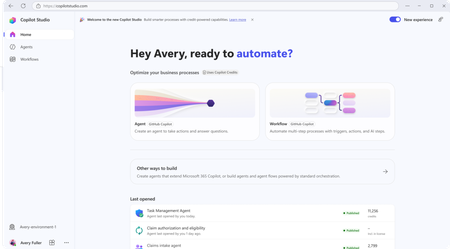
Copilot Studio consistent System Error issue
I have built an agent that invokes a Power Automate flow as a tool. Inside the flow, I'm using the Execute Agent and Wait activity, which calls another agent. This execution takes around 10–15 minutes to complete, after which the flow returns the result using Respond to Agent (asynchronous response). Although the flow completes successfully and the downstream agent finishes its execution, the calling agent still receives a System Error instead of the expected response. Why I'm using a Flow instead of directly connecting the agent Normally, I would connect the agent directly. However, the agent being invoked is already connected to another agent. Since agent → agent → agent chaining is not supported in Classic mode, I used a Power Automate flow as an orchestration layer to work around this limitation. Looking for someone who have faced this issue and has any solution to this.3Views0likes0CommentsMicrosoft Copilot for Project Management: A Complete Guide to Smarter Planning
Project management has always been about balancing priorities, managing deadlines, coordinating teams, and making informed decisions. As projects become increasingly complex, project managers are expected to do more with less—less time, fewer resources, and tighter budgets. Fortunately, artificial intelligence is transforming the way teams work, and Microsoft Copilot is leading that transformation. https://dellenny.com/microsoft-copilot-for-project-management-a-complete-guide-to-smarter-planning-faster-decisions-and-better-team-collaboration/19Views0likes0CommentsCopilot Studio Agent for Excel Macro Modernization — Anyone Tried This?
Anyone built a Copilot Studio agent to analyze macro-enabled Excel workbooks (.xlsm) and recommend a modernization path — e.g., migrating logic to Power Automate or rebuilding as Power BI dashboards? Curious about real-world attempts: what worked, what didn’t, and where the ROI actually showed up. Would love to compare notes before diving in myself. #CopilotStudio #Excel #PowerAutomate #PowerBI #PowerPlatform4Views0likes0CommentsIs Copilot Notebook Replacing OneNote? What I Tell Concerned Users
Copilot Notebook and OneNote both use the word notebook, so it is easy to assume that one is replacing the other. That is not what is happening. OneNote remains a useful place to capture notes, organize information, and develop content over time. Copilot Notebook serves a different purpose. It brings selected sources together so Copilot can help you work toward a specific project, topic, or outcome. You may use both tools within the same workflow. However, there are also times when Copilot Chat or SharePoint may be all you need. In my full article, I compare Copilot Notebook and OneNote, explain the licensing considerations, share workplace examples, and provide a simple way to choose the right Microsoft 365 tool for the work. https://traccreations4e.com/copilot-notebook-vs-onenote/ #MSFTOneNotePartner #traccreations4e-p26 8/3/2026Looking for ideas: Reducing "Allow" prompts when using SharePoint Knowledge
Hello community members! I'm hoping to get some advice from people who may have come across a similar challenge with their Copilot Studio "SharePoint knowledge retrieval" agents 🤞 Current setup Agent set up in Copilot Studio and published to channels - M365 Copilot and Teams Agent is connected to 4 SharePoint folders (I'm using Method#1 - see below screenshot for reference). This is essential because the documents inside the folders contain both text and image-based content. This is the only method that brings results Users have permissions to access the content in these folders Problem We are currently preparing to roll out this agent but we've hit a user experience issue that is becoming a blocker for moving forward. When a user interacts with the agent for the first time, they are asked to click "Allow" ... 4 times .. one for each of the folder that the agent is connected to This experience feels heavy for users (based on our pilot feedback) and people give up after the first or second time because they think it is not working. In spite of comms and a video about having to repeat this action until done. We want the first time experience to be as smooth as possible to drive adoption. Also, we are going to expand the solution to include more folders soon - so there is also a concern that number of consent prompts could grow further. What I've tried Used Method#2 to connect to SharePoint folders. While this didn't pop up the "Allow" prompts, as indicated earlier, this approach doesn't work because it doesn't return any results from documents as they contain both text and image content. Tried Method#1 to connect to the library (and use instructions to indicate necessary folders) - this didn't work because the method doesn't allow to connect to libraries. Note - I cannot restructure the library and put all the documents into one folder because that's the way the documents have been maintained for a long time & direct links to the folders are being used across the organization via. emails, decks etc. Looking for advice Has anyone found a way to reduce or eliminate these consent prompts? Are there any other recommendations on using SharePoint as a knowledge source that respects user permissions without these consent prompts? Does anyone know why Method#1 and Method#2 have different user experiences where the first one prompts for consent and the second doesn't?23Views1like0Comments
Deterministic way to mark generative answer output as AI-generated - AI Act
Hi all, We have a text-based RAG agent in Copilot Studio using the Azure AI Search connector as the knowledge source. It's customer-facing. We need every generated turn to carry a machine-readable marker identifying it as AI-generated, not just a visible disclaimer line. Instructing the model to append something isn't acceptable for us, because it's non-deterministic and can be prompt-injected away. Has anyone found a cleaner pattern? Like how to do it?14Views0likes0CommentsIs My Code Safe with GitHub Copilot? A Practical Guide for Developers and Businesses
Artificial intelligence has transformed software development, and one of the biggest names leading this change is GitHub Copilot. It helps developers write code faster, generate functions, explain unfamiliar code, and even suggest complete implementations based on natural language prompts. While the productivity gains are impressive, one question continues to surface among developers, engineering managers, startups, and enterprise organizations: https://dellenny.com/is-my-code-safe-with-github-copilot-a-practical-guide-for-developers-and-businesses14Views0likes0CommentsScout Not Working After Upgrade from 0.23.331 to 0.23.578
I have been using Scout actively and after upgrading to 0.23.578 the device registration with GitHub has stopped working. I get to the point where it asks me for the device ID, GitHub accepts it then shows "sign-in could not be completed". I'm wondering if anybody else has experienced this. I'm inclined to think it is a new bug since the added the Enterprise host in this version.11Views0likes0Comments
365 on iPhone cannot access work data
Microsoft 365 Copilot on iPhone recognizes that work data is connected. Enterprise Search can access my work content, and grounding works in Safari and on my other devices. However, Copilot Chat on this 1 phone does not return grounded results and behaves as if enterprise grounding is unavailable. Reinstalling, signing out/in, and resetting network settings did not resolve the issue.12Views0likes0Comments
Copilot pain points....
Guys… seriously… we need some improvements here. I’m not asking Copilot to solve quantum physics or decode alien transmissions. I’m asking a Microsoft program for help with a Microsoft program. You’d think that would be the one scenario where Copilot would shine, right? Like, “Ah yes, my home turf, allow me to demonstrate competence.” But no. I can’t even get Copilot to correctly explain how to do basic SharePoint tasks. BASIC. As in, “click the thing, then click the other thing.” Instead I get a TED Talk about SharePoint philosophy and a guided meditation on patience. And then there’s the folder comparison fiasco. I want Copilot to do something so simple it should practically be a reflex: Compare two folders on my hard drive and tell me if they’re identical. Copilot’s response? “Absolutely, I can do that!” Followed immediately by an ever‑expanding scavenger hunt of things I apparently need to do first. It’s like asking someone to hand you a screwdriver and they say, “Sure, but first you’ll need to assemble this IKEA shelving unit, install three dependencies, sacrifice a goat, and agree to a quest.” I’m glad to hear you’re merging all the copilots into one “super Copilot.” Great idea. Fantastic. But let’s be honest — I’m praying the one that survives is the personal Copilot, because Copilot 365… whew. That thing feels like it was built by a committee that communicates exclusively through interpretive dance. And don’t even get me started on the wrapper versions. Those are like Copilot wearing a Halloween costume of itself, but the costume is made of cardboard and disappointment. And by the way — I’m STILL waiting for Copilot to create an app or program that automatically files my Outlook emails into folders. This is not a moon landing. This is not a Mars rover. This is not a Nobel Prize category. This is a simple, everyday, normal-person task. Yet somehow Copilot treats it like I’ve asked it to build the next Windows release from scratch using only a spoon and positive thinking. Come on, guys. We love the vision. We love the potential. But the basics need to work before the magic tricks do.Custom Skills in Copilot Cowork
Skills are specialized instruction sets that tell Copilot Cowork exactly how to think, act, and respond for a specific task. There are two types: Out-of-the-box skills – built and maintained by Microsoft and Anthropic, automatically invoked based on conversation context (~13 available currently) Custom skills – instruction sets you write yourself, defining a specific process, format, and set of standards for Cowork to follow every time the skill is triggered Custom skills are really where Cowork starts to feel less like a generic assistant and more like a tool built around how you actually work. Once a skill is defined, Cowork applies the same process, format, and standards every time it's triggered, so you're not re-explaining your requirements in every conversation. For an in-depth tutorial on how to leverage skills in Copilot Cowork, check out the video below 👇 https://youtu.be/MnJmzZvqjJA25Views0likes0CommentsURLs not accessible when running python script in sandbox
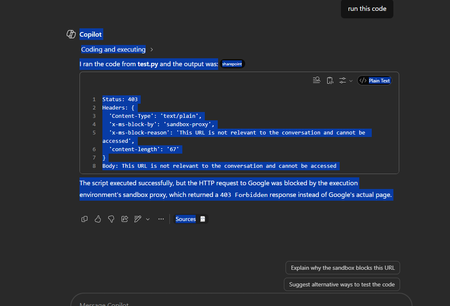
I have a script: import requests try: r = requests.get("https://google.com", timeout=10) print("Status:", r.status_code) print("Headers:", dict(r.headers)) print("Body:", r.text[:300]) except Exception as e: print(repr(e)) When I run it with an agent, it gives me this error: I have no idea how to make the URL valid for the conversation and it doesn't work with any URL I have provided so far.53Views0likes1CommentSaving a Model Generated File in SharePoint - New Copilot Studio
Hi everyone, I have spent the last two days trying to solve a problem that to me should be a straightforward functionality. I have an agent I made which generates Word file reports. The agent is Cluade Opus 4.8 and it generates the file wonderfully as per my brand guidelines. The document in not a simple content file. Rather these documents can get complex based on the user requirement. Currently the document generates fine and the user gets a popup to download the file. I however need the file to be saved in our share SharePoint library. I created a workflow tool that accepts a file input and then saves it to SharePoint, however when I tried to configure this tool in the agent, the file input parameter was not showing. I then tried to set up a workflow which accepts a url, but the agent cannot seem to access any url or pass it to my workflow. Using a create file tool within the agent and having the agent fill in the file name and content parameters was slow, and the agent was actually attempting to rewrite the file byte-by-byte which lead to the file being re-created and is not scalable for large files. Based on the agent, this is how the file is currently saved: "The file is saved inside my sandboxed container at: /app/created/Sample_Report.docx /app/created/ is a special output directory: any file I place there is automatically packaged by the platform and returned to you as the chat attachment (the Sample_Report.docx chip you see). This is a private, ephemeral location inside my container — it is not a shared network path, and it is not the SharePoint library. Neither you nor the SharePoint tool can reach /app/created/ directly; the platform's attachment mechanism is the only bridge out of it, and as we established, that bridge delivers a direct download rather than a hosted HTTPS URL. So to be precise: the file exists only (a) here in my container at /app/created/Sample_Report.docx, and (b) as the downloadable attachment the platform generated from it. It has not been saved to SharePoint." I need this functionality working as I will have several automations flows around report generation so no human will be available to download the file from within Copilot. Note: I cannot use the old copilot studio as the file generation capabilities are not on par with the new copilot studio experience. The same agent model does not output files, and the create word file node does not output files at the depth and formatting complexity I require. Can anyone please help with a reliable way to get the file save in SharePoint from the New Copilot Studio experience? I'm at my wits end here.49Views0likes1Comment
Copilot Studio agents problems connecting to Sharepoint knowledge source
Hello, Since last week users in my tenant are experimenting issues regarding the connection between copilot studio agents and Sharepoint. The agents are not able to extract information from Sharepoint sites, printing there is not information in the Sharepoint site regarding the user's question when that information is in Sharepoint. These agents used to work well till last week. Does have been any update in Microsoft 365 services that can be affecting these agents ability to retrieve information from Sharepoint?122Views0likes4CommentsMicrosoft Copilot for IT Administrators: The Complete Enterprise Deployment Guide
Artificial Intelligence has moved beyond being an experimental technology and has become an essential part of modern enterprise productivity. Among Microsoft’s AI-powered offerings, Microsoft Copilot stands out as one of the most transformative tools for businesses. It helps employees automate repetitive tasks, improve collaboration, generate content, analyse data, and make faster decisions using natural language. https://dellenny.com/microsoft-copilot-for-it-administrators-the-complete-enterprise-deployment-guide/81Views2likes4Comments
Microsoft AI Agent Creator Associate Certificate
Hello everyone, I have a question about the Microsoft AI Agent Creator Associate certification. I’m passionate about artificial intelligence and Microsoft Copilot Studio. I’m currently taking the training course and working toward earning the Microsoft AI Agent Creator Associate certification. My question is: Will earning this certification improve my chances of getting a job at Microsoft? If anyone in this community has earned this certification or has experience with it, I’d really appreciate your feedback. Has it helped you get hired by Microsoft or one of its partners? Thank you in advance for your advice and insights!34Views0likes0Comments






Events
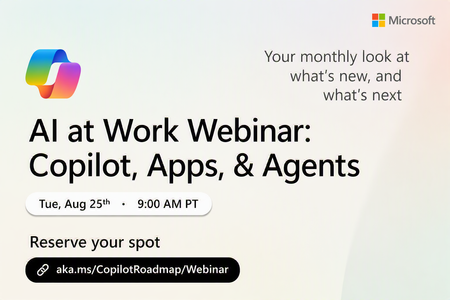
Register Here: https://aka.ms/MTC/CopilotRoadmapEvent
Keep up with the latest in Microsoft 365 Copilot, all in one place. This Roadmap webinar series is your central hub for the latest Copilot inno...
Tuesday, Aug 25, 2026, 09:00 AM PDTOnline
1like
43Attendees
0Comments
Recent Blogs
- We want to inform the community that the Domain Exclusion for Microsoft 365 Copilot feature described in this post, More control over web grounding with Domain Exclusion for Microsoft 365 Copilot, ha...Aug 04, 2026135Views0likes0Comments
- Over the past two months, we’ve been previewing a new capability within Copilot Studio that lets you build agents capable of taking on more complex business processes. Today, we’re excited to share t...Aug 03, 202619KViews6likes4Comments