Recent Discussions

Passkey Sign‑In Fails in Entra Free Tenants (AADSTS135016 – FIDO Sign‑In Disabled via Policy)
Hello everyone, I’m documenting an issue which seems to be appearing across multiple tenants and multiple threads, but the root cause has never been clearly stated. If I’m mistaken in any part of this analysis, my apologies and I welcome correction. This post is intended to consolidate the symptoms, the misleading error message, and the actual underlying cause so other admins don’t waste time troubleshooting a problem that cannot be fixed through configuration. Summary of the Issue In Microsoft Entra ID Free tenants: Passkeys can be enabled Passkeys can be registered Passkeys appear correctly in Security Info Passkeys work for MFA Passkeys work for self‑service setup But passkey sign‑in fails, consistently, with: AADSTS135016: FIDO sign‑in is disabled via policy This occurs even when: FIDO2 is fully enabled AAGUIDs are correct “Allow self‑service setup” is enabled No Conditional Access policies exist Security defaults are disabled User‑level MFA settings are off Passkey profiles are correctly targeted Browser/device combinations are clean Multiple admins have reported this exact behavior. Why This Error Is Misleading The error suggests that a policy is blocking FIDO sign‑in. However, in Entra Free tenants, the real issue is that the required policy objects do not exist at all. Specifically, Entra Free tenants do not include: Authentication Strengths Passwordless Strength Phishing‑Resistant MFA Strength FIDO2 Strength Conditional Access enforcement Strength‑based sign‑in policies Passkey sign‑in requires these backend objects to bind the FIDO2 credential to the primary authentication flow. Without them, the sign‑in pipeline rejects the passkey and throws error 135016, even though registration succeeds. This is why: Some tenants work (licensed) Some tenants fail (Entra Free) “Fixes” like waiting, renaming profiles, or toggling settings only work in licensed tenants where the backend policy objects exist No amount of configuration resolves the issue in Entra Free This is a licensing limitation, not a configuration problem. Why This Needs Attention Microsoft is actively promoting: Passkeys Passwordless authentication Phishing‑resistant MFA Modern identity security But Entra Free tenants — including personal tenants, small labs, students, developers, and home environments — cannot use passkey sign‑in at all, despite documentation implying otherwise. This creates: Confusion Wasted time Misleading error messages Failed deployments Frustration for users who purchased physical passkeys A contradiction between Microsoft’s marketing and actual product behavior Passkeys are a security feature, not an enterprise feature. Basic passkey sign‑in should not be locked behind Entra ID P1. Request to Microsoft Please consider enabling basic passkey sign‑in for Entra Free tenants. At minimum: Update documentation to clearly state that passkey sign‑in requires Authentication Strengths (P1+) Update the error message to reflect the real cause Provide guidance for admins deploying passkeys in small or personal tenants This would reduce confusion and align the product with Microsoft’s own passwordless security goals. Closing If anyone has additional data points, please add them here. This issue is affecting multiple tenants and deserves a clear, authoritative answer from Microsoft. Thanks.41Views0likes0CommentsUnexpected button behaviour when using the prompt=create parameter in Entra External ID user flows
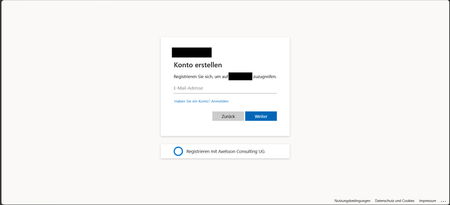
Hi, In a recent workload, I'm assisting a client to implement Entra External ID for streamlined authorization as well as single sign-on for associated registered external facing third-party applications for external customer users through their Entra External ID identity, as well as assisting the client with auth branding and other UI customizations, and preparing Entra ID federation custom OIDC providers and configuration for enabling SSO with organizational internal and remote work- and school accounts etc. The sign-up / create account experience is of importance to the client, as a rather substantial amount of users are expected to sign-up via self-service sign-up following having received an invite via another app. To ensure that the user lands on the create account view, in order to minimize the number of steps and actions the users need to take to get there, the prompt=create parameter is used to pre-select the sign-up/register experience in the user flows UI. Having stress-tested the user flows and experience recently, we noticed that in a specific scenario, some UI elements behave in a manner that could be described as unexpected, and even though a workaround has mitigated it to some extent, the behaviour of some elements could probably be improved a bit to ensure an even more consistent user experience in the built-in user flows. Specifically, if the user flow is invoked with the prompt parameter set, the user lands on the create account screen as expected, however, unless custom CSS modification is applied, the Back button that would typically be there, as if having arrived there from the initial sign-in screen where it’s also displayed. If pressing the Back button displayed on the Create account view when having navigated there with the prompt=create set in the /authorize request, pressing the button seemingly doesn’t have any impact or result in any action, one can click it, but nothing happens. I'd suspect it's perhaps a "remnant" from if the flow is invoked without any prompt parameter set, or with prompt=login set, but when prompt=create is set, there is no state/page history in the UI to navigate back to, as no previous page has been displayed or rendered yet and added to the history, and the Back button click thus doesn’t have any effect. In general, I think buttons that don't have any tangible action should not be displayed, also, if prompt=login is set, the Back button isn't shown then either on the very initial user flow view shown then, so it would seem the built-in user flows actually already follow such approach in fact, but not when the prompt=create has been set, thus causing some inconsistency in the UI that users could notice unless custom CSS styling is applied. The expected behaviour for our business case would be that if prompt=create is set, then, similar to the prompt=login, no Back button should be displayed, or, if shown, it should result in some navigation (perhaps something like javascript.go(-1), but that could/would be dependent on from where the user arrived, e.g., going back a step in the browser history won't work if the user clicked a link from an invite email ) and preferably not be non-actionable. Furthermore, on the topic of the Back button and its behaviour when the prompt=create parameter is set, there is another case at which we observed some unexpected button behaviour as well, that could probably benefit from some attention. At a specific second scenario, it seems that the Continue button is displayed without providing any action, and when clicking the Back button then, clicking it seemingly resets the "create account", state likely set by the prompt=create initially, and instead switches the flow back to the sign-in state, which can at least affect the display text of some subsequent buttons shown in later steps in the UI. The user arrives at a built-in Entra External ID user flow /authorize endpoint, with the prompt=create query parameter set The user triggers the OTP challenge by entering an email address to verify the email address The user receives the OTP code but enters it incorrectly, i.e., doesn't copy the full code length of eight digits, and instead enters/pastes six of the eight code digits. The UI then shows an error message that the code could not be used/validated, and the email address field is displayed again with the email address that was used for the verification attempt prefilled. If the user clicks the Continue button at this stage, nothing happens. If the user clicks the Back button instead (given that it’s not hidden), it shows the same view one more time, with the Back and Continue buttons at the bottom. However, if the user clicks the Continue button this time, it works and a new code is sent. On the next screen, where the newly sent code can be entered, instead of a button named "Continue", it will now instead show a button with the text "Sign-in" (it would seem like the create account state has gotten lost somewhere along the way at this point, perhaps when the back button in the step 5 above was pressed). If one omits the prompt=create parameter, or when using prompt=login, things seem to work fine, the above occurs when the prompt=create is set. The reason why is the prompt=create is used is due to a business requirement to try to minimize the steps, especially in conjunction with the registration/sign-up, as far a possible when signing up. We have opted for the built-in user flows, not the self-hosted native authentication UI pages, for this project, and then as I understand it, it is the prompt=create parameter that can/should be used to enable the user to land directly on the registration page without having to navigate there manually via the sign-up link, that is otherwise shown on the initial sign-in page. It would thus be great if the prompt=create parameter could have some attention (or perhaps if a dedicated sign-up user flow type could be added potentially, even though that would perhaps warrant some update to the user flow app linking as well, as my understanding is that one user flow can be linked to one app registration at a time currently) to avoid that some buttons become unresponsive when the parameter is used, or falls back to sign-in, to improve the built-in user flows further, as the prompt=create fulfils the business requirement well otherwise. If there would be any further/follow-up questions on the above, e.g., to clarify the requirement, or further explain the reproduction steps and behaviour observed, or anything else, please tell, and I'll ensure to get back as soon as possible. Also, would someone have some input on potential other/additional ways to pre-select the create account/sign-up experience, that would naturally be much appreciated as well, thanks! Regards Kristoffer55Views0likes0CommentsHybrid Join Lifecycle Model
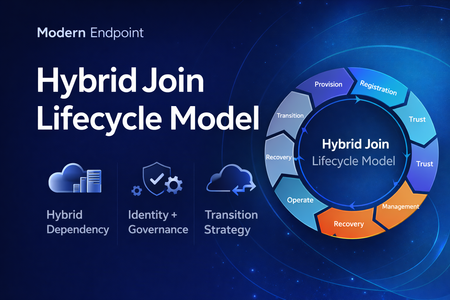
Microsoft Entra hybrid join is still a common reality in enterprise environments. For many organizations, it remains necessary because legacy applications still rely on Active Directory machine authentication, Group Policy is still in use, and on-premises operational dependencies have not fully been retired. At the same time, the long-term direction for endpoint identity is increasingly cloud-native. That creates an important architectural question: Should hybrid join be treated as a permanent device state, or as a lifecycle stage in a broader modernization journey? In practice, hybrid join is often discussed as a binary condition: the device is either hybrid joined or it is not. But from an operational perspective, that view is too limited. In real enterprise environments, hybrid join behaves much more like a lifecycle. A device moves through provisioning, registration, trust establishment, management attachment, steady-state operation, recovery, retirement, and eventually transition. That distinction matters because most hybrid join issues do not fail loudly. They usually appear as stale objects, pending registrations, broken trust, inconsistent management ownership, and environments that remain temporarily hybrid far longer than intended. Why a lifecycle model is useful Treating hybrid join as a lifecycle helps explain why so many organizations struggle with it even when the initial implementation appears technically correct. The challenge is usually not the first successful join. The challenge is everything that happens around it: Provisioning quality Trust validation Management ownership Drift detection Stale object cleanup Exit criteria for transition to Entra join Without that lifecycle view, hybrid join often becomes a static design decision with no clear operational model behind it. The eight phases 1. Provisioning The lifecycle starts when the device is built, imaged, or provisioned. This stage is more important than it looks. If the device is provisioned from a contaminated image, or if cloning and snapshot practices are not handled carefully, later identity issues are often inherited rather than newly created. Provisioning should be treated as an identity-controlled event, not just an OS deployment task. 2. Registration The device becomes known to Microsoft Entra. This is where many environments confuse visibility with readiness. A device object may exist in the cloud, but that does not automatically mean the hybrid identity state is healthy or operationally usable. 3. Trust Establishment This is the point where hybrid join becomes real. A device should not be considered fully onboarded until both sides of trust are present and healthy. In operational terms, this means the device is not only registered, but also capable of supporting the expected sign-in and identity flows. 4. Management Attachment Once trust exists, governance becomes the next question. Many organizations still balance Group Policy, Configuration Manager, Intune, and legacy application dependencies at the same time. That is exactly why hybrid join often persists. But if management ownership is not clearly defined, organizations end up with overlapping policy planes, inconsistent control, and unclear accountability. 5. Operational Steady State Hybrid join does not stop at successful registration. The device must remain healthy over time, and that means monitoring trust health, registration state, token health, line-of-sight to required infrastructure, and management consistency. A device that was healthy once is not necessarily healthy now. 6. Recovery Every real environment eventually encounters drift. Pending states, broken trust, orphaned records, reimaged devices, and inconsistent registration scenarios should not be treated as unusual edge cases. They should be expected and handled with formal recovery playbooks. Recovery is not an exception to the lifecycle. It is part of the lifecycle. 7. Retirement Retirement is one of the weakest areas in many hybrid environments. Devices are replaced or decommissioned, but their identity records often remain behind. That leads to stale objects, inventory noise, and administrative confusion. A proper lifecycle model should include a controlled retirement sequence rather than ad hoc cleanup. 8. Transition This is the most important strategic phase. The key question is no longer whether a device can remain hybrid joined, but whether there is still a justified reason to keep it there. Hybrid join may still be necessary in many environments today, but in many cases it should be treated as transitional architecture rather than the target end state. Practical takeaway Looking at hybrid join as a lifecycle creates a more useful framework for architecture decisions, operational ownership, troubleshooting, directory hygiene, governance, and transition planning toward Microsoft Entra join. That is the real value of this model. It does not replace technical implementation guidance, but it helps organizations think more clearly about why hybrid join exists, how it should be operated, and when it should eventually be retired. Final thought Hybrid join is still relevant in many enterprise environments, but it should not automatically be treated as a default destination. In many cases, it works best when it is managed as a lifecycle-driven operating model with defined phases, controls, and exit criteria. That makes it easier to stabilize operations today, while also creating a clearer path toward a more cloud-native endpoint identity model tomorrow. Full article: https://www.modernendpoint.tech/hybrid-join-lifecycle-model259Views1like0Comments
Introducing the Entra Helpdesk Portal: A Zero-Trust, Dockerized ITSM Interface for Tier 1 Support
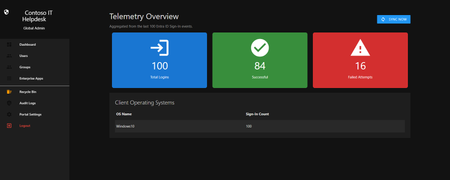
Hello everyone, If you manage identity in Microsoft Entra ID at an enterprise scale, you know the struggle: delegating day-to-day operational tasks (like password resets, session revocations, and MFA management) to Tier 1 and Tier 2 support staff is inherently risky. The native Azure/Entra portal is incredibly powerful, but it’s complex and lacks mandatory ITSM enforcement. Giving a helpdesk technician the "Helpdesk Administrator" role grants them access to a portal where a single misclick can cause a major headache. To solve this, I’ve developed the Entra Helpdesk Portal (Community Edition)—an open-source, containerized application designed to act as an isolated "airlock" between your support team and your Entra ID tenant. Why This Adds Value to Your Tenant Instead of having technicians log into the Azure portal, they log into this clean, Material Design web interface. It leverages a backend Service Principal (using MSAL and the Graph API) to execute commands on their behalf. Strict Zero Trust: Logging in via Microsoft SSO isn’t enough. The app intercepts the token and checks the user’s UPN against a hardcoded ALLOWED_ADMINS whitelist in your Docker environment file. Mandatory ITSM Ticketing: You cannot enforce ticketing in the native Azure Portal. In this app, every write action prompts a modal requiring a valid ticket number (e.g., INC-123456). Local Audit Logging: All actions, along with the actor, timestamp, and ticket number, are written to an immutable local SQLite database (audit.db) inside the container volume. Performance: Heavy Graph API reads are cached in-memory with a Time-To-Live (TTL) and smart invalidation. Searching for users or loading Enterprise Apps takes milliseconds. What Can It Do? Identity Lifecycle: Create users, auto-generate secure 16-character passwords, revoke sign-in sessions, reset passwords, and delete specific MFA methods to force re-registration. Diagnostics: View a user's last 5 sign-in logs, translating Microsoft error codes into plain English. Group Management: Add/remove members to Security and M365 groups. App/SPN Management: Lazy-load raw requiredResourceAccess Graph API payloads to audit app permissions, and instantly rotate client secrets. Universal Restore: Paste the Object ID of any soft-deleted item into the Recycle Bin tab to instantly resurrect it. How Easy Is It to Setup? I wanted this to be universally deployable, so I compiled it as a multi-architecture Docker image (linux/amd64 and linux/arm64). It will run on a massive Windows Server or a simple Raspberry Pi. Setup takes less than 5 minutes: Create an App Registration in Entra ID and grant it the necessary Graph API Application Permissions (e.g., User.ReadWrite.All, AuditLog.Read.All). Create a docker-compose.yml file. Define your feature toggles. You can literally turn off features (like User Deletion) by setting an environment variable to false. version: '3.8' services: helpdesk-portal: image: jahmed22/entra-helpdesk:latest container_name: entra_helpdesk restart: unless-stopped ports: - "8000:8000" environment: # CORE IDENTITY - TENANT_ID=your_tenant_id_here - CLIENT_ID=your_client_id_here - CLIENT_SECRET=your_client_secret_here - BASE_URL=https://entradesk.jahmed.cloud - ALLOWED_ADMINS=email address removed for privacy reasons # CUSTOMIZATION & FEATURE FLAGS - APP_NAME=Entra Help Desk - ENABLE_PASSWORD_RESET=true - ENABLE_MFA_MANAGEMENT=true - ENABLE_USER_DELETION=false - ENABLE_GROUP_MANAGEMENT=true - ENABLE_APP_MANAGEMENT=true volumes: - entra_helpdesk_data:/app/static/uploads - entra_helpdesk_db:/app volumes: entra_helpdesk_data: entra_helpdesk_db: 4.Run docker compose up -d and you are done! I built this to give back to the community and help secure our Tier 1 operations. If you are interested in testing it out in your dev tenants or want to see the full architecture breakdown, you can read the complete documentation on my website here I’d love to hear your thoughts, feedback, or any feature requests you might have!
Free Webinar: Microsoft Entra ID Break-Glass Accounts Done Right (Live Demo + Q&A)
Hi everyone, I’m hosting a free community webinar focused on one of the most common (and painful) Entra ID issues: tenant lockouts caused by break-glass account misconfiguration. This session is practical and demo-driven, and I’ll cover real-world scenarios I’ve seen involving Conditional Access and emergency access design. What we’ll cover Why every tenant should have at least two break-glass accounts Common misconfigurations that lead to lockouts Conditional Access exclusions: what works and what fails Recommended hardening approach (without blocking emergency access) Monitoring + alerting best practices Live demo + Q&A Who it’s for Microsoft 365 admins Entra ID / Conditional Access admins Security engineers MSP engineers The recording will be shared with registrants after the session. Registration link: https://teams.microsoft.com/l/meetup-join/19%3ameeting_MjkwYzExNzItMzY4OC00NThmLTg2ZDYtM2ExMTRiNWYwMGZl%40thread.v2/0?context=%7b%22Tid%22%3a%224bb6dd74-2dd1-459b-b867-f51781e1e7ed%22%2c%22Oid%22%3a%2251c6a848-6393-44f9-bac5-21855d5c7c3d%22%7d Thanks! Jaspreet Singh141Views0likes0CommentsAsia Pacific and Japan- Become an Entra Insider!
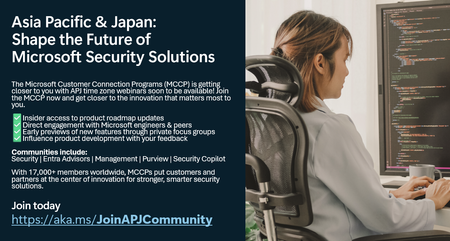
Get insider access and influence product development with your feedback. Connect with Microsoft Security engineers, engage in private previews and focus groups, and network with community members like you! https://aka.ms/JoinAPJCommunity99Views0likes0Comments
Feature Request: DLP Controls for App Registrations Using Sites.Selected to Prevent PII/PHI Exposure
We’re using the Sites.Selected SharePoint API to restrict app access to specific sites, which is a great improvement over tenant-wide permissions. However, we’re increasingly concerned about the lack of native DLP enforcement at the app registration level—especially for AI-powered apps or integrations that may unintentionally access sensitive data. Does Microsoft offer any capability to safeguard against PII/PHI data transfer across the Graph API that can: Flag apps as restricted from accessing PII/PHI. Prevent apps from reading content labeled with sensitivity labels like “Confidential,” “PII,” or “PHI.” Enforce real-time inspection and blocking of Graph API calls that attempt to access sensitive data. Generate alerts and audit logs when apps approach or violate these boundaries. If not, are there plans to introduce these protections? Protection across all APIs is desirable, but currently our greatest concern are SharePoint APIs.54Views0likes0CommentsWorkplace Benefits Program (earlier meaning: home Use)
Hello, let me describe our current situation: Tenant A: our first tenant, should be decom. soon Tenant B: our new productive tenant On Tenant A we are able to use the Workplace Benefits Program. Unfortunatelly we have to decom this tenant. so we have created an new one, Tenant B. Enterprise Agreement was transfered well to the new, but one topic is missing, we couldn't transfer the existing workplace benefits from A to B. Perhaps someone here has been in the same situation and has found a solution? Thanks a lot. best regards, Markus60Views0likes0CommentsIdentity, access, and agent governance—Microsoft Entra at Ignite 2025
Security is a core focus at Microsoft Ignite this year, with the Security Forum on November 17, deep dive technical sessions, theater talks, and hands-on labs designed for security leaders and practitioners. Join us in San Francisco, November 17–21, or online, November 18–20, to learn what’s new and what’s next across identity and access management to the forefront, with sessions focused on Zero Trust, agent governance, and securing AI-powered apps. Featured sessions: BRK243: Microsoft Entra: What's new in secure access on the AI frontier Strengthen your Zero Trust foundation, manage and govern the rising tide of agents, and enable AI to accelerate your success. BRK265: Secure access for AI agents with Microsoft Entra Discover, manage, govern, and protect agent identities and access—just as you do for human identities. LAB549: Strengthen your identity security posture with Conditional Access Learn safe rollout patterns and use the CA Optimization Agent (Security Copilot in Entra) to find and fix gaps with one-click and phased enforcement. Explore and filter the full security catalog by topic, format, and role: aka.ms/Ignite/SecuritySessions Why attend: Ignite is the best place to learn about new Microsoft Entra capabilities for agentic AI, identity governance, and secure access. We will also share its vision for the future of identity and agent management. Security Forum (November 17): Kick off with an immersive, in‑person pre‑day focused on strategic security discussions and real‑world guidance from Microsoft leaders and industry experts. Select Security Forum during registration. Register for Microsoft Ignite >397Views0likes0CommentsJoin Merill Fernando and other guests for our Identity and Network Practitioner Webinar Series!
This October, we’re hosting a three-part webinar series led by expert Merill Fernando for Identity and Network Access practitioners. Join us as we journey from high-level strategy to hands-on implementation, unifying identity and network access every step of the way. Each session builds on the last, helping you move from understanding why a unified approach matters to what are the foundations to get started, and finally to how to configure in practice. The goal is to equip you with actionable skills, expert insights, and resources to secure your organization in a unified, Zero Trust way. Register below: Identity and Network Security Practitioner Webinar Series | Microsoft Community HubMicrosoft Entra Internet Access for iOS in Public Preview!
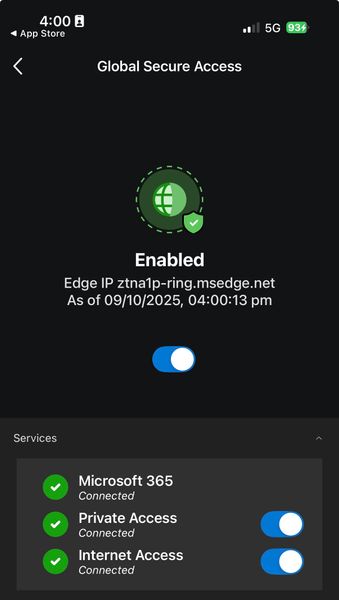
With the latest update to Microsoft Defender for Endpoint on iOS, Organisations licensed for Microsoft Entra Suite or Microsoft Entra Internet Access will have access to Microsoft's Secure Web Gateway (SWG) and traffic forwarding for HTTP/HTTPS traffic, with support for Web-Content Filtering. This has been a huge win for iOS Mobile Security. Previously, Defender for Endpoint on iOS has supported Phishing Protection, M365 Traffic, and Entra Private Access Traffic. Combined with Global Secure Access Threat Intelligence, which consumes indicators from Microsoft Intelligent Security Graph (ISG), Organisations can implement granular internet access controls on iOS devices with integrated, context aware protection against malicious threats. Excited to hear what you think! Release notes are available hereShape the future of our communities! Take this survey to share your practitioner insights. 💡 ✏️ 🔓
This brief survey explores your experiences and preferences in professional identity and network security communities. Your feedback will help shape our team's approach to future community resources and engagement opportunities. Take the survey here! For any questions about this survey, please contact dansantos@microsoft.com. Privacy Statement: https://go.microsoft.com/fwlink/?LinkId=521839
Services I had no understanding of being used against me.
First of all, I want to apologize for the lack of technical knowledge, I was backed into a corner by a complete lockout of all my accounts and devices as a result of individuals using Azure resources and a Microsoft 365 admin account. They put the Azure services into play in early 2022 and were using an old Android to access my accounts and lock me out by changing passwords. This situation is unique because it was a homeless couple (Or so I thought) that I opened my home to in late 2021. When I had lost access to all my accounts that had been mine for over a decade I tried moving on and creating new accounts. I was creating a recovery email account for my new primary email and fell asleep before I finished. I woke to discover it had been completed, and the password was set. When unsuccessful with the .aspx recovery form I wrote it off because the account was new and I did not believe it was a danger. Maybe I finished setting it up as I drifted off and forgot. A few weeks later I was still having issues with unauthorized access to my new primary email, and when investigating noticed the email I never had access to had been assigned as admin over my Microsoft 365 apps. I tried for a month to address the issue and failed. I was fine with not being able to recover the account but if it was not mine it had no business being admin over my personal accounts. I had also discovered the people in my home running a scam on Azure using my credentials from another account, and I reported this to Microsoft. There are a lot of factors that go into this and in 2022 I had zero understanding of all of it. Only when I found myself completely locked out of everything with my personal accounts being used to request and receive an EIN from the IRS, and file a fraudulent business return, and more did I really begin troubleshooting to determine the best course of action. I was still not receiving the escalation I had requested in early 2022, and things had gone beyond too far so I created a business profile to gain an understanding of Azure services, roles and permissions, and more. Now granted when this began in September of 2024, I still had zero IT experience, admin experience or developer experience. I am still a novice at these at best in my opinion, but I have been combatting those with advanced system knowledge and developer skills the entire time. I found developer portals that had been set up using my credentials with anything associated to me. HP for my PCs, Microsoft, Google Cloud, Norton, and more. I would be directed to update drivers with HP to a site that must have been some developer's sandbox because eventually Norton flagged all HP sites as malicious. My passwords were being scraped out of my Norton Password Vault and more. This has all been quite an ordeal since 2022, and I still do not understand most of it, but I am doing my best. I already had the issue that it was my Microsoft account, and my problems crossed various platforms, and when I created my own business accounts to investigate I began having significant success seeing what was happening, but I cannot export the data in my head to a .csv about my personal accounts to share with 365 Business support or vice versa about my business accounts to personal support, so I am the only one that can see both sides. Cross platform communication on tickets is hard enough let alone crossing the business and personal threshold. I had just found myself in a position that it was my best investigative option. It has been successful on my end, however communicating what the criminals were doing has been a challenge. My lack of technical knowledge and the fact I am on a Microsoft Learn as I go system makes this quite demanding on my part. The logs and screenshots from my original investigation in 2022 exist in my photographic memory but nowhere else. And I can pick out details in logs and reports that will go unnoticed and flagged as "not me" by AI". But because of my attention to detail, I see the names associated with the activity and know that it is where the fraud began.51Views0likes0CommentsFetch Email From Entra Joined Device Login User
Dear Team, We are working on retrieving email address of the user joined to Entra ID from Entra-joined Windows devices, specifically while running in a system context.The whoami /upn command successfully returns the joined user’s email address in a user context, but it does not work in a system context, particularly when using an elevated terminal via the psexec utility. We also tested the dsregcmd /status command; however, in a system context, the User Identity tab in the SSO State section only appears when there is an error in AzureAdPrt. Under normal, healthy operating conditions, this command does not provide the user identity or the full domain username. We would greatly appreciate guidance on how to retrieve the Entra ID joined user’s email address in a system context, especially from those with prior experience in this area. Thank you for your support.124Views0likes0CommentsSecure Linux Logins with Azure Entra ID: MFA, Hello, Device Compliance & SSO with Himmelblau
As organizations adopt Azure Entra ID and Intune to secure their fleets, Linux has often been left behind — especially for modern authentication requirements like MFA, Conditional Access, and device compliance. Traditional Linux frameworks (PAM, NSS) were never designed for cloud identity or Zero Trust. Himmelblau is an open-source project that bridges this gap by integrating Linux systems directly with Entra ID. With Himmelblau, you can: Join Linux machines to Azure Entra ID, creating a device object in Entra ID to establish device identity and enable Conditional Access checks tied to trusted devices. Enroll Linux systems into Microsoft Intune (currently in beta), so they participate fully in compliance policies alongside Windows. Enforce MFA at the Linux login prompt, using your existing Entra ID Conditional Access configurations. Offer secure Hello for Business PIN authentication on Linux, providing end-users with a familiar, strong second factor that’s backed by hardware-bound credentials. Integrate Linux with SSO in Firefox and Chrome, allowing seamless access to Entra-protected web apps once the user is logged in. Manage Linux users and groups via Entra ID, with robust caching for reliable offline operation. Leverage TPM-backed certificates and secure key storage, so device credentials remain protected even if the system is compromised. For many IT teams, this means finally bringing Linux endpoints under the same Zero Trust umbrella as Windows — without compromising user experience or compliance. Get started: https://himmelblau-idm.org https://himmelblau-idm.org/landing.html https://github.com/himmelblau-idm/himmelblau We’d love your feedback — especially from organizations managing hybrid fleets. What other Entra scenarios would you like to see better supported on Linux?976Views2likes0CommentsEdge Warning when clicking on Links in Entra
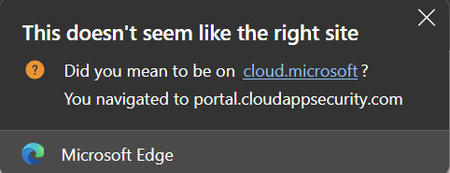
I am in the Entra portal looking at the latest recomendations to improve the Identity Secure Score. When you select an option, and the fly-out windows shows on the right, you have the 'Get Started' link at the bottom. Upon clicking on that, Edge will warn you that something doesn't look right. I know that the URLs were changed a while ago now for the various portals, but it looks like Edge didn't get the message on this one, hence the warning showing in the browser Can this be addressed as I constantly get this alerted to myself from other users.69Views0likes0CommentsStrengthening Enterprise Identity Security with Country Based Blocking in Conditional Access
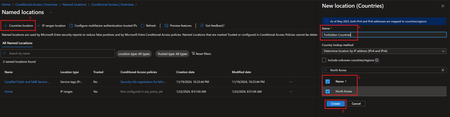
In a Zero-Trust world, identity is the foundational security perimeter. Securing access begins with full visibility and control over authentication activity - including where login attempts originate. By continuously validating the context of every access request, organizations can detect threats early and enforce least privilege with precision. For public sector agencies and global enterprises alike, defending against unauthorized sign-ins from foreign locations is a top priority, especially when those locations fall outside the boundaries of legitimate business activity. Why Country-Based Blocking Matters Not every foreign login attempt is malicious but when your organization has no employees, contractors, or systems operating out of certain countries, any authentication activity from those regions should be treated as suspicious by default. We’ve seen organizations use this capability to: Block access from countries where they have no personnel or partnerships Reduce exposure to credential stuffing or token replay attacks from known threat regions Enforce geo compliance policies related to data sovereignty or regional restrictions This helps reduce risk without interfering with legitimate business operations—and it’s surprisingly easy to configure. Fortunately, Microsoft Entra ID (formerly Azure Active Directory) provides a powerful, often overlooked feature in Conditional Access: the ability to block authentication attempts by country using Named Locations. 🔧 Step by Step: How to Block Access by Country Using Conditional Access 1. Create a Named Location for the Country Go to the Microsoft Entra admin center (Entra Portal). Navigate to Protection > Conditional Access > Named locations. Click + Country location. Name the location (e.g., Blocked - China). Check the box for the country or countries you want to block (e.g., North Korea). Click Create. 2. Create the Conditional Access Policy Still in Conditional Access, click + Create New policy. Name your policy, e.g., Block Sign-ins from Forbidden Countries. Under Assignments: Users: Choose All users (or specific groups), and exclude your break glass accounts. Target resources: Select All resources (or target specific apps). Under Network: Set Configure to Yes. Include: Selected networks and locations, Choose the Named Location(s) you created earlier (e.g., Blocked - North Korea). This setup tells Conditional Access to apply the policy unless the sign-in is from an excluded location i.e., from a blocked country. Under Access controls > Grant: Select Block access. Enable the policy (set to On) or test it first by setting it to Report-only. Click Create. 🛡️ Best Practices Begin with Report-only mode to simulate the effect of your policy before enforcement. Exclude break-glass (emergency) accounts to avoid accidental lockout. Monitor sign-in activity in Microsoft Entra sign-in logs to validate the policy’s effect. Combine with sign-in risk policies or device compliance to further refine access decisions. Consider the service limits for Named Locations and IP address ranges. While these limits are generous and unlikely to affect most organizations, it is good practice to review them to ensure your design remains scalable. More details can be found in the Microsoft Entra service limits documentation. Final Thoughts Blocking access from foreign countries where your organization has no legitimate activity is one of the most straightforward and effective Conditional Access strategies available. It strengthens your authentication perimeter and supports a zero trust approach to identity security. However, it is important to remember that Named Locations should be part of a broader defense-in-depth strategy. Sophisticated attackers can use VPNs or proxy services to disguise their location, so country-based controls alone are not enough. For stronger protection, combine them with additional signals such as sign-in risk, device compliance, and multi-factor authentication. Whether you're protecting a government agency or a multinational enterprise, adding country-based controls to your Conditional Access policy set remains a simple but powerful step forward. 🧭 Ready to get started? Dive into the official docs here: ➡️ Block access by location using Conditional Access ➡️ Simplify Conditional Access policy deployment with templates - Microsoft Entra ID | Microsoft Learn1.5KViews1like0CommentsHow to test MSAL Android app with SSO across long periods (token expiry and silent sign-in)
Hi, I'm developing an Android application using MSAL and SSO for authentication and I am pretty new to using these tools. I want to ensure that SSO and token refresh mechanisms continue to work correctly over long periods especially after access and refresh tokens expire. My goal is to simulate and test the following scenarios: Behavior after access token expiration Behavior after refresh token expiration If silent token acquisition via acquireTokenSilent() continues to work as expected over time If user needs to re-authenticate interactively after refresh token expiry and if this re-authentication work How to simulate token expiry effectively for testing (e.g., adjusting system clock, clearing token cache, or using custom Azure AD token lifetimes) What is the best approach to simulate long-term usage and token expiration within an Android environment using MSAL? I have come across this ressource: https://learn.microsoft.com/en-us/entra/identity-platform/configurable-token-lifetimes But I don't have access to "Conditional Access" and policies in my Entra Admin center. Does anybody have any recommendations, sample code, or official tools to test these scenarios without using policies? It would be greatly appreciated. Thanks!117Views0likes0CommentsUnable to modify SSO with External Member account
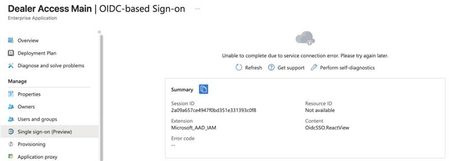
Hi everyone, Our client is using their Work force tenant accounts to manage the External ID tenant. The accounts are initially created as External Guests on the External tenant and then converted to External Members. However, they encounter the following error when attempting to modify SSO for some applications: When we convert the admin account back to a guest account, it works. This issue doesn't occur with all applications, only some of them. Additionally, we have a test tenant where we cannot reproduce the issue. Do you have any idea why this is happening? Also, is it possible to open support tickets for External ID? Under the "New support request" option, I can only see options for Billing and Subscription management. Thanks a lot, Dario102Views0likes0Comments











Events
Recent Blogs
- Five signs your organization has outgrown Active Directory, and four practical steps to reduce dependency and modernize identity.Aug 13, 20269.8KViews2likes1Comment
- Discover the latest Microsoft Entra Internet Access and Private Access innovations to secure AI interactions, local agents, web traffic, and private applications.Aug 12, 20263.4KViews1like0Comments