azure active directory (aad)
1571 Topics
Single group for TEAM AND Lighthouse (Security Group + 'Unified' group)
Trying to simplify our groups, since we are a 20+ year old firm, the variety of groups we have has bloated over the years. I'm trying to clean these up, but I've met a hitch. Our Service Desk dept has their own Internal team. Aka a 365 Group. Aka a 'unified' group. We use Lighthouse, which only takes Security Groups - it can't take the above 365 Group. First instinct is to create a Security group that can be used for both. But I can't seem to find a way to do this. The 365 Group is unable to nest a Security group. The Security group is unable to nest a 365 Group. So there's no single source of truth. I thought I could use Dynamic Grouping as a workaround - using the MemberOf property. But according to this, this Preview Feature is being abandoned and disabled. Anyone have workarounds/advice? Here's the output I get, when trying to do this via EOM PS C:\Users\lmtpo\Downloads> New-MgGroupMember -GroupID (team) -DirectoryObjectId (sec) New-MgGroupMember : Non-Unified Security Groups cannot be added to Unified Groups. paramName: Members, paramValue... PS C:\Users\lmtpo\Downloads> New-MgGroupMember -GroupID (sec) -DirectoryObjectId (team) New-MgGroupMember : A Unified Group cannot be added as a member of a Distribution List or Security Group or Elevated Group. paramName: Members, paramValue: , objectType: Microsoft.Online.DirectoryServices.Group43Views0likes0Comments
Locked account due to many attempts from malicious IP
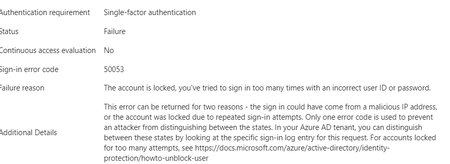
Hello experts, today, a user contacted me that she cannot access M365 and asked to unlock her account. 1st thing I've checked were her log-ins in MS Entra and there I've found many and many attempts to log in from different countries - like India, Russia, Demark etc... that happened with just few seconds delay.... As a result, the user's account got blocked. Had to deal 1st time with this kind of issue.... See pictures below. Now, it looks like there was another user under the same attack few days ago (who is on vacation so doesnt know he is blocked for now :)).... Anyway, wondering - how I can prevent these types of attack? We have MFA (app auth) configured so even if the password got broken, MFA should prevent the attacker to sign in. I was going to create a conditional access but there are countries like Italy, Denmark (and other EU ones) etc that I don't want to block. We have M365 E3 with M365 E5 Security subscriptions assigned to all users. Would be grateful for any advise.3KViews0likes4Comments
Any good book for practical recipes for Azure Entra ID
I tried two books on Azure Active Directory and Microsoft Identity platform to try to build applications. But I will be honest, the books are very dry when explaining the concepts (Application Object, Service Principal, Registered App, Enterprise App...), and I try to understand it but find it difficult. Are there books that are practical in their approach by doing hands-on approach, and then while building hands-on, explain the concepts. Like the recipes books in IT. Are there books like that forSolved4.9KViews1like2Comments
Need Microsoft support to resolve a historical tenant association with a domain I recently acquired
Hello, I recently became the legitimate and independent registrant of a domain that had previously been owned or used by an unrelated organization. I have no affiliation whatsoever with the previous domain holder or that organization. I have now received a Microsoft Power Platform notification at an email address under my domain concerning a Default environment belonging to the previous organization. The notification includes a Tenant ID and Environment ID, and the environment name corresponds to that organization. I do not own, administer, or have access to this tenant or Power Platform environment, and I am not seeking access to or control over it. My main concern is that there may still be a historical association between my domain or its email addresses and the previous organization's Microsoft tenant or related services. I would like Microsoft to investigate this and, where necessary, properly separate my domain and its email addresses from any unrelated historical Microsoft accounts, tenants, directories, or services. Most importantly, I want to ensure that this historical association will not adversely affect my ability in the future to use my domain and its business email addresses to create, verify, and use my own Microsoft 365, Microsoft Entra, Power Platform, or other Microsoft business services. At present, I do not have a Microsoft business account, Microsoft 365 tenant, or Power Platform tenant of my own. As a result, I appear to be unable to use some of the normal business support channels that require an existing tenant or administrator account. Could someone please advise me on the appropriate way to get this matter reviewed by Microsoft Support? If a Microsoft employee or official support representative can assist or direct me to the appropriate private support channel, I would greatly appreciate it. For privacy and security reasons, I have intentionally not posted the actual domain name, email address, Tenant ID, or Environment ID publicly. I am happy to provide all of the relevant details privately to an authorized Microsoft support representative if required. Thank you for any guidance.337Views0likes1CommentDisabled account OU
Hello We have a scenario for which I need help User account was disabled and was in Disabled account OU when she joined back it was enabled and moved to proper user account OU.This is synched from onpremise in O365 The earlier mailbox is converted from user mailbox to a cloud mailbox.This is a incloud object How do we proceed here We want the shared mailbox to be linked to the user account which was disabled earlier. Regards,322Views0likes2Comments
Best practices: Open OneDrive/SharePoint sharing but restrict Teams guest access by domain
Hi all, Since SharePoint Online and OneDrive moved fully to Microsoft Entra B2B for external sharing, we've run into a policy conflict and would like to hear how others are handling it. Our requirements Enable OneDrive and SharePoint file sharing with external users, regardless of their email domain. Restrict Microsoft Teams guest access to a predefined list of approved partner domains. Continue allowing Teams external access (federated chat and meetings) for all domains. The problem: Teams guests, SharePoint guests, and OneDrive guests are now governed by the same Microsoft Entra B2B invitation framework and the single Collaboration restrictions allow/deny list under: External Identities → External collaboration settings As a result, restricting guest invitations by domain also restricts OneDrive and SharePoint sharing for domains not on the allowlist. According to Microsoft's response in the following Q&A, this behavior is currently by design: https://learn.microsoft.com/en-us/answers/questions/5954975/onedrive-external-sharing-no-longer-working-with-a Questions to the community Has anyone implemented a solution where OneDrive/SharePoint sharing remains open to all domains while Teams guest access is restricted to approved domains only? Are there recommended approaches using Entitlement Management, Access Packages, Connected Organizations, or other Entra capabilities? Is there any roadmap item for workload-specific collaboration restrictions (e.g., separate policies for Teams guest invitations and SharePoint/OneDrive sharing)? Any real-world experience or best practices would be greatly appreciated. Thanks, Bejhan538Views0likes6CommentsPHS staged rollout works for existing users but not new synced users
We are troubleshooting an Entra ID PHS staged rollout issue with a federated domain using a third-party WS-Fed IdP. The intended behavior is that normal federated users redirect to the IdP, while users in the PHS staged rollout group receive the Microsoft/Entra password prompt instead. Existing users in the staged rollout group continue to work correctly. They enter their UPN and receive the Microsoft password prompt. One known-good test user is not provisioned in the third-party IdP and still signs in successfully through the Entra password prompt, so the working path does not require the user to exist in the IdP. The issue is only with newly created AD-synced users. Newly synced users in the same staged rollout group are still being routed to the federated IdP at HRD instead of receiving the Entra password prompt. We’ve verified the staged rollout policy and group membership from Graph, confirmed the affected users are properly AD-synced with clean immutableID/sourceAnchor, and confirmed PHS is working. Federation metadata and HRD policies also look clean. Seamless SSO/AZUREADSSOACC was checked and remediated, but the behavior did not change. For failed attempts, there is no Entra sign-in log entry, including tenant-wide interactive and non-interactive logs. However, the federated IdP logs show a WS-Fed inbound request from login.microsoftonline.com for the affected user. That makes it look like Entra HRD is routing the user to federation before sign-in logging or token issuance. The issue started around an Entra Connect AD connector/DC-path change. We have since reverted the connector to the previous known-good configuration. After reverting, we created a clean-room test user with the correct UPN set before first sync, confirmed sync/PHS/sourceAnchor, added the user directly to the staged rollout group, and waited 60+ minutes. The clean-room user still redirected to the federated IdP instead of getting the Entra password prompt. So the current behavior is that established staged-rollout users still get the Entra password prompt, but newly created synced staged-rollout users are sent to the federated IdP by HRD. Has anyone seen staged rollout get into this state, where existing users work but new synced users remain on the federated HRD path despite valid rollout policy, group membership, synced password hash, and clean immutableID/sourceAnchor? Is there any known backend cache/state reset or escalation path for HRD/staged rollout routing?816Views1like5Comments
Am trying to create group with dynamic user membership using attribute "Employee Type"
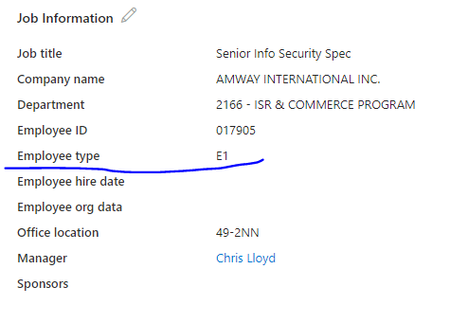
Am trying to create group with dynamic user membership using attribute "Employee Type", tried to get details from Extension attribute but didn't find any option, Did anyone tried this and able to do ? I found a posting where it said to create a custom attribute that would be populated by the 'employee Type' field. That just seems a little strange to me to to create an attribute to be exactly like the one that is already there.1.8KViews3likes6Comments
Can External ID (CIAM) federate to an Azure AD/Entra ID tenant using SAML?
What I'm trying to achieve I'm setting up SAML federation FROM my External ID tenant (CIAM) TO a partner's Entra ID tenant (regular organizational tenant) for a hybrid CIAM/B2B setup where: Business users authenticate via their corporate accounts (OIDC or SAML) Individual customers use username/password or social providers (OIDC) Tenant details / Terminology: CIAM tenant: External ID tenant for customer-facing applications IdP tenant: Example Partner's organizational Entra ID tenant with business accounts Custom domain: mycustomdomain.com (example domain for the IdP tenant) Configuration steps taken Step 1: IdP Tenant (Entra ID) - Created SAML App Set up Enterprise App with SAML SSO Entity ID: https://login.microsoftonline.com/<CIAM_TENANT_ID>/ Reply URL: https://<CIAM_TENANT_ID>.ciamlogin.com/login.srf NameID: Persistent format Claim mapping: emailaddress → user.mail Step 2: CIAM Tenant (External ID) - Added SAML IdP (Initially imported from the SAML metadata URL from the above setup) Federating domain: mycustomdomain.com Issuer URI: https://sts.windows.net/<IDP_TENANT_ID>/ Passive endpoint: https://login.microsoftonline.com/mycustomdomain.com/saml2 DNS TXT record added: DirectFedAuthUrl=https://login.microsoftonline.com/mycustomdomain.com/saml2 Step 3: Attached to User Flow Added SAML IdP to user flow under "Other identity providers" Saved configuration and waited for propagation The problem It doesn't work. When testing via "Run user flow": No SAML button appears (should display "Sign in with mycustomdomain") Entering email address removed for privacy reasons doesn't trigger federation The SAML provider appears configured but never shows up in the actual flow Also tried using the tenant GUID in the passive endpoint instead of the domain - same result My question Is SAML federation from External ID to regular Entra ID tenants actually possible? I know OIDC federation to Microsoft tenants is (currently, august 2025) explicitly blocked (microsoftonline.com domains are rejected). Is SAML similarly restricted? The portal lets me configure everything without throwing any errors, but it never actually works. Am I missing something in my configuration? The documentation for this use case is limited and I've had to piece together the setup from various sources. Or is this a fundamental limitation where External ID simply can't federate to ANY Microsoft tenant regardless of the protocol used?778Views1like4CommentsOrphaned TPM-bound Entra Workplace Join device — no tenant access, backend deletion required
I have a personal Windows device that remains stuck in a TPM-protected Workplace Join to a former Microsoft Entra ID tenant. I no longer have tenant access and am not an admin. Local remediation completed: - dsregcmd /leave executed as SYSTEM - All MS-Organization / AAD certificates removed - Device still reports WorkplaceJoined : YES Azure Support ticket creation fails with: AADSTS160021 – interaction_required Application requested a user session which does not exist. Tenant inaccessible / user not present in tenant. This is an orphaned Entra ID device object. Requesting guidance or escalation for backend deletion. Tenant ID: 99f9b903-8447-4711-a2df-c5bd1ad1adf7 Device ID: f47987f4-a20b-4c34-a5f7-40ab0f593c6c391Views0likes1Comment