azure
122 TopicsEntra External ID email OTP send event requestType always set to "signIn" regardless of user action
Hi, In a recent workload, I'm assisting a client with implementation of Entra External ID for identity management and app authentication, which includes sending OTP codes with customized email templates. To accomplish this, a custom authentication extension has been created that authorizes the request and then communicates with an email service via an event-driven, loosely coupled architecture. While implementing and testing this feature together with the client, we noticed that it seems like the different modes or states in the user flows are not reflected in the requestType property in the request payload posted to the OnOtpSend auth extension configured. E.g., if a user tries to sign in but has forgotten their password and navigates to the password reset view and requests to send the OTP code to their email address to reset the password, the following payload is sent to the auth extension endpoint (the original payload below was logged with Application Insights, with identifiers below then redacted and formatted, otherwise intact): { "type": "microsoft.graph.authenticationEvent.emailOtpSend", "source": "/tenants/aaaaaaaa-bbbb-cccc-dddd-eeeeeeeeeeee/applications/11111111-2222-3333-4444-555555555555", "data": { "@odata.type": "microsoft.graph.onOtpSendCalloutData", "otpContext": { "identifier": "email address removed for privacy reasons", "oneTimeCode": "<REDACTED>" }, "tenantId": "aaaaaaaa-bbbb-cccc-dddd-eeeeeeeeeeee", "authenticationEventListenerId": "22222222-3333-4444-5555-666666666666", "customAuthenticationExtensionId": "33333333-4444-5555-6666-777777777777", "authenticationContext": { "correlationId": "44444444-5555-6666-7777-888888888888", "client": { "ip": "192.0.2.10", "locale": "en-gb", "market": "en-gb" }, "protocol": "UNDEFINED", "requestType": "signIn", "clientServicePrincipal": { "id": "55555555-6666-7777-8888-999999999999", "appId": "11111111-2222-3333-4444-555555555555", "appDisplayName": "Example Web App", "displayName": "Example Web App" }, "resourceServicePrincipal": { "id": "55555555-6666-7777-8888-999999999999", "appId": "11111111-2222-3333-4444-555555555555", "appDisplayName": "<client-app-name>-Web", "displayName": "<client-app-name>-Web" } } } } The above payload was captured using browser-based authentication (native auth is not used), with the below parameters passed (identifiers, tenant name etc. redacted, otherwise intact): https://example.ciamlogin.com/ aaaaaaaa-bbbb-cccc-dddd-eeeeeeeeeeee/oauth2/v2.0/authorize ?response_type=code &client_id=11111111-2222-3333-4444-555555555555 &redirect_uri=https%3A%2F%2Fexample.com%2Fsignin%2Fcallback%2F &scope=openid+profile+email &state=<REDACTED> &prompt=login &ui_locales=de-DE &mkt=de-DE &nonce=<REDACTED> &code_challenge=<REDACTED> &code_challenge_method=S256 Following having navigated to the authorize endpoint above, the issue can be reproduced by entering an email address or an existing user identity, then on the password entry view, press the “Forgot Password?” link under the password input field, and then press the button/element “Email code to <user-email>”. I have looked at using the requestType in the email OTP send event payload to determine which email template and email content are used as per client requirement, but noted that the requestType seemingly always contains the value "signIn" even if the OTP code was sent as part of a password reset operation. At first glance, it would seem like this property indicates which step in the UI the user is currently at, even though I’m not certain whether that is what the property is actually meant to represent or indicate or not. However, for the above scenario and requirement, some identifier or value indicating the action would be needed in order to tailor the email content. The alternatives to having a reliable context property in the payload to indicate user action would require more or less significant additional components and infrastructure, thus increasing the complexity of the solution. Based on its name and values, it would seem like the requestType property appears be a good candidate to carry a user action context identifier. A suitable alternative solution has been adopted currently, using a generalized OTP template, which works well, but the requirement that it would be preferable to tailor the content based on user context and intent, e.g., whether the request was triggered as part of a password reset action or for another authentication scenario, is still present, ideally via the event payload sent from Entra External ID to the auth extension. If there would be any further/follow-up questions on the above, e.g., to clarify the requirement, or further explain the reproduction steps and behaviour observed, or anything else, please tell, and I'll ensure to get back as soon as possible. Also, would someone have some input on potential other/additional ways to make the requestType include a context identifier, that would be much appreciated as well, thanks! Regards Kristoffer130Views0likes0CommentsUnexpected button behaviour when using the prompt=create parameter in Entra External ID user flows
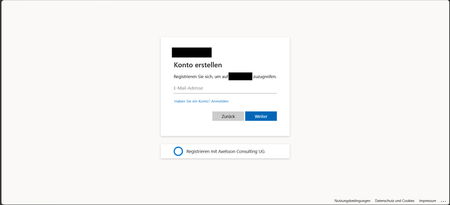
Hi, In a recent workload, I'm assisting a client to implement Entra External ID for streamlined authorization as well as single sign-on for associated registered external facing third-party applications for external customer users through their Entra External ID identity, as well as assisting the client with auth branding and other UI customizations, and preparing Entra ID federation custom OIDC providers and configuration for enabling SSO with organizational internal and remote work- and school accounts etc. The sign-up / create account experience is of importance to the client, as a rather substantial amount of users are expected to sign-up via self-service sign-up following having received an invite via another app. To ensure that the user lands on the create account view, in order to minimize the number of steps and actions the users need to take to get there, the prompt=create parameter is used to pre-select the sign-up/register experience in the user flows UI. Having stress-tested the user flows and experience recently, we noticed that in a specific scenario, some UI elements behave in a manner that could be described as unexpected, and even though a workaround has mitigated it to some extent, the behaviour of some elements could probably be improved a bit to ensure an even more consistent user experience in the built-in user flows. Specifically, if the user flow is invoked with the prompt parameter set, the user lands on the create account screen as expected, however, unless custom CSS modification is applied, the Back button that would typically be there, as if having arrived there from the initial sign-in screen where it’s also displayed. If pressing the Back button displayed on the Create account view when having navigated there with the prompt=create set in the /authorize request, pressing the button seemingly doesn’t have any impact or result in any action, one can click it, but nothing happens. I'd suspect it's perhaps a "remnant" from if the flow is invoked without any prompt parameter set, or with prompt=login set, but when prompt=create is set, there is no state/page history in the UI to navigate back to, as no previous page has been displayed or rendered yet and added to the history, and the Back button click thus doesn’t have any effect. In general, I think buttons that don't have any tangible action should not be displayed, also, if prompt=login is set, the Back button isn't shown then either on the very initial user flow view shown then, so it would seem the built-in user flows actually already follow such approach in fact, but not when the prompt=create has been set, thus causing some inconsistency in the UI that users could notice unless custom CSS styling is applied. The expected behaviour for our business case would be that if prompt=create is set, then, similar to the prompt=login, no Back button should be displayed, or, if shown, it should result in some navigation (perhaps something like javascript.go(-1), but that could/would be dependent on from where the user arrived, e.g., going back a step in the browser history won't work if the user clicked a link from an invite email ) and preferably not be non-actionable. Furthermore, on the topic of the Back button and its behaviour when the prompt=create parameter is set, there is another case at which we observed some unexpected button behaviour as well, that could probably benefit from some attention. At a specific second scenario, it seems that the Continue button is displayed without providing any action, and when clicking the Back button then, clicking it seemingly resets the "create account", state likely set by the prompt=create initially, and instead switches the flow back to the sign-in state, which can at least affect the display text of some subsequent buttons shown in later steps in the UI. The user arrives at a built-in Entra External ID user flow /authorize endpoint, with the prompt=create query parameter set The user triggers the OTP challenge by entering an email address to verify the email address The user receives the OTP code but enters it incorrectly, i.e., doesn't copy the full code length of eight digits, and instead enters/pastes six of the eight code digits. The UI then shows an error message that the code could not be used/validated, and the email address field is displayed again with the email address that was used for the verification attempt prefilled. If the user clicks the Continue button at this stage, nothing happens. If the user clicks the Back button instead (given that it’s not hidden), it shows the same view one more time, with the Back and Continue buttons at the bottom. However, if the user clicks the Continue button this time, it works and a new code is sent. On the next screen, where the newly sent code can be entered, instead of a button named "Continue", it will now instead show a button with the text "Sign-in" (it would seem like the create account state has gotten lost somewhere along the way at this point, perhaps when the back button in the step 5 above was pressed). If one omits the prompt=create parameter, or when using prompt=login, things seem to work fine, the above occurs when the prompt=create is set. The reason why is the prompt=create is used is due to a business requirement to try to minimize the steps, especially in conjunction with the registration/sign-up, as far a possible when signing up. We have opted for the built-in user flows, not the self-hosted native authentication UI pages, for this project, and then as I understand it, it is the prompt=create parameter that can/should be used to enable the user to land directly on the registration page without having to navigate there manually via the sign-up link, that is otherwise shown on the initial sign-in page. It would thus be great if the prompt=create parameter could have some attention (or perhaps if a dedicated sign-up user flow type could be added potentially, even though that would perhaps warrant some update to the user flow app linking as well, as my understanding is that one user flow can be linked to one app registration at a time currently) to avoid that some buttons become unresponsive when the parameter is used, or falls back to sign-in, to improve the built-in user flows further, as the prompt=create fulfils the business requirement well otherwise. If there would be any further/follow-up questions on the above, e.g., to clarify the requirement, or further explain the reproduction steps and behaviour observed, or anything else, please tell, and I'll ensure to get back as soon as possible. Also, would someone have some input on potential other/additional ways to pre-select the create account/sign-up experience, that would naturally be much appreciated as well, thanks! Regards Kristoffer275Views0likes0Comments
Introducing the Entra Helpdesk Portal: A Zero-Trust, Dockerized ITSM Interface for Tier 1 Support
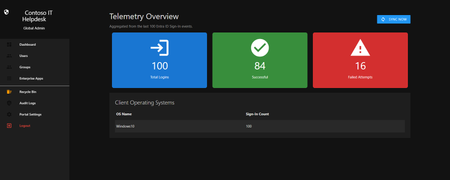
Hello everyone, If you manage identity in Microsoft Entra ID at an enterprise scale, you know the struggle: delegating day-to-day operational tasks (like password resets, session revocations, and MFA management) to Tier 1 and Tier 2 support staff is inherently risky. The native Azure/Entra portal is incredibly powerful, but it’s complex and lacks mandatory ITSM enforcement. Giving a helpdesk technician the "Helpdesk Administrator" role grants them access to a portal where a single misclick can cause a major headache. To solve this, I’ve developed the Entra Helpdesk Portal (Community Edition)—an open-source, containerized application designed to act as an isolated "airlock" between your support team and your Entra ID tenant. Why This Adds Value to Your Tenant Instead of having technicians log into the Azure portal, they log into this clean, Material Design web interface. It leverages a backend Service Principal (using MSAL and the Graph API) to execute commands on their behalf. Strict Zero Trust: Logging in via Microsoft SSO isn’t enough. The app intercepts the token and checks the user’s UPN against a hardcoded ALLOWED_ADMINS whitelist in your Docker environment file. Mandatory ITSM Ticketing: You cannot enforce ticketing in the native Azure Portal. In this app, every write action prompts a modal requiring a valid ticket number (e.g., INC-123456). Local Audit Logging: All actions, along with the actor, timestamp, and ticket number, are written to an immutable local SQLite database (audit.db) inside the container volume. Performance: Heavy Graph API reads are cached in-memory with a Time-To-Live (TTL) and smart invalidation. Searching for users or loading Enterprise Apps takes milliseconds. What Can It Do? Identity Lifecycle: Create users, auto-generate secure 16-character passwords, revoke sign-in sessions, reset passwords, and delete specific MFA methods to force re-registration. Diagnostics: View a user's last 5 sign-in logs, translating Microsoft error codes into plain English. Group Management: Add/remove members to Security and M365 groups. App/SPN Management: Lazy-load raw requiredResourceAccess Graph API payloads to audit app permissions, and instantly rotate client secrets. Universal Restore: Paste the Object ID of any soft-deleted item into the Recycle Bin tab to instantly resurrect it. How Easy Is It to Setup? I wanted this to be universally deployable, so I compiled it as a multi-architecture Docker image (linux/amd64 and linux/arm64). It will run on a massive Windows Server or a simple Raspberry Pi. Setup takes less than 5 minutes: Create an App Registration in Entra ID and grant it the necessary Graph API Application Permissions (e.g., User.ReadWrite.All, AuditLog.Read.All). Create a docker-compose.yml file. Define your feature toggles. You can literally turn off features (like User Deletion) by setting an environment variable to false. version: '3.8' services: helpdesk-portal: image: jahmed22/entra-helpdesk:latest container_name: entra_helpdesk restart: unless-stopped ports: - "8000:8000" environment: # CORE IDENTITY - TENANT_ID=your_tenant_id_here - CLIENT_ID=your_client_id_here - CLIENT_SECRET=your_client_secret_here - BASE_URL=https://entradesk.jahmed.cloud - ALLOWED_ADMINS=email address removed for privacy reasons # CUSTOMIZATION & FEATURE FLAGS - APP_NAME=Entra Help Desk - ENABLE_PASSWORD_RESET=true - ENABLE_MFA_MANAGEMENT=true - ENABLE_USER_DELETION=false - ENABLE_GROUP_MANAGEMENT=true - ENABLE_APP_MANAGEMENT=true volumes: - entra_helpdesk_data:/app/static/uploads - entra_helpdesk_db:/app volumes: entra_helpdesk_data: entra_helpdesk_db: 4.Run docker compose up -d and you are done! I built this to give back to the community and help secure our Tier 1 operations. If you are interested in testing it out in your dev tenants or want to see the full architecture breakdown, you can read the complete documentation on my website here I’d love to hear your thoughts, feedback, or any feature requests you might have!280Views0likes0Comments
Cloud Kerberos Trust with 1 AD and 6 M365 Tenants?
Hi, we would like to enable Cloud Kerberos Trust on hybrid joined devices ( via Entra connect sync) In our local AD wie have 6 OUs and users and devices from each OU have a seperate SCP to differnt M365 Tenants. I found this Article to configure the Cloud Kerberos Trust . Set-AzureADKerberosServer 1 2 The Set-AzureADKerberosServer PowerShell cmdlet is used to configure a Microsoft Entra (formerly Azure AD) Kerberos server object. This enables seamless Single Sign-On (SSO) for on-premises resources using modern authentication methods like FIDO2 security keys or Windows Hello for Business. Steps to Configure the Kerberos Server 1. Prerequisites Ensure your environment meets the following: Devices must run Windows 10 version 2004 or later. Domain Controllers must run Windows Server 2016 or later. Install the AzureADHybridAuthenticationManagement module: [Net.ServicePointManager]::SecurityProtocol = [Net.ServicePointManager]::SecurityProtocol -bor [Net.SecurityProtocolType]::Tls12 Install-Module -Name AzureADHybridAuthenticationManagement -AllowClobber 2. Create the Kerberos Server Object Run the following PowerShell commands to create and publish the Kerberos server object: Prompt for All Credentials: $domain = $env:USERDNSDOMAIN $cloudCred = Get-Credential -Message 'Enter Azure AD Hybrid Identity Administrator credentials' $domainCred = Get-Credential -Message 'Enter Domain Admin credentials' Set-AzureADKerberosServer -Domain $domain -CloudCredential $cloudCred -DomainCredential $domainCred As I understand the process, a object is created in local AD when running Set-AzureADKerberosServer What happens, if I run the command multiple times, for each OU/Tenant. Does this ovveride the object, or does it create a new objects?Solved600Views0likes3CommentsEntra ID Object Drift – Are We Measuring Tenant Health Correctly?
In many enterprise environments: Secure Score is green. Compliance dashboards look healthy. Yet directory object inconsistency silently accumulates. Stale devices. Hybrid join remnants. Intune orphan records. Over time, this becomes governance debt. In large tenants this often leads to inaccurate compliance reporting and Conditional Access targeting issues. I recently wrote a breakdown of: • Entra ID drift patterns • Hybrid join inconsistencies • Intune orphan objects • Lifecycle-based cleanup architecture Curious how others approach object hygiene at scale. Full article: https://www.modernendpoint.tech/entra-id-cleanup-patterns/?utm_source=techcommunity&utm_medium=social&utm_campaign=entra_cleanup_launch&utm_content=discussion One pattern I keep seeing is duplicate device identities after re-enrollment or Autopilot reset. Curious how others handle lifecycle cleanup in large Entra ID environments.356Views0likes3Comments
Entra Risky Users Custom Role
My customer implemented unified RBAC (Defender Portal) and removed the Entra Security Operator role. They lost the ability to manage Risky Users in Entra. Two options explored by the customer - Protected Identity Administrator role (licensing unclear) or create a custom role with microsoft.directory/identityProtection/riskyUsers/update, which they couldn't find under custom role. Do you know if there are other options to manage Risky Users without using the Security Operator role?360Views0likes4Comments
Dynamic group membership rules stopped working
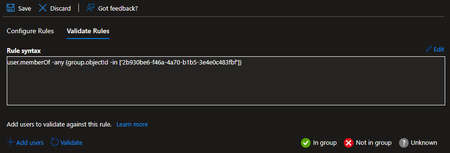
We've been using the following the following dynamic membership rule to check if a user is a member of another group: user.memberOf -any (group.objectId -in ['2b930be6-f46a-4a70-b1b5-3e4e0c483fbf']) The group is an Active Directory group that is represented in Entra with the stated Entra group object Id. The validation fails for every user and looks like this: It seems that all out dynamic groups are affected and stopped working. Have you seen this before? Thanks.1.4KViews0likes6CommentsConditional Access - Block all M365 apps private Mobile Device
Hello, Ive try to block all private mobile phone from accessing all apps from m365, but it wont work. Im testing it at the moment with one test.user@ I create a CA rule: Cloud Apps Include: All Cloud Apps Exclude: Microsoft Intune Enrollment Exclude: Microsoft Intune Conditions Device Platforms: Include: Android Include: iOS Include: Windows Phone Filter for Devices: Devices matching the rule: Exclude filtered devices from Policy device.deviceOwnership -eq "Company" Client Apps Include: All 4 points Access Controls Block Access ----------------------- I take a fresh "private" installed mobile android phone. Download the Outlook App and log in with the test.user@ in the outlook app and everything work fine. What im doing wrong? Pls help. PeterSolved560Views0likes5Comments👉 Microsoft Entra in Action: From Conditional Access to Identity Protection
One of the areas I’m most passionate about is identity-driven security. Microsoft Entra makes it possible to apply Zero Trust principles directly at the identity layer. ⚡ Conditional Access – the backbone of modern access policies. 👤 Privileged Identity Management (PIM) – ensuring just-in-time, least privilege for admins. 🛡️ Identity Protection – risk-based policies to stop compromised sign-ins in real time. In my labs, I’ve seen how these features transform security posture without adding friction for users. Coming soon: - Step-by-step breakdown of a risky user detection scenario. - A visual guide to Conditional Access controls for critical apps. Would love to exchange insights with others experimenting in this space — what Entra features are you finding most impactful? #MicrosoftEntra | #ConditionalAccess | #IdentityProtection | #MicrosoftLearn | #PerparimLabs382Views1like4Comments