identity protection
94 Topics
Locked account due to many attempts from malicious IP
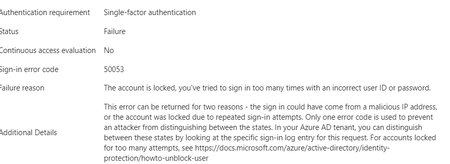
Hello experts, today, a user contacted me that she cannot access M365 and asked to unlock her account. 1st thing I've checked were her log-ins in MS Entra and there I've found many and many attempts to log in from different countries - like India, Russia, Demark etc... that happened with just few seconds delay.... As a result, the user's account got blocked. Had to deal 1st time with this kind of issue.... See pictures below. Now, it looks like there was another user under the same attack few days ago (who is on vacation so doesnt know he is blocked for now :)).... Anyway, wondering - how I can prevent these types of attack? We have MFA (app auth) configured so even if the password got broken, MFA should prevent the attacker to sign in. I was going to create a conditional access but there are countries like Italy, Denmark (and other EU ones) etc that I don't want to block. We have M365 E3 with M365 E5 Security subscriptions assigned to all users. Would be grateful for any advise.2.9KViews0likes4CommentsWarning: PIM disconnects users from Teams Mobile
I have been working with Microsoft Support on this issue for three months. Hopefully I can save others the trouble. Sometime around April 2024, I and my colleagues started seeing regular alerts on our mobile devices saying "Open Teams to continue receiving notifications for <email address>", or "<email address> needs to sign in to see notifications". Just as promised, after this message appears, we do not get notified about messages and Teams calls do not ring on our mobile devices until we open Teams. We eventually determined that these alerts coincided with activating or deactivating PIM roles. Apparently, a change was made to Privileged Identity Management in Microsoft Entra ID around that time whereby users' tokens are invalidated when a role is activated or deactivated. Quoting the Microsoft Support rep: "When a user's role changes (either due to activation or expiration), Skype AAD[?] will revoke existing tokens of that users. Skype AAD will also notify PNH about that token revocation. This is expected behavior and is working as designed. These changes were rolled out in Skype AAD in April/May 2024 which is since when you are facing the issue as well." Anyway, as far as I can tell, this change was not announced or documented anywhere, so hopefully this message will show up in the search results of my fellow admins who are dealing with this.2.8KViews1like5Comments
Can the built-in "No account? Create one" link redirect to a custom sign-up page?
I'm using Microsoft Entra External ID with a built-in sign-in/sign-up user flow. On the Microsoft-hosted sign-in page, the "No account? Create one" link always redirects users to the default Entra sign-up page. I already have a custom registration page and would like this built-in link to redirect to my custom URL instead. Is there any supported way to customize the destination of this link in a built-in user flow? If not, could someone confirm whether this behavior is fixed by design? Thanks!282Views0likes2CommentsRequest to enable preview feature - Face Check with CAP
Dear Microsoft, I am on a business premium plan for my home test tenant. I cannot raise ticket nor do I have an account manager. I know this is in private preview. I would like my tenant to be enabled to test this new Verified ID feature to have "Face Check" in CAP as one of the Grant conditions. tenant id: bc85b508-0107-4472-a49c-fc8cefd4f0d7 Thank you.273Views0likes1CommentRisky sign-ins not showing anything
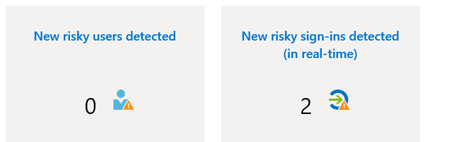
Hi, For some time already, I am not sure why but I cannot see anything in risky sign-ins in Identity Protection (MS Entra). Even when I receive a summary email (Microsoft Entra ID Protection Weekly Digest) mentioning there were risky sinn-ings detected. When I click on the risky signings directly in the email to take me to the report, I see no data there at all... When I modify filters to include all, nothing shows up either. It has been like this for few months already. Before, I could see them with no issues. Has anything changed? Or why I can't see any records?1KViews0likes6Comments
passkeys in the Authenticator app regarding attestation
I have a question about passkeys in the Authenticator app regarding attestation in connection with QR code-based cross-device sign-in. When we register a passkey with attestation enabled in the Authenticator app, it can be used to complete the sign-in process on another device via QR code and Bluetooth Low Energy. According to Microsoft’s documentation, this shouldn’t be possible with attestation enabled, yet it works. What are we misunderstanding here? https://learn.microsoft.com/en-us/entra/identity/authentication/how-to-enable-authenticator-passkey Thanks for your inputs. JohannesSolved469Views2likes4Comments
Introducing the Entra Helpdesk Portal: A Zero-Trust, Dockerized ITSM Interface for Tier 1 Support
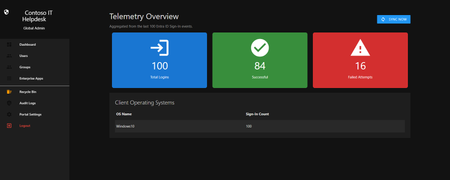
Hello everyone, If you manage identity in Microsoft Entra ID at an enterprise scale, you know the struggle: delegating day-to-day operational tasks (like password resets, session revocations, and MFA management) to Tier 1 and Tier 2 support staff is inherently risky. The native Azure/Entra portal is incredibly powerful, but it’s complex and lacks mandatory ITSM enforcement. Giving a helpdesk technician the "Helpdesk Administrator" role grants them access to a portal where a single misclick can cause a major headache. To solve this, I’ve developed the Entra Helpdesk Portal (Community Edition)—an open-source, containerized application designed to act as an isolated "airlock" between your support team and your Entra ID tenant. Why This Adds Value to Your Tenant Instead of having technicians log into the Azure portal, they log into this clean, Material Design web interface. It leverages a backend Service Principal (using MSAL and the Graph API) to execute commands on their behalf. Strict Zero Trust: Logging in via Microsoft SSO isn’t enough. The app intercepts the token and checks the user’s UPN against a hardcoded ALLOWED_ADMINS whitelist in your Docker environment file. Mandatory ITSM Ticketing: You cannot enforce ticketing in the native Azure Portal. In this app, every write action prompts a modal requiring a valid ticket number (e.g., INC-123456). Local Audit Logging: All actions, along with the actor, timestamp, and ticket number, are written to an immutable local SQLite database (audit.db) inside the container volume. Performance: Heavy Graph API reads are cached in-memory with a Time-To-Live (TTL) and smart invalidation. Searching for users or loading Enterprise Apps takes milliseconds. What Can It Do? Identity Lifecycle: Create users, auto-generate secure 16-character passwords, revoke sign-in sessions, reset passwords, and delete specific MFA methods to force re-registration. Diagnostics: View a user's last 5 sign-in logs, translating Microsoft error codes into plain English. Group Management: Add/remove members to Security and M365 groups. App/SPN Management: Lazy-load raw requiredResourceAccess Graph API payloads to audit app permissions, and instantly rotate client secrets. Universal Restore: Paste the Object ID of any soft-deleted item into the Recycle Bin tab to instantly resurrect it. How Easy Is It to Setup? I wanted this to be universally deployable, so I compiled it as a multi-architecture Docker image (linux/amd64 and linux/arm64). It will run on a massive Windows Server or a simple Raspberry Pi. Setup takes less than 5 minutes: Create an App Registration in Entra ID and grant it the necessary Graph API Application Permissions (e.g., User.ReadWrite.All, AuditLog.Read.All). Create a docker-compose.yml file. Define your feature toggles. You can literally turn off features (like User Deletion) by setting an environment variable to false. version: '3.8' services: helpdesk-portal: image: jahmed22/entra-helpdesk:latest container_name: entra_helpdesk restart: unless-stopped ports: - "8000:8000" environment: # CORE IDENTITY - TENANT_ID=your_tenant_id_here - CLIENT_ID=your_client_id_here - CLIENT_SECRET=your_client_secret_here - BASE_URL=https://entradesk.jahmed.cloud - ALLOWED_ADMINS=email address removed for privacy reasons # CUSTOMIZATION & FEATURE FLAGS - APP_NAME=Entra Help Desk - ENABLE_PASSWORD_RESET=true - ENABLE_MFA_MANAGEMENT=true - ENABLE_USER_DELETION=false - ENABLE_GROUP_MANAGEMENT=true - ENABLE_APP_MANAGEMENT=true volumes: - entra_helpdesk_data:/app/static/uploads - entra_helpdesk_db:/app volumes: entra_helpdesk_data: entra_helpdesk_db: 4.Run docker compose up -d and you are done! I built this to give back to the community and help secure our Tier 1 operations. If you are interested in testing it out in your dev tenants or want to see the full architecture breakdown, you can read the complete documentation on my website here I’d love to hear your thoughts, feedback, or any feature requests you might have!250Views0likes0CommentsEvolving identity security: How the Conditional Access Optimization Agent helps you adapt
Organizations are expanding Zero Trust across more users, applications, and now a growing population of AI agent identities, making it even more challenging to maintain visibility and control at scale. As environments grow more complex and change daily, static best-practice approaches can’t keep up. Security teams are left trying to reason across dozens of access policies, shifting conditions, and evolving risks, often without clear visibility into where gaps exist. That’s exactly what we’re hearing from customers. “The recommendations are great, but they don’t always match how our organization works.” With this latest set of enhancements, the Conditional Access Optimization Agent moves beyond static guidance to continuous, context-aware identity posture optimization. The agent now understands your organization’s business context, surfaces gaps that manual reviews miss, helps you act on insights safely, and proves the impact of your improvements—all as part of a new operating model for identity security. Here’s a quick look at what’s new in the Conditional Access Optimization Agent, now in public preview: Context-aware recommendations tailored to your environment. Continuous deep gap analysis to identify persistent or emerging policy gaps. Automated least-privilege enforcement to reduce unnecessary permissions. Enhanced phased rollout for gradual, controlled deployment. Passkey deployment campaigns that streamline phishing-resistant authentication rollout. Zero Trust posture reporting that helps demonstrate measurable improvements. These new capabilities are designed to work together as part of a continuous operating model for identity security. To make this concrete, let’s walk through how the agent works in practice across four key steps – from tailoring recommendations to your environment, to identifying gaps, safely deploying changes, and measurable impact. This is a view of the agent overview dashboard, showing analyzed coverage, identified gaps, and recommended actions to strengthen your access policies. Step 1: Make recommendations match your reality Every organization runs Conditional Access a little differently. Naming conventions, policy design patterns, and exception processes – these all vary across environments. Until now, the agent's recommendations were based on industry and Microsoft best practices, sign-in data, and your Conditional Access policies. However, guidance needs to reflect how your organizations actually operate. Context-aware policy recommendations – teach the agent your standards With context-aware policy recommendations, you can upload internal documentation directly to the agent. Think about the guidance your team already relies on, such as documents that outline authentication strength requirements, device compliance baselines, and internal or external policy standards. These often live as PDFs, wiki pages, or long policy docs that admins manually cross-reference during periodic reviews. The agent securely uses that context to tailor recommendations for your organization, so they align with how your team designs and manages Conditional Access. For example, the Australian government publishes Conditional Access guidance for organizations operating in regulated environments. The agent is able to reason over this guidance and produce recommendations aligned to Australian compliance standards. In the agent’s settings page, you can upload organization-specific policies and guidance so the agent can tailor recommendations to your environment Step 2: Surface gaps humans can’t easily see As environments grow more complex, Conditional Access policies become increasingly difficult to reason over. Organizations often manage dozens, or even hundreds, of policies across user groups, applications, authentication strengths, and device requirements, making it hard to fully understand how they interact. Continuous deep gap analysis Enterprise customers average 83 Conditional Access policies. The number of possible interactions between those policies – layers, overlaps, and coverage gaps – is challenging to reason over. Manual review typically focuses on recently changed policies. But some of the most critical gaps have been there all along. They are persistent configuration issues that have existed for years. The agent evaluates how policies interact with one another, understands how authentication requirements are enforced across the policies, and identifies gaps where coverage falls short. This means it can detect: newly introduced gaps caused by policy changes or configuration drift persistent structural gaps cause by policy overlap, constantly evolving exceptions, and more Instead of reviewing policies one by one, the agent evaluates the entire access control system as a whole. The agent identifies uncovered users and policy gaps by analyzing how Conditional Access policies interact across your environment. Zero Trust least-privileged enforcement for agent identities Nowadays, access is no longer just about people. Gartner stated that by 2029, most secure access requests will come from non-human identities—up from less than 5% today. As AI agents become a rapidly growing part of the workforce, they also introduce new risks. Many of these identities can be over-privileged, making them attractive targets for attackers! The Conditional Access Optimization Agent identifies agent identities with excessive or unused permissions and recommends least-privilege adjustments. This extends continuous Zero Trust enforcement beyond workforce identities to the fastest-growing population in your environment. Step 3: Turn insight into action without breaking things Finding gaps is important. Fixing them safely is where the real operational challenge begins. We all know the risk of making access policy changes without understanding their real-world impact. A single misconfigured policy can lock out users or disrupt critical applications. These enhancements help your teams move from insight to execution with confidence. Phased rollout for any Conditional Access policy With our updated Phased Rollout capability, you can now deploy any Conditional Access policy gradually, not only agent-recommended ones like in our previous release. For each rollout, the agent proposes low-impact phases, monitors real user impact at every stage, and intelligently suggests progression or roll back so you can easily deploy policies while minimizing end-user impact. This means your team no longer needs to manually move policies from report only to enabled. The agent handles that progression for you. This allows your team to strengthen access protections in a way that works for your business, without widespread lockouts, helpdesk spikes, or disruption to critical workflows. The agent creates a phased rollout plan, allowing policies to be deployed gradually while monitoring user impact and minimizing disruption. Passkey deployment campaigns – structured adoption of phishing-resistant authentication Phishing-resistant authentication is one of the most important steps organizations can take to strengthen identity security – and passkeys deliver both security and usability. The challenge isn't whether to adopt passkeys, but how to roll them out without creating operational friction. Microsoft data shows consumer users are 3× more successful signing in with passkeys compared to legacy authentication methods. That's where the agent's passkey campaign experience comes in, helping you run structured adoption campaigns across your organization. Start with your highest-impact users such as administrators, executives, or employees most targeted by phishing. The agent tracks registration progress, identifies users that haven’t enrolled yet, communicates with them via teams, and helps you expand adoption wave by wave. No more ad hoc enforcement or spreadsheet-driven tracking across teams. The agent guides passkey adoption with structured campaigns, targeting users, tracking progress, and expanding rollout in stages. Step 4: Prove progress and communicate impact Closing gaps is only just a piece of the whole story. Security leaders increasingly need to demonstrate measurable progress, to both internal stakeholders and your executive leadership. The built-in reporting dashboard provides a clear summary of posture improvements driven by you and the agent. You can track: Exactly how many Conditional Access policy gaps the agent has discovered Users, Apps, and Agent IDs you have improved policy coverage for Remaining users, apps, and agent IDs requiring additional coverage This makes it easier to demonstrate the value of your Zero Trust investments and communicate progress to your leadership. The reporting dashboard tracks Conditional Access posture improvements, showing gaps closed, coverage gained, and remaining areas to address. The new operating model for identity security These enhancements aren't incremental improvements to a recommendation engine. They represent a shift in how identity security operations work. Moving from static rule management to continuous, context-aware optimization leveraging the power of AI. Identity security is no longer a periodic audit exercise. It becomes a continuous operational capability - helping you secure both human and non-human identities across authentication, access, and risk. Get started today If you have Microsoft 365 E5, the Conditional Access Optimization Agent will become available through a phased rollout. Once available in your tenant, you can enable it directly in the Microsoft Entra admin center and start using it right away. We are continuing to expand these capabilities and will evolve the agent based on your feedback. Enable the Conditional Access Optimization Agent → Security Copilot agents - Microsoft Entra admin center Swaroop Krishnamurthy Principal Product Manager, Microsoft Entra Swaroop Krishnamurthy | LinkedIn Additional resources Microsoft Entra Conditional Access optimization agent | Microsoft Learn Conditional Access Optimization Agent knowledge base (Preview) | Microsoft Learn Conditional Access Optimization Agent phased rollout | Microsoft Learn Learn more about Microsoft Entra Prevent identity attacks, ensure least privilege access, unify access controls, and improve the experience for users with comprehensive identity and network access solutions across on-premises and clouds. Microsoft Entra News and Insights | Microsoft Security Blog Microsoft Entra blog | Tech Community Microsoft Entra documentation | Microsoft Learn Microsoft Entra discussions | Microsoft Community5KViews0likes0Comments