Recent Discussions

Outlook Desktop users continually prompted for credentials On-Prem Exchange SE
Battling ongoing issues with users being continually prompted for password using Outlook 2024 LTSC with on-prem Exchange 2019 SE. Removed Windows credentials, turned off cache mode, removed shared calendar(s), outlook connection status seems fine. Only (temp) workaround seems to be removing mail profile and recreating it. All other network resources on domain are fine. Any input appreciated. Thanks21Views0likes0CommentsReporting Recent Distribution List Changes
A recent discussion about reporting changes to Microsoft 365 groups provoked the question about how to report distribution list changes. The answer is that the same structure can be taken in a PowerShell script to fetch and report data, including the audit records containing the information about the changes, but the actual code is very different. Distribution lists Exchange Online objects and not Entra ID groups… https://office365itpros.com/2026/06/02/distribution-list-changes/48Views0likes0CommentsHVE for Microsoft 365: When to Use It, When Not To, and Who Should Be Allowed to Send at Scale
Microsoft recently announced the General Availability of High Volume Email for Microsoft 365, also known as HVE, in Exchange Online. This is an important and long-awaited capability for organizations that need to send large volumes of internal email from applications, devices, or line-of-business systems without using regular user mailboxes as bulk-sending engines. But HVE should not be misunderstood. It does not mean that every mailbox in Exchange Online should now be used for mass email. It does not mean Exchange Online has become a general-purpose marketing platform. And it does not remove the need for proper outbound email governance. Why HVE Matters For years, many organizations have used regular Exchange Online mailboxes, shared mailboxes, or service accounts to send automated messages from applications, scanners, monitoring platforms, ticketing platforms, and custom business applications. That approach creates several problems. Standard mailboxes are designed for human and business communication, not for sustained high-volume automated traffic. Exchange Online has recipient limits, message rate limits, outbound spam protections, and tenant-level controls to protect the service and reduce abuse. HVE introduces a more appropriate model for specific high-volume scenarios. Instead of using a normal mailbox for automated traffic, organizations can create dedicated HVE accounts and use specific SMTP endpoints, admin controls, reporting, and governance for approved high-volume internal messaging scenarios. What HVE Is Designed For HVE is designed for automated, operational, and transactional messaging at scale, primarily for internal recipients within the tenant. Examples include: Internal application notifications. Line-of-business system messages. Device-generated messages. Operational alerts. Security advisories. Internal workflow communications. Monitoring platform alerts. IT service notifications. Large-scale internal announcements generated by systems. This is especially relevant when the organization needs to send messages at scale but still wants to keep the workload within Microsoft 365 governance and Exchange Online mail flow. In practical terms, HVE is useful when the sender is not a human user, but a controlled business system. What HVE Is Not HVE is not a replacement for marketing platforms. HVE is not a general-purpose internet bulk email engine. HVE is not a way to bypass Exchange Online sending limits for external campaigns. HVE is not the correct platform for newsletters, promotional campaigns, large-scale customer communication, or high-volume external transactional email. For external transactional, marketing, or customer-facing bulk email, organizations should evaluate platforms designed for that purpose, such as Azure Communication Services Email, SendGrid, Amazon SES, Mailchimp, Brevo, or another specialized delivery platform. When to Use HVE Use HVE when the workload matches these characteristics: The sender is an application, device, service, or business system. The recipients are primarily internal users in the Microsoft 365 tenant. The volume is higher than what should be sent from a standard mailbox. The workload is operational, automated, or transactional. The organization needs centralized Microsoft 365 administration and reporting. The organization wants to avoid impacting user mailbox sending limits. The use case is approved, documented, monitored, and governed. Good examples: A security platform sending internal security advisories. A monitoring system sending infrastructure alerts to internal teams. A business workflow system sending high-volume approval or status notifications. An IT service platform sending internal notifications. A service management platform sending ticket updates to internal users. A device management system sending operational messages to internal teams. When Not to Use HVE Do not use HVE when the workload is external bulk email. Avoid HVE for: Marketing campaigns. Newsletters to customers. Promotional email. Mass external invitations. External transactional email at scale. Customer invoices and receipts in high volume. OTP or password reset flows for external users. External portal notifications. Any workload where deliverability, bounce handling, reputation management, unsubscribe handling, analytics, or customer consent management are required. Those workloads require a platform designed for external delivery, reputation management, suppression lists, opt-out, tracking, bounce handling, and compliance. Who Should Be Allowed to Use HVE HVE should not be enabled casually for every team or every application. It should be treated as a controlled platform capability. Recommended eligible senders: Approved line-of-business applications. Corporate systems owned by IT, Security, Operations, Facilities, or Service Management teams. Managed devices or services with a clear business purpose. Internal platforms that send operational messages to employees. Applications with documented ownership, authentication, monitoring, and expected volume. Recommended non-eligible senders: Normal users. Shared mailboxes used by humans. Marketing teams sending to external audiences. Unmanaged scripts. Legacy systems with no owner. Applications with unknown volume. Systems that send to external recipients at scale. Any application using HVE just to avoid standard mailbox limits. The core principle is simple: HVE should be enabled for workloads, not for convenience. Governance Model Before enabling HVE, organizations should define a governance model. At minimum, each HVE account should have: A named business owner. A technical owner. A documented purpose. Expected daily and monthly volume. Recipient scope. Authentication method. Monitoring process. Incident response path. Decommissioning criteria. Review frequency. HVE accounts should not become invisible service accounts that nobody owns. They should be treated as privileged communication identities. Security and Authentication HVE supports OAuth authentication, and Microsoft provides guidance for restricting OAuth authentication to specific Microsoft Entra ID applications. This is important because organizations should avoid broad, uncontrolled access. They should restrict which applications can send through each HVE account, monitor usage, and separate workloads by purpose. For example: One HVE account for security alerts. One HVE account for monitoring systems. One HVE account for IT service notifications. One HVE account for internal operational communications. This separation improves visibility, investigation, accountability, and risk containment. HVE vs Standard Exchange Online Mailboxes A standard Exchange Online mailbox should be used for normal human communication. A shared mailbox should be used for collaborative business processes. An HVE account should be used for approved high-volume internal system email. A dedicated external delivery platform should be used for marketing, bulk external communication, or high-volume transactional email. Scenario Recommended Platform Human business email Exchange Online mailbox Team or department mailbox Shared mailbox Low-volume application notifications Standard Exchange Online, if approved High-volume internal system notifications HVE Internal operational alerts at scale HVE Marketing campaigns Marketing platform External transactional email Transactional email service Customer newsletters Marketing automation platform OTP/password reset for external users Dedicated transactional platform External bulk email Dedicated bulk email provider HVE and the Mailbox External Recipient Rate Limit Cancellation Microsoft also announced that the Mailbox External Recipient Rate Limit in Exchange Online was cancelled indefinitely. However, that cancellation should not be interpreted as permission to use Exchange Online for uncontrolled bulk sending. Microsoft was clear that other limits remain unchanged, including the existing Recipient Rate Limit and the Tenant-level External Recipient Rate Limit. That distinction is important. The cancellation of one mailbox-level external recipient limit does not remove the need for proper architecture. Exchange Online still has service limits. Outbound spam controls still apply. Tenant-level protections still matter. And HVE is still not a marketing engine. Practical Architecture Decision Before enabling HVE, ask these questions: Who is sending? Is the sender a human, shared mailbox, application, or device? Who are the recipients? Are they internal or external? What is the expected volume? Is the workload operational, transactional, promotional, or human communication? Does the business need Microsoft 365 mail flow and governance? Does the use case require bounce handling, unsubscribe, tracking, or reputation management? Is the application properly authenticated and monitored? Who owns the account? Who approves the sending pattern? Who responds if the account is abused? If the workload is internal, automated, high-volume, and business-approved, HVE may be the right answer. If the workload is external, promotional, customer-facing, or marketing-driven, use a dedicated email delivery platform. Recommended Enablement Approach Organizations should enable HVE in phases. First, identify existing systems currently using user mailboxes, shared mailboxes, or SMTP AUTH for automated sending. Second, classify each workload as internal, external, operational, transactional, marketing, or human communication. Third, migrate only approved internal high-volume workloads to HVE. Fourth, move external high-volume workloads to dedicated email delivery platforms. Fifth, monitor usage and review HVE accounts regularly. This avoids turning HVE into another uncontrolled sending layer. Conclusion High Volume Email for Microsoft 365 is an important addition to Exchange Online. It gives organizations a native way to support high-volume internal system messaging without using standard mailboxes for automated high-volume traffic. But HVE is not a free pass for bulk email. It is not a marketing platform. It is not a replacement for transactional email services. And it should not be enabled for every mailbox or every application. The right approach is workload classification. Use Exchange Online for corporate communication. Use HVE for approved high-volume internal system messaging. Use dedicated platforms for external bulk, marketing, and transactional email. The question is not only: “Can this system send email through Microsoft 365?” The better architectural question is: “What type of email is this, who is the audience, and what is the correct platform for this workload?” That is where proper email architecture begins.159Views0likes0CommentsOffboarding mailboxes fails with “PropTagToPropertyDefinitionConversionException.”
Hybrid M365 setup, just recently upgraded the on-prem server from Exchange 2019 to Exchange SE. After doing so, migrations from Exchange Online back to Exchange On-prem fail at 10% with the error “PropTagToPropertyDefinitionConversionException.” I opened a case with M365 exchange support, and after some time, they came back to tell me that the Exchange Online portion of the process is not at fault, and that I have to engage the on-premise support team (this seems a little nuts to me, as its all connected and all supported, but I've been in this business for 30 years now, and it's not the first time I've seen buck-passing), and/or ask this community for help. Hence, this post. That error appears exactly two places on the internet, as far as I can tell: a blog (in German) from an Exchange expert doing cross-tenant migrations, and a page at https://west.jcteams.info/bhit11/docs/EX1232513.html that seems to describe my exact issue. Neither had useful suggestions - mostly, they say this: Set-MoveRequest -Identity "<UserPrincipalName>" -SkipMoving FolderRestrictions Resume-MoveRequest -Identity "<UserPrincipalName>" That didn't actually work, but when I tried the same parameters with Set-MigrationBatch, they worked as long as I ignored the message "The SkipMoving parameter is deprecated. Use the MoveOptions parameter instead. If you have any scripts that use the SkipMoving parameter, update them to use the MoveOptions parameter." So what was a simple process is now a more cumbersome workaround. Does anyone have an idea on how to troubleshoot "PropTagToPropertyDefinitionConversionException?"353Views0likes0Comments
Cross Tenant Migration licensing
Hello, I'm planning a native cross-tenant migration for several shared mailboxes that have archives enabled. I’m looking to confirm if it is necessary to temporarily convert these to user mailboxes in the source to ensure the archive data migrates successfully. Also, what specific licenses should I assign to the target objects specifically, do I need to provide an Exchange Online Plan 2 plus the Cross-Tenant User Data Migration add-on for each shared mailbox? If anyone has handled archived shared mailboxes recently, I’d appreciate a quick confirmation on the cleanest licensing and conversion steps. Thank you in advance ! :)104Views0likes0CommentsExchange Online to Deprecate Legacy TLS for POP3 and IMAP4
Microsoft will start to refuse inbound IMAP4 and POP3 client connections using legacy TLS versions (1.0 and 1.1) in July 2026. The move is consistent with other projects to remove obsolete or insecure email protocols from Exchange Online to increase the overall security of the online email service. In this article, we examine some methods to understand the POP3 and IMAP4 usage within a tenant. https://office365itpros.com/2026/04/29/legacy-tls-removal/148Views1like0CommentsPermission activesync on smartphone
Hi everyone, when you grant the permissions in question to manage company email from a smartphone, do these permissions, in addition to Remote Wipe, Password Enforcement and Device Encryption (I remember these as the main ones), somehow give the Exchange administrator access to my personal data? For example, photos, any documents saved on the SD card or on the smartphone itself? Thanks in advanced!22Views0likes0CommentsHigh Volume Email is Generally Available and Ready to Charge
On April 1, Microsoft announced the general availability for the High-Volume Email (HVE) solution together with details of the PAYG charges incurred to send email to internal recipients, which is all that HVE can do. Microsoft will enable HVE charging on June 1, 2026, Before then, you’ll need to create a billing policy and link it to a valid Azure subscription if you want to continue to use HVE. https://office365itpros.com/2026/04/23/hve-ga-charging/425Views0likes0CommentsMicrosoft Limits App Access to Sensitive Message Properties
Microsoft has announced details of a change to app permissions to restrict updates to sensitive message properties (like recipients) without consent for a new advanced mail access permission. If tenants have apps that interact with message properties, including apps developed by third parties, they should check whether the apps are updating sensitive properties. If so, the new permission must be assigned or the apps will stop working. https://office365itpros.com/2026/03/26/sensitive-message-properties-graph/66Views1like0CommentsCan we hide default address lists in Outlook Address Book and show only custom ones?
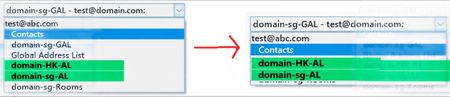
There are existing Custom Address Lists. When users use the MS Outlook App (Office 2019) and open the Address Book, is it possible to hide the other address lists (including domain-sg-GAL, Global Address List, and domain-sg-Rooms), and only display the Custom Address Lists (domain-HK-AL and domain-sg-AL) — the ones shown in green in the photo?60Views0likes0CommentsMicrosoft Rushes High-Volume Email to General Availability
Almost two years after it first previewed, Microsoft is making the High-Volume Email (HVE) solution generally available in March 2026. HVE runs on a pay-as-you-go basis, but Microsoft won’t start charging tenants for sending email until May 2026. Two months should be enough for people to decide if they want to use HVE for internal communications as it has no ability to send external email. https://office365itpros.com/2026/03/09/hve-ga/249Views1like0CommentsMeasuring KPIs like Response Times for Shared Mailboxes
Shared mailboxes are not CRM systems. However, many Microsoft 365 tenants use shared mailboxes to handle customer queries and then want to measure KPIs such as agent responsiveness to customer queries or the number of queries handled per agent in a month. As explored in this article, it’s possible to use the Microsoft Graph and PowerShell to extract some KPI-like data from shared mailboxes. https://office365itpros.com/2026/03/05/shared-mailbox-kpi/120Views1like0Comments
Proper whitelisting of microsoft.com on dnswl.org
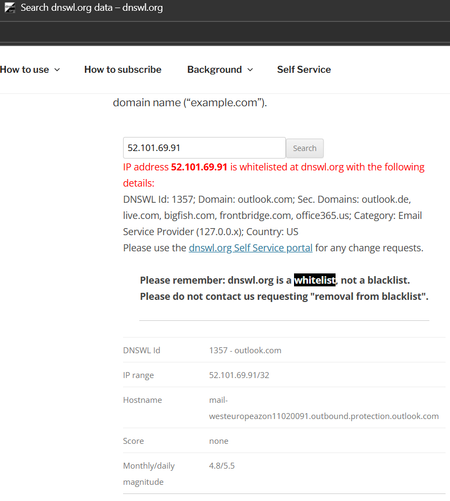
I keep having the issue that system-generated e-mails, e.g. on Trace Reports get classified as spam by the receiving e-mail provider. The sender address is email address removed for privacy reasons and the e-mails go to my M365 mailbox and are redirected to my external monitoring mailbox with that e-mail provider. The e-mail provider calculates a score that includes checking the sender's IP address 52.101.69.91 with dnswl.org . Unfortunately, that address is only whitelisted for outlook.com and some secondary domains, but not for microsoft.com. Of course, the issue also occurs with mailto:email address removed for privacy reasons and other IP addresses, so this is an example. It started to occur around two weeks ago, not sure if the provider changed policies or Microsoft changed the whitelisting; of course the provider refuses to overrun dnswl.org it, e.g. by own whitelisting. Who at Microsoft could I ask to fix that kind of issues? I don't find any appropriate category in their support menues, M365 support says the cannot help (TrackingID#2603031420001611). Thanks in advance for any hints, this is my first posting here, so please forgive me, if this is a dumb question.75Views0likes0CommentsExchange Online PowerShell Dumps the Credential Parameter
On February 12, Microsoft announced the deprecation of the Credential parameter for the Connect-ExchangeOnline cmdlet in the Exchange Online PowerShell module. The deprecation won’t affect interactive sessions (which should all be protected by MFA), but it might stop some background jobs running when Microsoft retires the server components that currently support the ROPC authentication flow. Time to check scripts! https://office365itpros.com/2026/02/16/exchange-online-powershell-ropc/144Views0likes0Comments- 63Views0likes0Comments
The Final Countdown to Remove EWS from Exchange Online Begins
Microsoft announced the dates leading to the final retirement of Exchange Web Services from Exchange Online. If all goes well, the EWS retirement in the cloud will happen by May 2027. Challenges still exist. Microsoft must remove EWS from its own apps, including Outlook, and help tenants and ISVs make the leap to Graph APIs. Plans are in place and progress is being made, but will everyone be ready when Microsoft starts to remove EWS permanently from Exchange Online in April 2027? https://office365itpros.com/2026/02/06/ews-retirement-may-2027/250Views0likes0CommentsUsing the Exchange Online Message Trace API
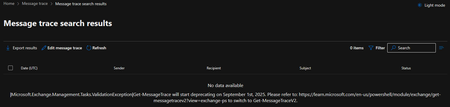
January 22 saw the announcement of the beta version of an Exchange Online Graph-based message trace API. The API can retrieve message trace records and their details and offers equivalent functionality to the message trace cmdlets in the Exchange Online management PowerShell module. However, sometimes applications simply want to access data without going through a module, and that’s what this API delivers. The article includes a complete PowerShell script to demonstrate how to use the API. https://office365itpros.com/2026/01/27/message-trace-api/103Views0likes0Comments
Modern Auth EWS error 50199 when signing from Crestron Touchpanels
Good Afternoon, All I am having a difficult time nailing down this issue. I have a few Crestron TTS-770s that were, up to last week, working correctly by pulling Calendars data with EWS. They were configured with a service account signed into EWS using 'modern authentication'. This week, these panels have disconnected and report that 'Needs to be authorized' as the EWS status. I have verified that CA is not blocking sign in, the account is excluded from MFA policies, and is correctly licensed for Exchange Access. We do not use Intune for device management. When I attempt to re-register the device, I follow the prompts until I am prompted to close the browser window; The device spins, then fails to connect with the status above. I have attempted this with the service account and my own Admin account with MFA, to the same result. Entra Enterprise Apps Sign-in logs show a 'Successful' entry, then immediately after, a 'Failed' entry with an error '50199'. I had not made changes to any of the URIs before initial failure, and any additional entries or changes do not change the results of the error. Initial URI was configured to 'https://app.noop' (no idea, was configured before I got here, and I hadn't needed to change it), I have attempted combinations of our Tenant URI, ' https://login.microsoftonline.com/common/oauth2/nativeclient', and other 'fixes' I had found while GTS-ing. I additionally have set my 'legacy authentication' and 'legacy applications' CA polices to read-only for troubleshooting. I am working to disable OAuth2ClientProfile on Exchange Online temporarily for troubleshooting. Does anyone have any ideas? Please let me know if any additional information is needed, or if needed to post in another location. Thank You171Views0likes0CommentsMicrosoft Cancels Exchange Mailbox External Recipient Rate Limit
After considering customer feedback, Microsoft cancelled the mailbox external recipient rate limit for Exchange Online. The idea behind the new limit was simple – it makes life more difficult for spammers to use Exchange Online as a platform. Unhappily, customers didn’t like losing the ability to send relatively small amounts of external email for different reasons, and Microsoft didn't have a cost-free alternative to offer. C’est la vie. https://office365itpros.com/2026/01/08/mailbox-external-recipient-rate/251Views1like0Comments


Events
Recent Blogs
- We have released Security Updates for Exchange Server SE. Exchange Server 2019 and 2016 ESU updates only.Jun 09, 202622KViews4likes39Comments
- Here are some tips on how to learn more about Exchange Online resource mailbox use.May 21, 20263.6KViews1like2Comments