Recent Discussions

Excluding break-glass account from MFA Registration Campaign – impact on existing users?
Hi everyone, I'm currently reviewing the configuration of a break-glass (emergency access) account in Microsoft Entra ID and I have a question regarding MFA registration enforcement. We currently have an Authentication Methods Registration Campaign enabled for all users for quite some time. We identified that the break-glass account is being required to register MFA due to this configuration. The account is already excluded from all Conditional Access policies that enforce MFA, so the behavior appears to be specifically coming from the registration campaign (Microsoft Authenticator requirement). Our goal is to exclude this break-glass account from the MFA registration requirement, following Microsoft best practices. My question is: If we edit the existing registration campaign and add an exclusion (user or group), could this have any impact on users who are already registered? Specifically, could it re-trigger the registration process or affect existing MFA configurations? We want to avoid any unintended impact, considering this campaign has been in place for a long time. Has anyone implemented a similar exclusion for break-glass accounts within an active registration campaign? Any insights or confirmation would be really helpful. Thanks in advance!Solved68Views0likes2Comments
Slow response times in different regions
I have a website which is primarily for people in Asia and uses Front Door. Microsoft say that content served through Front Door is hosted in POPs all over the world but Grafana checks show consistently bad performance in Asia. The London ping response times are consistently low from London but around 150ms from Singapore, frequently spiking to over 500ms. While London is closer to where the origin is hosted, I wouldn't expect pings to go to the origin but be handled by Front Door? Is there any way I can verify that the site is being propagated to regional POPs in the APAC area?Solved122Views0likes1Comment
Help ! - Hub Spoke Architecture and Routing via NVA
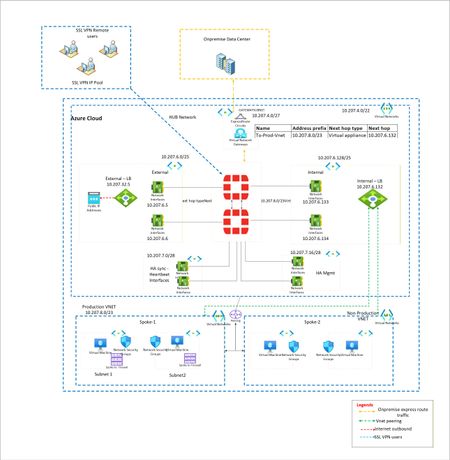
I have a classic example of routing. I want to force all traffic via Fortigate firewalls. EastWest and NorthSouth. However when large Supernet of Azure Vnet is used to route and force the traffic via UDR at gateway subnet, its not working. Because Routes learned at Hub Vnet via Vnet peering is taking precedence. To isolate, i have created multiple small subnet routes for Gateway subnet. Each pointing to spoke vnet and next hop as Fortigate firewall. However this is working, i want to make solution solid. Means if someone creates new vnet in future and peer with Hub, it should not get direct traffic. Is that possible? Or this is typical shortcoming of Azure where routing works with preference to vnet peeering.? Below is architecture -Solved216Views0likes2Comments
Azure passowrd protection
We have a hybrid Azure infrastructure with an AD Connector installed on-prem and configured for PTA. We installed the password protection server and registered it with the Azure tenant, then deployed the DC agent on all domain controllers. Both the proxy and agents are operational. We published a few banned words to block in case anyone uses them. For testing, I changed my password to include one of the banned words. To my surprise, I was able to change the password. I checked the corresponding logon server, and the DC event viewer showed that the password was validated, but the banned word was in the password list that Azure set to enforce. Why is it not blocking the change?Solved84Views0likes1Comment
PAAS resource metrics using Azure Data Collection Rule to Log Analytics Workspace
Hi Team, I want to build a use case to pull the Azure PAAS resources metrics using azure DCR and push that data metrics to log analytics workspace which eventually will push the data to azure event hub through streaming and final destination as azure postgres to store all the resources metrics information in a centralized table and create KPIs and dashboard for the clients for better utilization of resources. I have not used diagnose setting enabling option since it has its cons like we need to manually enable each resources settings also we get limited information extracted from diagnose setting. But while implementing i saw multiple articles stating DCR is not used for pulling PAAS metrics its only compatible for VM metrics. Want to understand is it possible to use DCR for PAAS metrics? Thanks in advance for any inputs.Solved149Views0likes2CommentsAzure File copy task v4 and later causes 403 error
I've configured a release pipeline in ADO which copies some files to a Storage Account. Using Azure File copy task version 6 consistently fails with a 403 error. RESPONSE Status: 403 This request is not authorized to perform this operation using this permission. After much wasted time checking IP restrictions, checking access and recreating service connections I tried using an earlier version of the task that some other pipelines which do the same thing were using. I found that using version 4 or later of the file copy task causes the issue. Setting the task version to 3 works. Are there any known issues around this?Solved96Views0likes1CommentContainer on App Service keeps getting stopped and terminated
I've got a .Net app running in a Docker container that I'm trying to run on a Linux App Service but as per the (sanitised) log output below from the Platform log stream, it's getting terminated only 4 seconds after it started. Where can I get information on why this is happening? Starting container: a0e3af0a_myapp-dev-as. Starting watchers and probes. Starting metrics collection. Container is running. Container start method finished after 1990 ms. Container is terminating. Grace period: 0 seconds. Stop and delete container. Retry count = 0 Timestamps removed as the forum doesn't seem to like log output?Solved379Views0likes2Comments
Azure Virtual Desktop External Identities
Hi. I was delighted to find out that External Identities are now supported in Azure Virtual Desktop (preview). https://learn.microsoft.com/en-us/azure/virtual-desktop/authentication#external-identity-preview I have attempted to set this up and test it as per the requirements and known limitations above. However, when I sign into the Windows app with my guest account, I do not have any AVD resources available. Are there any detailed setup instructions or is there anything not obvious that I might be missing? Thank you!Solved672Views0likes4CommentsFixed ip address for outbound calls from Azure APIM Standard V2
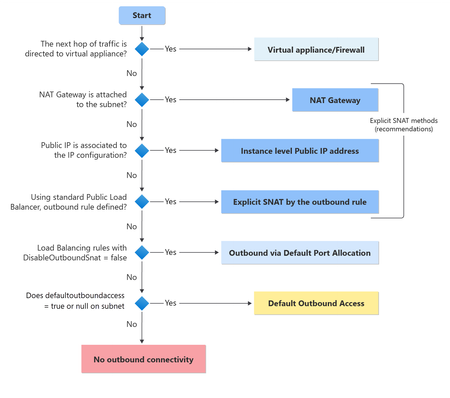
Hi, I recently ran a PoC deployment of Azure APIM Standard V2 Sku instead of our current Premium Classic instance. This worked well! Performance is great and I am able to route calls to an on-prem network ok using vnet-integration. However, one of the features we currently make use of with the Premium Classic instance is a fixed ip address for calls from APIM to 3rd parties. Is there a way to achieve this using Standard V2? We have tried a nat gateway with fixed ip on the same vnet but this does not seem to help.Solved328Views0likes1Comment
How to update the proxyAddresses of a Cloud-only Entra ID user
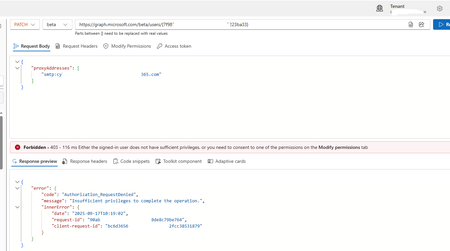
I currently have a client with an Entra ID user (not migrated from on-premises) that is cloud-based, but has proxyAddresses values assigned. Now, I want to update the proxyAddresses through the Graph Explorer and have used this link as a guide: https://learn.microsoft.com/en-us/answers/questions/2280046/entra-connect-sync-blocking-user-creation-due-to-h. Now this guide is suggesting you can use the BETA model and this URL format... https://graph.microsoft.com/beta/users/%USERGUID% It states you can use that URL to do both 'GET' and 'PATCH' queries - the PATCH query being the one that will change the settings. You have to put forth a body for the proxyAddresses property in the PATCH query, which represents all of the addresses you want the user to utilise as proxy addresses. Now the GET query works... The PATCH query does not... Screenshot provided: Now, regarding the error message, I have applied ALL possible permissions in the 'Modify Permissions' tab. It is still erroring, Now I cannot use Exchange Online PowerShell, as the user does not have a mailbox! Aside from potentially using a license for Exchange Online or provisioning a mailbox for the user, and making the necessary changes, would the only other option be to delete/recreate the user?Solved801Views0likes3CommentsHub spoke design with NVA firewall
I have my Azure landing zone setup but it isn't working as i expected. So i have a vnet named vnet-lz-fw-001 with 2 subnets. External and Trusted. I then have a NVA Watchguard Firewall with an interface on each subnet. I then have 2 further vnets, vnet-lz-prod-001 and vnet-lz-id-001. Each of these vnets has peering to vnet-lz-fw-001 but no peering between each other. vnet-lz-prod-001 and vnet-lz-id-001 have user defined routes to point to each other via the trusted interface on the Watchguard NVA The Watchguard firewall has static routes to point to each subnet in the vnets via the Trusted interface gateway address. Virtual machines in both vnet-lz-prod-001 and vnet-lz-id-001 can ping each other, but when they do its not routing via the Watchguard firewall. Is this as expected behavior? Virtual machines in both vnet-lz-prod-001 and vnet-lz-id-001 can ping the trusted interface on the Watchguard Firewall okSolved141Views0likes1CommentUnable to revert Azure DevOps user access level
I have a user that was assigned Visual Studio Subscriber a few years ago. We have an on-prem AD to assign the user to a Visual Studio licensing group that gets replicated to Entra ID so the system recognized that a license had been assigned and Azure DevOps shows the correct Visual Studio license (Visual Studio Enterprise subscription). After a few years the user no longer needs the Visual Studio license so the person was removed from the on-prem AD group which replicated the change to Entra ID. However, Azure DevOps still shows the user's access level as Visual Studio Enterprise subscription. I double-checked the Visual Studio license page and confirmed the user no longer has an assigned license. I changed the user's access level to Stakeholder manually but when the user logs back into Azure DevOps it changes back to Visual Studio Enterprise subscription. I completely removed the user from Azure DevOps (Remove from organization) and re-added them along with adding back all the original project permissions and assigning Stakeholder. Once the user logged in the access level changed to Visual Studio Enterprise subscription again (skipping the initial default Visual Studio Subscriber that a "new to DevOps" user would get). Is there something I am missing that will not allow me to set this person's access level back to Stakeholder?Solved349Views0likes2CommentsApp Permissions for Microphone
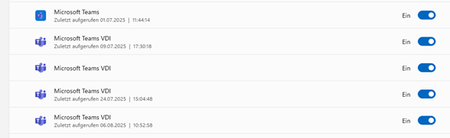
Hi all, I have found an issue with one of my users on a Windows 11 device that has the remote desktop app installed. When connecting to the avd Win11 multisession host and starting Teams the user was asked to confirm data privacy questions regarding microphone and camera which all of them were answered to allow access. Strangewise the Jabra Microphone did not work and when checking on the local device, the Microsoft Teams VDI app was not allowed to use the microphone. Here I noticed that multiple Microsoft Teams VDI apps exist. Is this a bug? Will each new Team Update create a new entry? Now, the question is how to force that such questions do not appear respectively that Microsoft Teams VDI app is always allowed.Solved1.4KViews0likes1CommentTerraform export template on Azure Portal
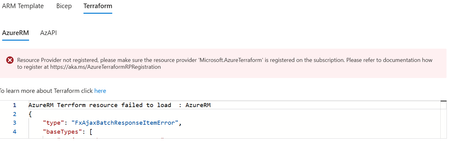
Hello, guys! I'm facing an issue during my export template by terraform. I Already registered on my subscription the Microsoft.AzureTerraform, the status is registered, i re-register again and did not change. Anyone else has faced the same issue? How do you solved it?Solved105Views0likes1Comment[newbie] Can I access files in a given storage account via the Azure Cloud Shell CLI filesystem?
Can I access "these" files "there", or are the filesystems completely separate? Or is there a CLI command to link the two? Thanks in advance for any insight you can provide.Solved174Views0likes2Comments


Events
in 20 hours
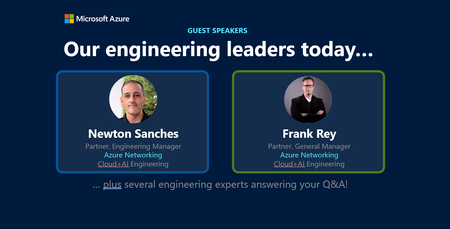
Join our upcoming live webcast for a transparent discussion about this recent Azure service incident — led by our engineering teams.
Network degradation within East US AZ-02
Tracking ID: DG_Z-S08...
Thursday, Apr 23, 2026, 09:30 AM PDTOnline
0likes
2Attendees
0Comments
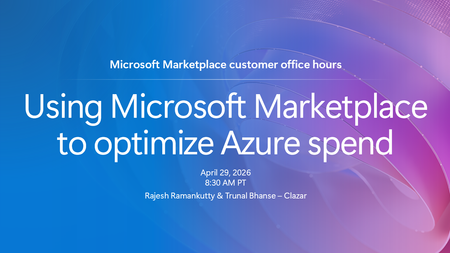
If your organization has an Azure cloud commitment, Microsoft Marketplace can be a powerful tool for optimizing how that spend is used. Tune in to explore how your organization can leverage its Azure...
Wednesday, Apr 29, 2026, 08:30 AM PDTOnline
1like
15Attendees
0Comments
Recent Blogs
- 6 MIN READAzure is evolving to better support secure‑by‑default cloud architectures. Starting with API version 2025‑07‑01 (released after March 31, 2026), newly created virtual networks now default to u...Apr 22, 202630Views0likes0Comments
- Co-authors: Jie Su, Abhinav Dua, Mukthar Ahmed, Dhruv Joshi In a previous post, we shared how Azure Automated VM Recovery works to minimize virtual machine downtime through a three-stage approach: ...Apr 22, 202643Views0likes0Comments