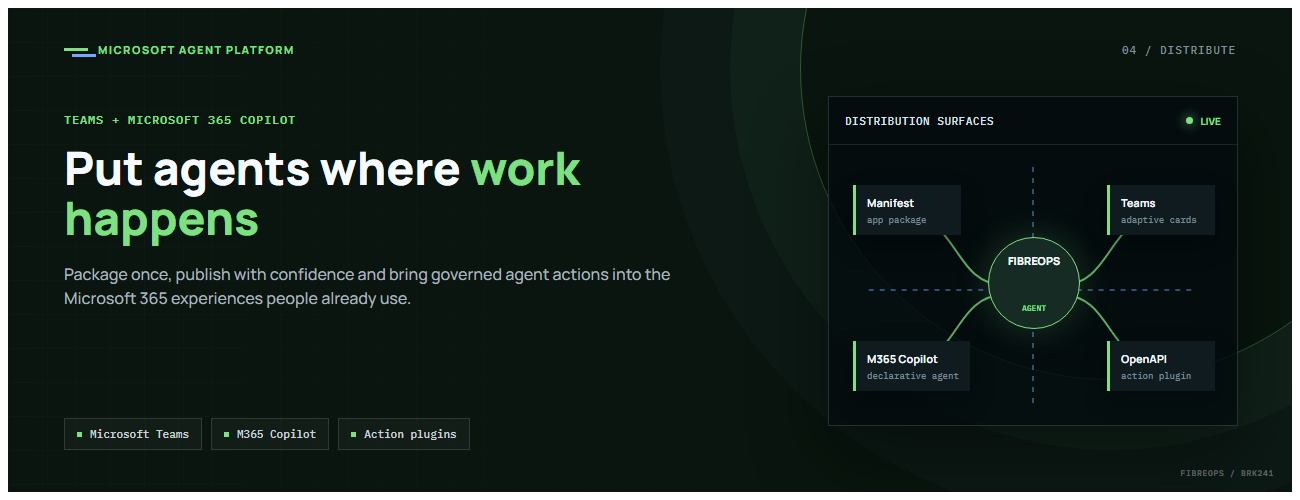
This is the fourth post in our series on the Microsoft agent platform. We cover the Distribute in M365 pillar — publishing your agents to Microsoft Teams and Microsoft 365 Copilot so they reach users where they already work.
All examples reference the FibreOps repository, demonstrated at Microsoft Build BRK241.
The Distribution Story
Building a great agent is only half the challenge. The other half is getting it into the hands of users without asking them to learn a new tool, visit a new URL, or change their workflow. Microsoft 365 Copilot and Microsoft Teams are where enterprise users already spend their day, making them the natural distribution surface for agents.
With the GA release, publishing an agent to Teams and M365 Copilot is a single command. No separate app registration portal, no manual manifest assembly, no multi-step approval workflow for development and testing.
Publishing to Microsoft 365 Copilot (GA)
FibreOps ships as a declarative agent + action plugin ready for sideload. A single CLI command produces the complete package:
python -m fibreops.demo publish-m365 --out dist/m365

# Output:
#  ✓ wrote dist/m365/declarativeAgent.json
#  ✓ wrote dist/m365/fibreops-action.json
#  ✓ wrote dist/m365/manifest.json
#  ✓ wrote dist/m365/color.png  (192x192)
#  ✓ wrote dist/m365/outline.png ( 32x32)
#  ✓ wrote dist/m365/fibreops-copilot.zip
What Gets Generated
| File | Purpose |
|---|---|
declarativeAgent.json | Defines the agent's persona, capabilities, and conversation starters for M365 Copilot |
fibreops-action.json | Action plugin that proxies tool calls to the deployed FastAPI backend via OpenAPI |
manifest.json | Teams app manifest with publisher metadata, permissions, and capabilities |
color.png / outline.png | App icons for Teams and M365 surfaces |
fibreops-copilot.zip | Ready-to-upload package for Teams Admin Center |
Configuration
Set the base URL to your deployed FastAPI app before publishing — the action plugin uses this to resolve the OpenAPI runtime:
# Set the public HTTPS hostname of the deployed FastAPI app
$env:M365_ACTION_BASE_URL = "https://fibreops-demo.azurewebsites.net"

# Optional: customise publisher metadata
$env:M365_PUBLISHER_NAME = "Contoso Network Operations"
$env:M365_PUBLISHER_WEBSITE = "https://contoso.com/noc"

# Generate the package
python -m fibreops.demo publish-m365 --out dist/m365| Environment Variable | Purpose |
|---|---|
M365_ACTION_BASE_URL | Public HTTPS root for the FastAPI /openapi.json (e.g., Container Apps FQDN) |
M365_APP_ID | Override the generated Teams app GUID (default: deterministic per repo) |
M365_PUBLISHER_NAME | Publisher name shown in M365 Admin Center |
M365_PUBLISHER_WEBSITE | Publisher website link |
Uploading the Package
Upload the generated fibreops-copilot.zip through either path:
- Teams Admin Center → Manage apps → Upload new app
- M365 Admin Center → Integrated apps → Upload custom apps
Once uploaded, the declarative agent:
- Inherits the publisher metadata you configured
- Advertises conversation starters from the FibreOps deck (e.g., "What is the current outage status?", "Dispatch an engineer to FN-LDN-001")
- Proxies tool calls to the deployed FastAPI app via the action plugin
- Appears in Microsoft 365 Copilot as a specialised agent users can invoke
How Declarative Agents Work
A declarative agent in Microsoft 365 Copilot is defined by metadata rather than code running in the M365 surface. The intelligence lives in your backend — Copilot handles the conversational UX, tool orchestration schema, and user authentication.
The flow:
- User invokes the agent in Microsoft 365 Copilot or Teams
- Copilot renders conversation starters and accepts natural language input
- When the agent needs to act, Copilot calls the action plugin (your OpenAPI endpoint)
- Your FastAPI backend processes the request using the full agent pipeline
- Results return to the user in the Copilot/Teams UX
This architecture means your agent logic stays in one place — the backend. The M365 surface is purely a distribution and interaction layer.
Action Plugins and OpenAPI
The action plugin (fibreops-action.json) references your FastAPI app's /openapi.json endpoint. FibreOps exposes a JSON API that the action plugin can call:
/api/runs— List and query agent runs/api/optimiser— Get optimizer scores and suggestions/sdk/chat— Natural language interaction with the agent system/healthz— Liveness probe
Because FastAPI auto-generates OpenAPI schemas from your typed Python endpoints, the action plugin gets accurate parameter descriptions, response schemas, and error codes without any manual specification work.
Publishing as Autopilots (Public Preview)
Autopilots take distribution one step further — agents that operate autonomously without requiring a user to initiate each interaction. An Autopilot can:
- React to events (e.g., a critical telemetry signal) without human initiation
- Take actions within defined guardrails
- Notify users only when human intervention is needed
- Operate continuously across Microsoft 365 surfaces
For FibreOps, an Autopilot would monitor the Event Hub stream continuously and only surface to the NOC team when an incident exceeds automated resolution capability — a fully autonomous operations agent.
Teams Adaptive Cards
FibreOps posts rich Adaptive Card notifications to Microsoft Teams throughout the agent pipeline. This is separate from the declarative agent — it is a push notification channel for real-time operational awareness.
# The NetOps agent posts an outage notice via Incoming Webhook
def post_outage_notice(incident_id, node_id, severity, summary, engineer=None):
    card = {
        "type": "AdaptiveCard",
        "body": [
            {"type": "TextBlock", "text": f"🚨 Outage: {node_id}", "weight": "Bolder", "size": "Large"},
            {"type": "FactSet", "facts": [
                {"title": "Severity", "value": severity.upper()},
                {"title": "Incident", "value": incident_id},
                {"title": "Summary", "value": summary},
            ]},
        ],
        "actions": [
            {"type": "Action.OpenUrl", "title": "View in NOC Console", "url": f"{base_url}/runs/{incident_id}"}
        ]
    }
    # POST to Teams webhook or append to outbox for offline mode
    ...
If TEAMS_WEBHOOK_URL is not configured, cards are appended to state/teams_outbox.jsonl for review in the NOC console's Teams panel.
End-to-End: From Code to Copilot
Here is the complete flow from development to distribution:
- Build — Develop agents with Microsoft Agent Framework, test locally with
python -m fibreops.demo --backend local - Publish agents —
python -m fibreops.demo publishcreates hosted Prompt Agents in Foundry - Deploy infrastructure —
azd upprovisions App Service, ACR, Event Hub, Key Vault, and Application Insights - Deploy hosted agent —
azd env set FIBREOPS_DEPLOY_HOSTED true && azd up - Generate M365 package —
python -m fibreops.demo publish-m365 --out dist/m365 - Upload to Teams — Upload
fibreops-copilot.zipvia Teams Admin Center - Users interact — The agent is now available in Microsoft 365 Copilot and Teams
Security Considerations
- Managed Identity — The deployed app uses system-assigned managed identity for all Azure service access. No secrets in code.
- Least privilege — Each role grant is scoped to the minimum required (Event Hubs Data Owner, Key Vault Secrets User, AcrPull, Azure AI Developer).
- Authentication — The M365 Copilot surface handles user authentication; your backend receives authenticated requests.
- Guardrails — Autopilots operate within defined boundaries; human-in-the-loop escalation is built into the Routine and agent decision logic.
Key Takeaways
- Publishing to Teams and M365 Copilot is GA — a single command generates the complete package.
- Declarative agents separate distribution (M365) from intelligence (your backend).
- Action plugins leverage your existing FastAPI OpenAPI schema — no manual specification needed.
- Autopilots (Public Preview) enable fully autonomous operation within guardrails.
- Adaptive Cards provide real-time push notifications alongside the conversational agent surface.
- The same backend serves the NOC console, the Copilot SDK, and the M365 declarative agent.
Next Steps
- Explore the FibreOps repository — try
python -m fibreops.demo publish-m365 - Microsoft 365 Copilot extensibility documentation
- Next in this series: Voice Live and Observability for Production Agent Systems

 Microsoft