windows server 2019
41 Topics
windows 2019 KB5066586 & KB5070883 both have error 0x800f0985
Stuck and need suggestions, I have tried SFC & DISM recovery commands, Resetting the Windows Update subsystem Manually downloading the patches Trying to patch though power shell get-windwosupdatelog doesn't provide any insight. cbs.log & dism.log don't provide any insight Tried to update the Servicing Stack Update (SSU) for Windows Server with KB070883 that came out on Oct 23 2025, but it won't install either I get 0x800f0985. Suggestions other than in Place upgrade?956Views0likes1Comment
2025-10 Cumulative Update for Windows Server 2019 (KB5066586) Undoes Update on Reboot
We have a Windows Server 2019 Standard which will not install the 2025-10 Cumulative Update for Windows Server 2019 (KB5066586) update. The installation part goes fine, but when the server is rebooted to finalize the update, it goes into "Undoing changes". Then it reboots again, and I am back where I started. The error code is 0x8007000d. I have done the following to debug this: Ran System File Checker sfc /scannow. No errors found. DISM /Online /Cleanup-Image /ScanHealth. No errors found. Ran Windows Update Troubleshooter. No errors found. Shut down Windows Update services. Renamed SoftwareDistribution and Catroot2 folders. Restarted services. No change. Ran ScanDisk. No errors found. Disabled antivirus. No change. Ran Disk Cleanup and manually deleted additional temp files. No change. Checked Event Viewer. Only error is Event 20 which is a failure of the Windows Update Agent. I am out of ideas. If anyone has some, I would much appreciate the help. I am out of ideas.Solved1.9KViews0likes10Comments
Windows Server 2019 Administrator access gone
I recently was using Windows Server 2019 Evaluation version, everything working great. Then purchased full license and upgraded it with the license. Now I am unable to do anything because the Administrator account is inaccessible. I can't even restart the server without having to power off. Any help would be appreciated.91Views0likes0Comments
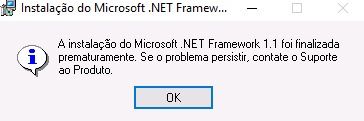
.NET Framework 1.1 Installation on Windows Server 2019
Hi! I'm trying to install .NET Framework 1.1 on Windows Server 19. I downloaded it from Microsoft Official Website, on the following link: https://www.microsoft.com/pt-br/download/details.aspx?id=26 When I run the installer, got two popups at the end of installation, that follow attached. Anyone know how to get through this?987Views1like1Comment2025-01 Cumulative Update for Windows Server 2019 KB5050008 Causing Slow Performance and Freezing
We had this same problem back in August with the 2024-08 Cumulative Update for Windows Server 2019 KB5041578, slow performance and freezing. Here we go again with KB5050008. Remote Desktop does not respond. It freezes up for minutes. We have SQL Server and Terminal Server on this Windows Server 2019 and people can't access it through Remote Desktop. I had to uninstall KB5050008. The server went back to normal. I don't a repeat of this with every Windows Server update. Please advise.3.1KViews0likes2CommentsInstallation of Freshservice probe fails at starting service
BLUF: My background is desktop administration. New job and trying to learn as I go in regard to servers. According to inventory reports from our Freshservice ticketing system, the Freshservice probe was installed on one of our DCs and reporting back in November of last year. No real evidence of it now. When trying to install the probe on Windows Server 2019, it gets all the way to starting services and it fails. Message saying to verify that you have sufficient privileges.364Views0likes0Comments
Syncing Sharepoint files using OneDrive on Windos Server 2019
Hi everyone. We are a small office and use Sharepoint in Microsoft 365 to keep our office files. We have an on-premises Windows Server 2019 server and is currently using OneDrive to sync Sharepoint files to the server. The folder that was created by OneDrive on the server is also being shared to all PCs in our office mapped as the J drive. We are using Active Directory. So, users can do changes to the files or create new ones from their PCs using the J drive and they get uploaded/updated to Sharepoint when OneDrive syncs the files. This part is working good as expected. The issue we are having is that there are 4 employees that work remotely so we shared the SharePoint folders with them and they installed OneDrive directly on the computers to get access to the SharePoint folders. If one of these 4 users creates a folder, this folder gets downloaded with the parent folder permissions on our on-premises server. But, if one of these 4 users adds a file, this file is being downloaded with Administrator permissions only so no one in the office can see the files until someone manually changes the file permissions on the server to allow users to get access to the file. We have tried almost everything we can think of to try to give the right permissions to the files downloaded from OneDrive but with no success yet. I would really appreciate any recommendations.1.3KViews0likes2Comments
Partly english terms in german Windows Server 2019 - Update 2024-06
Hi folks, Since the latest cumulative update (KB5039217), English terms have been appearing in the dialogs on our German-language Windows Server 2019 servers. Uninstalling this update fixes the problem, but in my opinion it is not a solution as it leads to security problems. Are there other solutions to this? Thanks in advance Frank407Views0likes0Comments
Install on Windos server 2019 RDS - Problem - blank
Hey, hello, everybody. I have a problem with installing Teams on Windows server 2019 RDS. We are currently using the server as a terminal server for 10 users. We have installed MS365, where the whole office suite is installed, but Teams is not. So I was solving the installation manually via a procedure: https://learn.microsoft.com/en-us/MicrosoftTeams/teams-for-vdi#deploy-the-teams-desktop-app-to-the-vm --> After installing and running MS Teams (new version), I was given the option to log in. After logging in, there was only a blank white screen. So I was solving the installation via: https://learn.microsoft.com/en-us/microsoftteams/msi-deployment Here it was a bit better, but after logging in and a long loading time I got an error cad0009 So I was solving via: https://learn.microsoft.com/en-us/microsoftteams/new-teams-bulk-install-client This gave me a message that the version was incompatible with the system. The last one was through the command: Dism /Online /Add-ProvisionedAppxPackage /PackagePath:<MSIX package path> /SkipLicense But the same problem as the first variation... How to get MS Teams for Windows server 2019 RDS (license - business standard ) Thanks a lot for your help... Bing failed me, it was not able to help me. Unfortunately neither ChatGPT.3.9KViews0likes0Comments