windows app
16 Topics
Windows App iOS RemoteApp Won't Reconnect
We are building a RemoteApp environment using AVD for the session hosts. On iOS, what happens is the screen powers off/device goes to sleep. When a user logs back into the iPad, the RemoteApp was still the focus, so they see buttons to reconnect or disconnect. If we press reconnect, it will either spin endlessly OR it will report an error on reconnection attempt. If we then close the error OR if we press disconnect where it drops us into the Windows App, then reopen the exact same Windows App it immediately reconnects. This does not happen in Windows at all, we have no Android deployments to test, and are trying iOS deployments on iPad and troubleshooting with iPhones. Both device types experience the issue. To troubleshoot, I've tried multiple iOS devices by multiple users; same problem. Those same users connecting to our AVD desktops, not RemoteApps, reconnect without issue. Our AVD and RemoteApp session hosts all use the same Group Policies and are, at this point, only domain joined, not Entra or Hybrid. Any thoughts on why this happens? Would logs be helpful?367Views0likes3Comments
Uninstalling Remote Desktop client closes users' Windows App connections
We have our users working from Windows App now to meet the 3/27 out of support date. We are beginning to uninstall the Remote Desktop from their laptops and are finding it closes active Windows App connections on uninstall (of Remote Desktop). That is less than ideal. Looking to see if any way around that, but wondered if others had seen the same?447Views0likes2Comments
Feature request: allow setting web client features from direct-launch-url
We use the "direct launch URL" feature of the AVD web client to deep link users to a session desktop (https://learn.microsoft.com/en-us/windows-app/direct-launch-urls?tabs=avd). One of the reason we use the web client is because we use AVD in exam halls on Chromebooks in kiosk-mode. The ChromeOS kiosk-mode only supports websites. Students are faced with a connection dialog in which they can toggle IME and Special Keys. The students have to enable IME, but since these are university-owned devices, they do not know and just click "Connect". We would like to be able to configure these client options automatically. For example, as query parameters in the direct-launch-url. Ideally, we would also skip the "Connect" dialog entirely and just go strait into the session once the direct-launch-url is loaded.332Views0likes2Comments
Windows App - RDP channel crashes when printing on a redirected canon printer
Hey team, I would like to know, if anyone else struggles with the following scenario: A canon printer is installed on a local client. The user is working in the AVD environment. The printers are redirected into the AVD-Session via "printer redirect". Since the users are migrating to the new "Windows App", the AVD session breaks as soon as the user is printing on a redirected Canon-Printer. When printing on another printer, there is no issue. Also: With the "Microsoft-Remotedesktop" Application, everything works as it should. A Microsoft ticket is already raised. I would like to know if there are other environments, which are encountering the same issue.2.2KViews1like10Comments
Mouse Click Offset Issue in Azure Virtual Desktop App on Windows 11 with Dual Monitors
We are experiencing a recurring mouse misalignment issue when using the Azure Virtual Desktop (AVD) Windows App on several Windows 11 clients. The problem occurs on devices with two external monitors and affects multiple users. Environment Windows version: 10.0.26200.6899 (Windows 11, 25H2) AVD Windows App: mainly version 2.0.757.0, some clients are on slightly different versions Hardware: Windows 11 PCs with two external monitors Display settings: both monitors at 1920x1080, 100% scaling Mac users (using the AVD app) report no issues Issue description The visual mouse pointer and the actual click position become misaligned inside the AVD RemoteApp session. For example, clicking on one item may select the item below it. This appears to be a rendering or coordinate-mapping issue within AVD when running inside the Windows App. Temporary workaround Minimizing the AVD window and then maximizing it immediately resolves the issue. This refresh/redraw action realigns the pointer and click coordinates. Questions Has anyone else seen mouse click offset issues in the AVD Windows App on Windows 11 25H2 with dual-monitor configurations? Are there known fixes, configuration adjustments, or recommended workarounds beyond the minimize/maximize redraw?1.3KViews0likes3Comments
Windows App Application Protection Policy
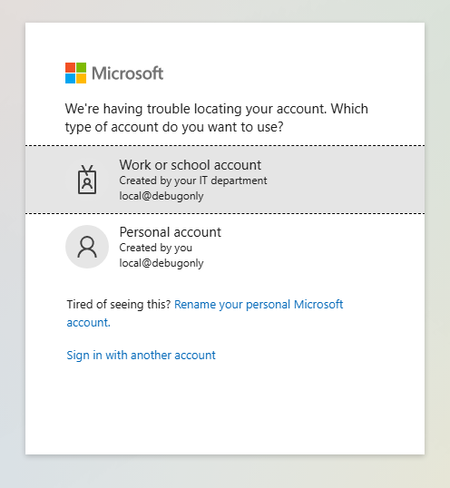
I have been testing out an Intune MAM policy to restrict copy/paste and drive redirection to AVD session hosts based on the link here: https://learn.microsoft.com/en-us/windows-app/require-device-security-compliance-intune?tabs=web#related-contentHowever, I've run into problems (in two separate tenants) that have halted me from being able to test. Setup Intune App Protection Policy targeting Windows Devices & Microsoft Edge\ Conditional Access Policy enforcing App Protection Policy when users access 'Azure Virtual Desktop' target resource via https://windows.cloud.microsoft.com Results First When signing into a user account targeted by the policy, they are prompted to Switch Edge Profile which signs in the user to a new Edge profile for 'Work or School Account'. The account has to sign in again. The account can access Windows App resources When launching a desktop session, this authentication page pops up for an account "local@debugonly" Second When signing into a user account targeted by the policy, they are prompted to Switch Edge Profile which signs in the user to a new Edge profile for 'Work or School Account'. The account has to sign in again. After sign in, the account loops with 'Switch Edge Profile' and gets stuck here I'm curious if anyone has gotten this to work and what was your setup? Or if Microsoft or provide some assistance or if this is in the wrong forum, any help would be appreciated.568Views0likes2CommentsSingle-Sign On
After troubleshooting an issue for a customer, we determined that the prerequisites for enabling SSO at the AVD host pool level is not strictly enforced when a user goes to execute the SSO workflow from MSRDC or the Windows App. Meaning, that if an administrator does not enable the -IsRemoteDesktopEnabled flag on the Service Principals "Microsoft Remote Desktop" and "Windows Cloud Login" respectively. Setup: Deploy Entra ID Joined session hosts to a host pool and enable the "Microsoft Entra single sign-on" RDP property to "Connections will use Microsoft Entra authentication to provide single sign-on" or update the RDP connection string with 'enablerdsaadauth:i:1'. Result: User will not receive the 'Windows Security' dialog box to access the session host with their Entra ID credentials. Caveat: Be aware that to sign in with Entra ID credentials, minimally, the host pool RDP settings must contain 'targetisaddjoined:i:1'. Microsoft states this is going away and blending into 'enablerdsaadauth:i:1', which also enables SSO. It seems a bit odd of a move in my opinion and having two separate RDP properties makes sense if a company does not want SSO. But it is in alignment with Microsoft's push for passwordless authentication. For the Microsoft AVD team, why does this behavior exist and is it on the roadmap to be fixed if it's a known gap?888Views1like4Comments
Windows App, pasting files hangs OS
Hi all, We’re experiencing an intermittent but frustrating issue when using the Windows App to connect to our Azure Virtual Desktop environment. Issue: When users attempt to copy and paste certain files from their local machine to the remote session, the operating system on the remote side hangs. The mouse still moves, and the clock continues to tick, but: -Start menu becomes unresponsive -Taskbar icons stop registering clicks -Desktop icons are frozen -No error messages appear This occurs sporadically and seems to affect files of varying sizes and types — 100KB up to 20MB. What we've tried: -Updating the Windows App to the latest version -Verifying clipboard redirection is enabled -Using MSTSC, and the Remote Desktop Store App. These work but don't support Session Pools, Remote -Apps, or SSO. -Using RemoteDesktop_1.2.6228.0 (MSI Install) Has the same issue as Windows App Environment: -Remote app hosted in Azure Virtual Desktop (AVD) -Users connecting from Windows 10/11 clients -Windows App version: 2.0.419.0, 2.0.420.0, and 2.0.500.0 All ideas welcome - is a major disruption to our business processes.2.7KViews0likes25Comments