webinars
6 TopicsTeams Events Hosting Assistance (TEHA): Expert Guidance for Business-Critical Teams Events
Hosting a CEO Town Hall, CIO broadcast, company-wide announcement, webinar, or large-scale virtual event or a large meeting? TEHA provides direct access to Microsoft event specialists who help customers plan, prepare, deliver, monitor and optimize business-critical Teams events. From planning and technical readiness to live event monitoring and post-event analysis, TEHA works alongside your organization throughout the entire event lifecycle. How TEHA Can Help Event Planning and Readiness Event scoping and guidance Town Hall, Webinar, and Meeting selection Technical readiness assessments Network readiness reviews Microsoft eCDN guidance and validation Training and Rehearsals Producer and presenter training Moderator guidance Dry runs and event rehearsals Event production best practices Live Event Support Real-time event monitoring Operational guidance during the event Support for Town Halls, Webinars, and Meetings Assistance for executive broadcasts and large-scale events Post-Event Analysis Event summary reports Attendance and engagement insights Recording and playback guidance Quality and network observations Log analysis and issue investigation Recommendations for future events Who Typically Uses TEHA? Organizations frequently engage TEHA for: CEO and CIO Town Halls Leadership broadcasts Global employee communications High-visibility webinars Product launches and Critical meetings Company-wide announcements Business-critical virtual events How to Engage TEHA Customers with eligible Premier or Unified Support agreements can request assistance through the Microsoft Engage Centre: Teams Events Hosting Assistance Request Portal If the Engage Centre option is unavailable, contact your Customer Success Account Manager (CSAM) and request TEHA support for your upcoming event. For highly visible events, we recommend engaging early to maximize readiness and planning opportunities. Deliver your next Teams event with confidence.201Views0likes0CommentsAssistance on Microsoft Townhalls, Live events and Webinars
Dear All, We hope you're enjoying our new Teams Town Halls! To further support your event experience, we’re excited to introduce the Microsoft Live Event Assistance Program (LEAP)—a complimentary service designed to help you seamlessly plan and execute your events (New Teams Townhalls, Live events, Webinars) What Does LEAP Offer? This free program connects you with Microsoft event experts who can assist with: Training and demos Configuration support Assistance before, during, and after your Town Halls, webinars, or live events Whether you're transitioning from Teams Live Events to Town Halls or planning future events, our team is here to guide you every step of the way. How to Access Free Support To receive assistance for your Microsoft events, simply log a support case with our experts. Please bookmark or update the following links to submit your request: Microsoft events assist portal (LEAP) Microsoft free support for your events (LEAP) Important Notes for First-Time Users Profile Creation: On your first visit, you may be prompted to create a profile. If redirected to a form that doesn’t mention LEAP, simply revisit Live Event Assist after profile creation. When submitting your support request, please follow these guidelines: Product Family: Cloud and Online Services Product: Live Events Assistance Program (LEAP) Support Type: Professional No Charge Issue Description: Title: Live Events Assistance Request Event Date and Duration Event Location Note: Use your work contact details (corporate email). Personal accounts such as Outlook or Gmail are not supported. If you're an event attendee, please contact your event host for assistance. Additionally, our team can assist with Microsoft eCDN-related queries. Learn More To explore the full benefits of the LEAP program, visit: Microsoft Virtual Event Guidance We look forward to helping you make your events a success!807Views2likes0CommentsNews from Inspire: Enhancing Webinar Experiences
If you haven't seen it already, take a look at this Microsoft Teams blog outlining some of the new webinar features announced at the recent Inspire conference: Enhancing webinar experiences with Microsoft Teams - Microsoft Tech Community630Views2likes0Comments
Teams webinar 'no longer exists'
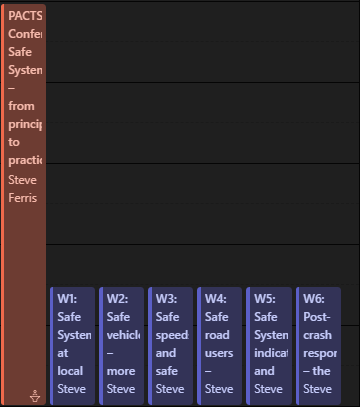
I set up a webinar with registration, which was working fine up until monday last week (7th March) - it now says that it no longer exists when you click on it in the calendar, and as such I'm not able to make any edits or download an updated registration list. It also no longer has the ability to join when you right click on it. It is still present in my outlook calendar with all of the original information, and It can be joined from here (so it does exist). The only thing that is different about this one is that you'll see in the picture above there are 6 workshops, each set up as a separate teams meeting. I created a table with a hyperlink to each of these and put it in the body of text for the meeting. Everything in one place so that attendees would know where to go next. Could this have somehow confused it by having other hyperlinks in the actual body of it? Has anyone else had this problem before and managed to resolve it? Or any other suggestions? I can't set it up all over again because 200 odd people have already registered and that would generate a new link to join. Thanks, Steve1.2KViews0likes1Comment
Event Cancelled, which wasn't cancelled
I had a serious 'snafu' which occurred in a webinar. We required registration for the webinar up to the final day. We decided to change it to no registration needed so that anyone who wants to attend last minute can just click on the link and enter. When we made the change 'Teams' sent an email to all those who had registered that the event was cancelled. No warning was given that this would happen and the event was not cancelled, only one of the properties changed. This has to be fixed.Solved3.3KViews0likes2Comments