webinar
442 TopicsTeams Events Hosting Assistance (TEHA): Expert Guidance for Business-Critical Teams Events
Hosting a CEO Town Hall, CIO broadcast, company-wide announcement, webinar, or large-scale virtual event or a large meeting? TEHA provides direct access to Microsoft event specialists who help customers plan, prepare, deliver, monitor and optimize business-critical Teams events. From planning and technical readiness to live event monitoring and post-event analysis, TEHA works alongside your organization throughout the entire event lifecycle. How TEHA Can Help Event Planning and Readiness Event scoping and guidance Town Hall, Webinar, and Meeting selection Technical readiness assessments Network readiness reviews Microsoft eCDN guidance and validation Training and Rehearsals Producer and presenter training Moderator guidance Dry runs and event rehearsals Event production best practices Live Event Support Real-time event monitoring Operational guidance during the event Support for Town Halls, Webinars, and Meetings Assistance for executive broadcasts and large-scale events Post-Event Analysis Event summary reports Attendance and engagement insights Recording and playback guidance Quality and network observations Log analysis and issue investigation Recommendations for future events Who Typically Uses TEHA? Organizations frequently engage TEHA for: CEO and CIO Town Halls Leadership broadcasts Global employee communications High-visibility webinars Product launches and Critical meetings Company-wide announcements Business-critical virtual events How to Engage TEHA Customers with eligible Premier or Unified Support agreements can request assistance through the Microsoft Engage Centre: Teams Events Hosting Assistance Request Portal If the Engage Centre option is unavailable, contact your Customer Success Account Manager (CSAM) and request TEHA support for your upcoming event. For highly visible events, we recommend engaging early to maximize readiness and planning opportunities. Deliver your next Teams event with confidence.174Views0likes0CommentsSales & Pre-sales Partner Skilling | Partnering for Success Together | LIVE & Virtual event
Join this partner skilling session to stay informed on the latest news, offerings, and go-to-market support to help you accelerate readiness and drive faster customer impact. Dates: September 9, October 14, December 10, 2026; January 13, February 10, March 11, April 21, May 12 Format: You can either attend the morning or evening sessions Morning Session: 8:00 AM PST/PDT Evening Session: 5:00 PM PST/PDT (same day) Event Overview: Each session provides the latest updates on Microsoft's commercial solution areas, partner opportunities, investments, and go-to-market support to help partners successfully navigate evolving market opportunities. What you’ll get as a participant: Stay up-to-date on key announcements and partner opportunity across Microsoft's commercial solution areas Deepen your understanding of Microsoft investments designed to accelerate partner enablement and drive applicable strategies for go-to-market success Recommended Audience: Channel and SME&C SI Partners on the Managed Partner List, including: Microsoft Alliance Leaders Microsoft-aligned Executives Business Unit Leaders Practice Leaders Partner Strategy and Sales Leaders Similar partner-facing leadership roles Register today!279Views0likes0CommentsTOMT: One ERP Doesn't Fit All - Using Microsoft Dynamics to Complete Your ERP Strategy
Many complex organizations, such as large city, county, and state governments, have invested in ERP systems that simply don’t work for all their stakeholders. Agencies with unique business operations - pension funds, lotteries, health departments, planning departments, and more - just may not work within a broad general government ERP system. Or their requirements are so unique that fitting them into the big system isn’t worth the expense. Register for this webinar to: Discover how Microsoft helps agencies left behind from the big system find the "just right" balance of functionality, flexibility, and affordability. Hear real-world success stories of how state and local organizations successfully deployed Microsoft Dynamics alongside larger systems. See how built-in AI is helping teams streamline and automate business processes. This session is offered as part of Microsoft's State & Local Government Solution Showcase Series. REGISTER TODAY!159Views0likes0CommentsShadow Autonomy & Enterprise AI Governance
As AI agents become more autonomous, organizations face a growing challenge: identifying and governing AI systems that emerge outside established processes. Join this expert-led session to learn how to uncover "shadow autonomy" across your environment and build effective governance frameworks that balance innovation with security and compliance. You'll gain practical insights into detecting unauthorized agentic AI deployments, establishing approval and oversight workflows, implementing guardrails that empower teams to innovate responsibly, and creating enterprise-wide visibility into autonomous AI capabilities. Whether you're responsible for AI strategy, security, governance, risk, or compliance, this session will provide actionable guidance for managing the next generation of AI at scale. Hear from Microsoft experts Mehrnoosh Sameki, Responsible AI and AI Evaluation Tools Lead, and David Tang, Security Partner Marketing Lead for Asia, as they share best practices for building a secure, governed, and innovation-friendly AI ecosystem. Register now and learn how to confidently govern autonomous AI while accelerating responsible adoption across your organization, Shadow Autonomy & Enterprise AI Governance When: Thursday, 27 August 2026, 2:00 – 3:00 pm (GMT+10:00) Delivery language(s): English Closed captioning language(s): 简体中文, 繁體中文, 日本語, 한국어, English
Add Location to a Webinar
Hello! I appreciate Webinars are designed to be online - but does anyone know if it's possible to be able to add the Location field to Webinars? We often have hybrid meetings and it would be great to include Location. I have tried to add Location within Outlook after it's published, but this location does not then transfer down to those who register for the webinar. If I created a custom template (which I know requires Teams Premium) can I include Location on a custom template?393Views0likes2CommentsICYMI: Accelerate your Frontier journey: Summit sessions now available on demand
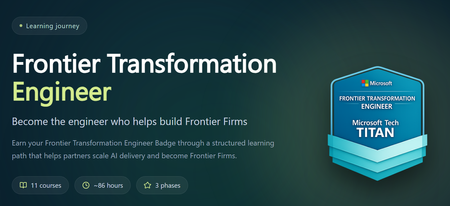
The Frontier Transformation Engineer Summit may be over, but you can keep the momentum going. Revisit the highlights or catch up on sessions you missed. Read more on the new Partner Skilling discussion board Follow the Partner Skilling discussion board here to keep up to date on all future announcements!178Views2likes0Comments
Observability as trust: Differentiation points for customer-facing AI agent operations
As AI agents become increasingly customer-facing, trust is emerging as a critical differentiator. Customers need confidence that AI-powered solutions will operate reliably, securely, and predictable especially when agents are making decisions, interacting with systems, and adapting to changing conditions. Observability provides the visibility needed to understand agent behavior, identify issues early, and demonstrate operational maturity. Join this session to learn how software development companies can use observability to build confidence in AI applications and agents. We'll explore the key signals, metrics, and operational practices that help make agent behavior transparent, measurable, and explainable across customer environments. You'll gain practical insights into monitoring AI operations at scale, improving reliability, and reducing risk while creating better customer experiences. Discover how observability can move beyond a technical requirement to become a strategic advantage—helping you strengthen customer trust, accelerate adoption, and differentiate your AI solutions in the marketplace. Learn more and register: Observability as Trust: Differentiation points for customer-facing AI agent operationsDon’t miss these key opportunities to strengthen your security practice
Security is the baseline expectation in migration and modernization—and the partners who lead in security can drive faster adoption, smoother deployments, and stronger customer outcomes from day one. Here’s how you can start today: Complete the Cloud Security Envisioning Workshop before June 30: Sharpen your security‑first approach and engage customers earlier in their cloud journey. After June 30, access requirements may change, so complete the workshop while current guidance is still in effect. Earn the Cloud Security specialization: Unlock continued workshop access and reinforce your role as a trusted partner for secure cloud transformations. Review the specialization requirements, check your status in Partner Center, and work with your Partner Development Manager or the Microsoft AI Cloud Partner Program Concierge to accelerate readiness. Strengthen your security framing today Want more guidance? Explore these additional resources: Partner Concierge Azure Migrate and Modernize Partner Forum286Views1like0Comments🎉APAC FY26 Fabric Partner Community Year‑End Celebration
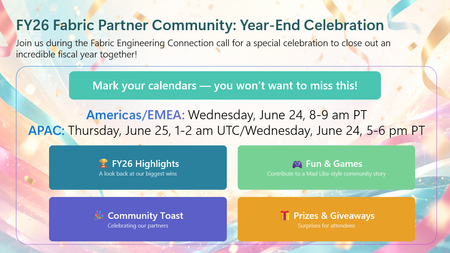
As we prepare to wrap up FY26, we’re closing the year the same way we built it — together. This year‑end celebration will be held as part of the final Fabric Engineering Connection calls of FY26, giving us space to pause, look back on what we built together, and celebrate the partners who make this community what it is. 🌎Americas & EMEA Wednesday, June 24 | 8:00–9:00 AM PT 🌍APAC Thursday, June 25 | 1:00–2:00 AM UTC / Wednesday, June 24 | 5:00–6:00 PM PT) ✨ What to expect: A look back at the moments that defined FY26 along with partner updates to take you into FY27 Fun & games — including a Mad Libs–style community story built live by partners A community toast and a few surprises along the way 👉 Important: This call is open to members of the Fabric Partner Community on Microsoft Teams. If you’re not already a member, you can join here: https://aka.ms/JoinFabricPartnerCommunity This isn’t just a year‑end recap. It’s a thank‑you to the partners who showed up, shared openly, asked great questions, and helped each other grow real Microsoft Fabric practices. Mark your calendars. We can't wait to celebrate with you! 🥳 🥂147Views0likes0Comments🎉 Americas/EMEA FY26 Fabric Partner Community Year‑End Celebration
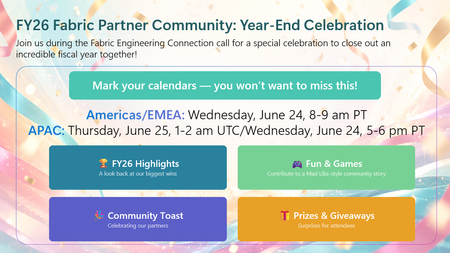
As we prepare to wrap up FY26, we’re closing the year the same way we built it — together. This year‑end celebration will be held as part of the final Fabric Engineering Connection calls of FY26, giving us space to pause, look back on what we built together, and celebrate the partners who make this community what it is. 🌎Americas & EMEA Wednesday, June 24 | 8:00–9:00 AM PT 🌍APAC Thursday, June 25 | 1:00–2:00 AM UTC / Wednesday, June 24 | 5:00–6:00 PM PT) ✨ What to expect: A look back at the moments that defined FY26 along with partner updates to take you into FY27 Fun & games — including a Mad Libs–style community story built live by partners A community toast and a few surprises along the way 👉 Important: This call is open to members of the Fabric Partner Community on Microsoft Teams. If you’re not already a member, you can join here: https://aka.ms/JoinFabricPartnerCommunity This isn’t just a year‑end recap. It’s a thank‑you to the partners who showed up, shared openly, asked great questions, and helped each other grow real Microsoft Fabric practices. Mark your calendars. We can't wait to celebrate with you! 🥳 🥂186Views1like0Comments