web part
35 TopicsAfter Communication Site upgrade of the root site full-width sections are limited
If you upgrade root site's team site template with a communication site template, the new home page (front page) contains one section that can have a full-width web part and it's the first section (uppermost). You cannot add a full-width section down on the page because it's not available in Add Section menu. Is there a possibility somehow to allow full-width sections also on other slots on the new homepage? The upgrade was done with Powershell: Enable-SPOComm... and it was otherwise successful.1KViews0likes3Comments
SharePoint Online List Webpart Views Ignored (Team site Classic Experience)
Can anyone confirm that none of a list's views can be applied to it inserted in to a page as a web part? The Web Part Properties section gives the following message if anything other than All Items is selected for Selected View: Cannot save all of the property settings for this Web Part. Cannot complete this action. Please try again. I thought the issue might be with my custom list, so I created a new list using the Recipe Tracker template. I made no additions, changes, or edits to the list content or definition. I created a new Web Part page and inserted the Recipe Tracker Web Part. The behaviour is the same. Steps to reproduce: Go to https://<yoursite>.sharepoint.com//_layouts/15/viewlsts.aspx Click on + New Click on List Scroll down and click on Recipe tracker in the "Templates" section under the "From Microsoft" tab. Click on Use template Click on Create Go to https://<yoursite>.sharepoint.com/SitePages/Forms/AllPages.aspx Click on + New Click on Web Part Page Type in a name for the page in the "Name:" text box. Select Full Page, Vertical in the "Choose a Layout Template:" list. N.B. the selection here did not seem to make any difference to the outcome. Select Site Pages in the "Document Library" drop-down. N.B. the selection here did not seem to make any difference to the outcome. Click on Create Click on Add a Web Part Click on the right-facing arrow until you see Recipe tracker in the "Parts" list. Click on Recipe tracker Click on Add Select the Recipe tracker web part Click on Web Part tab at the top of the ribbon Click on Web Part Properties in the "Properties" section of the ribbon Select Recipe gallery from the "Selected View" drop-down in the "List Views" section on the right-hand side of the page Click on OK Receive error message, and the view has not changed.1.2KViews0likes1CommentEmployee Recognition web part "View More" not working
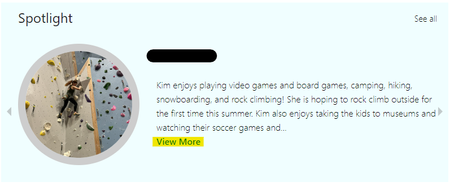
We have a Spotlight web part set up that only displays a portion of the text entered into the field. On April 13, we noticed that when we clicked "View More" we were now taken to an error page. Previously, we would be taken to a page where the full text would be displayed alongside the picture. The connected list has not changed. We also checked older entries that were previously working and they no longer work. We have tried deleting and re-adding items and still have the same result. Anybody know what's going on? I was hoping to report this to Microsoft but I'm not an Admin on the SharePoint tenant so I don't have that capability, I am a Site owner.613Views0likes0Comments
Where are custom images for quick links saved?
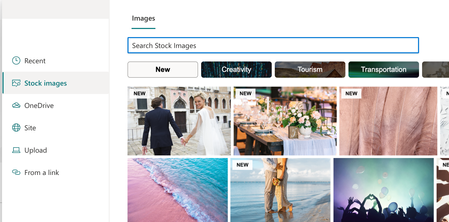
When you add a quick link in it's web part and select 'custom image' to upload your own, where does that image get saved. When right clicking on the image it doesn't show it being saved to the site collection it was created but to https://company.sharepoint.com/_api/v2.1/shares/ any idea where that is?Solved2KViews0likes1CommentEmbed LinkedIn Content in SharePoint
LinkedIn has removed the Embed option so we can't grab code from posts that we want to highlight on our intranet home page (which is a (SharePoint Online Comm site). Any ideas on a workaround or another web part we could use? Does Microsoft have plans for a LinkedIn web part like they do for YouTube or Twitter?2.1KViews3likes1Comment
web part Component to upload or select existing images
I'm developing a custom web part similar to quick links. But I'm unable to find a way to trigger the modal/window for uploading a new image or selecting an existing image. Could anyone share some resources related to this? thank you776Views0likes0CommentsSharePoint 2019 (On Prem) - Number of news post option is not available for news webpart in SP 2019
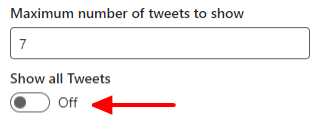
There is no such option is available on web part property pane to set the number of news post for SharePoint 2019 . For SharePoint online we have the option to set the number of new to be displayed as shown in the below screen. SharePoint Online The same is not available for the SharePoint 2019 (On Premises).803Views0likes0Comments