views
28 Topics
Why doesn't OneDrive support metadata and custom views?
Does OneDrive not support metadata? Problem The only details I can see are as follows: Type, Modified, Added, Date created, Path Size. But my files have so much more metadata and categorizations. SharePoint file management is nice The experience in SharePoint is great; it has all of our files packed with useful metadata; at one organization I was even able to remove all folders and rely only on libraries and metadata, providing UI via web parts like the Highlighted Content, Feed, and Public Views. File duplicates across hundreds of people went from thousands to zero for the majority of the time. Time searching for files went down to mere seconds. Collaboration increased. File integrity improved. On other sites, we had a mixture of folders and metadata, but still those Public Views were invaluable for managing our department data. Onedrive seems to lose much of my file data! But moving over to OneDrive, it seems all that file storage functionality has been lost. Even existing file metadata seems to get lost during transfers. Devs seem to be throwing in some AI stuff, memories, but for some reason failing to listen to community feedback and add this basic functionality; even with complaints where Onedrive use resulted in lost and corrupted file metadata. Now they've announced the Next Generation of OneDrive but the topic doesn't seem to be addressed. I see requests and complaints on the internet going back years, including many over the past 12 months over on the feedback portal. Most of this feedback seems to go ignored though. Is there a reason why Microsoft hasn't allowed users to http://%20https://support.microsoft.com/en-us/office/create-a-managed-metadata-column-8fad9e35-a618-4400-b3c7-46f02785d27f?ui=en-us&rs=en-us&ad=us or to create custom views of our OneDrive libraries?618Views0likes0CommentsLesson Learned #401:Creating Dynamic Views from Multiple Tables using Stored Procedure
Recently, I encountered an intriguing scenario where our customer needed to dynamically create views based on multiple tables, allowing them to efficiently filter and aggregate data. The challenge arose when dealing with varying amounts of data, which required careful consideration for performance optimization. Through this article, I would like to share my insights and present a stored procedure that offers additional options to address this dynamic view creation requirement effectively.2.8KViews1like0Comments
How to hide the applied filters at document library?
Dear All, Just found out that document library is showing applied filters for each views. Some view shows exactly filters info as shown in 1st picture while some just showing "This view uses classic filters that you can view and edit here" as shown in 2nd picture. If clear the filters, the screen will shows all the documents which should be not allowed to view. Anyone have idea to hide this???20KViews9likes35CommentsViewing modern list as calendar
I have a modern SharePoint list. The list has various task-oriented fields, including Title, Start, and Due. I would like to be able to toggle a calendar view of the list. There was no built-in calendar view available under the view options, so I created one ("Create new view"). The new calendar view has column headings of Title, Start, and Due. The problem is that it has no content. If I toggle back to "all items," everything appears fine. If I toggle to the new "Calendar," it's empty except for the column heads. What did I do incorrectly? How do I do this? I'm assuming that modern lists can be viewed as a calendar...1.4KViews0likes1CommentWhy Does Gantt Chart Change When Adjusting Timeline View
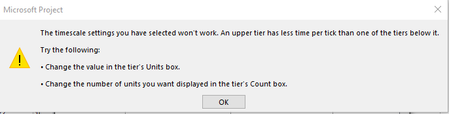
I'm using the Gantt with Timeline view in Project and first, I don't know why when I change the timeline date range, it also changes the gantt chart view, which I don't want it to do. I set the timeline date range to be the start and finish date option, this then affected my Gantt view by displaying days as the units for the bottom tier instead of weeks that I had set previously. Then when I go and try to change the bottom tier timescale units from days back to weeks, I get this error, which doesn't make sense to me why its saying "the upper tier has less time per tick", when the upper tier is set to Months. Help please.2.7KViews0likes5CommentsSharePoint online, Microsoft Lists, gallery view, views, word wrap
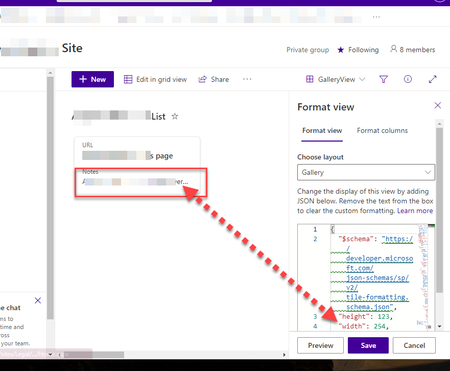
I have a GalleryView in SharePoint Online, Modern view, in Microsoft Lists and I would like to have the description / notes word wrap, I know I can change the width however is there a way to have it go DOWN to be more of a portrait than landscape?2.5KViews0likes1Comment
SharePoint View Formatting
Hi All, I am trying to create a view that is basically showing a medals table for a SharePoint list. What I would like to do is have a consistent format for this. My list contains the following columns Title - Country Name Gold - Numeric Value Silver Bronze Total The view i am struggling to create should have a fixed width and the elements inside should be as follows <Country Name> <Gold> <Silver> <Bronze> <Total> I would like the country name to be of a fixed value so that the medal numbers line up. My JSON is shown below { "$schema": "https://developer.microsoft.com/json-schemas/sp/view-formatting.schema.json", "hideSelection": true, "hideColumnHeader": true, "rowFormatter": { "elmType": "div", "style": { "display": "flex", "flex-direction": "column", "align-items": "flex-start" }, "attributes": { "class": "sp-row-card" }, "children": [ { "elmType": "div", "style": { "text-align": "left" }, "children": [ { "elmType": "div", "attributes": { "class": "sp-row-title" }, "txtContent": "[$Title]" }, { "elmType": "div", "txtContent": "[$Gold]" }, { "elmType": "div", "txtContent": "[$Silver]" }, { "elmType": "div", "txtContent": "[$Bronze]" }, { "elmType": "div", "txtContent": "[$Total]" } ] } ] } }Solved1.4KViews0likes2Comments
Show the total number of files in a SharePoint library
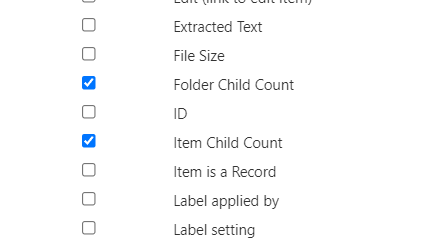
My users (non developers) are often complaining that it is so hard in SharePoint to show: - The total number of files (not items) in a library I know that its possible to see the total number of items if I go to "site contents" and find the document library there. But this includes the folders. Often people are interested how many files are there. Is there any way to do this? - The total number of files inside a folder In the Windows Explorer I can right click a folder and see the number of files in the details. But in SharePoint I can only show the top level children via changing the view: But this info is worthless for most of the people. They want to see the number of files including all sub folders. - Is there a way to archive this? We have huge document libraries and it is not recommended to sync those via OneDrive client. This would be a (bad) way to archive what we need via Windows Explorer. But there must be a way in SharePoint how to do this that does not require a PowerShell skript. Any idea how to (easily, for normal users) do this in the GUI?13KViews0likes3CommentsSharePoint Task List Project - Unable to filter certain tasks from view
Hello everyone, I have a SharePoint task list project. On the task list I created a view that filters out tasks that are 100% complete. The filter works on all completed tasks with the exception of one. I have tried using different filter criteria (such as 'completed = no') to no avail. This one completed task in particular refuses to be filtered out of the view. Has anyone encountered an issue like this before?832Views0likes0Comments