update management
1258 Topics
After updating KB5127648, only half of the archive history was restored.
For Microsoft engineers After fixing the update from Windows 11 KB5124010/Windows 10 KB5120249 to Windows 11 KB5127648/Windows 10 KB5126657, the File History can find and run the backup drive, but the last copy date of the files has not changed, and any new files can be backed up. This is my question: Click in and read carefully. File History timestamp sync bug still broken in KB5124010 - Anyone else? | Microsoft Community Hub After updating KB5127648, only half of the archive history was restored. | Microsoft Community Hub This is my opinion response center report. https://aka.ms/AA13n2f3 https://aka.ms/AA13n22w https://aka.ms/AA13ucfz https://aka.ms/AA13urx3 https://aka.ms/AA13ukxv Please click here. If you have the same problem as me, please agree, add a comment, or ask your question in the feedback post. You can also paste the URL in the comments section.92Views0likes1Comment
win re wim file
I have NOT played with any system files on my Windows 11 PC but have found that under "create a restore point", there is a line that says "WinRETools (Missing)". It has been there for years in an uncorrupted status and I don't understand why it is now missing. it appears I need a file called Winre.wim and that it can be extracted from a Windows 11 ISO file. I have downloaded 2 ISO files, one in "English (United States)" and one in "English (Great Britain)". There was also an option for "English (International)". BUT none of these match the region shown by my Control Panel which says my PC is English (Australia). Web searches say this language mismatch is a problem and I've posted a separate query to the Community regarding this. Nevertheless I have proceeded to follow the various instructions on the web / Microsoft website about: download a zip extraction software. find install.win within the ISO file, and open it/extract/find the file winre.wim. BUT this is where I'm stuck - no matter how many times I've tried, there is NO winre.wim file within the ISO file. It appears that if my PC crashes and I need to recover/rebuild from the ISO file, and I won't be able to because the winre.wim file is missing from my computer's C drive, under Windows\System 32\Recovery. Help!!47Views0likes1Comment
Recent Windows update causing performance issues when using multiple programs
I was recently forced to update to the most recent Windows update/patch. And now I can barely open 2 programs (let alone one) without having 100% of my RAM being used; even typing this very paragraph is causing my laptop to stutter. I used to be able to have a video or two open in the background without any major performance issues, even with already intensive RAM-heavy software alongside it (e.g Adobe Photoshop, Illustrator, InDesign, etc.), but now it's too risky to do any of that again, and it's starting to impair my academic work, which relies heavily on that kind of software and usually requires another tab to be open in the background too. Additionally, what I noticed is that ~30% of my memory (16GB) is being used in the background immediately after starting up (with only one non-Windows-related background process) by a completely invisible process, which never happened before the update (I remember it taking only about ~5% before). I am only asking if there is a way to minimize the RAM usage or roll back the update on my laptop. I have never had this issue before, even after about 2 years of usage, and I am afraid if this will be permanent. And apologize if this has bad grammar; English isn't my first language.32Views0likes0Comments
My Microsoft WebStore will not install anything. Everything is either in queue or not working.
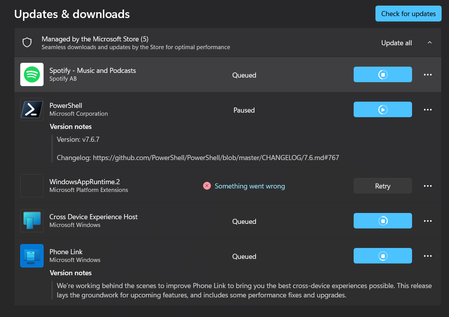
I noticed it when I went to try and download MineCraft. Nothing will download, and what is not in queue just says "something went wrong." The WindowsAppRuntime.2 is particularly concerning. I have tried clearing the cache, resetting network settings, the works. I haven't messed with anything that can be permanent, though. This might be nothing, but my settings also won't finish the update scan. I am pretty sure I am up to date, but when I go to check for updates, it just keeps loading and loading.63Views0likes1CommentIntel Extension 2.0.10200.8 keeps reappearing after successful installation
Windows Update repeatedly offers Intel – Extension – 2.0.10200.8, even though update history shows it was successfully installed. After restarting, the same update returns and requires another restart. This causes repeated mandatory restarts under our organisation’s update policy and affects device compliance. How can we safely clear this update from the queue and stop it reappearing without disabling other Windows updates?37Views0likes0CommentsAfter updating KB5127648, only half of the archive history was restored.
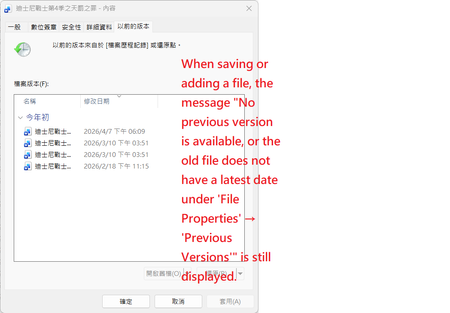
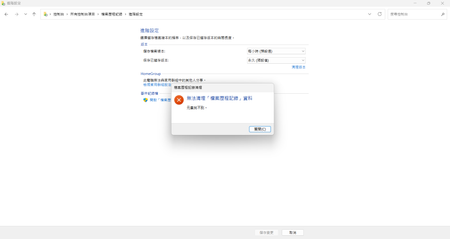
After updating my laptop to KB5127648, only half of the file history was restored. Post-update status: Files were successfully backed up to drive D, but after clicking the Execute Now button under Control Panel > System and Security > File History, the last copied date and time still cannot be updated to the latest storage time.Currently, you can only temporarily select the disk drive (D drive) by going to Control Panel > All Console Items > Archive History > Select Disk Drive. Folders in the User Folders and regular folders display the latest timestamp version, but the displayed time of the last backup is different from the actual backup time, even though the backup to drive D was successful. However, newly added or updated files, images, etc., do not display the latest timestamp version; only the date and time of the previous version are displayed. This also causes newly added or updated files, images, etc., to not appear when opening regular folders, although the latest timestamp version is displayed. For newly created files (such as Word files), File Properties > Previous Versions displays: No previous versions are available. The contents of older files will not display the latest timestamp version; only the date and time of the previous version will be shown. Serious problem: Although backups have been made to the D drive, not all data is displayed correctly; several files are missing. When attempting to execute the Clear Versions function, the system immediately displays the error message Element not found Even after updating Windows 10 to KB5126657, while file history can be backed up to the D drive, the last copy date of the files remains unchanged. This issue has existed since the KB5101684 update on July 29th. I did not perform any actions before updating KB5101684. I have submitted this issue through the Feedback Center and the Microsoft Community Center. Some users have reported that the last backup time was not updated after the KB5124010/KB5120249 update. Japanese media and computer repair shops have also mentioned similar issues. If you have the same problem, please let me know. Feel free to ask in the Feedback Center.Hopefully Microsoft will fix it soon. my feedback hub :https://aka.ms/AA13ucfz Screenshot of the problematic screen; Folders and general folders in the "Users" folder display the latest timestamp version Serious problem: Although backups have been made to the D drive, not all data is displayed correctly; several files are missing.130Views0likes0CommentsISO file - select language - mismatch
I am trying to install an updated ISO file for my Windows 11 PC. I went to https://www.microsoft.com/en-us/software-download/windows11 and it asks to select a language. For English it only provides 2 options: English International or English (United States). but my Control Panel region says my PC is set to English (Australia). So what language do I select for the ISO file download? Why doesn't English (Australia) appear as an option? a web search indicates that a language mismatch between a PC and the ISO file is a problem.50Views0likes0CommentsOctober 13th security patch repair log: File History minor bug.
I am absolutely certain that all backups File History were performed correctly before installing KB5101684, Since the KB5101684 update in late July and the more recent KB5124010/KB5120249 updates, Windows File History has been experiencing a serious synchronization anomaly. Although the backup mechanism shows it's running and can back up to the D drive, the latest file versions are not written, timestamps are not updated, and even when older files are saved, previous versions cannot read the new modifications and display Element not found error messages. This issue has affected users and repair services in multiple countries worldwide. Microsoft customer support representative Vensky confirmed that the engineering team has included this issue in their investigation and urged Microsoft to provide a system fix in the security patch released today (October 13th) to completely resolve the backup failure problem. If other users are also experiencing the same issue, please visit the Feedback Hub for discussion and include your feedback link below so the official team can resolve the issue more quickly! My Feedbackub https://aka.ms/AA13n22w Problem screen screenshot232Views0likes1Comment
Windows 11 Insider Build 29683.1000 - Explorer.exe does not start automatically after sign-in
Windows version: Windows 11 Pro Insider Preview Build 29683.1000 Issue: Black screen after sign-in; desktop and taskbar do not load. Temporary workaround: Running explorer.exe manually from Task Manager restores the desktop. Troubleshooting already performed: DISM SFC Registry verification New user profile test System Restore Attempted in-place repair installation When the issue started: Approximately 1-2 months ago. The ISO download and repair installation could not be completed. Help is required. Pradeep Kumar Bebarta40Views0likes0CommentsSave the date: Windows office hours - October 15, 2026
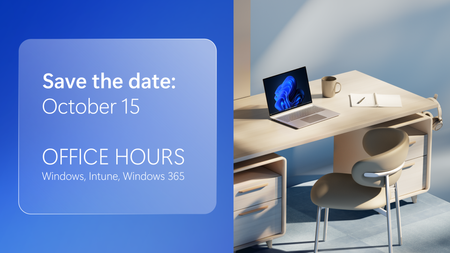
Need answers from the people behind the products you manage every day? Join us for Windows Office Hours on October 15th from 8:00–9:00 AM PT, where experts from Windows, Microsoft Intune, Configuration Manager, Windows 365, Windows Autopilot, security, public sector, FastTrack, and more will be available to answer your questions. This is a live, chat-based event with no video and no meeting link. Simply join the discussion, ask your questions, and participate in conversations with Microsoft engineers and specialists. If you can't attend live, post your questions on the event page in advance and we'll address them during the session.128Views0likes0Comments