update management
1287 Topics
KB5127648 update
Hello,after the latest updates my sapphire pulse rx 7900 xtx with 9850x3D have micro stutters,stutters.lags and fps drops from 144 fps to 88~78 fps i was using Windows 11 25H2 and i dont remember which build but after the latest updates i have those issues and before thoses updates my gaming was smooth without fps drops,i have done clean install Windows 11 26H2, build 26300.9711 but the issues remains the same and the update KB5127648 have resolve NOTHING. Please fix that mess Thank you.40Views0likes1Comment
Win11 Forget this network option missing for saved Wi-Fi networks in Settings
In Settings → Network & Internet → Wi-Fi → Manage known networks, the Forget button does not appear when selecting certain saved networks. This option is visible for some networks but is missing for others, particularly those added via a QR code or imported from another device. The button still does not appear after reconnecting or restarting the computer.26Views0likes2Comments
Quel convertisseur youtube mp3 est fiable et sécurisé en 2026 ?
Bonjour à tous, Je cherche un moyen simple et sécurisé pour convertir youtube en mp3 sur mon PC. J'ai essayé plusieurs sites gratuits, mais la plupart affichent trop de publicités, des pop-ups ou de faux boutons de téléchargement. Est-ce que vous connaissez un bon convertisseur youtube mp3 qui fonctionne encore en 2026, sans virus ni logiciels indésirables ? Je préfère un outil gratuit, facile à utiliser et capable de télécharger des fichiers MP3 en bonne qualité (320 kbps si possible). Un logiciel à installer me conviendrait aussi.477Views0likes7CommentsOctober 2026 Windows Update causing major issues
We have had about 50 computers in our organization giving boot failures after Windows restarts to apply the October update, KB5127648. Affected machines are Dell devices, both laptops and desktops. The most common error message is "file missing or containing errors \windows\system32\winload.efi" The only fix for now is to try booting into Safe Mode and uninstall the October update. We use a 3rd party tool to patch our devices, Automox, but manually triggering updates from Windows Settings yields similar results. But what I have noticed is that when running Windows Update from Settings, multiple drivers and firmware udpates are also being installed, so I'm wondering if there is incompatibility with outdated stuff in our machines. So we're pushing Dell updates for drivers, firmware, and BIOS, along with Windows Updates hoping that this will take care of the issue. Has anyone else experienced anything similar with this update? Or have any ideas on what may be the root cause in our case? Any feedback will be much appreciated.3.3KViews1like8Comments
win 11 pro update de 23h2 à 25h2, échecs successifs
Objet : Échecs répétés de mise à niveau Windows 11 – 0xC1900101 - 0x40017 Bonjour, Mon PC MSI MS-7C91, sous Windows 11 Professionnel 23H2 (build 22631), échoue systématiquement lors d'une mise à niveau vers une version récente de Windows 11. Les tentatives effectuées par Windows Update vers 25H2 et manuellement depuis un ISO 26H2 échouent, avec retour automatique à Windows 11 23H2. Erreur relevée par SetupDiag : 0xC1900101 - 0x40017 Phase : Post First Boot Dernière opération : Ensure suspended services are stopped Anomalie également présente dans les journaux : échec de copie de WinSetupMon.sys, erreur 0x80070005. Les contrôles DISM et SFC n'ont révélé aucune anomalie. L'antivirus tiers et les pilotes VPN ont été désinstallés. Un démarrage minimal (Clean Boot) n'a pas permis de résoudre le problème. Aucun fichier Minidump n'a été retrouvé. Les indicateurs de compatibilité Windows (UpgEx) sont au vert. Lles journaux d'installation et de retour arrière sont disponibles pour identifier précisément la cause de l'échec et obtenir une solution permettant de conserver mes applications et mes fichiers. Merci pour votre aide. Subject: Repeated Windows 11 upgrade failures – 0xC1900101 - 0x40017 Hello, My MSI MS-7C91 PC, running Windows 11 Pro 23H2 (build 22631), consistently fails when attempting to upgrade to a more recent version of Windows 11. Attempts made via Windows Update (to 25H2) and manually using an ISO (for 26H2) both fail, resulting in an automatic rollback to Windows 11 23H2. Error reported by SetupDiag: 0xC1900101 - 0x40017 Phase: Post First Boot Last operation: Ensure suspended services are stopped An issue also noted in the logs: failure to copy WinSetupMon.sys, error 0x80070005. DISM and SFC checks revealed no issues. Third-party antivirus software and VPN drivers have been uninstalled. A "clean boot" did not resolve the problem. No Minidump files were found. Windows compatibility indicators (UpgEx) are all green. Installation and rollback logs are available to help pinpoint the exact cause of the failure and find a solution that allows me to keep my applications and files. Thank you for your help.40Views0likes0Comments
USB Audio Class 1.0 Code 10/no-audio issue fully resolved in KB5127648 and Windows 11 26H2?
a { text-decoration: none; color: #464feb; } tr th, tr td { border: 1px solid #e6e6e6; } tr th { background-color: #f5f5f5; } Microsoft acknowledged the USB Audio Class 1.0 issue associated with the September 2026 Windows update line. KB5129195 fixed the multichannel (8-channel / 3D audio) symptom, but Microsoft documentation indicated that other USB Audio Class 1.0 symptoms remained unresolved. Specifically: Device Manager Code 10 errors No audio output USB audio device initialization failures Unresponsive volume controls or sound settings KB5127648 has since been released and Windows 11 26H2 is now available. Can Microsoft clarify: Is the USB Audio Class 1.0 issue now fully resolved? If resolved, which KB is considered the final fix? Does Windows 11 26H2 include the complete fix? When will the Windows Release Health entry move from Mitigated to Resolved? We are currently delaying approval of Windows 11 cumulative updates because the available documentation remains unclear regarding the remaining Code 10 / no-audio symptoms. We have already had to disable automatic approval of Windows 11 updates in our enterprise patch-management workflow pending clarification. Ridiculous that Microsoft continues to fail at QA80Views0likes0Comments
After updating KB5127648, only half of the archive history was restored.
For Microsoft engineers After fixing the update from Windows 11 KB5124010/Windows 10 KB5120249 to Windows 11 KB5127648/Windows 10 KB5126657, the File History can find and run the backup drive, but the last copy date of the files has not changed, and any new files can be backed up. This is my question: Click in and read carefully. File History timestamp sync bug still broken in KB5124010 - Anyone else? | Microsoft Community Hub After updating KB5127648, only half of the archive history was restored. | Microsoft Community Hub This is my opinion response center report. https://aka.ms/AA13n2f3 https://aka.ms/AA13n22w https://aka.ms/AA13ucfz https://aka.ms/AA13urx3 https://aka.ms/AA13ukxv Please click here. If you have the same problem as me, please agree, add a comment, or ask your question in the feedback post. You can also paste the URL in the comments section.161Views0likes1Comment
win re wim file
I have NOT played with any system files on my Windows 11 PC but have found that under "create a restore point", there is a line that says "WinRETools (Missing)". It has been there for years in an uncorrupted status and I don't understand why it is now missing. it appears I need a file called Winre.wim and that it can be extracted from a Windows 11 ISO file. I have downloaded 2 ISO files, one in "English (United States)" and one in "English (Great Britain)". There was also an option for "English (International)". BUT none of these match the region shown by my Control Panel which says my PC is English (Australia). Web searches say this language mismatch is a problem and I've posted a separate query to the Community regarding this. Nevertheless I have proceeded to follow the various instructions on the web / Microsoft website about: download a zip extraction software. find install.win within the ISO file, and open it/extract/find the file winre.wim. BUT this is where I'm stuck - no matter how many times I've tried, there is NO winre.wim file within the ISO file. It appears that if my PC crashes and I need to recover/rebuild from the ISO file, and I won't be able to because the winre.wim file is missing from my computer's C drive, under Windows\System 32\Recovery. Help!!88Views1like1Comment
Recent Windows update causing performance issues when using multiple programs
I was recently forced to update to the most recent Windows update/patch. And now I can barely open 2 programs (let alone one) without having 100% of my RAM being used; even typing this very paragraph is causing my laptop to stutter. I used to be able to have a video or two open in the background without any major performance issues, even with already intensive RAM-heavy software alongside it (e.g Adobe Photoshop, Illustrator, InDesign, etc.), but now it's too risky to do any of that again, and it's starting to impair my academic work, which relies heavily on that kind of software and usually requires another tab to be open in the background too. Additionally, what I noticed is that ~30% of my memory (16GB) is being used in the background immediately after starting up (with only one non-Windows-related background process) by a completely invisible process, which never happened before the update (I remember it taking only about ~5% before). I am only asking if there is a way to minimize the RAM usage or roll back the update on my laptop. I have never had this issue before, even after about 2 years of usage, and I am afraid if this will be permanent. And apologize if this has bad grammar; English isn't my first language.59Views0likes0Comments
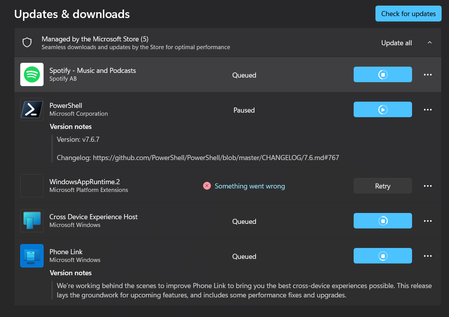
My Microsoft WebStore will not install anything. Everything is either in queue or not working.
I noticed it when I went to try and download MineCraft. Nothing will download, and what is not in queue just says "something went wrong." The WindowsAppRuntime.2 is particularly concerning. I have tried clearing the cache, resetting network settings, the works. I haven't messed with anything that can be permanent, though. This might be nothing, but my settings also won't finish the update scan. I am pretty sure I am up to date, but when I go to check for updates, it just keeps loading and loading.87Views0likes1Comment