update management
1258 Topics
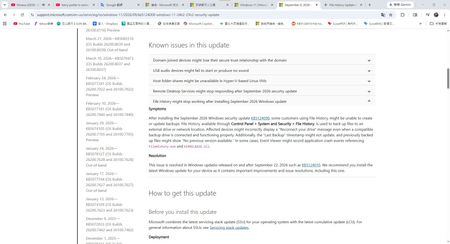
Microsoft support KB5124010, KB5124008: Known issues in this update, Highlights: semantic ambiguity
Hello, I have a question regarding Microsoft is announcement. Hi everyone,I was reviewing the Microsoft support pages for the September 2026 Windows updates and got quite confused by the wording regarding the File History bug fix. Furthermore, my actual experience after updating doesn't seem to align with the official description. I'd like to hear your thoughts on this. Question 1: Does the word after in KB5124008 imply a phased/partial fix? https://support.microsoft.com/en-us/servicing/os/windows-11/2026/09/kb5124008-windows-11-24h2-25h2-security-update In the Known issues section of KB5124008, Microsoft lists a few specific symptoms: Incorrectly displaying a Reconnect your drive message. The Last Backup timestamp might not update, and previously backed-up files might show No previous version available. Application crash events referencing FileHistory.exe. However, in the Resolution section, Microsoft states: This issue is resolved in Windows updates released on and after September 22, 2026 such as KB5124010. What exactly does after mean in this context? Does it imply that KB5124010 did not completely fix all symptoms, and the remaining issues (like the timestamp bug) will not be fully resolved until the October 13th Patch Tuesday? Question 2: Why did the KB5124010 release notes omit the timestamp issue? https://support.microsoft.com/en-us/servicing/os/windows-11/2026/09/kb5124010-windows-11-24h2-25h2-update I then checked the Highlights section for KB5124010, which states: File History Fixed: This update addresses an issue where File History might fail to back up or restore files... Affected devices might incorrectly display a Reconnect your drive message... Noticeably, it completely omits any mention of fixing the Last Backup timestamp might not update symptom. Does this omission mean that this specific part of the bug has not been fixed yet? My Actual Experience: My suspicions seem to be confirmed in my actual usage. After installing the latest KB5124010 update, my File History can now successfully find the backup drive, run properly, and back up new files (Symptom 1 is resolved). However, the Last Backup date/timestamp still has not changed at all (Symptom 2 remains). To summarize my questions: Based on Microsoft is wording, is KB5124010 only a partial fix? For the lingering issues regarding the timestamp not updating and no previous version available, do I just have to wait for the October update? Has anyone else experienced this exact situation?1KViews1like4CommentsAfter updating KB5127648, only half of the archive history was restored.
For Microsoft engineers After fixing the update from Windows 11 KB5124010/Windows 10 KB5120249 to Windows 11 KB5127648/Windows 10 KB5126657, the File History can find and run the backup drive, but the last copy date of the files has not changed, and any new files can be backed up. This is my question: Click in and read carefully. File History timestamp sync bug still broken in KB5124010 - Anyone else? | Microsoft Community Hub After updating KB5127648, only half of the archive history was restored. | Microsoft Community Hub This is my opinion response center report. https://aka.ms/AA13n2f3 https://aka.ms/AA13n22w https://aka.ms/AA13ucfz https://aka.ms/AA13urx3 https://aka.ms/AA13ukxv Please click here. If you have the same problem as me, please agree, add a comment, or ask your question in the feedback post. You can also paste the URL in the comments section.88Views0likes1CommentWindows 11 recovery tool not working. I need to create a bootable repair usb
My Windows 11 PC got blue screen of death frequently after installing the latest update. I tried booting in the advance options to repair the system but this did not work. Now, I can get into the desktop so I need a repair tool to help me out. Is there any other Windows 11 recovery tool I can use to create bootable Windows 11 repair USB? I don't want to make a clean install as there are a few important files saved on the desktop.3.6KViews0likes6CommentsTitle: Severe Font Rendering Issue After Installing KB5122385 and KB5120998 on Windows 11 25H2
Hello Microsoft Team, I would like to report a significant font rendering issue that appeared immediately after installing Windows updates KB5122385 and KB5120998. Issue Description After installing these updates, text rendering became noticeably degraded across multiple web browsers, including: Google Chrome Microsoft Edge Mozilla Firefox The issue included: Blurry text rendering. Distorted fonts. Reduced text sharpness and clarity. Overall degradation of readability and user experience. System Information Operating System: Windows 11 Version 25H2 Processor: Intel Core i9-13900HK Memory: 32 GB RAM Graphics Adapter: Intel Iris Xe Graphics Graphics Driver Version: 32.0.101.7088 Troubleshooting Performed I spent a considerable amount of time diagnosing the issue and tested several common solutions, including: Resetting Windows font settings to default. Reconfiguring and recalibrating ClearType. Disabling Hardware Acceleration in the affected browsers. Restarting the system multiple times. Reviewing display and graphics-related settings. None of these actions resolved the problem. Verified Resolution After extensive testing, I determined that the only solution that completely restored normal font rendering was: Uninstalling KB5122385. Uninstalling KB5120998. Restarting Windows. Immediately after removing these updates, font rendering in Chrome, Edge, and Firefox returned to normal. Text became sharp, clear, and properly rendered again. Request for Investigation Based on my testing, there may be a compatibility issue within Windows components responsible for font rendering, text display, graphics handling, or related system functions introduced by these updates. Because the issue affects multiple browsers, including Firefox, it does not appear to be limited to Chromium-based browsers and may be related to Windows itself. I recommend that the Windows engineering team investigate this issue, as other users may be experiencing: Blurry text. Distorted fonts. Reduced display quality in browsers. The need to remove Windows updates as a temporary workaround. The issue was consistently reproducible on my system, and uninstalling the updates was the only action that restored normal behavior. Thank you for your time and attention. I hope this report helps identify and resolve the root cause of the problem. Best regards, Hossam Soliman929Views0likes5Comments
Weird font and personalization issues after september update
Since the Windows September update, our company laptops have been experiencing numerous issues. It starts with all desktop customizations being reset, and changes are lost with every restart. The desktop background keeps reverting to a solid black color, the keyboard switches to an English layout, and taskbar settings are lost. The issue with the black background is reportedly a known problem following the August update (KB5120998). However, this issue was supposed to have been fixed with the September update. The affected PCs have build version 26200.9550 or 26200.9457 installed. The KB5124010 update is also reported to cause a black background in some cases, though this is said to be due to a crashed explorer.exe process. The explorer.exe process runs flawlessly on our PCs. We also installed the KB5124010 rollback for this known issue as a test, but it did not make any difference. The worst part, however, is the font, which in most applications looks as if the resolution is incorrect. Strangely enough, the font appears completely normal in some applications, such as Windows Settings. The screenshots show both the incorrect and the correct fonts. The incorrect one looks as if the text were poorly printed and then scanned back in. It’s terrible. I've read about the issues with the background image and personalization, but it seems like no one else is having this font problem? Unfortunately, uninstalling the update didn't solve the problem. Enabling ClearType doesn't fix the problem either, and the setting resets after a restart. Otherwise, I’ve tried: sfc /scannow, dism /online /cleanup-image /checkhealth, installing KIR, clearing the font cache, and restarting the font service. At this point, I don’t know what else to do, and I’m worried that the problem won’t be fixed by an upcoming Windows update, since it doesn’t seem to be a known issue.400Views0likes4Comments
win re wim file
I have NOT played with any system files on my Windows 11 PC but have found that under "create a restore point", there is a line that says "WinRETools (Missing)". It has been there for years in an uncorrupted status and I don't understand why it is now missing. it appears I need a file called Winre.wim and that it can be extracted from a Windows 11 ISO file. I have downloaded 2 ISO files, one in "English (United States)" and one in "English (Great Britain)". There was also an option for "English (International)". BUT none of these match the region shown by my Control Panel which says my PC is English (Australia). Web searches say this language mismatch is a problem and I've posted a separate query to the Community regarding this. Nevertheless I have proceeded to follow the various instructions on the web / Microsoft website about: download a zip extraction software. find install.win within the ISO file, and open it/extract/find the file winre.wim. BUT this is where I'm stuck - no matter how many times I've tried, there is NO winre.wim file within the ISO file. It appears that if my PC crashes and I need to recover/rebuild from the ISO file, and I won't be able to because the winre.wim file is missing from my computer's C drive, under Windows\System 32\Recovery. Help!!47Views0likes1Comment
Recent Windows update causing performance issues when using multiple programs
I was recently forced to update to the most recent Windows update/patch. And now I can barely open 2 programs (let alone one) without having 100% of my RAM being used; even typing this very paragraph is causing my laptop to stutter. I used to be able to have a video or two open in the background without any major performance issues, even with already intensive RAM-heavy software alongside it (e.g Adobe Photoshop, Illustrator, InDesign, etc.), but now it's too risky to do any of that again, and it's starting to impair my academic work, which relies heavily on that kind of software and usually requires another tab to be open in the background too. Additionally, what I noticed is that ~30% of my memory (16GB) is being used in the background immediately after starting up (with only one non-Windows-related background process) by a completely invisible process, which never happened before the update (I remember it taking only about ~5% before). I am only asking if there is a way to minimize the RAM usage or roll back the update on my laptop. I have never had this issue before, even after about 2 years of usage, and I am afraid if this will be permanent. And apologize if this has bad grammar; English isn't my first language.32Views0likes0Comments
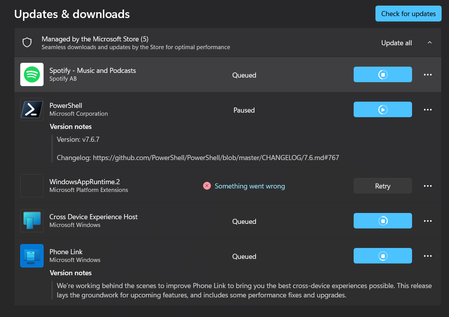
My Microsoft WebStore will not install anything. Everything is either in queue or not working.
I noticed it when I went to try and download MineCraft. Nothing will download, and what is not in queue just says "something went wrong." The WindowsAppRuntime.2 is particularly concerning. I have tried clearing the cache, resetting network settings, the works. I haven't messed with anything that can be permanent, though. This might be nothing, but my settings also won't finish the update scan. I am pretty sure I am up to date, but when I go to check for updates, it just keeps loading and loading.62Views0likes1CommentAfter updating KB5127648, only half of the archive history was restored.
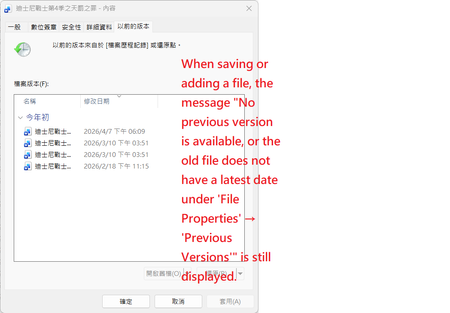
After updating my laptop to KB5127648, only half of the file history was restored. Post-update status: Files were successfully backed up to drive D, but after clicking the Execute Now button under Control Panel > System and Security > File History, the last copied date and time still cannot be updated to the latest storage time.Currently, you can only temporarily select the disk drive (D drive) by going to Control Panel > All Console Items > Archive History > Select Disk Drive. Folders in the User Folders and regular folders display the latest timestamp version, but the displayed time of the last backup is different from the actual backup time, even though the backup to drive D was successful. However, newly added or updated files, images, etc., do not display the latest timestamp version; only the date and time of the previous version are displayed. This also causes newly added or updated files, images, etc., to not appear when opening regular folders, although the latest timestamp version is displayed. For newly created files (such as Word files), File Properties > Previous Versions displays: No previous versions are available. The contents of older files will not display the latest timestamp version; only the date and time of the previous version will be shown. Serious problem: Although backups have been made to the D drive, not all data is displayed correctly; several files are missing. When attempting to execute the Clear Versions function, the system immediately displays the error message Element not found Even after updating Windows 10 to KB5126657, while file history can be backed up to the D drive, the last copy date of the files remains unchanged. This issue has existed since the KB5101684 update on July 29th. I did not perform any actions before updating KB5101684. I have submitted this issue through the Feedback Center and the Microsoft Community Center. Some users have reported that the last backup time was not updated after the KB5124010/KB5120249 update. Japanese media and computer repair shops have also mentioned similar issues. If you have the same problem, please let me know. Feel free to ask in the Feedback Center.Hopefully Microsoft will fix it soon. my feedback hub :https://aka.ms/AA13ucfz Screenshot of the problematic screen; Folders and general folders in the "Users" folder display the latest timestamp version Serious problem: Although backups have been made to the D drive, not all data is displayed correctly; several files are missing.130Views0likes0CommentsIntel Extension 2.0.10200.8 keeps reappearing after successful installation
Windows Update repeatedly offers Intel – Extension – 2.0.10200.8, even though update history shows it was successfully installed. After restarting, the same update returns and requires another restart. This causes repeated mandatory restarts under our organisation’s update policy and affects device compliance. How can we safely clear this update from the queue and stop it reappearing without disabling other Windows updates?36Views0likes0Comments