time
18 Topics
Windows regularly changes the time by one minute: what can I do?
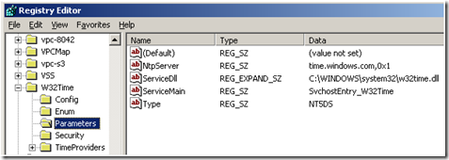
Hi all, How to prevent Windows from updating the time? (please read all the text) My windows application developed in for Windows 7/10 & 11, works 7 days a week on a PC that is not connected to the Internet, there is no time server connected to the computer. I developed my application to receive the WM_TIMECHANGE message that is why I notice that I receive this message regularly, at a frequency that seems to depend on the PCs but always with the same offset: 1 minute. My explanation (supposition) would be that Windows maintains a software clock that would shift over time and would update itself when the shift reaches one minute, at least that's what I conclude. Note that this PC is not connected to the Internet and is not on a network. In the event manager, I can find this information in the System item (source=Kernel-General) with the following message: System time changed from 2023-02-08T21:38:00,887702300Z to 2023-02-08T21:39:01.50000000Z. Reason for change: System time synchronized with the hardware clock. Procedure: "" (PID4) This phenomenon that sometimes happens once every 2/3 months, and sometimes every week. This is a big problem for me because I store data as it happens and I timestamp it. How to avoid this automatic clock updating ? - I stopped w32time and even disabled it (w32tm /unregister and net stop w32time) - I've disabled the time synchronisation task in the task scheduler. - I also disabled "Hyper-V Time Synchronisation Service" Nothing helps, Windows changes the time by one minute every ten days or so. Thank you for your help.9.8KViews0likes21CommentsTimespan/duration values in KQL, Power Query and Power BI
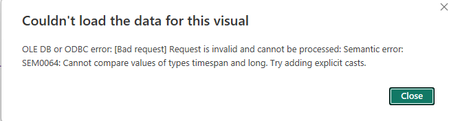
In many scenarios event durations are very important. They can be measured in days or in milliseconds and anything in between. In real time analytics it is especially important. In this article I'll describe how such values are treated in KQL and what happens to them when they are brought into Power Query and eventually to Power BI. Finally, I'll provide my recommendation for treating these values in Power BI.6.7KViews3likes0Comments
Trouble quoting date+time(hour/mins) of project start date/completion using the WORKDAY function.
Hello, I'm currently tasked with completing an excel document that accurately quotes job start and completion dates (including time of day within a work shift). So far I've been able to come up with a system that works for the most part but I'm having some issues relating to the WORKDAY function. My goal is to have an input start date/time (ex. Wednesday July 10, 2019 7:00 AM) which in turn will generate accurate information of the completion date/time for the job and simultaneously calculating when the next job will start/finish (start date/time is the finish date/time of the previous job). Ex: Start: Wednesday July 10, 2019 7:00 AM - Finish: Thursday July 11, 2019 2:55 PM. Start: Thursday July 11, 2019 2:55 PM - Finish: Friday July 12, 2019 9:45 AM. So far I've been able to calculate the finish "date" but I'm having troubles with the information generating the "time" of completion and therefore the next jobs start date/time (specifically time) correctly. The system seems to be generating the "day of completion" fine but the "hours/mins" are not calculated into the equation. I would like the WORKDAY function to be set to 7:00am - 3:30pm but I'm not sure if this is possible. The document is referring to a chart which calculates the approximate time it takes to complete a specific job depending on the amount of "parts"and "blades". (ex: (#of parts * #of blades) * Time Per Blade = Total time (0.0 days) .) The total time is then used in the workday calculation: WORKDAY(start_date, Total Time, no holidays). I'm not sure if I'm using the WORKDAY function incorrectly or not. The end goal is to have it calculate the date and time of day when a job will be competed, then in turn generating the next jobs start time. Attached is the document for better clarity. Any help would be appreciated. I'm fairly new to excel so spare me the criticism if this is a common error. Thanks!4.2KViews0likes5Comments
Exchange 2019 - Outlook/OWA all messages show the same time 8:02PM
Ok this one has me really puzzled. For some reason, which started randomly (since Feb 2023) the display time in Outlook, OWA and Phones (default app or outlook) have randomly been showing all emails as being received at 8:02PM and sometimes the next day at that time, on every message, could be ones that were sent at 11:02 am, could be ones sent at 2:22pm etc. And seems to have been some but not all users, but now more and more users are affected. All time zone and time syncs are correct. Headers shows the correct time and time zone on the messages. Messagetracking shows correct times as well. I was on Exch 2019, CU12, Nov22SU but did update to the Feb23SU(and all WU) and issue returned. It seems a reboot does fix it for a while. (Did the updates about 5-6 days ago, started again today) No major errors in event viewer other than the following, and that my SSL cert is expiring (in may) MSExchange Front End HTTP Proxy - 1003 [GetActiveCopiesForDatabaseAvailabilityGroup.FindAnotherServerLocatorServer: Server locator number of failovers since 2/22/2023 12:02:42 AM is already 25. No more failover attempts are allowed.] An internal server error occurred. The unhandled exception was: %2 but do not have a DAG The only other odd thing that I see is for some reason there is about 6 Microsoft Exchange certs (4 expire 2023, 2 expire 2026) and I believe there should only be one of those if I look at other setups1.7KViews0likes2CommentsWindows 10 v1909 (19042.1586) Missing Set time zone automatically
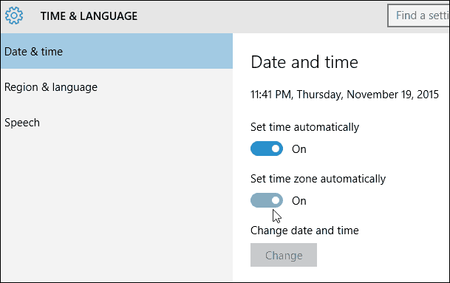
A user who recently traveled requested that we setup Windows so that the time zone would update automatically the next time she traveled. In checking our machines (Win 10 v1909 19042.1586) we're noticing that the "Set time zone automatically" option in Settings > Time & Language > Date & Time is missing. Was this feature removed in some version of Windows? If yes, which version and where is it documented? If no, Any thoughts as to why it might be missing? I checked this article "https://docs.microsoft.com/en-us/troubleshoot/windows-client/shell-experience/cannot-set-timezone-automatically" but my "Start" value is already set to "3" and "Value" is already set to "Allow".1.6KViews0likes0Comments