theme
28 Topics
Fonts & Colors - NULL field background color
I have changed the fonts and colors of SQL Server to emulate a dark mode. The only problem I have now is that the NULL field is unreadable. See this screenshot for an illustration: The regular fields are white text with black background. I did this by changing Fonts & Colors > Grid Results > Text. How do I change the background of the NULL field (3rd row)? The only option in Grid Results is "Text". I am using SQL Server Management Studio 20.620Views0likes0Comments
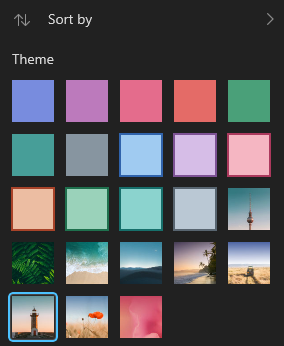
Where are the Microsoft To Do theme backgrounds stored?
I was wondering where these backgrounds are stored, since a few of them are quite pretty and wanted to use them as my desktop wallpaper too. I was not able to stumble onto them through reverse image searches, thus I was wondering if anyone could help me out. See below for reference:Solved4.7KViews1like2Comments
Task colors from Task List not persisting to My Day
Each Task List can have a theme, which changes the colors of the Tasks for that list. For example I have my personal lists set to blue and my work lists set to red. Before I updated to 2.77 today (or at least very recently), these colors would persist to My Day. This would allow me to easily see the general type of a Task according to the color of the Task completion circle. This is no longer happening, in My Day all tasks are blue. All the Task Lists themes are still correct.2.1KViews3likes1CommentSharePoint - PowerShell script to force Modern Theme for all existing subsites in a Site Collection
In SharePoint sites, we can a lot of subsites and assign the Modern Theme for each could be long. To simplify that action, I created the following PowerShell script to simplify this update. You will need an access as O365 SPO tenant admin to execute the command "Set-PnPWebTheme" as explained into the official documentation: Set-PnPWebTheme #Register-PSRepository -Default #> Required to force PowerShell module reconfig when install-module command is failing #Install-Module -Name PnP.PowerShell -Force #> Required to install PNP.PowerShell module on your computer [string]$TeamSiteToUpdate = "https://YourTenant.sharepoint.com/sites/YourTeamsite/" [string]$TenantRootURL = "https://YourTenant.sharepoint.com" [string]$SubsiteFullURL = "" [string]$ThemeName = "Your Theme Name" Import-Module PnP.PowerShell -DisableNameChecking #Connect the root teamsite to get the list of SubSites Connect-PnPOnline -Url $TeamSiteToUpdate -UseWebLogin $web = Get-PnpWeb $AllSubWebs = Get-PnPSubWeb -Recurse Disconnect-PnPOnline #Connect the SharePoint Tenant to force the defined Theme into each of the subsites and root site Connect-PnPOnline -Url https://YourTenant-admin.sharepoint.com -UseWebLogin Set-PnPWebTheme -Theme $ThemeName –WebUrl $TeamSiteToUpdate foreach($MySubsite in $AllSubWebs) { $SubsiteFullURL = $TenantRootURL + $MySubsite.ServerRelativeUrl Write-Host "Subsite Name:", $MySubsite.Title, " - Full URL:", $SubsiteFullURL ,"(RelativeURL:", $MySubsite.ServerRelativeUrl, ")" Set-PnPWebTheme -Theme $ThemeName –WebUrl $SubsiteFullURL Write-Host " >>> Theme Applied - ", $ThemeName -ForegroundColor Green } Disconnect-PnPOnline When your script is adapted and executed, you will find the root site and subsites with the correct Theme. You can also use this script to adapt the case with different Theme for subsites versus rootsite Fabrice Romelard1.6KViews0likes0CommentsDefault theme and style for all Office products
Hi, we need to configure all Office 365 applications to have our brand color palettes, font, and font size. I've tried to create a template and I'm able to manually import it in PowePoint and Word but how can we deploy a single theme for all computers in our organization and set it automatically as the default theme? Thank you in advance for your support!842Views0likes0CommentsCustom modern theme with JSON schema in SPSE?
Can we create custom modern themes for SharePoint Server Subscription Edition? In SPO we can create these with PowerShell an JSON formatting: https://docs.microsoft.com/en-us/sharepoint/dev/declarative-customization/site-theming/sharepoint-site-theming-overview I couldn't find a command to apply these locally on a SharePoint Server Subscription Edition.Microsoft Teams theme for fluentui/react
I am confused whether to use fluentui/Northstar or fluent/react. Few control of northstar are easy to implement example searchable dropdown, which is complecated in fluentui/react. If I use fluentui/react how do I set the theme. The pivot which is mentioned in the design document of the teams ui is not available in fluentui/ northstar.. 🙁. The menu of northstar don't have an example how to call a component on click of a menu item.. Please help me. It is so confusing.4.4KViews0likes2CommentsWhere did the Wonder Woman 1984 theme go
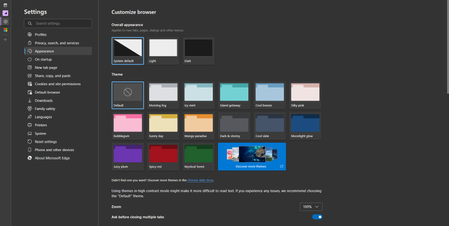
There used to be a Wonder Woman 1984 theme for Microsoft Edge in Addons store, but no more. https://microsoftedge.microsoft.com/addons/microsoft-edge-themes Where did it go? it was the first available theme for Edge browser, i really liked it, it had nice colors that I like and compatible with vertical tabs.4.2KViews2likes10CommentsEdge now has new Accent color themes
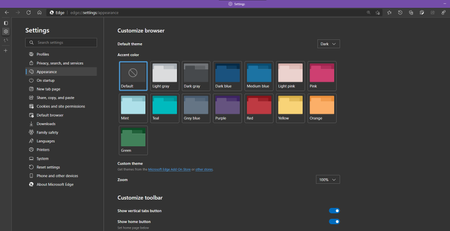
Microsoft Edge Version 89.0.731.0 (Official build) canary (64-bit) in order to get this, you need to enable this flag: edge://flags/#edge-color-theme-picker Enable picker for color based themes When enabled, gives a set of options for autogenerated themes based on a base color – Mac, Windows, Linux #edge-color-theme-picker19KViews6likes32Comments