tabs
74 TopicsDuplicating windows regression with 143.0.3638.1
Has anyone else ran into this issue lately in 143.0.3638.1 where merely clicking links (e.g, links from Windows 11 applications) spawns duplicate windows of all your existing tabs in addition to the new tab (rather than re-using the existing window?) Windows 11 25H2 143.0.3638.1 Example: Open Settings in Windows 11, Windows Update, click the Learn More link. If it doesn't work the first time, it will happen on the second. A duplicate second window open with all your tabs in Edge (minus pinned tabs). What a weird regression.344Views0likes3Comments
How to disable confirmation pop-up in Edge Browser when opening many tabs
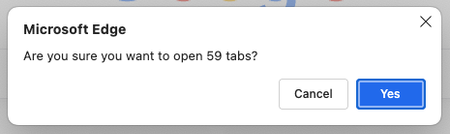
I have bookmarks arranged in multiple folders, varying from 10 to 500 or more links per folder. Whenever I try to click on the bookmark folder to open all of them at once, I always get this Pop-up, which is very annoying to me (I was ignoring that pop-up for more than a year). Is there any built-in setting to disable or increase the limit? P.S: FYI, I am on a very high-end laptop(M4 pro with increased RAM & SSD) and due to my use case, I have to regularly, almost every day open many links134Views0likes0Comments
MS Teams Tab sending chats?
I noticed some tabs have a chat tab that corresponds to a chat in the messages tab on the teams client. I'm wondering how you can do that all in one because the docs seem to specify messaging capabilities is a chatbot feature. I'm looking at this and it isn't clear that my tabs app can send messages as well. https://learn.microsoft.com/en-us/microsoftteams/platform/resources/bot-v3/bots-with-tabs957Views0likes4Comments
Missing tabs in chats
I cannot see/ add tabs in private (group)chats in the new preview. And in team chats, the tabs are there but the possibility of adding them is gone. So my question. Is this a known Bug or not? Or is this a 'feature'? Private chat tabs: Old teams new teams Chat in a team Old teams New teams
MS Teams Tabs - Web embedding drawbacks
Hello, I am about to start working on a project and would like to know the drawbacks of embedding a website in MS Teams tabs, and would like to know what the best solution for my problem is. I am working on a web application that will allow users to search for files within the GUI I create. I also want to directly integrate this into teams so users can access this GUI directly in teams. I have noticed I am able to embed a website directly into a tab by providing a URL to the site. I would like to know the limitations for this. If I develop a web app and host it on https://www.test.com/ and link it directly to a tab in Teams, what limitations will users encounter? Should I be developing this as a MS Team embedded web experience (using MS Teams JavaScript SDK)? Or is it fine to develop it as a standalone web application and then have a tab in ms teams direct to it? One limitation I have already noticed within embedded websites in teams tabs is that when I leave the tab and come back, it does not save my session. (Ex: I have a tab directing to https://www.google.com and when I search for something then leave the tab and come back my session is not saved and I am starting off from google.com again). Is there anything else I should know about? Thanks1.8KViews0likes1CommentEdge only restore one window with tabs
Edge do not restore all windows and tabs, only a single windows with all tabs from only that window. After more than year, not gonna lie I'm starting to lose it Video https://www.youtube.com/watch?v=7jhNKi-kLV8&ab_channel=VirgilFabre Also your forum is broken I tried to post, didn't work due to an iframe not support, so I tried again once it was fixed, "Post flooding detected"... No comment2.5KViews1like4Comments
Add tab/page to group on other page
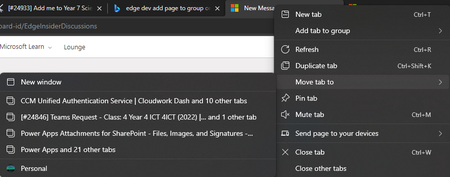
Classification: TABS PRIORITY IN MY OPINION: 5 on a scale from 1 (low) to 10 (high) At the moment, it is great that tabs can be moved to a new window, other windows in profile and other profiles. There is also an option to add tabs to groups. However, this only applies within the current window. It would be ideal to be able to move tabs to another group on a different window (but in the same profile).868Views0likes0Comments
You get Tabs and you get Tabs! Everybody get Tabs!!
While I appreciate that "Users can move Vertical Tabs to the right side of the screen" is planned in recent post here Re: Top Feedback Summary for December - Microsoft Tech Community I think that Edge Team can go a step further and allow for tabs to be available on all four sides of the window. This is very useful for power user, or even one who want to separate some tabs into individual zone/segment. Eg. right tabs for social media and emails, left tabs for work related, top tabs for casual/once-off page browsing, maybe bottom for banks, financials, etc. I think this makes sense nowadays in the era of ultrawide and big screen monitor. Bringing the idea further or sideways, since multi-monitor setup is very common now, maybe the ability to have multi-window browser with each saved tabs would be good too. So say, having one window with many tabs relating to work on left side of an ultrawide monitor, and another group of tabs on another window on the right side of the ultrawide, then another window on second monitor with another group of tabs and these states and tabs are saved persistently so that restart or closing the browser would not be a problem and still start the next day with the same setup, now that would be a banger. Hopefully these two ideas are considered and implemented.725Views1like0Comments