stream
61 Topics
Microsoft Stream
Hi, I only received the alert about Stream Classic last week. I always thought it was part of the O365 suite and not related to SharePoint. Now it has been renamed Stream (SharePoint Online) My query is now that the deadline has passed, is there anyway to retrieve video uploads from the classic version?Solved61KViews0likes4CommentsSave MS Team Meeting Recording to Stream instead of OneDrive/SharePoint
Hello All - With the recent and upcoming changes to MS Teams meeting records going to OneDrive or SharePoint will there be a way to manually move those recordings into Stream or will Stream prevent them from being uploaded? I am asking because we have a number of teams that conduct training, record the training and add that to a channel in MS Stream. Wasn't able to track down info pertaining to this scenario any place. Or if anyone has encountered this so far, what approach was taken? Thanks!!13KViews0likes7Comments
Stream API
Hi everyone. I'm trying to understand if there will be the possibility to have Stream API in the near future. My need is to download the autogenerated transcript, translate it via online services, and then load the new transcript file back on the video. Do u have any advice? thanks Michele12KViews1like8Comments
Teams Meeting Recording does not include Embedded Video from PowerPoint presentation
One of my customers ran into an interesting issue recently that I have been able to replicate. I'm curious if others are also experiencing this, and if there's a way to make it work properly. Here's the scenario: A PowerPoint slideshow is shared in a Teams meeting using the "Present in Teams" button from PowerPoint. The slideshow contains an embedded *.webm video that was recorded with Stream (on SharePoint). Participants in the meeting are able to see and hear the video correctly during the meeting. In the Teams meeting recording, the audio and video from the *.webm video does not work... it appears blank on the slide as if no video was played. In some testing with the customer prior to the meeting, the video file playback quality was best when using the "Present in Teams" button instead of a screen share in Teams with computer audio. I had assumed this built-in sharing method would be our best route. We did not realize the meeting would be recorded and did not test that specifically. After the issue occurred, I recorded a new video and created a new PowerPoint slideshow to test this in 3 scenarios... First by sharing the PowerPoint app from the Teams meeting. The Teams meeting recording contained the audio and video properly from the embedded *.webm file that was played. Second, from the Teams meeting, sharing the entire screen including computer audio, the embedded *.webm video again played properly in the meeting recording. Third, when using the "Present in Teams" button from PowerPoint, the *.webm video played correctly during the meeting, but the Teams meeting recording did not contain audio or video from the embedded *.webm video, just like what my customer experienced. I can't tell if this is a known limitation, an issue with Teams meeting recording functionality, or an issue with PowerPoint. If anyone has some insight to share, it would be greatly appreciated! Thanks, Brian11KViews2likes5Comments[FIXED] Your session has expired Error popping up all the time! Edge insider Canary
I'm trying to upload a video at https://web.microsoftstream.com/ and I'm getting this error every 10 seconds which forces me to refresh the page all the time and won't let me get anything done. I have this behavior in both Google Chrome Canary Version 80.0.3965.0 (Official Build) canary (64-bit) and Microsoft Edge Canary Version 80.0.331.0 (Official build) canary (64-bit) sent it as smiley feedback along with problem recreateSolved9.3KViews0likes1CommentJoin Microsoft Stream at BETT 2020!
BETT 2020 is kicking off this week and we look forward to seeing you there! The Stream team will join educators, students, partners and others on January 22 -25 in London. We hope you visit us in the Microsoft Hub and in sessions to learn more about inclusive and collaborative digital experiences that are fueling learning and growth for students and teachers from K-12 to higher education and beyond. SESSIONS Join Stream in the Learn Live Theater where we will share new innovations and best practices for using video in classrooms and with your fellow educators. Wednesday - Friday @ 14:00-14:30 Learn Live Theater: Develop a Teaching and Learning Video Culture with Teams and Stream - Connect with meetings and live events, teach with web-based screen recordings and create on mobile using the Flipgrid Camera. MICROSOFT TRAINING ACADEMY Attend these sessions to learn how to enrich your classrooms with Teams, Stream and other collaboration applications in Office 365. Wednesday- Saturday @ 10:30-11:00 Getting teachers to learn and students to teach This session will inspire teachers to leverage Class Notebook, Teams, SharePoint and Stream to experiment with new student tasks and innovative practice for their own context and set up opportunities for O365 staff training to improve learning outcomes in the long run. Wednesday - Saturday @ 15:30- 16:00 Teams University - Maximizing Teams at your higher education institution This session will cover the basics of Teams for a newcomer in Higher Education that don't have much experience with the tool. Faculty will benefit from getting hands on training and immersing themselves in the tool. MICROSOFT HUB Come by the Microsoft Hub to connect with Stream experts throughout the conference. The Hub is located in booth Booth #NF40 . We look forward to seeing you at BETT 2020!9.1KViews1like0CommentsFile versions taking all my storage space (Stream)/turn off versioning/delete all versions
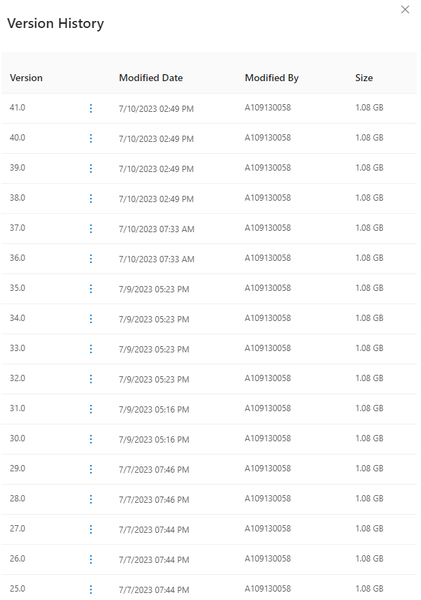
(I'm using education version)Whenever I create or edit a chapter in Stream, it automaticly creates a new version for me in onedrive, the problem is, it actually duplicates the file, for example, if the video size is 1GB and I edited the chapter 50 times, then there would be 50 versions of this video file, and the file size would be 50GB, this issue is really bothering me, it basically takes up all 1TB of my storage, someone help plz.Solved8.5KViews1like4Comments