stream
61 Topics
Teams Meeting Recording does not include Embedded Video from PowerPoint presentation
One of my customers ran into an interesting issue recently that I have been able to replicate. I'm curious if others are also experiencing this, and if there's a way to make it work properly. Here's the scenario: A PowerPoint slideshow is shared in a Teams meeting using the "Present in Teams" button from PowerPoint. The slideshow contains an embedded *.webm video that was recorded with Stream (on SharePoint). Participants in the meeting are able to see and hear the video correctly during the meeting. In the Teams meeting recording, the audio and video from the *.webm video does not work... it appears blank on the slide as if no video was played. In some testing with the customer prior to the meeting, the video file playback quality was best when using the "Present in Teams" button instead of a screen share in Teams with computer audio. I had assumed this built-in sharing method would be our best route. We did not realize the meeting would be recorded and did not test that specifically. After the issue occurred, I recorded a new video and created a new PowerPoint slideshow to test this in 3 scenarios... First by sharing the PowerPoint app from the Teams meeting. The Teams meeting recording contained the audio and video properly from the embedded *.webm file that was played. Second, from the Teams meeting, sharing the entire screen including computer audio, the embedded *.webm video again played properly in the meeting recording. Third, when using the "Present in Teams" button from PowerPoint, the *.webm video played correctly during the meeting, but the Teams meeting recording did not contain audio or video from the embedded *.webm video, just like what my customer experienced. I can't tell if this is a known limitation, an issue with Teams meeting recording functionality, or an issue with PowerPoint. If anyone has some insight to share, it would be greatly appreciated! Thanks, Brian11KViews2likes5Comments
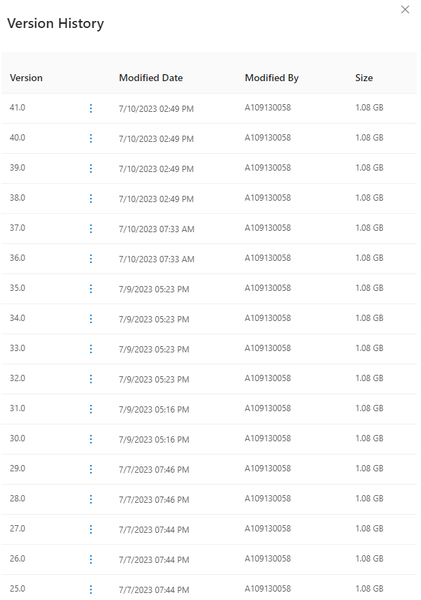
File versions taking all my storage space (Stream)/turn off versioning/delete all versions
(I'm using education version)Whenever I create or edit a chapter in Stream, it automaticly creates a new version for me in onedrive, the problem is, it actually duplicates the file, for example, if the video size is 1GB and I edited the chapter 50 times, then there would be 50 versions of this video file, and the file size would be 50GB, this issue is really bothering me, it basically takes up all 1TB of my storage, someone help plz.Solved8.5KViews1like4CommentsSharing a Video from Stream using Anonymous links doesn't allow users to download video
Hi, Download button disappeared again from the Stream view of the video when it is shared via Anonymous link using Can view Setting. Can view setting also wrongly presents the description as: Anyone with the link can view but can't download which in essence is true but it shouldn't be true for the Can view setting. When I switch to Can't download and Apply it and then go back to the link settings and choose Can view, I get the correct description: Anyone with the link can view. However, when opened, the video still doesn't have the Download button. Marc Mroz is this planned shift in regard to Stream revamp or just a unintended side effect - bug? Thank you for the effort.
SQL Server Stream Aggregate vs Hash match Aggregate
Hello, I am a new SQL Server engineer. While looking at the execution plan of a query that SUM() values of int type based on the range of a date column of datetime type, I discovered that SUM() processing is handled by Stream Aggregate and Hash match aggregate in each case. The table is composed of a Clustered Index with Date as the key. I think it changes to Hash match processing as the index search range increases, but I don't know the difference between the two processing methods and what criteria determine the processing method. Can you give me a good answer?498Views0likes1Comment
Stream API
Hi everyone. I'm trying to understand if there will be the possibility to have Stream API in the near future. My need is to download the autogenerated transcript, translate it via online services, and then load the new transcript file back on the video. Do u have any advice? thanks Michele12KViews1like8CommentsMicrosoft Stream
Hi, I only received the alert about Stream Classic last week. I always thought it was part of the O365 suite and not related to SharePoint. Now it has been renamed Stream (SharePoint Online) My query is now that the deadline has passed, is there anyway to retrieve video uploads from the classic version?Solved62KViews0likes4CommentsPrivate preview for advanced video analytics
Interested in seeing more analytics on your Stream videos within Microsoft 365? Microsoft Stream has begun a private preview for a new advanced video analytics service. What's in the private preview? It includes new per-video analytics such as average watch time, usage by device, and views by geographic location for individual videos. Additionally, a site-level analytics dashboard will show stats for all the videos in a SharePoint site including lifetime views, trends for videos over time, and even which videos are the most popular in the site. Both features will help you understand how your videos are performing and engaging your audiences. If you are interested in joining the private preview for this service please submit your application here.1.4KViews1like2CommentsNew Stream Web Part - Source > Folder > From Sites > Only shows recent shared libraries
The new Stream (on SharePoint) web part just hit my org's tenant. When you add the web part to the SharePoint page, there are several source options: Videos on this site, Folder, and Single Video. When you select Folder as the source and the Select Folder button, it gives you the option to select Your Organization, OneDrive, Site, and From sites. Here's the problem I'm running into: When you select From sites, it only allows you to see the Shared (Doc) Libraries you have accessed most recently and is limited to 12. If the Shared (Doc) Library you need is not shown, you have to: Stop editing the SharePoint page Navigate too and open the Shared (Doc) Library where the video file(s) live Wait a few minutes Go back to the SharePoint page you were editing and hope the Shared (Doc) Library shows up when you select From sites. The workaround "works" but it isn't a great experience for the end user. Is there any other way to get the ability to search for the Shared Library?5.2KViews3likes20Comments
I thought we'd be able to use Stream for playing videos on Teams meetings without lag but we can't?
From everything I've read, we should be able to host a video on SharePoint or OneDrive in order to share it in a teams meeting. It doesn't seem like this feature works. Stream isn't an app available in the apps list unless I use the one available in the chat window. If I select Microsoft Stream from the chat apps, it asks me to post a link to share with the meeting. When I input my video link from sharepoint, it gives the error "Please enter a valid Stream URL." It should be a valid URL. We've tested this numerous time with numerous settings, but even if we set it so that anyone with the link can view the video, it won't let us use the sharepoint link (from mysharepoint.com) to Stream on a Teams meeting. We can't watch videos by sharing our screens or windows because it lags too much. The only current solution we have is to use the YouTube app which seems to work better than the Microsoft ones. Is there a solution for this?3.1KViews0likes4Comments