sharepoint
4101 TopicsMicrosoft 365 Community Conference: A Beacon for Builders, Innovators, and Icons of Intelligent Work
You’re passionate about what you do, and we’re passionate about empowering your potential. Microsoft 365 Community Conference - is your chance to keep up with AI, build game-changing skills, and take your career (and business) even further. With over 200 sessions, workshops, keynotes, and AMAs, you’ll learn directly from the experts and product-makers who are reimagining what’s possible in the workplace. Conference Details Join us in Las Vegas April 21-23. 2026 for the premier Microsoft 365 community event. We want to help you get the most out of the tools you use every day, so we’re bringing back the conference you know and love—with even more opportunities to learn, connect, and level up. Here’s what you can expect: Meet one-on-one with the people who create Microsoft products—ask questions, share feedback, and discover real-world solutions Explore Microsoft’s latest product updates and learn about what’s on the horizon Build and sharpen skills you can use immediately to be more productive, creative, and collaborative with the Microsoft tools you use every day Grow your network, dive deep, and have fun with the best community in tech How to Register Register today and get ready to transform the way you work. Save $150 with our exclusive customer code SAVE150. https://aka.ms/M365ConfWebsite Explore Sessions and Workshops There’s plenty of breadth—and depth—to the learning opportunities at the Microsoft 365 Community Conference. No matter your role or experience level, we've got something for everyone! https://aka.ms/M365ConfSessionsWebPage Meet the Speakers Our lineup of speakers includes some of the brightest minds behind the most powerful Microsoft innovations. You’ll hear from experts like: Jeff Teper | President, Collaborative Apps and Platforms Charles Lamanna | President, Business Apps and Agents Vasu Jakkal | Corporate Vice President, Microsoft Security Business Rohan Kumar | Corporate Vice President, Microsoft Security, Purview & Trust The Microsoft 365 Community Conference is more than an event. It’s the gateway to what’s next for your career, community, team, customers, and business—and for work itself. Claim your front-row seat to the future of work today!812Views0likes1CommentAutoSave disabled when opening SharePoint-synced files from Finder after macOS Tahoe 26.6 update
Files stored in SharePoint Online and synchronized locally through OneDrive are opened as local documents when launched from Finder. Office applications display "Saved to my Mac" and AutoSave is turned off by default. However, opening the exact same files through Word/Excel > Open > Sites, or via SharePoint "Open in Desktop App", correctly identifies them as cloud documents. In that scenario, AutoSave is enabled and collaboration/version history features work as expected. Troubleshooting already performed: OneDrive reset and re-linked SharePoint library re-synced Signed out and back into both Office and OneDrive Removed Microsoft credentials from macOS Keychain and re-authenticated Recreated local OneDrive sync relationships Verified OneDrive File Provider extensions are enabled Verified Office applications and OneDrive are fully up to date Tested with newly created files and existing files Tested "Always Keep on This Device" with no change in behavior The issue appears to be specific to the Finder-to-Office launch path after upgrading to macOS Tahoe 26.6. Before upgrading to macOS Tahoe 26.6, opening the same SharePoint-synchronized files directly from Finder correctly preserved cloud document identity and AutoSave was enabled as expected. I discussed this issue in detail with Apple Support, but they quickly dismissed it, saying that the problem is not on Apple's side and that I should contact Microsoft instead.1.7KViews10likes17CommentsUpcoming changes to classic experiences in SharePoint Online
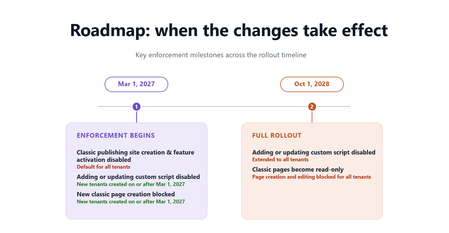
For the latest details, timelines, FAQs, and implementation guidance, read the full Microsoft Learn article. In 2016, we introduced modern SharePoint and the SharePoint Framework to our online service – a cloud-born user experience & developer extensibility framework. Ten years later, we continue to invest in this stable platform to provide reliable, well-governed, AI-ready, mobile-friendly, and secure-by-default foundations for customers’ publishing and content management needs. Also in 2016, we renamed our previous publishing and UX extensibility system to “classic”. These features were designed to ease our customers’ transition from on premises environment to the cloud service. Now, ten years later, these classic features are used by fewer than 5% of our monthly active tenant base, and the classic SharePoint page content is not participating in the latest ways content should be secured, managed, and shared. Classic pages are also not fully represented in the content formats that power Microsoft 365 Copilot, which can reduce the coverage and accuracy of Copilot responses that draw on classic content. As such, over the next two years, we will take steps to retire classic SharePoint pages and custom scripting add/update capability in SharePoint Online from Microsoft 365 – below you will find details on timelines, assessment tooling, and migration guidance. Overview We are introducing a set of changes to classic experiences in SharePoint Online across two phases. No classic page content or data will be deleted by Microsoft in these phases. Existing pages will remain accessible in a read-only form. Phase 1 – Beginning March 1, 2027 The following changes will take effect: For all tenants Creation of new classic publishing sites and activation of the classic publishing feature will be disabled for site collection and sub sites. The AllowClassicPublishingSiteCreation tenant setting will be enforced as False and cannot be changed. For new tenants created on or after March 1, 2027 Users cannot create new classic pages — including wiki pages, web part pages, blog pages, publishing pages, and custom ASPX pages. The ability to add or update custom scripts will be disabled by default, and the site setting DenyAddAndCustomizePages will be enforced as True and cannot be changed. Note that this setting applies only to classic pages — modern SharePoint pages are not affected, and custom solutions built on the SharePoint Framework (SPFx) will continue to work under your organization's existing governance. Phase 2 - Beginning October 1, 2028 The following changes will extend to all tenants: Classic user-created pages — including wiki pages, web part pages, blog pages, publishing pages, and custom ASPX pages — will become read-only. Users will no longer be able to create or edit these classic pages. The ability to add or update custom scripts will be disabled and the DenyAddAndCustomizePages site setting will be enforced as True and cannot be changed. What you should do now For SharePoint administrators: No data or content will be deleted by Microsoft as part of this change, and all existing data governance features will continue to be honored and continue to function. Discover and assess your classic SharePoint environment Identify usage of classic sites and pages across your tenant. Use the “SharePoint Classic Activities” Purview Audit log category - included in Audit (Standard) and available to all organizations, and events (ClassicPageCreated, ClassicPageEdited, and ClassicPageViewed) to identify active classic page usage, and leverage the Microsoft 365 Assessment Tool to understand the overall classic scope and modernization feasibility. Prioritize based on business importance and usage If your assessment finds no classic content, none of these changes apply to your organization — no action needed. Otherwise, focus first on high-value or frequently updated classic sites and pages, and identify where modernization will have the greatest impact. Classifying content by business criticality can help guide a phased migration plan. Transform to modern SharePoint experiences before enforcement deadlines SharePoint administrators should use modernization tools such as SharePoint PnP Modernization and SharePoint Page Modernization Agent to convert classic pages into modern SharePoint experiences where applicable. Microsoft will continue enhancing the tooling to accelerate page modernization with best-effort fidelity reservation, but it may not fully automate complex scenarios; modernization is a project that typically requires planning, resourcing, and highly customized pages often need redesign or manual rebuilding. Adopt a phased migration strategy Combine centralized IT-led planning and prioritization with distributed execution by site owners over time. Most organizations find success by modernizing page content in waves rather than attempting a single large-scale migration. For detailed guidance, tools, and step-by-step recommendations, refer to the Microsoft Learn article. For site owners and content authors: Site owners should work with their SharePoint administrators to identify classic sites and pages that are still actively used and determine which content should be modernized, retired, or replaced. Documentation, assessment tools, and migration guidance linked below can help organizations understand available modernization options and prepare for the transition. How do I get help? Refer to the following documentation, tools, and Microsoft partner resources to support your migration from classic SharePoint experiences: Modernize your classic SharePoint sites | Microsoft Learn Transform classic pages to modern pages | Microsoft Learn Microsoft 365 Assessment Tool Microsoft Solution Providers Learn more For complete details, timelines, FAQs, and ongoing updates, see the Microsoft Learn announcement. A Message Center post in the Microsoft 365 admin center has been sent to all tenants. (MC1464926 & MC1464924)5.8KViews0likes4CommentsSharePoint AI page authoring: Select, describe, and refine
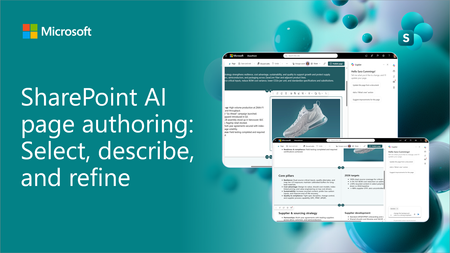
SharePoint AI page authoring is getting an updated experience with on-canvas selection. Authors can select a web part or section, describe the intended change in natural language, and review the results directly on the page. See the updated experience in action and learn how it makes page editing faster and more intuitive for both new and experienced authors.848Views0likes0CommentsCopilot, Microsoft 365 & Power Platform product updates call
💡Copilot, Microsoft 365 & Power Platform product updates call concentrates on the different use cases and features within the Microsoft 365 and in Power Platform. Call includes topics like Microsoft 365 Copilot, Copilot Studio, Microsoft Teams, Power Platform, Microsoft Graph, Microsoft Viva, Microsoft Search, Microsoft Lists, SharePoint, Power Automate, Power Apps and more. 👏 Weekly Tuesday call is for all community members to see Microsoft PMs, engineering and Cloud Advocates showcasing the art of possible with Microsoft 365 and Power Platform. 📅 On the 15th of September we'll have following agenda: News and updates from Microsoft Together mode group photo Rémi Dyon – Building an Agent with GitHub Harness in Copilot Studio Steve Pucelik + Marc Windle – Latest on SharePoint Embedded Vesa Juvonen – Surfacing your business apps in Copilot canvas – IT concierge scenario 📞 & 📺 Join the Microsoft Teams meeting live at https://aka.ms/community/ms-speakers-call-join 🗓️ Download recurrent invite for this weekly call from https://aka.ms/community/ms-speakers-call-invite 👋 See you in the call! 💡 Building something cool for Microsoft 365 or Power Platform (Copilot, SharePoint, Power Apps, etc)? We are always looking for presenters - Volunteer for a community call demo at https://aka.ms/community/request/demo 📖 Resources: Previous community call recordings and demos from the Microsoft Community Learning YouTube channel at https://aka.ms/community/youtube Microsoft 365 & Power Platform samples from Microsoft and community - https://aka.ms/community/samples Microsoft 365 & Power Platform community details - https://aka.ms/community/home 🧡 Sharing is caring!60Views0likes0CommentsCopilot, Microsoft 365 & Power Platform Community call
💡 Copilot, Microsoft 365 & Power Platform weekly community call focuses on different use cases and features within the Microsoft 365 and Power Platform - across Microsoft 365 Copilot, Copilot Studio, SharePoint, Power Apps and more. Demos in this call are presented by the community members. 👏 Looking to catch up on the latest news and updates, including cool community demos, this call is for you! 📅 On 17th of September we'll have following agenda: Latest on SharePoint Framework (SPFx) Latest on Copilot prompt of the week PnPjs CLI for Microsoft 365 Dev Proxy Reusable Controls for SPFx SPFx Toolkit VS Code extension PnP Search Solution Demos this time Josh Bray – Managing Power Platform Environments from SharePoint with an SPFx Web Part Yves Habersaat – Agent-Driven Power Apps: Canvas Authoring MCP Server with GitHub Copilot CLI Mohammed Amer – Build Interactive Component Components UX for Copilot canvas for Microsoft 365 Roadmap Features 📅 Download recurrent invite from https://aka.ms/community/m365-powerplat-dev-call-invite 📞 & 📺 Join the Microsoft Teams meeting live at https://aka.ms/community/m365-powerplat-dev-call-join 💡 Building something cool for Microsoft 365 or Power Platform (Copilot, SharePoint, Power Apps, etc)? We are always looking for presenters - Volunteer for a community call demo at https://aka.ms/community/request/demo 👋 See you in the call! 📖 Resources: Previous community call recordings and demos from the Microsoft Community Learning YouTube channel at https://aka.ms/community/youtube Microsoft 365 & Power Platform samples from Microsoft and community - https://aka.ms/community/samples Microsoft 365 & Power Platform community details - https://aka.ms/community/home 🧡 Sharing is caring!44Views0likes0CommentsSharePoint Showcase: 10 Custom AI Skills Every SharePoint Site Owner Should Build
In this edition of SharePoint Showcase, we explore how skills work, how to create or install them, and ten practical examples to help SharePoint site owners get started. These examples are not an exhaustive list, but a curated starting point for identifying everyday processes that can become reusable, team-ready skills.9KViews4likes2Comments
Power Apps - development vs production
“It works fine in development.” Probably one of the most dangerous sentences in application development. 😄 I've seen Power Apps behave perfectly when we test with a small amount of data. Then the application goes to UAT or production and suddenly users start reporting: “It's taking too long to load.” “The gallery is empty.” “The search isn't returning everything.” “Why is this screen so slow?” Many times, the formula itself isn't the only issue. The data is. For example, an app might work perfectly with a few hundred SharePoint records. But as the list grows, the same approach can become a problem because of delegation and the amount of data being processed. That's why I've started asking these questions before finalizing an app: Is this query delegable? How much data will this list have after one year? Are we loading records into collections unnecessarily? Are we doing multiple LookUps inside a gallery? Can the filtering happen closer to the data source? Would Dataverse be a better option for this requirement? These questions don't always come up when we're building the first version of the application. But they become very important later. One thing I'm learning with Power Platform is that a solution that works today is not necessarily a solution that will scale tomorrow. Sometimes spending a little more time on the data and architecture in the beginning saves a lot of time later. Curious to know what others have experienced: What was the biggest Power Apps performance issue you faced after moving an application to production?31Views0likes0CommentsUnattended RPA — the real problem isn't starting the bot
Unattended RPA is not just about running a bot without a user I was working on an unattended desktop automation recently, and one thing that stood out to me was that making the bot run automatically is actually the easier part. The real question is: What happens when nobody is there to fix it? For example, the bot starts processing invoices at night. The machine is available. The user session is ready. The desktop flow starts normally. But halfway through the process, the legacy application shows a popup that wasn't there during development. The bot stops. There is no person sitting in front of the machine. Now the problem is no longer just a failed desktop flow. The question becomes how the automation is going to recover. This made me look at unattended RPA a little differently. Before moving a desktop automation to production, I think we should consider things like: What if the machine is unavailable? What if someone is already logged in? What if the target application is down? What if the application UI changes? What if credentials expire? What if the bot fails after completing 50% of the transactions? How do we know which transactions were completed? Can the process be restarted without processing the same transaction twice? For me, an unattended automation is not really unattended if someone from the support team has to keep checking it manually. The automation needs a proper failure and recovery strategy as well. The interesting part of RPA isn't making the happy path work. It's deciding what should happen when the happy path doesn't happen. What has been your experience with unattended desktop flows in production? #PowerAutomate #PowerAutomateDesktop #RPA #UnattendedRPA #PowerPlatformIntroducing SharePoint News and Viva Engage cross-posting
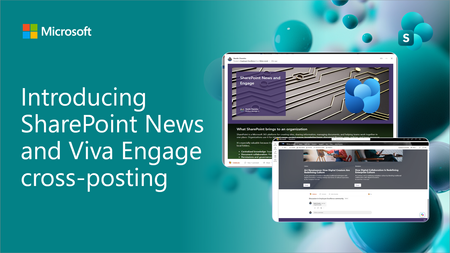
SharePoint News can now be cross-posted directly to a Viva Engage storyline or community. The original post retains its full SharePoint experience, while comments, replies, and reactions stay synchronized across both platforms.1.8KViews10likes9Comments