screen sharing
28 Topics
Screen Sharing Causes System Shutdown on Surface Pro
Dear Microsoft Teams Support, We are encountering a persistent issue with one of our users involving Microsoft Teams on a Microsoft Surface Pro 2 device. Each time she attempts to initiate screen sharing, the computer abruptly shuts down. We have already performed extensive troubleshooting, including: Verified that all drivers are up to date. Closed all background applications before attempting screen sharing. Updated Microsoft Teams to the latest version. Cleared the Teams cache. Attempted both repair and reset of Teams via Windows Settings. Ran System File Checker (SFC) and DISM scans, both of which reported no issues. Uninstalled Teams and downloaded the latest installer, but reinstallation fails. Despite these efforts, the issue remains unresolved. We would appreciate your guidance on further steps or escalation to resolve this problem. Thank you for your support.213Views0likes1CommentAdjustable section sharing
Hello, I noticed that Zoom now offers the ability to share a freely adjustable section of any screen. As a MS trainer and solution developer I find this feature incredibly useful and was wondering if anybody knows of there are any plans to implement a similar option in Microsoft Teams? Thank you! Sven144Views1like2Comments
Screen sharing in teams takes over audio from phone call.
Dear all, Users are connected with their BT headset to their phone on a call. Caller wants to share screen. User accepts. After a while the audio from the phone is switched to computer. Any way of solving this without removing the BT headset from the computer?407Views0likes0CommentsUnable to share screen on MS Teams in Google Chrome 109.0.5414 on Ubuntu 22.10
Hello, I have not been able to share the screen (or other windows) like I used to share with MS Teams running inside Google Chrome 109.0.5414 on Ubuntu 22.10. The only thing I can share is other tabs inside Google Chrome. The same thing is happening inside Chromium 109.0.5414. The strange thing is that Google Chrome and Chromium display the following message: "Go to Security & Privacy > Screen Recording to give permission and start sharing." But I do not have these Security & Privacy Settings. I am not using macOS, where I know about these settings. On Linux, there are no such settings. Are there any other options on a Linux System to set to make sharing screens possible once more? Thanks in advance. Details: - Ubuntu 22.10 with GNOME 43.1, Wayland - Chromium 109.0.5414 (via snap) and Google Chrome 109.0.5414 (via dpkg/apt)17KViews1like7Comments
Screen sharing
We run a mix of W10/W11 devices. I have completed every single update and reinstalled the app (so lets skip that conversation). Even with all this in play I (and a lot of our staff) struggle to share screen (occasionally)?! irrelevant of the application we are trying to share. sometimes it works, sometimes it doesnt. what fixes the issue is terminating the call and calling them back. Can you assist please, its really beginning to irritate everyone in the business from sales to MD.Solved2.7KViews0likes4Comments
Static noise on MS Teams during powerpoint screenshare (Mac)
Hi, I've used Teams for a few years and this is a new problem for me in the last 2 weeks. In Teams, if someone else shares their screen with a Powerpoint, I have very loud static noise so that I can't hear anything else and they can't hear me. I have to read captions/use chat. The noise stops as soon as they stop screen sharing. It's only when they share Powerpoint. If the same person, in the same meeting, same set up, swaps to sharing a PDF of that Powerpoint there's no problem. This has happened several times now - different meetings, different participants, different days, same problem. I've restarted etc. I updated to Monterey (12.6) after it started, but that didn't solve it. Any suggestions on what I should try next? UPDATED: In one case, it seems to happen when they share their powerpoint by selecting from the 'powerpoint live' list - it doesn't happen if they share by selecting the 'window'.17KViews2likes32Comments
How do i enable screen sharing from the Teams desktop app?
I think I turned this off erroneously. I did change several settings recently in my Teams subscription, but somehow this setting got turned off, and I really need to turn it back on. How do I re-enable this in the desktop app? Please send instructions. It is working for me in both the web app, and in the Android app, so it is nothing to do with my account. It is specific to the desktop app. And it is disabled for me in the desktop app for all meetings - not just the ones I schedule, but for those scheduled by other people. Other folks can share their desktop in the same meetings, so it is definitely not meeting-specific. I am running version 1.5.00.17656, the 32-bit client, The last update was 7/6/22. The version I have is optimized for HD Citrix - I run the desktop app exclusively on a Citrix VM.25KViews0likes2Comments
How can I improve the frame rate from screen share?
We use teams a lot at my workplace to screen share. We usually show code, diagrams or other sort of static content. The framerate on these screen shares are usually pretty low, at 2fps. In the long run this gives me a headache trying to follow the presenter's mouse cursor, or diagrams when it gets scrolled around. This is happening across the board, with great laptops and connections. I believed the framerate is getting capped by teams itself. Can this be changed?Solved57KViews0likes9CommentsTeams Admin - User > Session Type
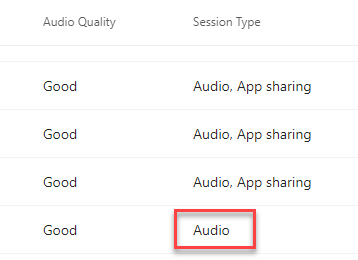
I have a user that was having issues with screen sharing - when I went to look at the data on the call in the Teams admin center I noticed that the user was showing as only Audio under Session Type. Tried to research but can't find anything on what Session Type is. Any ideas?1.2KViews0likes1Comment
Teams Web app shared screen Issues
Hi all, I can't see others screen when they share it (all I see is a black screen), using the teams web app (tried chrome and IE). It works fine on the desktop app however. This is a new laptop that was upgraded to windows 11. I still have an older laptop with windows 10, and I can see shared screens on the teams web app fine from the older laptop. I was thinking to factory reset, however is their any options I can take besides that?1.4KViews0likes0Comments