reliability
135 TopicsAI-900: Microsoft Azure AI Fundamentals Study Guide
This comprehensive study guide provides a thorough overview of the topics covered in the Microsoft Azure AI Fundamentals (AI-900) exam, including Artificial Intelligence workloads, fundamental principles of machine learning, computer vision and natural language processing workloads. Learn about the exam's intended audience, how to earn the certification, and the skills measured as of April 2022. Discover the important considerations for responsible AI, the capabilities of Azure Machine Learning Studio and more. Get ready to demonstrate your knowledge of AI and ML concepts and related Microsoft Azure services with this helpful study guide.41KViews11likes3Comments
Microsoft Remote Desktop for Mac repeatedly forgets Windows 365 workspace
In the last week or so, I have repeatedly had to re-add the workspace URL for Windows 365 (the "subscription URL" collected from windows365.microsoft.com) to Microsoft Remote Desktop for Mac. The issue started with the previous version of the app, but has continued to happen about once-a-day since installing the latest version (10.9.0 build 2140) from the Mac App Store. Every time the workspace is re-added, it needs to be reauthorized by signing in via OAuth again and any custom settings for the workspace need to be reconfigured. Is this a known issue or am I the lone recipient of this particular cosmic annoyance? 😂8.6KViews21likes19CommentsSimpler, private connectivity between Azure and AWS with Azure Multicloud Interconnect
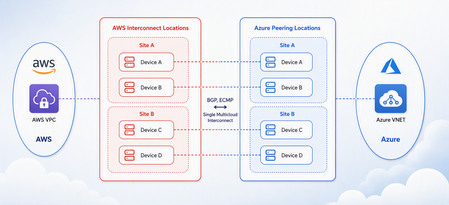
Multicloud is no longer the exception — it is how most enterprises operate. Teams run analytics in one cloud and applications in another, place workloads to meet data-residency requirements, and increasingly move large volumes of data between clouds to train and serve AI models. Yet the network that connects these environments has remained one of the hardest parts of a multicloud strategy to get right. Connecting Azure and AWS privately has traditionally meant stitching together Azure ExpressRoute, AWS Direct Connect, a connectivity provider or colocation footprint, customer-managed routers, BGP sessions, and link-layer encryption — then owning the resiliency design and day-to-day operations across all of it. The result is often slow to deliver, difficult to troubleshoot, and inconsistent in performance. Today, Microsoft and AWS are together introducing Azure Multicloud Interconnect, a jointly engineered, fully managed service that delivers private, high-throughput connectivity between Azure and AWS through a single logical resource. Both clouds coordinate provisioning, resiliency, encryption, and lifecycle operations, so the connection between your environments simply works — end to end. The challenge with connecting clouds today For most organizations, cross-cloud connectivity has been a build-it-yourself exercise. Establishing a private link between Azure and AWS typically requires provisioning an ExpressRoute circuit on one side and a Direct Connect circuit on the other, engaging a connectivity provider or securing space in a colocation facility to bridge them, and then configuring and maintaining the routers, BGP peering, and encryption that tie the two clouds together. Each of those pieces is owned by a different team or vendor, which makes the end-to-end path only as reliable as its least-managed component. When something breaks, isolating the root cause means coordinating across Microsoft, AWS, a network provider, and your own operations team — and mean time to resolution suffers as a result. Capacity planning is equally difficult: bandwidth is often provisioned for peak demand and left underused, while scaling up to meet a new AI or data initiative can take weeks. The outcome is a connectivity layer that is slow to stand up, expensive to operate, and hard to reason about — exactly the opposite of what a multicloud strategy is meant to deliver. Azure Multicloud Interconnect removes that complexity by turning cross-cloud connectivity into a managed service. What is Azure Multicloud Interconnect? Azure Multicloud Interconnect is a provider-managed, private intercloud connectivity service built on the proven foundations of Azure ExpressRoute and AWS Direct Connect. Instead of assembling and operating the underlying components yourself, you establish one interconnect resource and consume a private, dedicated path between your Azure and AWS environments. Under the covers, Microsoft and AWS coordinate the circuits, routing, and encryption on your behalf. You get the outcome you want — a reliable private connection between clouds — without becoming the systems integrator for it. Because the service builds on ExpressRoute and Direct Connect, it fits naturally into the connectivity models, tooling, and operational practices your teams already use in each cloud. One managed resource replaces a stack of circuits, routers, BGP sessions, and encryption you would otherwise build and operate yourself. Figure 1. Azure Multicloud Interconnect provides a single, managed private path between Azure and AWS, built on ExpressRoute and Direct Connect with a quad-redundant, 400G-class design and MACsec encryption. How it works Azure Multicloud Interconnect is engineered for the performance and availability that production and AI-scale workloads demand: A single logical connection. You provision and manage one interconnect resource. There are no customer-owned routers to rack, configure, or patch between the clouds. Quad-redundant, multi-site design. The data path is built across redundant devices and diverse sites — four Azure Microsoft Enterprise Edge (MSEE) routers and four AWS routers — so there is no single point of failure. High bandwidth backbone. A high-capacity LAG-based design provides the headroom needed for large-scale data movement and distributed AI traffic. Elastic bandwidth. Scale capacity up or down as demand changes, rather than provisioning for peak and paying for it year-round. Encryption by default. MACsec link-layer encryption is enabled automatically, so traffic between clouds is protected without extra configuration. Enterprise-ready networking. The service is IPv6-ready, supports APIPA addressing, and targets a 99.99% availability SLA. Routing and provisioning are coordinated by the platform, which removes the most common sources of cross-cloud connectivity errors — mismatched BGP configuration, inconsistent encryption settings, and asymmetric or fragile failover paths. A foundation you can trust Azure Multicloud Interconnect is not a new, unproven path — it extends two connectivity services that enterprises already rely on: Azure ExpressRoute and AWS Direct Connect. Both are private connectivity backbones trusted for mission-critical hybrid and cloud workloads, and the interconnect inherits their carrier-grade capacity, global edge presence, and operational maturity from day one. It also means your teams do not have to learn a separate model. The interconnect appears as a first-class resource governed by the identity, access, and monitoring controls each cloud already provides, and it can be automated with the tooling you use today. Extending trusted services, rather than introducing a parallel one, is what allows Microsoft and AWS to offer intercloud connectivity as a managed experience with confidence. Why this matters for your team Azure Multicloud Interconnect is designed to change the economics and the experience of running across clouds. Taken together, these benefits shift cross-cloud networking from a specialized, high-effort project to a repeatable, on-demand capability. Instead of dedicating senior engineers to build and babysit intercloud links, your team can direct that expertise toward the applications and data platforms that differentiate your business — while trusting that the connective tissue between clouds is reliable, secure, and ready to scale. Faster time to value. Turn up private Azure–AWS connectivity through a guided, managed workflow instead of a multi-week integration project spanning several vendors. Lower operational burden. Microsoft manages the infrastructure, resiliency, and lifecycle, so your networking team is freed from patching routers and diagnosing cross-cloud faults. Predictable, high performance. A dedicated, private path with high capacity that delivers the consistent throughput and low latency that public-internet or VPN paths cannot guarantee. Security you don’t have to assemble. Private connectivity plus default MACsec encryption keeps intercloud traffic off the public internet and protected in transit. A consistent experience in both clouds. Provision, monitor, and manage the interconnect using the native constructs and tooling your teams already rely on in Azure and AWS alike. Built for the way enterprises use multicloud “I've heard a very consistent message across many years of customer engagements - we are multi-cloud enterprise by design. With this announcement we are taking a burden on connecting clouds away from the customers." Igor Sakhnov, CVP Azure Networking Customers have told us where dedicated, managed intercloud connectivity makes the biggest difference. Azure Multicloud Interconnect is designed for scenarios such as: Distributed AI workloads. Move training data and model outputs between clouds at high throughput to feed pipelines wherever the compute lives. Large-scale data movement. Replicate datasets, back up across clouds, and support analytics that span Azure and AWS. Cross-cloud disaster recovery. Use a second cloud as a resilient recovery target over a private, reliable link. Hybrid and best-of-breed architectures. Run each application on the cloud that suits it best while keeping the connection between them private and performant. Regulated and sovereign workloads. Keep intercloud traffic on a private path to help meet data-residency and compliance requirements. Workload migration. Rehost or rebalance workloads between clouds without re-engineering connectivity for each move. Availability and what’s next Azure Multicloud Interconnect is launching first for Azure and AWS connectivity, the pairing customers ask about most often. Microsoft and AWS are starting with a preview so that you can validate the experience against your own architectures, with general availability to follow. This is the beginning of a broader journey. Building on existing multicloud connectivity capabilities, we plan to extend the managed interconnect model to additional clouds — including Google Cloud (coming soon)— so that a consistent, provider-managed experience can span your entire multicloud estate. As always, the roadmap will be guided by customer demand and real-world use. Our shared goal is simple: make the network the easiest part of your multicloud strategy, not the hardest. By delivering intercloud connectivity as a managed service, Microsoft and AWS want every organization — from a team moving its first dataset between clouds to an enterprise operating at AI scale — to connect Azure and AWS privately, securely, and with confidence, and to do it in minutes rather than months. Get started Learn more about Azure Multicloud Interconnect, Azure ExpressRoute, and AWS Direct Connect from Microsoft and AWS documentation, talk with your Microsoft or AWS account team about joining the preview, and tell us which cloud pairings and scenarios matter most for your organization. We are building this with your feedback. Azure Multicloud Interconnect is jointly delivered by Microsoft and AWS, built on Azure ExpressRoute and AWS Direct Connect. Feature availability, performance targets, and timelines may evolve as the service moves from preview to general availability.5.9KViews3likes0Comments
Microsoft Remote Desktop for Mac - Copy and paste works a while then fails
Using Mac OS X 12.6.8 and Remote Desktop 10.9.2. Beginning two versions back (10.9.0?), copy and paste works for a while after launching RD, but it eventually fails when copying from the remote machine to the local Mac. The failure manifests as a spinning beach ball in the application I'm pasting into. The paste operation eventually times out, but the quickest way to recover is to quit Remote Desktop and start the whole operation over again with the copy.5.4KViews22likes19Comments
MAC REMOTE DESKTOP Error code: 0x407
MICROSOFT JUST UPDATED REMOTE DEKTOP to version 10.8.1 but I just keep getting the same Error code: 0x407 Your session ended because of a data encryption error. If this keeps happening, contact your network administrator for assistance. Anybody has the same problem?4.6KViews0likes5Comments
Certificates are cached too aggressively in RD Web Client
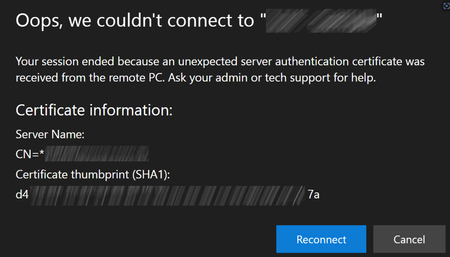
We use the https://docs.microsoft.com/en-us/windows-server/remote/remote-desktop-services/clients/remote-desktop-web-client-admin (Latest version 1.0.27) Normally it works really well, but then once a year we have to update our SSL Certificates. The problem is the Web Client likes to cache the old certificate and not get the latest certificate. This results in people getting the following error: Hitting F5, Ctrl F5 does not resolve this. The following are the instructions we have to give the AVERAGE USER to get them passed it: * Press F12 to open DEVTOOLS * Press F1 to open DEVTOOLS SETTINGS * Under Networking tick Disable Cache (while DevTools is open) * On the tab, refresh the page with F5. * Close the DevTools tab Luckily these instructions more or less work for every major browser. But I think you can see that no end user should have to do anything as crazy as this. This also makes the move towards certificates with a shorter life impossible. Can this please be looked into with urgency? (Note: I know this is the Azure Virtual Desktop Feedback, but It's what the feedback button in the web client links to. If there's a better place to provide this feedback please let me know)3.1KViews5likes13Comments
Something is preventing you from using Windows App right now.
After being auto-updated from Windows App version 2.0.327.0 to version 2.0.328.0, some of our users can't launch their Windows App anymore and get an error message says: "Something is preventing you from using Windows App right now." Since there is no way to control the update process, we could only let our desk users use MSRDC instead, as a temporary solution. For the frontline users, I could only pray that this problem will not take place until weekend. If any Microsoft person sees this post, please let the Windows App team know about this and fix this problem ASAP.3KViews2likes7CommentsRemote Desktop for Mac 10.9.4 often causes spinning wheel of death when copying from Windows machine
Starting in the last version or two, I frequently get the "spinning wheel of death" after using Remote Desktop for Mac to copy from the remote Windows client. This manifests when I switch back to the mac and try to switch to Slack -- Slack will be frozen for 30 seconds to several minutes with the colorful spinning pinwheel. Many people have been experiencing this issue, both recently and in the last several years: https://techcommunity.microsoft.com/t5/azure-virtual-desktop-feedback/copy-and-paste-from-microsoft-remote-desktop-to-mac-causes/idi-p/3947326 https://techcommunity.microsoft.com/t5/azure-virtual-desktop-feedback/microsoft-remote-desktop-for-mac-copy-and-paste-works-a-while/idi-p/3930905 https://learn.microsoft.com/en-us/answers/questions/565240/microsoft-remote-desktop-freezes-constantly-apple Please look into this, it's a productivity killer. And if there's anything I can grab for you that will help (like a snapshot of a process using the Mac activity monitor) please let me know. EDIT: I just attached a sample and spindump of Slack (the macOS process that gets the spinning wheel of death after copying text on the remote windows machine).2.6KViews18likes15Comments[Mac OS] [Bug] Microsoft remote desktop app blur after resize on retina display
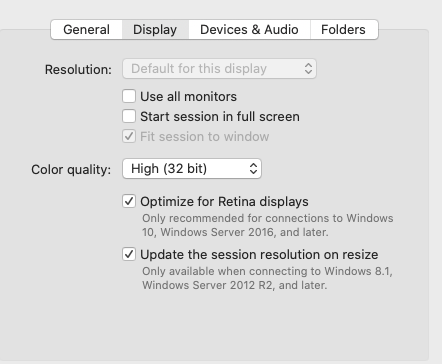
Version 10.7.6 (1972) The issue is reproducible 100% when resizing a RDP session window. The whole interface will be blur after resizing, looks like the Retina optimize is gone after resizing. If I disconnect the session and reconnect, the Retina optimize will work on the new window size.2.4KViews2likes3Comments
iPad Magick Keyboard support for VirtualBox Windows Guest
Hi there, I work in following scenario: 1. iPad Pro (12,9“, iOS 15.2.1) with Magic Keyboard (Swiss Layout) 2. On the iPad, I use the app Microsoft Remote Desktop 10.3.6 (5090) 3. In the app, I RDP to a Windows 11 desktop machine 4. In the RDP, I use VirtualBox to a Windows 10 VM. Problem: The Magic Keyboard is NOT recognized correctly in the VM from (4.). For example, the physical keys 1, 2, 3 and 4 will produce the signs „n“, „m“, „,“ and „.“, while other keys do not produce anything. Physical keys like D and F react as if they were arrow keys. Most keys do not react at all. Note, that the keyboard works perfectly fine on the iPad itself AND on the RDP Machine from (3.). But solely NOT in the Virtual Box (4.). I don‘t suspect an issue with the language setting, since this problem affects ALL characters (a-z and 1-9) and not the special characters only. Hopefully, this can be solved soon, since it would be very convenient to work with that keyboard and RDP/VB setting.