reliability
132 Topics
Evoluindo a Resposta a Incidentes em AKS com Azure SRE Agent - Parte 1
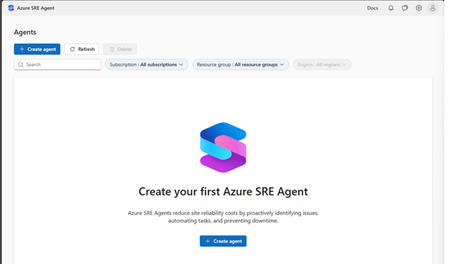
Resumo executivo Em aplicações executadas no Azure Kubernetes Services (AKS), eventos OOMKilled estão entre as causas recorrentes de reinicialização de contêineres e indisponibilidade intermitente em aplicações web. A observabilidade fornecida por Azure Monitor, Container Insights, Log Analytics e métricas Prometheus permite detectar o sintoma, registrar o evento e disparar o alerta. A detecção isolada, porém, ainda deixa para a equipe de plantão o trabalho mais caro: correlacionar métricas, logs, eventos, alterações recentes e limites de recursos até chegar a uma hipótese defensável. Sobre essa base de observabilidade, o Azure SRE Agent adiciona uma camada de raciocínio e execução governada. Ao receber o incidente, ele coleta evidências nas fontes conectadas, valida hipóteses e produz um diagnóstico explicável. Em seguida, recomenda a ação de menor risco e, conforme o modo de execução configurado, solicita aprovação humana ou executa uma remediação pré-autorizada. O resultado é um fluxo mais rápido e rastreável, sem eliminar os controles de acesso e aprovação. Este whitepaper documenta o padrão em um laboratório reproduzível. No cenário, um pod em CrashLoopBackOff por limite de memória subdimensionado (20 Mi de limite, 10 Mi de solicitação) é investigado, diagnosticado e corrigido pelo agente sob aprovação humana, com verificação posterior e disparo automatizado por alerta do Azure Monitor. Além do passo a passo, o documento aprofunda a mecânica que sustenta o diagnóstico, cgroups v2, o OOM killer do kernel, classes de QoS, working set versus RSS e o comportamento de heap dos runtimes, porque a qualidade da resposta assistida depende diretamente da qualidade dos sinais que a alimentam. O que este documento entrega A anatomia técnica de um evento OOMKilled em AKS, do cgroup ao status do pod. Consultas KQL e PromQL prontas para detecção e para o desenho da regra de alerta. O modelo operacional do Azure SRE Agent: fontes de contexto, modos de execução, permissões, hooks e políticas de acesso a ferramentas. Um laboratório completo, do provisionamento do agente à recuperação verificada do workload. Um enquadramento de governança, auditoria e segurança para operações agênticas. O que este documento não cobre Disparo totalmente automatizado a partir do alerta e integração com o processo de gestão de incidentes, tema da Parte 2. Ajuste fino de capacidade em escala de frota (VPA/HPA em produção), tratado apenas como método. Valores de preço vigentes; o modelo de cobrança é descrito de forma qualitativa. 1. Introdução Aplicações nativas de nuvem distribuem o processamento entre pods, serviços, dependências e nós. Essa elasticidade melhora a escala, mas amplia a complexidade da investigação quando uma falha ocorre. Em um incidente de memória, o primeiro sinal pode ser um pod reiniciado, uma elevação de erros HTTP, aumento de latência ou degradação parcial de uma jornada específica. O problema raramente é a ausência de dados. É o custo cognitivo de atravessar métricas, logs, eventos do Kubernetes, histórico de implantação e manifestos sob pressão de tempo, para só então formular uma hipótese. Esse custo é pago integralmente a cada incidente, e não se acumula como conhecimento reutilizável. Este whitepaper apresenta um padrão de resposta a incidentes em que o Azure Monitor sustenta a detecção e a telemetria, enquanto o Azure SRE Agent converte sinais em contexto operacional acionável, preservando a decisão humana onde ela é necessária. 2. Contexto e desafio operacional O cenário considera uma aplicação web em AKS instrumentada com Container Insights, Log Analytics, métricas Prometheus e alertas do Azure Monitor. O desafio não é apenas saber que um contêiner foi encerrado, é determinar por que a memória ultrapassou o limite, qual versão e qual carga estavam envolvidas, qual foi o impacto ao usuário e qual ação reduz risco sem ocultar a causa raiz. Ou seja, transformar sinais distribuídos em uma decisão defensável sobre pressão de tempo. Telemetria distribuída entre métricas, logs, eventos e histórico de implantação. Pressão de tempo para restaurar o serviço antes da violação do SLO. Risco de reinicializações repetitivas que mascaram a ausência de correção estrutural. Necessidade de aprovação, rastreabilidade e segregação de funções em ambientes regulados. Há ainda um viés operacional relevante: sob pressão, o caminho mais curto, reiniciar o pod ou ampliar o limite de memória, quase sempre funciona no curto prazo. Isso torna difícil distinguir, retrospectivamente, um limite subdimensionado de um vazamento de memória lento, porque a evidência que separaria os dois é descartada junto com o contêiner encerrado. 3. Anatomia técnica do evento OOMKilled Antes de delegar a investigação a um agente, é necessário estabelecer com precisão o que o sinal significa. Boa parte dos diagnósticos incorretos de memória em Kubernetes nasce da confusão entre três mecanismos distintos: o OOM killer do kernel atuando no cgroup do contêiner, o despejo (eviction) decidido pelo kubelet por pressão no nó, e o encerramento por falha da aplicação. 3.1 O caminho do kernel: cgroups v2, memory.max e o OOM killer Quando um contêiner declara resources.limits.memory, o kubelet traduz esse valor para o controlador de memória do cgroup correspondente. Em nós AKS com imagens baseadas em Ubuntu 22.04 ou superior e Azure Linux 3.0, padrão em versões recentes do Kubernetes, o runtime opera sobre cgroup v2, e o limite é materializado no arquivo memory.max do cgroup do contêiner. A partir daí, o comportamento é do kernel Linux, não do Kubernetes. Quando as páginas anônimas do cgroup não podem mais ser recuperadas e a alocação ultrapassaria memory.max, o kernel invoca o OOM killer restrito àquele cgroup, escolhe um processo e envia SIGKILL. O contador correspondente é incrementado em memory.events, no campo oom_kill. # Dentro do nó, inspecionando o cgroup do contêiner (cgroup v2) cat /sys/fs/cgroup/.../memory.max # limite efetivo (bytes) cat /sys/fs/cgroup/.../memory.high # ponto de throttling por reclaim cat /sys/fs/cgroup/.../memory.current # uso corrente cat /sys/fs/cgroup/.../memory.events # low / high / max / oom / oom_kill Vale distinguir dois campos frequentemente confundidos em memory.events: max conta quantas vezes a alocação esbarrou no teto e forçou reclaim, enquanto oom_kill conta quantos processos foram efetivamente encerrados. Um valor alto em max com oom_kill igual a zero indica um contêiner operando permanentemente no limite: degradado, porém vivo. É exatamente o estado que antecede o incidente e que raramente dispara alerta. Como o processo recebe SIGKILL (sinal 9), o código de saída observado é 137, resultado da convenção POSIX 128 + número do sinal. O kubelet então registra o término e reinicia o contêiner conforme a restartPolicy. É por isso que a evidência canônica não está no status corrente do pod, mas no estado anterior do contêiner: kubectl get pod <pod> -n pets -o jsonpath='{.status.containerStatuses[0].lastState.terminated}' | jq # Saída esperada em um OOMKill: # { # "exitCode": 137, # "reason": "OOMKilled", # "startedAt": "...", # "finishedAt": "..." # } Reinícios sucessivos levam o pod a CrashLoopBackOff, em que o kubelet aplica um atraso exponencial entre tentativas, iniciando na ordem de dezenas de segundos e dobrando até um teto de poucos minutos, cujo valor padrão vem sendo revisado em versões recentes do Kubernetes. Esse atraso é o motivo pelo qual a indisponibilidade percebida cresce ao longo do incidente mesmo sem agravamento da causa raiz. 3.2 OOMKilled não é eviction: dois mecanismos, duas correções A distinção é operacionalmente decisiva porque as correções divergem: um OOMKill se resolve no manifesto do workload; um despejo se resolve na capacidade ou no agendamento do nó. Dimensão OOMKilled (cgroup) Eviction (kubelet) Gatilho Alocação excede memory.max do cgroup do contêiner memory.available do nó abaixo do limiar evictionHard/evictionSoft Quem decide Kernel Linux (OOM killer restrito ao cgroup) kubelet, ordenando os pods por QoS e excesso sobre requests Escopo Um contêiner O pod inteiro, podendo atingir vários pods do nó Sinal SIGKILL → exit code 137 Encerramento do pod; sem exit code 137 característico Evidência lastState.terminated.reason = OOMKilled status.phase = Failed, reason = Evicted Objeto do pod Preservado; contêiner reinicia no mesmo pod Pod permanece como registro de falha e é reagendado por seu controlador Correção típica Ajustar limits/requests ou o consumo da aplicação Capacidade do nó, requests coerentes, limiares de despejo, distribuição Nota. Um terceiro caso é frequentemente confundido com ambos: o encerramento do processo principal por erro da aplicação, que produz códigos de saída próprios (1, 2, 143 para SIGTERM). Verificar exitCode e reason antes de concluir por memória evita corrigir o sintoma errado. 3.3 Classes de QoS e a ordem em que os pods são sacrificados O Kubernetes deriva a classe de Quality of Service de cada pod a partir da relação entre requests e limits. Essa classe não é apenas rótulo: ela determina a prioridade de despejo e influencia diretamente o valor de oom_score_adj atribuído aos processos do contêiner. Classe de QoS Condição Prioridade de despejo Guaranteed requests iguais a limits para CPU e memória em todos os contêineres Última a ser despejada Burstable Pelo menos um request ou limit definido, sem igualdade entre eles Intermediária, proporcional ao excesso sobre o request BestEffort Nenhum request ou limit definido Primeira a ser despejada Para pods Burstable, o kubelet calcula oom_score_adj em função da fração da memória do nó reservada pelo request: quanto menor o request em relação à capacidade do nó, maior o score e mais atraente o processo se torna para o OOM killer. Pods Guaranteed recebem um valor fortemente negativo, e pods BestEffort recebem o valor máximo. Aplicação ao laboratório O order-service deste cenário declara requests de 10 Mi e limits de 20 Mi. A desigualdade entre os dois o classifica como Burstable, e o request muito baixo em relação à capacidade do nó eleva seu oom_score_adj. O workload é, portanto, simultaneamente o mais provável de estourar o próprio limite e um dos primeiros candidatos ao OOM killer sob pressão do nó, combinação que o torna um caso de teste representativo. Há uma consequência de projeto pouco explorada: elevar apenas o limit sem elevar o request melhora a sobrevivência ao OOMKill do cgroup, mas mantém o pod vulnerável em cenários de pressão do nó, porque o agendador continua reservando pouca memória para ele. Foi exatamente por isso que a recomendação do agente no laboratório ajustou os dois valores, e não apenas o limite. 3.4 Working set, RSS e por que o dashboard pode enganar A métrica que melhor aproxima a decisão do OOM killer é o working set, e não o RSS. Em cAdvisor, a fonte de container_memory_working_set_bytes e da métrica memoryWorkingSetBytes exposta pelo Container Insights, o working set corresponde ao uso total do cgroup menos o page cache inativo, isto é, a porção da memória que o kernel não conseguiria liberar trivialmente sob pressão. Métrica O que representa Uso recomendado container_memory_working_set_bytes Uso do cgroup menos page cache inativo Referência para alertas e para dimensionar limits container_memory_rss Páginas anônimas residentes do processo Investigação de vazamento no heap da aplicação container_memory_usage_bytes Uso total, incluindo page cache reclaimável Diagnóstico; superestima a pressão real container_memory_cache Page cache atribuído ao cgroup Explicar divergência entre usage e working set A armadilha prática: um painel construído sobre container_memory_usage_bytes pode indicar uso próximo ao limite sem risco real, porque boa parte é cache recuperável. Inversamente, um painel com média de 5 minutos pode mostrar 60% de uso e ainda assim o contêiner ser encerrado, porque o OOM killer reage a um pico instantâneo que a agregação suavizou. Alertas de memória devem usar working set e agregação por máximo, não por média. 3.5 Heap do runtime versus limite do contêiner Uma causa frequente de OOMKilled não está no limite em si, mas no desalinhamento entre o limite do cgroup e a política de heap do runtime. Runtimes que dimensionam o heap a partir da memória visível do host, e não do limite do cgroup, planejam crescer muito além do que o contêiner pode alocar, e o kernel encerra o processo antes que o coletor de lixo julgue necessário agir. Runtime Controle recomendado Observação Node.js --max-old-space-size (MB) Fixar abaixo do limite do contêiner; o order-service deste laboratório é Node.js JVM -XX:MaxRAMPercentage com UseContainerSupport Reservar espaço para metaspace, threads e buffers fora do heap .NET DOTNET_GCHeapHardLimitPercent; avaliar Server GC Server GC eleva o consumo por número de núcleos visíveis Go GOMEMLIMIT Limite flexível: intensifica a coleta em vez de abortar Python Limitar workers e pool de conexões Sem heap gerenciado; o consumo escala com concorrência Regra prática: o limite do contêiner deve acomodar o heap máximo do runtime somada a memória fora do heap, pilhas de threads, buffers de I/O, conexões, bibliotecas nativas e o próprio page cache anônimo. Dimensionar o heap igual ao limite do contêiner é uma causa clássica de OOMKilled sob carga. 3.6 Causas frequentes Limite subdimensionado: o consumo legítimo da carga excede o valor configurado, como ocorre neste laboratório. Vazamento de memória: o processo retém memória de forma progressiva entre requisições. Pico de tráfego ou payload atípico: a demanda transitória ultrapassa a capacidade provisionada. Concorrência excessiva: workers, filas ou caches locais ampliam o working set de forma não linear. Requests e limits incoerentes: o agendamento e a contenção não refletem o perfil real de consumo. Heap do runtime maior que o limite do cgroup: o processo planeja crescer além do permitido. Valores herdados de um dimensionamento anterior que nunca foi revisado após mudanças de código ou de carga. 4. Impactos para aplicações web em AKS Dimensão Impacto potencial Usuário Erros HTTP 5xx, timeouts, perda de sessão e latência elevada. Aplicação Interrupção de requisições em andamento, reprocessamento e perda de cache local. Plataforma CrashLoopBackOff, aumento de restarts e pressão sobre outros pods ou nós. Negócio Violação de SLO, risco à receita e degradação da experiência digital. Operações Escalonamento de plantão, investigação manual e aumento do MTTR. Um agravante específico do OOMKilled é o efeito em cascata: ao reiniciar, o contêiner reconstrói caches e refaz conexões, produzindo um pico de consumo de memória e CPU justamente no momento em que a capacidade agregada do serviço está reduzida. Isso pode encadear novos encerramentos em réplicas ainda saudáveis e transformar uma falha localizada em degradação do serviço. 5. Detecção: sinais, consultas e desenho do alerta A qualidade da investigação assistida depende da qualidade dos sinais disponíveis. Esta seção consolida as consultas usadas para detectar OOMKilled em AKS e o desenho da regra de alerta empregada no laboratório. 5.1 Sinais canônicos # Estado atual e contagem de reinícios kubectl get pods -n pets -o wide # Razão do término anterior, a evidência decisiva kubectl get pods -n pets -o custom-columns=\ NAME:.metadata.name,\ STATUS:.status.phase,\ RESTARTS:.status.containerStatuses[0].restartCount,\ REASON:.status.containerStatuses[0].lastState.terminated.reason,\ EXIT:.status.containerStatuses[0].lastState.terminated.exitCode # Limites efetivamente aplicados ao contêiner kubectl get deployment order-service -n pets \ -o jsonpath='{.spec.template.spec.containers[0].resources}' # Eventos correlatos na janela do incidente kubectl get events -n pets --sort-by=.lastTimestamp 5.2 Consultas KQL no Log Analytics Com Container Insights habilitado, o inventário de pods carrega o estado anterior de cada contêiner em formato JSON, o que permite isolar terminações por OOMKilled diretamente na consulta: // Contêineres encerrados por OOMKilled nas últimas 6 horas KubePodInventory | where TimeGenerated > ago(6h) | where isnotempty(ContainerLastStatus) | extend LastStatus = parse_json(ContainerLastStatus) | where tostring(LastStatus.reason) == "OOMKilled" | project TimeGenerated, ClusterName, Namespace, Name, ContainerName = ContainerName, ExitCode = toint(LastStatus.exitCode), RestartCount = ContainerRestartCount, FinishedAt = todatetime(LastStatus.finishedAt) | summarize Ocorrencias = count(), Ultima = max(FinishedAt), MaxRestarts = max(RestartCount) by ClusterName, Namespace, ContainerName | order by Ocorrencias desc Os eventos do Kubernetes oferecem uma segunda camada de confirmação, útil quando o intervalo de coleta do inventário perde uma terminação de curta duração: // Eventos de OOM e falhas de inicialização correlatas KubeEvents | where TimeGenerated > ago(6h) | where Reason in ("OOMKilling", "OOMKilled", "BackOff", "Failed") | project TimeGenerated, ClusterName, Namespace, Name, Reason, Message | order by TimeGenerated desc Para separar limite subdimensionado de vazamento, a consulta relevante é a tendência do working set contra o limite declarado. Um platô estável junto ao teto sugere subdimensionamento; uma inclinação positiva sustentada entre reinícios sugere retenção progressiva: // Working set máximo por contêiner, em janelas de 5 minutos Perf | where TimeGenerated > ago(24h) | where ObjectName == "K8SContainer" | where CounterName == "memoryWorkingSetBytes" | summarize MaxWorkingSetMi = max(CounterValue) / 1024 / 1024 by bin(TimeGenerated, 5m), InstanceName | render timechart 5.3 Equivalentes em PromQL Em clusters com Azure Monitor managed service for Prometheus, os mesmos sinais ficam disponíveis como séries temporais, o que facilita alertas baseados em razão de utilização: # Razão entre working set e limite declarado, por pod max by (namespace, pod, container) ( container_memory_working_set_bytes{namespace="pets", container!=""} ) / max by (namespace, pod, container) ( kube_pod_container_resource_limits{namespace="pets", resource="memory"} ) # Contêineres cuja última terminação foi OOMKilled kube_pod_container_status_last_terminated_reason{reason="OOMKilled"} == 1 # Taxa de reinícios na última hora increase(kube_pod_container_status_restarts_total{namespace="pets"}[1h]) > 0 Nota. Um alerta preventivo sobre a razão working set / limite acima de 0,85 por vários minutos antecipa o incidente antes do primeiro OOMKill, transformando uma interrupção em uma tarefa de dimensionamento planejada. Essa é a regra que mais reduz incidentes desta classe. 5.4 Desenho da regra de alerta utilizada no laboratório A regra empregada no cenário é uma Log Alert V2 sobre o workspace do Log Analytics, avaliando a consulta de OOMKilled e disparando quando a contagem de resultados é maior que zero. Parâmetro Valor no laboratório Consideração de produção Tipo Log search alert (Log Alerts V2) Consultas sobre logs; considerar alerta de métrica para latência menor Escopo Workspace do Log Analytics do cluster Escopo por cluster ou por assinatura, conforme o modelo de plantão Lógica Contagem de resultados maior que 0 Aumentar o limiar para tolerar reinícios isolados e evitar ruído Severidade 1, Error Alinhar à criticidade do serviço e à política de plantão Frequência / janela Avaliação periódica sobre janela curta Janela igual ou maior que a frequência, para não perder eventos Ação Action group com notificação por e-mail Encaminhar também a ITSM/PagerDuty e ao gatilho do agente Auto-resolução Padrão da regra Habilitar para incidentes transitórios; desabilitar se exigir baixa manual Latência esperada de ponta a ponta No laboratório, o pod entrou em OOMKilled às 17h45 e a notificação chegou às 17h47. Esses dois minutos somam ingestão no Log Analytics, período de avaliação da regra e entrega pelo action group. Alertas baseados em log carregam essa latência por construção, um dado relevante ao definir SLOs de detecção e ao decidir entre alerta de log e alerta de métrica. 6. O processo tradicional e seus limites 6.1 Fluxo típico de resposta O Azure Monitor dispara o alerta e notifica o plantão. O plantonista abre o portal, os dashboards e o Log Analytics. Executa comandos kubectl para localizar o pod e confirmar a razão do término. Compara consumo, limite, reinícios, eventos e alterações recentes. Formula uma hipótese, reinicia ou reimplanta o workload e acompanha a recuperação. Registra evidências e ações no sistema ITSM. 6.2 Limitações do modelo reativo Esse fluxo depende da experiência individual, exige alternância constante entre ferramentas e produz decisões inconsistentes entre plantonistas. Um restart reduz o sintoma, mas não distingue vazamento de memória, limite inadequado ou pico legítimo de carga. Sob pressão, cresce também o risco de ampliar recursos sem validação, perder evidências ao encerrar o contêiner afetado ou executar ações privilegiadas fora do processo de mudança. O custo mais alto, porém, é invisível: o conhecimento produzido durante a investigação permanece no indivíduo e não fica disponível para o próximo incidente da mesma classe. 7. Azure SRE Agent: arquitetura e modelo operacional O Azure SRE Agent é um agente de confiabilidade que conecta fontes de observabilidade, plataformas de incidente, repositórios de código e conhecimento operacional. Ele investiga causas prováveis, propõe mitigações e automatiza respostas orientadas por planos e runbooks, dentro de guardrails e fluxos de aprovação. Princípio de arquitetura O Azure Monitor permanece como fonte de detecção e evidência. O SRE Agent atua como camada de investigação, decisão e orquestração governada. O agente não substitui a observabilidade: ele consome e correlaciona o que ela produz. 7.1 Fontes de contexto A qualidade do diagnóstico é função direta das fontes conectadas. Durante a configuração, o agente solicita explicitamente a associação de quatro categorias de contexto. Fonte O que habilita Uso no cenário OOMKilled Recursos do Azure Consultar e operar recursos por meio da identidade do agente Ler o estado do cluster AKS e aplicar a mitigação aprovada Logs Consultar workspaces do Log Analytics Correlacionar eventos, inventário de pods e métricas de working set Código Acessar repositórios e artefatos de engenharia Relacionar o limite aplicado ao manifesto de origem Incidentes Integrar Azure Monitor, ServiceNow e PagerDuty Receber o alerta e vincular a investigação ao incidente 7.2 Execução por ferramentas e classificação de risco O agente não age por um canal opaco, cada passo é uma chamada de ferramenta explícita, um comando da CLI do Azure, uma consulta KQL, um comando kubectl, apresentada na thread com o comando exato e uma classificação de risco associada. No laboratório, comandos de leitura como az aks show aparecem marcados como Safe, enquanto operações como kubectl get deployments e kubectl patch recebem a marcação Medium risk. Essa transparência tem duas consequências práticas. A primeira é auditoria: a thread registra a sequência exata de comandos, permitindo reconstruir a investigação. A segunda é revisão: o operador avalia o comando concreto, não uma descrição em linguagem natural do que o agente pretende fazer. 7.3 Modos de execução (Run Modes) Os modos de execução controlam o fluxo de aprovação, isto é, se o agente pergunta antes de agir. É importante separar esse conceito das permissões, que controlam o acesso ao recurso. O agente precisa das duas condições satisfeitas para executar uma ação. Modo Comportamento Indicação Review O agente propõe a ação e aguarda Approve ou Deny Produção, infraestrutura crítica, alertas de segurança Autonomous O agente executa imediatamente e relata o que fez Ambientes de não produção e tarefas recorrentes confiáveis Três detalhes que mudam o desenho de governança Primeiro: o modo de execução é definido por plano de resposta e por tarefa agendada, não no nível do agente; a configuração do agente serve apenas como padrão de fallback. Segundo: os botões Approve e Deny aparecem para operações de infraestrutura do Azure; outras ações, como enviar e-mail, publicar no Teams ou consultar fontes externas, seguem a instrução do plano de resposta e exigem hooks ou políticas de acesso a ferramentas para receber controle equivalente. Terceiro: apenas administradores do SRE Agent podem aprovar ações, o que materializa a segregação de funções. Uma observação de adoção relevante: os planos de resposta e as tarefas agendadas assumem Autonomous como padrão, enquanto o agente é criado em Review. Assumir que criar o agente em Review protege automaticamente todos os fluxos é um erro de configuração fácil de cometer e caro de descobrir. 7.4 Permissões, escopo e elevação sob demanda O agente opera por meio de uma identidade gerenciada, e o que ele consegue fazer é delimitado pelas atribuições RBAC dessa identidade e pelo escopo em que foram concedidas. Quando o agente não possui a permissão necessária para uma operação, ele solicita acesso temporário por meio do fluxo On-Behalf-Of do Microsoft Entra, em vez de falhar silenciosamente. Esse comportamento é arquiteturalmente importante: ele permite conceder à identidade do agente um conjunto mínimo e permanente de permissões de leitura, deixando as operações de escrita dependentes de uma elevação explícita e rastreável. É o oposto do padrão adotado no laboratório, que concede permissões amplas por conveniência de demonstração. 7.5 Hooks e políticas de acesso a ferramentas Hooks são pontos de verificação personalizados que validam, auditam ou bloqueiam o comportamento do agente em momentos específicos do fluxo. Eles complementam os modos de execução: enquanto os modos controlam quando o agente pode agir, os hooks controlam o que acontece antes e depois de cada ação. Evento Quando dispara Aplicações típicas PostToolUse Após a execução de uma ferramenta Auditar o uso, bloquear ou sinalizar operações inseguras, injetar contexto adicional no resultado Stop Quando o agente vai devolver a resposta final Validar completude, exigir formato, rejeitar a resposta e forçar continuidade da investigação Tipos de execução: Prompt, avaliado pelo modelo para verificações que exigem julgamento; e Command, script determinístico para auditoria e aplicação de política. Escopos de configuração: no nível do agente, aplicando-se a todas as threads; ou no nível de um agente personalizado. Quando ambos correspondem, os dois executam. Políticas de acesso a ferramentas complementam os hooks ao restringir previamente quais ferramentas podem ser invocadas em cada contexto. 7.6 Provedor de modelo e residência de dados O provedor de modelo é escolhido na criação do agente e pode ser alterado depois, sem recriar o recurso. Há duas famílias disponíveis, com perfis distintos: modelos do Azure OpenAI e modelos Anthropic Claude. Para organizações reguladas, essa escolha ultrapassa o critério de qualidade de raciocínio e entra no domínio de conformidade: os provedores diferem quanto à cobertura de requisitos de residência de dados, incluindo o EU Data Boundary, e a disponibilidade varia por região. A recomendação é validar os requisitos de residência e a lista de regiões suportadas na documentação vigente antes de padronizar o provedor para cargas de produção. 7.7 Modelo de consumo O consumo do agente é medido em Azure Agent Units e combina dois componentes: um fluxo contínuo, associado à existência do agente e ao monitoramento de base, e um fluxo ativo, proporcional aos tokens processados durante investigações. Modelos com janelas de contexto maiores tendem a consumir mais no fluxo ativo. A implicação de FinOps é direta: o custo escala com o volume de investigações e com a profundidade do contexto conectado, não com o número de recursos monitorados. Reduzir alertas ruidosos diminui o custo do agente pelo mesmo mecanismo que reduz a fadiga do plantão. Consulte a página de preços para os valores vigentes. 8. Processo de resposta com o SRE Agent Receber e classificar: consumir o incidente do Azure Monitor e aplicar filtros por severidade, serviço e título. Coletar evidências: consultar Log Analytics, métricas, eventos do Kubernetes, estado do pod, histórico de implantação e runbooks. Formar hipóteses: comparar limite versus uso, tendência temporal, payload, versão implantada e eventos correlatos. Validar: sustentar cada hipótese com evidência observável e registrar as alternativas descartadas. Recomendar: apresentar ação imediata, correção estrutural, risco associado e critérios de rollback. Agir sob governança: executar apenas ações pré-autorizadas ou aguardar aprovação, conforme o modo de execução do plano. Verificar e aprender: confirmar a estabilidade, documentar o resultado e enriquecer a memória operacional. A etapa 4 é a que mais diferencia uma investigação assistida de uma sugestão genérica. Um diagnóstico útil não afirma apenas qual é a causa provável: registra qual evidência sustenta a conclusão, qual hipótese foi descartada e por quê. É esse registro que permite ao operador revisar a decisão em segundos, em vez de refazer a investigação. 9. Cenário do incidente 9.1 Situação O serviço order-service, no namespace pets, processa requisições de uma aplicação web de comércio eletrônico. Após aumento de tráfego e uso de payloads maiores, as réplicas passam a reiniciar. O Azure Monitor detecta a elevação na contagem de reinicializações e a ocorrência de eventos OOMKilled. 9.2 Linha de investigação # Evidência buscada Interpretação 1 reason igual a OOMKilled e exitCode 137 em lastState Encerramento pelo kernel por ultrapassagem do limite do cgroup, não falha da aplicação. 2 Working set atingindo o limite declarado Distinguir limite inadequado de crescimento anômalo entre requisições. 3 Pico correlacionado a tráfego ou tamanho de payload Avaliar comportamento legítimo versus retenção progressiva de memória. 4 Implantação recente do workload Determinar se houve regressão em código ou em configuração de recursos. 5 Contagem de restarts e erros HTTP Quantificar impacto ao usuário e urgência da mitigação. 6 Classe de QoS e relação requests/limits Avaliar exposição adicional a despejo por pressão no nó. 9.3 Formato do diagnóstico assistido O agente entrega um resumo com causa provável, grau de confiança, evidências que a sustentam, alternativas descartadas e plano de mitigação com critério de reversão. A estrutura importa tanto quanto o conteúdo: ela permite que a revisão humana seja auditoria, e não repetição do trabalho. O contêiner atingiu repetidamente o limite de memória durante o processamento de payloads acima do padrão histórico. Não há evidência suficiente de crescimento contínuo entre requisições; a hipótese principal é limite subdimensionado para a nova carga. Mitigação proposta: elevar limits e requests de memória, com verificação do consumo após a alteração. 10. Implementação e validação do cenário no AKS A seguir, o padrão conceitual é aplicado a um ambiente AKS de demonstração. O objetivo é conectar o cluster ao SRE Agent, conceder as permissões necessárias, integrar as fontes de observabilidade e validar o fluxo de diagnóstico e recuperação de um pod afetado por OOMKilled. Preparar o ambiente: validar o cluster AKS, a aplicação de demonstração e o estado inicial do workload. Criar o SRE Agent: provisionar o agente e selecionar o provedor de modelo conforme os requisitos do ambiente. Conectar as fontes de dados: integrar o cluster, o Azure Monitor e o Log Analytics para disponibilizar alertas, logs e métricas. Conceder permissões: atribuir à identidade gerenciada do agente o acesso necessário para investigar e, no laboratório, executar a remediação aprovada. Validar diagnóstico e recuperação: provocar o evento OOMKilled, acompanhar a investigação, aprovar a recomendação e confirmar a recuperação do pod. Escopo do laboratório As permissões concedidas nesta seção são deliberadamente amplas para reduzir o atrito da demonstração. Elas não representam uma configuração recomendada para produção. A seção 10.5 apresenta o desenho de menor privilégio equivalente, e a seção 12 detalha as implicações de segurança. 10.1 Ambiente e pré-requisitos A aplicação utilizada é o AKS Store Demo, exemplo de referência da Microsoft que representa uma loja de comércio eletrônico decomposta em microsserviços poliglotas. A tabela a seguir consolida a configuração do ambiente, para permitir a reprodução do cenário. Componente Configuração no laboratório Cluster AKS-SRE-Demo-Cluster, SKU Base, tier Free, 1 node pool Versão do Kubernetes 1.35.6 Região East US 2 Rede Azure CNI Overlay Observabilidade Container Insights habilitado, enviando logs e métricas ao Log Analytics Aplicação AKS Store Demo, namespace pets, exposta por Service do tipo LoadBalancer Workload em falha order-service (Node.js), requests 10 Mi / limits 20 Mi de memória Alerta Alert-OOMKilled-Pods, Log Alerts V2, severidade 1, Error Agente Azure SRE Agent provisionado no grupo de recursos Azure-SRE-RG A arquitetura da aplicação é relevante para o diagnóstico: o order-service recebe pedidos do store-front e os publica em uma fila RabbitMQ, consumida pelo makeline-service. Um serviço que faz buffer de mensagens antes de publicar é estruturalmente sensível ao tamanho do payload e à concorrência, precisamente o perfil que torna um limite de 20 Mi insustentável sob carga. 10.2 Arquitetura e estado inicial da aplicação Figura 1: Arquitetura do AKS Store Demo. O store-front e o store-admin consomem o order-service (Node.js), o product-service (Rust), o makeline-service (Go) e o ai-service (Python), com RabbitMQ como broker de mensagens e MongoDB como armazenamento de estado. Figura 2: Página inicial da aplicação de demonstração, publicada por meio de um Service do tipo LoadBalancer. O endereço IP público foi suprimido. Figura 3: Visão geral do cluster AKS antes da investigação: Kubernetes 1.35.6, região East US 2, configuração de rede Azure CNI Overlay e um único node pool. Identificadores de assinatura e o endereço do servidor de API foram suprimidos. A inspeção do namespace revela o estado que servirá de referência para todo o exercício. O pod do order-service encontra-se em CrashLoopBackOff, acumulando reinicializações sucessivas, o sintoma de superfície de um encerramento repetido pelo kernel. Figura 4: Saída de kubectl get all -n pets. O pod do order-service aparece em CrashLoopBackOff com reinicializações acumuladas, enquanto os demais serviços do namespace permanecem íntegros. Endereços IP públicos foram suprimidos. Nota. Observe que apenas um serviço está afetado. Essa assimetria já elimina hipóteses de escopo mais amplo, pressão de memória no nó, falha do runtime de contêiner ou problema de rede, e concentra a investigação na configuração ou no comportamento daquele workload específico. 10.3 Criação do agente e escolha do provedor de modelo O agente é provisionado no portal do SRE Agent, em sre.azure.com. Figura 5: Portal do Azure SRE Agent. A criação inicia pela opção Create Agent. No formulário, define-se o grupo de recursos, o nome do agente e o provedor de modelo. É possível escolher entre Azure OpenAI, com a família GPT-5, e Anthropic, com a família Claude, e alterar essa opção posteriormente sem recriar o recurso. Conforme discutido na seção 7.6, essa escolha deve considerar também os requisitos de residência de dados da organização. Figura 6: Formulário de criação do agente, com a seleção do grupo de recursos, do nome e do provedor de modelo. Figura 7: Revisão da configuração antes da confirmação. Nomes de assinatura foram suprimidos. Figura 8: Provisionamento do agente em andamento. Figura 9: Agente criado. A opção Set up your agent conduz à configuração das fontes de contexto. 10.4 Conexão das fontes de contexto O objetivo do agente é investigar as aplicações em execução no cluster AKS. Para isso, conecta-se primeiro o recurso do cluster. Figura 10: Associação do recurso do cluster AKS ao agente. Figura 11: Seleção do grupo de recursos onde o cluster AKS está provisionado. Figura 12: Confirmação do escopo selecionado. Nomes de assinatura foram suprimidos. Neste laboratório, o agente receberá permissões ampliadas para executar tarefas específicas no cluster. Essa configuração é restrita ao ambiente de demonstração. Em produção, recomenda-se aplicar o princípio do menor privilégio, limitar o escopo das funções, exigir aprovação para ações de maior impacto e validar previamente operações autorizadas, como alterar um pod ou recuperar um nó com estado desconhecido. Figura 13: Definição do nível de permissão concedido ao agente sobre os recursos conectados. Em seguida, integra-se o agente ao Azure Monitor, para que ele acesse os alertas configurados e inicie uma investigação quando o incidente correspondente for emitido. Figura 14: Integração com o Azure Monitor, habilitando o consumo de alertas como gatilho de investigação. Além do Azure Monitor, o agente pode ser integrado ao ServiceNow e ao PagerDuty para apoiar fluxos de investigação e gestão de incidentes, permitindo que a thread da investigação seja correlacionada ao registro formal do incidente. Figura 15: Integrações disponíveis com plataformas de gestão de incidentes. O cluster tem o Container Insights habilitado e envia logs e métricas ao workspace do Log Analytics. Conectar esse workspace é o que permite ao agente executar as consultas KQL apresentadas na seção 5 durante a investigação. Figura 16: Início da conexão com o Log Analytics. Figura 17: Seleção do workspace do Log Analytics associado ao cluster. Figura 18: Preenchimento dos dados do workspace. Identificadores de assinatura foram suprimidos. Figura 19: Conclusão da conexão com o Log Analytics. Figura 20: Painel de configuração das fontes de contexto, consolidando código, logs, recursos do Azure e incidentes. A amplitude do contexto conectado determina diretamente a profundidade possível do diagnóstico. 10.5 Identidade gerenciada e atribuições RBAC Neste ponto o agente já é funcional para investigação. Para que ele também possa executar a remediação no cluster, atribuem-se funções à sua identidade gerenciada. O primeiro passo é identificar essa identidade. Figura 21: Identidade gerenciada associada ao agente. Os identificadores de cliente, de principal e de assinatura foram suprimidos. No laboratório, foram atribuídas as funções Azure Kubernetes Service Cluster Admin Role e Azure Kubernetes Service Contributor Role, com escopo no grupo de recursos do cluster. az role assignment create ` --assignee "<uami-client-id>" ` --role "Azure Kubernetes Service Cluster Admin Role" ` --scope "/subscriptions/<subscription-id>/resourceGroups/Azure-SRE-RG" az role assignment create ` --assignee "<uami-client-id>" ` --role "Azure Kubernetes Service Contributor Role" ` --scope "/subscriptions/<subscription-id>/resourceGroups/Azure-SRE-RG" Figura 22: Resultado da atribuição da função Azure Kubernetes Service Cluster Admin Role. Identificadores de assinatura, de principal e da atribuição foram suprimidos. Figura 23: Resultado da atribuição da função Azure Kubernetes Service Contributor Role. A confirmação é feita no painel Access control (IAM) do cluster, localizando as atribuições concedidas à identidade gerenciada do agente. Figura 24: Painel de controle de acesso do cluster, confirmando as duas atribuições à identidade gerenciada do agente (destacadas). Identificadores de objeto e nomes de entidades de serviço do locatário foram suprimidos. Por que essa configuração não deve ir para produção A função Azure Kubernetes Service Cluster Admin Role autoriza a obtenção da credencial administrativa do cluster. Essa credencial é um certificado de cliente que opera fora da integração com o Microsoft Entra ID e da autorização RBAC do Kubernetes, ou seja, contorna exatamente os controles de identidade que a organização configurou no cluster. Some-se a isso a função Contributor no grupo de recursos, e a identidade do agente passa a acumular controle administrativo do plano de dados e amplo poder no plano de controle. O desenho equivalente sob menor privilégio troca esse par de funções por um conjunto mínimo, com escopo no cluster e não no grupo de recursos, apoiando-se no fluxo de elevação sob demanda descrito na seção 7.4 para as operações de escrita eventuais. Necessidade Função recomendada Escopo Obter kubeconfig respeitando o Entra ID Azure Kubernetes Service Cluster User Role Cluster Leitura no plano de dados do Kubernetes Azure Kubernetes Service RBAC Reader Cluster ou namespace Escrita controlada no plano de dados Azure Kubernetes Service RBAC Writer Namespace do workload Consultar métricas e logs Monitoring Reader Workspace do Log Analytics Operações de infraestrutura do cluster Elevação sob demanda via fluxo On-Behalf-Of Por operação, com registro Nota. As funções RBAC do Kubernetes (Reader, Writer, Admin) exigem que a autorização RBAC do Azure para Kubernetes esteja habilitada no cluster. Escopar por namespace, e não pelo cluster inteiro, reduz o raio de impacto de uma ação incorreta ao conjunto de workloads sob responsabilidade daquele agente. 10.6 Investigação assistida A primeira interação é deliberadamente simples: uma pergunta aberta sobre a saúde do cluster, sem indicar o problema. O objetivo é avaliar se o agente chega ao workload afetado por conta própria. Figura 25: Estado do pod do order-service imediatamente antes da investigação, usado como linha de base para validar diagnóstico e recuperação. Figura 26: O agente inicia a investigação executando comandos de inspeção. Cada chamada de ferramenta exibe o comando exato e a classificação de risco associada: Safe para az aks show e Medium risk para kubectl get deployments. Identificadores de assinatura foram suprimidos. A Figura 26 concentra o que diferencia esse modelo de uma automação convencional. O agente não executa um runbook fixo: ele escolhe o próximo comando a partir do resultado do anterior, e cada escolha fica registrada com o comando literal e sua classificação de risco. O operador acompanha a cadeia de raciocínio como uma sequência auditável de operações, não como uma caixa-preta que devolve uma conclusão. Figura 27: O agente identifica o pod do order-service em CrashLoopBackOff, com 13 reinicializações acumuladas. A partir do estado do pod, o agente correlaciona a razão do término com os limites declarados no manifesto e conclui que o limite de 20 Mi é insuficiente para a carga observada. A recomendação é elevar o limite para 128 Mi e a solicitação para 64 Mi, acompanhando o consumo após a alteração. Figura 28: Diagnóstico do agente: OOMKilled associado ao limite de 20 Mi e à solicitação de 10 Mi, com recomendação de elevação para 128 Mi e 64 Mi respectivamente. Figura 29: Continuação do diagnóstico, com o detalhamento das evidências e das alternativas consideradas. Leitura crítica da recomendação A recomendação ajusta requests e limits em conjunto, e não apenas o limite, o que, conforme a seção 3.3, preserva a classe Burstable com uma reserva de memória compatível e reduz a exposição a despejo por pressão no nó. O agente também sinaliza que valores maiores, como 256 Mi, só devem ser adotados após análise de métricas, testes de carga e investigação de possível vazamento. Essa ressalva é o que separa uma mitigação de uma correção: o número proposto restabelece o serviço, mas ainda não é um dimensionamento validado. 10.7 Mitigação aprovada e verificação A recomendação é apresentada como uma ação concreta a ser aprovada. O comando exibido é exatamente o que será executado: kubectl patch deployment order-service -n pets --type='json' -p='[ {"op":"replace", "path":"/spec/template/spec/containers/0/resources/limits/memory", "value":"128Mi"}, {"op":"replace", "path":"/spec/template/spec/containers/0/resources/requests/memory", "value":"64Mi"} ]' O efeito é alterar os recursos de memória do deployment order-service no namespace pets: o limite passa de 20 Mi para 128 Mi e a solicitação, de 10 Mi para 64 Mi. Como a alteração atinge o template do pod, o controlador executa um rollout, substituindo as réplicas existentes. Figura 30: Proposta de alteração apresentada para revisão. A ação é classificada como Medium risk e apresenta os controles Approve action e Cancel, com a indicação de que as permissões do agente serão utilizadas para concluí-la. Aprovada a ação, o agente a executa e passa espontaneamente à verificação, consultando o estado do novo pod em vez de declarar sucesso pela ausência de erro no comando. Figura 31: Após aplicar o patch, o agente consulta o estado do novo pod e aguarda a conclusão do startup probe antes de concluir. Esse detalhe merece destaque: o agente distingue a execução bem-sucedida de um comando da recuperação efetiva do serviço, e aguarda a passagem pelo startup probe antes de afirmar que o problema foi resolvido. É a mesma disciplina que se espera de um operador experiente. Figura 32: Comparação entre o estado anterior e o posterior apresentada pelo agente, acompanhada da ressalva sobre reconciliação com a fonte da verdade quando o deployment é gerenciado por GitOps, Helm ou pipeline de IaC. Dimensão Antes Depois Estado do pod CrashLoopBackOff, 13 reinicializações Running, Ready, 0 reinicializações Memória (request/limit) 10 Mi / 20 Mi 64 Mi / 128 Mi Classe de QoS Burstable, com reserva mínima Burstable, com reserva compatível Figura 33: Validação manual por kubectl: todos os objetos do namespace pets em execução, com o order-service estável e sem reinicializações. 10.8 Reconciliação com a fonte da verdade Um ponto levantado pelo próprio agente na Figura 32 merece tratamento explícito, porque é onde a maioria das remediações assistidas falha silenciosamente: a alteração foi aplicada diretamente ao objeto no cluster. Se o deployment for gerenciado por GitOps, Helm ou qualquer pipeline de infraestrutura como código, a fonte da verdade continua declarando 20 Mi. A próxima reconciliação do controlador, ou a próxima implantação, reverterá a correção e reintroduzirá o incidente, agora sem a memória do diagnóstico que o originou. O sintoma reaparece dias depois, aparentemente sem causa. Modelo de gestão Efeito do kubectl patch Ação obrigatória de fechamento Manifesto aplicado manualmente Persiste até a próxima aplicação Atualizar o manifesto no repositório Helm Revertido no próximo upgrade Atualizar o values.yaml e versionar o chart GitOps (Flux/Argo CD) Revertido na próxima reconciliação Abrir pull request na fonte da verdade Pipeline de IaC Revertido na próxima execução Atualizar o template e o registro de mudança Regra operacional Toda mitigação aplicada diretamente ao cluster deve gerar um item de acompanhamento na fonte da verdade antes do encerramento do incidente. Um incidente cuja correção existe apenas no cluster não está resolvido: está agendado para reincidir. 10.9 Do acionamento sob demanda ao disparo por alerta Até aqui, o agente foi acionado sob demanda. A etapa seguinte valida o caminho automatizado: um alerta do Azure Monitor configurado para disparar quando um pod apresentar terminação por OOMKilled. Figura 34: Regra de alerta configurada no Azure Monitor para detectar terminações por OOMKilled no cluster. Para provocar o evento de forma controlada, utiliza-se uma aplicação local que gera carga sobre o order-service até que o consumo ultrapasse o limite do cgroup. Figura 35: Painel local de simulação, com o gatilho de geração de carga sobre o order-service e o acompanhamento de pods íntegros, terminações por OOMKilled e alertas disparados. Às 17h45, o pod entra em estado OOMKilled com código de saída 137. Figura 36: Confirmação do estado por kubectl, evidenciando a terminação por OOMKilled. Dois minutos após o evento, a notificação do alerta chega ao destinatário configurado no action group, intervalo que corresponde à soma da ingestão no Log Analytics, do período de avaliação da regra e da entrega da notificação. Figura 37: Notificação recebida por e-mail às 17h47, referente à regra Alert-OOMKilled-Pods. Figura 38: Detalhe da notificação, indicando a condição atendida: contagem de resultados maior que zero, com o valor alcançado igual a 1. O disparo é então confirmado no portal do Azure, com a severidade e o tipo de sinal registrados. Figura 39: Alerta registrado no portal do Azure com estado Fired. Figura 40: Detalhes do alerta: severidade 1, Error, tipo de sinal Log Alerts V2 e horário de disparo consistente com o evento observado no cluster. Com esse alerta emitido e o agente integrado ao Azure Monitor, o gatilho necessário para a automação completa está validado. A Parte 2 tratará da transição do acionamento assistido para o fluxo disparado automaticamente pelo alerta, incluindo planos de resposta, modos de execução por plano e a integração com o processo de gestão de incidentes. 10.10 Do restabelecimento ao dimensionamento correto O laboratório encerra com o serviço estável, mas os valores aplicados são uma mitigação informada, não um dimensionamento validado. Fechar o ciclo exige um método, e esse método é independente do agente. Estabelecer a linha de base: medir o working set em percentil 95 e 99 sobre uma janela que cubra o ciclo completo de carga do serviço, incluindo picos previsíveis. Definir o request pelo consumo típico: o percentil 95 do working set em regime normal, valor que o agendador usará para reservar capacidade. Definir o limit com folga sobre o pico: o percentil 99 acrescido de margem para transientes, tipicamente entre 25% e 50%, evitando folga excessiva que desperdiça capacidade do nó. Alinhar o runtime: ajustar o heap máximo conforme a seção 3.5, reservando espaço para memória fora do heap. Validar sob carga: reproduzir o cenário que originou o incidente e confirmar que o working set permanece abaixo do limite com margem estável. Descartar vazamento: comparar a inclinação do consumo entre reinícios; crescimento sustentado sem correlação com a carga indica retenção progressiva, que nenhum aumento de limite resolve. Automatizar a revisão: usar o Vertical Pod Autoscaler em modo recomendação para acompanhar a adequação dos valores ao longo do tempo, sem aplicação automática. Nota. Elevar o limite de memória é uma resposta legítima quando a evidência aponta subdimensionamento, e ilegítima quando serve para adiar a investigação de um vazamento. A diferença entre as duas situações está na inclinação do consumo entre reinícios, um dado que só existe se a telemetria for retida além do ciclo de vida do contêiner. 11. Governança, aprovação e rastreabilidade Esta seção separa deliberadamente dois planos: capacidades do produto, que podem ser verificadas na documentação, e recomendações de arquitetura, que cada organização deve validar e adaptar às próprias políticas. Nota. Nomenclaturas, opções e comportamentos evoluem. Antes de aplicar este padrão em produção, valide a documentação vigente, os controles disponíveis no ambiente e os requisitos internos de segurança, auditoria e mudança. 11.1 O que foi observado no laboratório O agente coletou métricas, eventos e o estado dos pods para investigar o incidente, com cada comando registrado na thread. Identificou que os valores de memória estavam subdimensionados para a carga observada. Propôs um comando kubectl patch explícito, exibindo a alteração de 20 Mi para 128 Mi no limite e de 10 Mi para 64 Mi na solicitação. Apresentou a ação para revisão humana, classificada como Medium risk, e aguardou aprovação antes de executar. Após a aprovação, executou a alteração e verificou a recuperação do pod antes de concluir. Sinalizou espontaneamente o risco de reversão da correção em cenários gerenciados por GitOps ou Helm. Esse comportamento reflete o cenário demonstrado e não estabelece regra universal para todas as ferramentas, comandos ou ambientes. 11.2 Referência de governança para a organização A tabela a seguir é uma recomendação de desenho, não uma matriz fixa nem garantia de comportamento do produto. Categoria Exemplos Política sugerida Leitura get, list, show, describe, consultas KQL Permitir quando escopo e RBAC forem compatíveis com a investigação. Escrita patch, update, scale, restart Exigir revisão humana em ambientes críticos por meio de Review Mode no plano de resposta ou de hooks. Alto impacto delete, redução de capacidade, mudanças destrutivas Restringir por RBAC e por política de acesso a ferramentas; submeter a processo formal de mudança ou negar conforme o risco. A classificação de risco deve ser definida pela organização conforme o ambiente, o tipo de recurso, a criticidade do serviço e os requisitos regulatórios. A documentação do produto não deve ser interpretada como regra universal de que toda leitura é sempre permitida, toda escrita sempre exige aprovação ou todo delete é sempre negado. 11.3 Camadas de evidência para auditoria Nenhuma fonte isolada reconstrói o incidente por completo. A rastreabilidade útil vem da correlação entre camadas com escopos distintos. Camada O que registra Limitação Thread do agente Comandos executados, evidências, proposta e aprovação Escopo da conversa; confirmar retenção e exportação no ambiente Telemetria de auditoria do agente Atividade do agente para acompanhamento e conformidade Confirmar granularidade e campos disponíveis no ambiente Log de auditoria do Kubernetes Chamadas ao servidor de API do cluster Requer habilitação e destino de coleta configurados Azure Activity Log Operações do plano de controle do Azure Não cobre alterações internas do Kubernetes Sistema de ITSM Registro formal de incidente e mudança Depende da integração e da disciplina de preenchimento Recomenda-se correlacionar, conforme disponibilidade: horário da proposta e da execução; a ação ou comando apresentado ao operador; o estado anterior e posterior do recurso; o resultado da ferramenta e mensagens de erro relevantes; os identificadores do agente, recurso, alerta, incidente e mudança; e as informações de aprovação expostas pelos mecanismos disponíveis. 11.4 Fluxo recomendado para este cenário Etapa Aplicação no laboratório Controle recomendado 1. Diagnóstico e proposta O agente consulta métricas, eventos e estado do cluster e apresenta a ação recomendada. RBAC de menor privilégio, escopo por namespace e evidências observáveis. 2. Revisão humana Em Review Mode, o operador analisa o comando, o impacto e o escopo antes da execução. Critérios de aprovação e rollback definidos; aprovação restrita a administradores do agente. 3. Execução controlada Após a aprovação, o agente executa a alteração dentro das permissões concedidas. Identidade gerenciada, escopo mínimo, hooks de PostToolUse para auditoria. 4. Verificação O agente valida a recuperação antes de concluir. Critério de sucesso objetivo, baseado em estado observado e não em ausência de erro. 5. Reconciliação Não aplicável ao laboratório; a alteração permaneceu no cluster. Atualizar a fonte da verdade e vincular ao registro de mudança. 6. Registro O resultado é apresentado na thread do agente. Correlação entre telemetria, logs do cluster, registros do Azure e ITSM. Enquadramento Os modos de execução, os controles de acesso, os hooks e a telemetria são capacidades do produto. A matriz de risco, as evidências exigidas, as convenções de repositório e as integrações de auditoria são decisões de governança da organização. Manter essa separação explícita evita transformar recomendações de arquitetura em garantias de produto. 12. Considerações de segurança para operações agênticas Introduzir um agente com capacidade de execução no caminho de resposta a incidentes altera o modelo de ameaças da plataforma. As considerações a seguir derivam diretamente da configuração demonstrada. Consideração Risco Mitigação Privilégio excessivo Cluster Admin Role concede credencial que contorna o Entra ID e o RBAC do Kubernetes Substituir por Cluster User + RBAC Reader/Writer com escopo por namespace; elevar sob demanda Escopo amplo demais Funções no grupo de recursos alcançam recursos não relacionados ao incidente Escopar no recurso, não no grupo de recursos Segregação de funções Quem opera aprova a própria ação Restringir aprovação a administradores do agente distintos de quem aciona a investigação Conteúdo não confiável no contexto Logs e eventos podem carregar texto capaz de influenciar o raciocínio do agente Hooks de PostToolUse e políticas de acesso a ferramentas; revisão humana para ações de escrita Raio de impacto Uma ação incorreta atinge o cluster inteiro Escopo por namespace, janelas de mudança e critérios de rollback definidos previamente Residência de dados O provedor de modelo determina onde o contexto é processado Selecionar o provedor conforme os requisitos regulatórios e as regiões suportadas Exposição em capturas e threads Identificadores e segredos aparecem em evidências compartilhadas Revisar artefatos antes de circular; suprimir identificadores, como feito neste documento O item sobre conteúdo não confiável merece atenção particular. Durante a investigação, o agente lê logs e eventos produzidos pela aplicação, dados que, em última instância, podem ser influenciados por entradas de usuários. Tratar esse conteúdo como dado, e não como instrução, é responsabilidade compartilhada entre o produto e o desenho de governança: manter operações de escrita sob revisão humana em ambientes críticos é a defesa mais direta contra essa classe de risco. Princípio de composição Nenhum controle isolado é suficiente. A defesa em profundidade nesse modelo compõe quatro camadas independentes: RBAC delimita o que a identidade alcança; os modos de execução determinam se há aprovação humana; a classificação de risco por chamada de ferramenta informa a decisão do revisor; e os hooks aplicam política e auditoria antes e depois de cada ação. Remover qualquer uma delas transfere risco às demais. 13. Métricas para avaliar a adoção A adoção de resposta assistida deve ser avaliada por evidência, não por percepção. As métricas a seguir permitem comparar o antes e o depois de forma objetiva. Métrica O que mede Sinal de maturidade MTTD Tempo entre o evento e a detecção Estável; limitado pela latência de ingestão e avaliação MTTA Tempo entre o alerta e o início da investigação Redução acentuada com investigação automática MTTR Tempo entre o alerta e a recuperação verificada Redução sustentada, sem aumento de reincidência Taxa de aprovação sem alteração Recomendações aprovadas sem ajuste pelo operador Crescente; habilita migração seletiva para modo autônomo Taxa de reincidência em 30 dias Incidentes da mesma classe que retornam Decrescente; indica correção estrutural e não apenas mitigação Aderência à reconciliação Mitigações refletidas na fonte da verdade Próxima de 100%; principal defesa contra reincidência Ações autônomas por classe de risco Distribuição entre leitura, escrita e alto impacto Crescimento apenas nas classes com histórico consistente A recomendação de adoção é conservadora e apoiada na própria documentação do produto: iniciar em Review Mode, observar as recomendações por algumas semanas e migrar para modo autônomo apenas os gatilhos cujo padrão de aprovação já se mostrou consistente. A taxa de aprovação sem alteração é o indicador que sustenta essa decisão com dados. 14. Limitações e armadilhas observadas A mitigação foi aplicada diretamente ao cluster. Em ambientes gerenciados por GitOps, Helm ou IaC, a correção será revertida se a fonte da verdade não for atualizada. Os valores de 128 Mi e 64 Mi restabeleceram o serviço, mas constituem mitigação informada, não dimensionamento validado por testes de carga. As permissões concedidas no laboratório são amplas por conveniência de demonstração e contornam a integração com o Entra ID no plano de dados do cluster. Alertas baseados em log carregam latência de ingestão e de avaliação, dois minutos no laboratório, o que os torna inadequados para SLOs de detecção mais agressivos. Um restart bem-sucedido mascara a distinção entre limite subdimensionado e vazamento de memória; sem telemetria retida além do ciclo do contêiner, a diferença se perde. O modelo pode propor valores plausíveis, mas a validação por métricas e carga permanece responsabilidade da engenharia. O cenário cobre uma única classe de falha em um único workload; a generalização para outras classes exige validação própria. 15. Conclusão da Parte 1 O Azure Monitor e o Azure SRE Agent transformaram um evento OOMKilled em um fluxo governado de detecção, investigação, recomendação, aprovação e recuperação verificada. O resultado demonstra valor não apenas por restabelecer o pod, mas por correlacionar evidências, manter a decisão explicável e executar a remediação dentro dos limites de acesso definidos. Três observações se destacam do exercício. A primeira é que a transparência por chamada de ferramenta, com o comando literal e sua classificação de risco, transforma a revisão humana em auditoria rápida em vez de repetição do trabalho. A segunda é que o agente verificou a recuperação antes de concluir, distinguindo execução bem-sucedida de serviço restabelecido. A terceira é que ele sinalizou o risco de reversão por GitOps, armadilha que mais frequentemente converte uma correção em incidente recorrente. A conclusão arquitetural permanece: a observabilidade continua sendo a base. O agente amplifica o valor de uma telemetria bem construída, e amplifica igualmente as lacunas de uma telemetria pobre. Investir em sinais corretos, como working set em vez de uso bruto, agregação por máximo em vez de média e retenção além do ciclo de vida do contêiner, é pré-requisito, não consequência. Na Parte 2, o fluxo evoluirá do acionamento assistido para o disparo automatizado por alertas, com planos de resposta, definição de modos de execução por plano, hooks de auditoria e integração com o processo de gestão de incidentes. 16. Referências Azure SRE Agent Documentação do Azure SRE Agent Run Modes in Azure SRE Agent Agent Hooks in Azure SRE Agent Tutorial: Configure Agent Hooks Model Provider Selection in Azure SRE Agent Execute Mitigations in Azure SRE Agent Set up ServiceNow incident indexing Azure SRE Agent: preços Azure Monitor e observabilidade de contêineres Azure Monitor overview Overview of Azure Monitor alerts Container insights overview Consultas de exemplo para KubePodInventory Azure Monitor managed service for Prometheus Kubernetes e AKS Configure Quality of Service for Pods Node-pressure Eviction Resource Management for Pods and Containers Access and identity options for AKS AKS Store Demo: code sample191Views4likes1CommentAzure Front Door edge actions: programmable compute for a secure, resilient, AI-ready edge
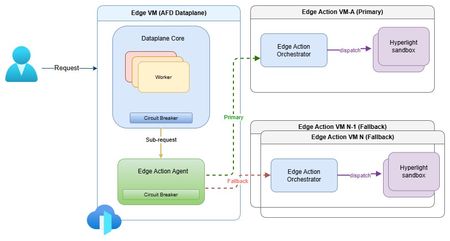
The need for secure edge programmability As modern web applications increasingly move decision-making closer to users, programmable compute at the edge is becoming a foundational capability for delivering low-latency, personalized, and intelligent experiences. Azure Front Door edge actions introduces lightweight customer-defined logic that executes close to users at Microsoft's global edge (https://aka.ms/edgeactionsblog). The engineering challenge extends well beyond moving code closer to the request path. It is about enabling edge programmability while preserving the core guarantees customers expect from a global edge platform: hyperscale performance and acceleration, strong security and tenant isolation, resiliency, and fast, controlled recovery. That sets up a much higher engineering bar than simply bringing a serverless runtime to the edge. Programmability introduces customer code, new execution paths, runtime dependencies, and additional failure modes directly into the critical request path. Architecture therefore must make flexibility a first-class capability without compromising the operational characteristics of a hyperscale edge platform. Preserving performance at hyperscale The first architectural challenge was preserving the performance characteristics of Azure Front Door while introducing programmable execution into the request path. Every additional execution step has the potential to increase latency, amplify failures, or reduce throughput at global scale. Edge actions was therefore designed to add programmability without changing the fundamental performance profile customers already expect from Azure Front Door. At request time, Azure Front Door evaluates the request, determines whether an edge action should be executed based on the associated rule, invokes the edge actions runtime, and applies the result inline. Because the runtime sits directly in the request path, every design decision was guided by a common principle: keep execution local whenever possible, bound latency when dependencies degrade, and ensure optional compute never becomes a platform-wide latency amplifier. Performance design principles Node-local execution keeps request processing on the same machine whenever possible, minimizing cross-node communications and preserving low latency. Minimized inter-node hops keep the common path compact while still enabling cluster-level fallback when local dependencies deteriorate. Connection reuse through Edge Action Agent reduces gRPC invocation overhead and improves hot path efficiency. Lightweight Hyperlight isolation provides strong tenant isolation with an execution model suitable for latency-sensitive edge workloads. Fast-fail and circuit-breaker protects latency by bounding waits on degraded dependencies and preventing cascading pressure. Together, these architectural choices introduce programmable compute without turning the Azure Front Door data plane into a distributed orchestration layer. The hot path remains local, predictable, and bounded, with fallback used only when necessary to preserve performance across the global edge. Security and tenant isolation by design Running customer-defined code on a shared global edge fundamentally changes the security model. Unlike traditional request processing, programmable execution introduces untrusted customer code directly into the request path, making strong isolation a foundational architectural requirement rather than an operational safeguard. For Azure Front Door edge actions, every execution is designed to run within a dedicated Hyperlight micro-VM, providing hardware-enforced isolation between customer workloads, the Azure Front Door data plane, and the underlying host environment. Security design principles Hypervisor-backed isolation ensures customer code executes within dedicated Hyperlight micro-VM boundaries rather than shared execution environments. Data plane separation isolates edge actions execution from Azure Front Door's core traffic-processing path. Minimal host surface area reduces the attack surface and limits privileged interactions. Restricted execution context exposes only the request information required to process a request. Reduced operational blast radius helps contain compromised or misbehaving workloads. These architectural boundaries extend beyond workload isolation. Azure Front Door's data plane remains physically separated from the edge actions orchestration service, while each execution receives only the minimum context required to perform its task. This defense-in-depth approach reduces both security risk and operational blast radius without compromising performance. Hyperlight: Security without sacrificing performance A key differentiator of Azure Front Door edge actions is its use of Hyperlight micro-VMs to provide hardware-backed isolation without introducing the traditional performance penalties associated with virtual machines. Hyperlight was designed to make VM-level protection practical for high-throughput function execution, enabling strong tenant isolation while remaining suitable for latency-sensitive edge workloads. Edge actions builds this foundation through the edge action orchestrator, which maintains a pool of warm Hyperlight sandboxes ready to serve requests. By reusing pre-initialized sandboxes instead of creating a new execution environment for every request, edge actions minimizes initialization overhead, reduces request latency, and sustains higher throughput under load. The result is a security model based on VM isolation that remains compatible with the performance expectations of a hyperscale edge platform. Critically, performance optimizations do not weaken isolation guarantees. After each execution, sandbox state is cleaned before reuse, ensuring that subsequent invocations cannot access data from prior executions while preserving the efficiency benefits of warm sandboxing. In internal benchmarking, lightweight edge actions executed in less than 2 ms inside Hyperlight, with approximately 1.27 ms of total sandbox overhead, demonstrating that strong isolation and high-performance edge execution can coexist. Security enables resiliency Security and resiliency are closely related architectural goals. Isolation helps contain malformed inputs, unexpected behavior, and execution failures, preventing individual workloads from affecting the broader platform. In a multitenant edge service, isolation is not only a security requirement; it is also a key resiliency mechanism. Resiliency built into the platform Strong isolation is not only a security property, but also a foundational resiliency mechanism. By containing malformed inputs, unexpected behavior, and execution failures within dedicated execution boundaries, the platform prevents individual workloads from affecting neighboring tenants or the broader service. At hyperscale, robust isolation is essential for maintaining customer trust and predictable platform reliability. Building on that foundation, Azure Front Door edge actions was designed around a simple operating principle: failures are inevitable, but their impact must be predictable, bounded, and recoverable. Because programmable compute introduces additional execution paths and runtime dependencies into the request path, resiliency must be built into the control points that determine when to execute, stop waiting, or fall back. The platform incorporates lessons learned from operating Azure services at a global scale, with a focus on minimizing blast radius, maintaining service continuity, and enabling controlled recovery when dependencies fail, overload, or time out. Resiliency principles Bound failure impact through isolation and containment. Recover predictably using health-aware routing and fallback paths. Protect customer availability first through graceful degradation. Fail fast rather than fail slowly to avoid latency amplification. Continuously validate assumptions through Game Days and fault injections. These principles translate into request-time behavior through deadlines, circuit breakers, fail-open behavior, and health-based fallback. Together, they ensure that optional programmable execution enhances application capabilities without compromising the stability of Azure Front Door's core request-processing pipeline. Continuous validation of resiliency assumptions Resilient architecture is credible only when validation becomes part of the operating model. For edge actions, Game Days and Fault Injections provide recurring opportunities to verify that architectural assumptions continue to hold under production-like stress. Validation includes chaos and failure injections, timeout and dependency-loss exercises, overload and queue-growth scenarios, mixed-workload testing, and interface fuzzing. These exercises answer practical production questions: Does fail-open behavior protect the request path? Do circuit breakers engage early enough? Does fallback routing preserve service continuity? Do malformed inputs remain contained? Repeated validation also strengthens operations. Detection improves, mitigation becomes more predictable, and recovery evolves from architectural intent into demonstrated operational capability. Built for future intelligent & modern workloads Edge actions is designed for lightweight programmable execution today, but the underlying architecture is intended to support increasingly intelligent decision-making over time. The engineering requirement remains unchanged: future intelligence workloads must operate within the same architectural constraints that govern today's request processing - bounded execution, strong isolation, predictable fallback, and protection of the common request path. Architectural implications for intelligence workloads Real-time AI inferencing for request classification and policy evaluation. Intelligent bot, abuse, and fraud detection closer to users. AI-assisted origin selection and traffic-routing decisions. Application-specific SLM-powered decision making at the edge. In that model, the objective is not simply to introduce more intelligence at the edge, but to ensure that intelligence inherits the same platform guarantees as every other component of the request path. Closing thoughts Programmable edge execution is becoming a foundational capability for modern distributed applications. The engineering challenge, however, extends far beyond running customer code closer to users. It is about preserving the system properties that customers already depend on while introducing a new execution surface into the critical request path. Edge actions demonstrates that edge programmability, performance, security, tenant isolation, and resiliency are not independent design goals - they are a single architectural problem that must be solved together. By keeping the common path protected, failures bounded, tenants strongly isolated, and recovery predictable, Azure Front Door edge actions extends the platform's capabilities without compromising the engineering principles that underpin a global hyperscale edge service. Learn more Introducing Hyperlight Edge actions samples: JavaScript request context515Views1like0CommentsAzure Front Door: Resiliency Series – Part 3: Tenant isolation
Abhishek Tiwari, Vice President of Engineering, Azure Networking Amit Srivastava, Partner Director of PM, Azure Networking Varun Chawla, Partner Director of Engineering, Azure Networking Azure Front Door serves hundreds of thousands of tenants from hundreds of edge locations, densely sharing the globally distributed edge fleet. That density is exactly what allows us to deliver global scale, performance, and cost efficiency. It also means that, without strong isolation, a single tenant’s incompatible configuration or anomalous traffic can, in the worst case, affect many other tenants. The October 2025 incidents reinforced how important it is to contain this class of risk. Our goal for this tenant isolation is simple to state and hard to achieve: no single tenant’s configuration or traffic should be able to impact any other tenant. In Part 1 of our three part mini blog series, we outlined our four‑pillar strategy for improving the resiliency of Azure Front Door: configuration resiliency, data plane resiliency, tenant isolation, and accelerated Recovery Time Objective (RTO). Part 1 detailed how we would make configuration propagation safer and how the data plane keeps serving from a ‘last‑known‑good’ (LKG) configuration, even if an incompatible configuration change is propagated to the data plane. Part 2 turned to recovery, showing how we bring the system back to full operation in an accelerated, predictable, and in a bounded timeframe. In this final part, we turn to the tenant isolation pillar that ensures that any single tenant configuration or traffic issues are limited in scope to that tenant alone and do not impact other tenants. We will also show how Azure Front Door achieves single-tenant containment through configuration isolation, lazy loading, and a micro-cellular layered ingress-sharding architecture. Repair status: all outstanding items now complete Before we dive into tenant isolation, here is a final update on the overall repair items from the two October 2025 incidents (you can review the details in our Azure Incident Retrospective sessions for the October 9th and October 29th incidents). We are pleased to report that all outstanding work across every pillar is now complete and fully deployed in production – including the tenant isolation work described in this post. With these safeguards in place, we have also returned configuration propagation latency to pre‑incident levels while keeping platform stability our top priority. In the table below, “Completed” means broadly deployed in production. Learning category Goal Repairs Status Safe customer configuration deployment Incompatible configuration never propagates beyond ‘EUAP or canary regions’ Control plane and data plane defect fixes; forced synchronous configuration processing; additional stages with extended bake time; early detection of crash state Completed Data plane resiliency Configuration processing cannot impact data plane availability Manage data‑plane lifecycle to prevent outages caused by configuration‑processing defects; isolated work‑process in every data plane server to process and load the configuration Completed 100% Azure Front Door resiliency posture for Microsoft internal services Microsoft operates an isolated, independent Active/Active fleet with automatic failover for critical Azure services Phase 1: onboarded critical services batch impacted on Oct 29th outage running on a day‑old configuration; Phase 2: automation & hardening of operations, auto‑failover and self‑management of onboarding for additional services Completed Recovery improvements Data plane crash recovery in under 10 minutes Data plane boot‑up time optimized via local cache; recovery time accelerated to under 10 minutes Completed Tenant isolation No configuration or traffic regression can impact other tenants Micro‑cellular Azure Front Door with ingress layered shards Completed Why isolation at edge scale is deceptively hard Traditional isolation techniques such as dedicating separate hardware to each tenant or running every tenant inside its own virtual machine are impractical at the edge. Edge sites are constrained on space, power, and capacity. The entire premise of a modern, multi-tenant application delivery platform is that any tenant can be served from any site closest to the user. We cannot simply partition hundreds of thousands of tenants onto dedicated machines without giving up either proximity, scale, or the efficiency that make the edge fast and cost efficient. Isolation therefore, must be achieved in software, inside a multi-tenant fleet. What we already do today Azure Front Door already includes several layers of tenant isolation and partitioning. However, the incidents in October clearly highlighted that these techniques were not enough. Prior to the incidents, our protection mechanisms included: Infrastructure partitioning. Edge sites were organized into physically isolated primary and fallback traffic rings. Noisy‑neighbor protection. Fair‑share resource allocation, rate limiting, and anomaly-based load protection kept any single tenant from monopolizing shared resources such as CPU, memory, or network bandwidth on an Azure Front Door server. Circuit breakers. Circuit breakers shed costly work first and can disable a risky per‑tenant feature before it exhausts shared resources on a server. Real‑time crash protection. A crash‑analysis system correlates crash signatures across machines and can pinpoint and block crash patterns caused by tenant IPs or traffic patterns. While these protections are valuable, many of them are reactive and proved insufficient during the October incidents. The next generation of isolation makes single‑tenant containment a fundamental part of the platform which governs how configurations are loaded, and how traffic is served. Configuration isolation: loading only what is needed Part 2 introduced ‘lazy loading’ as a recovery optimization technique. It is also an important configuration‑isolation mechanism. Historically, every worker on every edge server had to be ready to serve any tenant, which meant each worker loaded a large set of tenant configurations. A single incompatible configuration could therefore ripple across many workers. With lazy loading, a worker loads a tenant’s configuration and its TLS certificates only when it actually receives traffic for that tenant. The practical consequence for isolation is powerful: a faulty configuration can only affect the workers that have loaded that specific tenant, never the entire server or fleet. Combined with per‑tenant validation on load, and the Food Taster safeguard from Part 1 (a sacrificial process that pretests every configuration change in isolation), configuration problems are caught early and contained to the smallest possible footprint. Figure 1: With lazy loading, an incompatible configuration is contained to the workers serving that tenant, instead of poisoning the whole server. Tenant isolation: a micro-cellular, layered ingress sharding architecture Configuration isolation limits the blast radius of an incompatible configuration. Traffic isolation addresses the other half of the problem: a tenant whose anomalous traffic incident, like a sudden surge, a pathological request pattern, or malicious activity, could degrade a shared worker. Our approach is a micro‑cellular architecture that combines multiple concepts working together. Worker‑process isolation. Each edge server already runs many independent worker processes. Instead of letting every worker serve every tenant, we assign tenants to specific groups of workers. Those worker group (shards) become the unit of isolation: if a tenant destabilizes its shard, the impact is contained to that shard’s workers while the rest of the server keeps serving normally. Ingress sharding. Rather than a handful of fixed shards, we compose shards from overlapping subsets of a server’s workers. Even a modest number of workers can be combined into an enormous number of distinct, overlapping shards – giving us a very large number of fine‑grained fault domains without dedicating hardware to every tenant. Figure 2: Tenants are randomly assigned to different shards on each server (layer). Even when a good tenant shares the noisy tenant’s shard on one layer, routing steers its traffic to healthy shards on the others. Multi‑layer ingress sharding. This is where ‘layered’ comes in. Each edge server is treated as an independent layer, and each tenant is assigned to a different, randomly chosen shard on every server. Because assignments are independent from one server to the next, two tenants that happen to share a shard on one server are extremely unlikely to share a shard again on another server. The chance of any good tenant repeatedly colliding with a noisy tenant across many servers becomes vanishingly small. Intelligent ingress routing. Tying it together is a routing layer that terminates each incoming connection, identifies the tenant, and steers the request to that tenant’s assigned, healthy shard. If a shard is unhealthy or saturated, traffic is directed to the tenant’s healthy shards on other layers. Figure 3: Intelligent Ingress Routing The combined effect is that when a noisy tenant overwhelms or crashes its shard on one server, only that shard is affected. Because every other tenant is spread across a different, randomized set of shards, they continue to find healthy paths, and the routing layer moves their traffic accordingly. A worst-case availability problem is downgraded to, at most, a small and redistributable capacity problem, that the routing layer smooths over. An in-depth technical analysis of layered ingress sharding is available here for reference. Shrinking the blast radius Taken together, these mechanisms fundamentally change the shape of failure. In a uniform, fully shared fleet, an incompatible tenant can, in the worst case, affect a large share of the tenants on a machine, in an edge location, or beyond. With configuration isolation and layered ingress sharding, the same failure is confined to a subset of workers serving the offending tenant. Our target for this tenant isolation pillar is effectively single‑tenant containment: a configuration or traffic anomaly caused by one tenant should never cause issues to any other tenants. Figure 4: From a shared fleet where a single tenant can affect many, to micro‑cellular shards that confine impact to the offending tenant. Validating isolation in practice As with our recovery work, we don’t simply design these boundaries and assume they hold, we test them. Through deliberate fault‑injections, we have pushed noisy and faulty tenants into the system and confirmed that impact stayed contained to the offending shard, that healthy tenants kept serving, and that the routing layer steered around unhealthy shards as intended. This turns isolation from a design claim into a well-drilled, and repeatable outcome. Closing This post concludes our three-part mini blog series on Azure Front Door resiliency. We have shared how we are making configuration propagation safer (Part 1), recovering faster when failures do occur (Part 2), and containing the blast radius stemming from any single tenant through configuration isolation and a micro‑cellular, layered‑sharding architecture (Part 3). Resiliency, however, is not a project with an end date. It is an ongoing commitment. While this series concludes the blog series of our response to the October 2025 incidents, our investments in Azure Front Door’s resiliency, isolation, and recovery will continue. As we make further improvements, we will keep sharing them with you. We deeply value our customers’ trust in Azure Front Door. We remain committed to exceeding expectations for security, reliability, and transparency.1.6KViews4likes0Comments
AVD Forced log off by user
My suggestion for a feature request is to add a logoff/force-logoff option in both the web client and AVD client at a minimum. Right now, if a user logs into a host and they hit a black screen or any other type of error they are stuck to that host until the session is force logged off by an admin or they hit the logoff timeout that an admin sets. This would save frustration and productivity loss for a user that would have to wait for an admin to help. This is especially needed for companies that support around the clock teams.
Proposal: Dedicated Windows “Repair Companion” Device for Automatic Deep System Recovery
I’d like to propose a new hardware‑assisted recovery solution for Windows that would dramatically improve system reliability and reduce catastrophic failures caused by deep OS corruption. Today, Windows can repair many issues on its own, but certain types of corruption — such as servicing stack failures, broken WinSxS manifests, failed migrations, or damaged bootloaders — require offline repair or manual intervention. These situations often force users into time‑consuming troubleshooting or full reinstallations. My proposal is a dedicated, consumer‑friendly “Windows Repair Companion” device that connects to a home network and provides a trusted, isolated environment for deep system repair. This would be similar in concept to enterprise out‑of‑band management, but simplified and designed for everyday users. Key Features: • A small hardware device (similar in size to a Surface Dock or streaming box) that plugs into a router or PC. • Contains a hardened, read‑only repair OS and clean Windows recovery images. • Supports automatic network boot (PXE/UEFI) when a PC detects severe corruption or cannot boot normally. • Performs offline repairs: DISM, SFC, CHKDSK, servicing stack rebuilds, WinSxS restoration, bootloader repair, and update rollback. • Provides a true “push‑button restore” experience without requiring user technical knowledge. • Could leverage existing Surface recovery technology, secure boot chains, and cloud restore infrastructure. • Offers a new potential revenue stream for Microsoft while significantly improving Windows reliability. Benefits: • Makes Windows effectively unbrickable for most users. • Eliminates many catastrophic update failures and servicing issues. • Reduces support costs and frustration for consumers and small businesses. • Provides a clean, consistent recovery path across all OEM hardware. • Bridges the gap between consumer Windows and enterprise‑grade resilience. This device would give users peace of mind and provide Microsoft with a modern, hardware‑assisted recovery model that aligns with the direction of Surface and Windows Core OS technologies. Thank you for considering this idea — I believe it could meaningfully improve the Windows experience for millions of users.48Views0likes0Comments
Update 'Update-AzWvdSessionHost' cmdlet
Today via the PowerShell cmdlet 'Update-AzWvdSessionHost', an administrator can assign a user to a session host without the user being assigned to the applicationgroup. This can cause some confusion to administrators if they are able to perform this task as the user will not be able to see the host in the Windows App. The suggestion would be to either put in a check which denies the assignment if the user is not associated with the applicationgroup directly or indirectly via group association. Or, update the cmdlet to also add an assignment to the application group by adding a required parameter which would assign the user to the application group. It's a small tweak but it may help with the overall stability of the Desktop.Virtualization PowerShell stack. Thanks!72Views0likes0Comments
Fslogix. Add a command line to release the profile.
Hello. Add a command line with arguments to be able to release frozen folders in FSlogix. If you don't want to fix the problem, let me automate it myself. In large RDS installations, constant freezes and further duplication of local_%username% folders cause problems.85Views1like0CommentsZonas de Disponibilidade no Azure: Entendendo a Diferença entre Zonas Lógicas e Físicas
O que é o mapeamento de zonas do Azure (Zona Lógica vs Zona Física) No Azure, as Zonas de Disponibilidade (AZs) são agrupamentos de datacenters fisicamente separados dentros de uma mesma região. Cada zona possui infraestrutura independente - energia, refrigeração e rede - garantindo alta disponibilidade e resiliência. Porém, há uma distinção entre: Tipo de Zona Definição Zona Lógica Identificador exibido no portal do Azure (AZ1, AZ2, AZ3). Zona Física Grupo real de datacenters. O mapeamento entre lógica e física varia por assinatura O mapeamento entre zonas lógicas e físicas não é fixo. Isso significa que: AZ1 na assinatura A pode ser fisicamente igual à AZ3 na assinatura B. Sem verificação, você pode estar executando produção e DR na mesma infraestrutura física, anulando os benefícios da separação. Esse comportamento é intencional e inspirado no modelo da AWS, que também não garante consistência entre zonas lógicas em diferentes contas. Qual o objetivo desse design? A motivação por trás desse mapeamento dinâmico é: Distribuir a carga de consumo de forma mais eficiente entre os datacenters. Evitar hotspots e garantir resiliência operacional. Permitir flexibilidade de alocação conforme a capacidade física disponível. Esse modelo ajuda a balancear o uso da infraestrutura global, sem expor diretamente a topologia física aos clientes — o que também reforça a segurança e abstração da plataforma. Essa distinção é essencial: a zona lógica AZ1 em uma assinatura pode, na prática, ser a mesma zona física que a AZ3 em outra. Sem uma verificação adequada, o cliente pode acabar executando cargas de produção e de DR (Disaster Recovery) na mesma infraestrutura física, o que anula os benefícios esperados da separação entre zonas. Exemplo prático de risco Vamos considerar o seguinte cenário de um cliente: Produção: AZ1 e AZ2 em uma assinatura A DR: AZ3 em outra assinatura B, na mesma região O cliente acredita estar distribuindo suas cargas entre três zonas distintas. No entanto, ao verificar o mapeamento real, encontra a seguinte saída: [ { "logicalZone": "1", "physicalZone": "brazilsouth-az3" }, { "logicalZone": "2", "physicalZone": "brazilsouth-az1" }, { "logicalZone": "3", "physicalZone": "brazilsouth-az2" } ] Neste exemplo, a AZ3 lógica está mapeada para a AZ2 física, que já está sendo usada na produção. Ou seja, não há separação física real. Como verificar o mapeamento de zonas? Para evitar esse problema, é essencial verificar o mapeamento entre zonas lógicas e físicas em cada assinatura. Use o seguinte comando via Azure CLI: az rest --method get \ --uri "/subscriptions/<subscription-id>/locations?api-version=2022-12-01" \ --query "value[?name=='<region-name>'].{displayName: displayName,name: name,availabilityZoneMappings: availabilityZoneMappings }" \ -o json Substitua <subscription-id> e <region-name> (ex: brazilsouth) conforme necessário. Veja abaixo um exemplo de saída obtida no meu ambiente de laboratório, onde tenho duas assinaturas. Vou executar o mapeamento de zonas entre elas para a região Brazil South. Na primeira subscription 1 temos o seguinte mapeamento. Zona lógica: 1 – Zona Física: brazilsouth-az1 Zona lógica: 2 – Zona Física: brazilsouth-az2 Zona lógica: 3 – Zona Física: brazilsouth-az3 Na segunda subscription 2 temos o seguinte mapeamento. Zona lógica: 1 – Zona Física: brazilsouth-az3 Zona lógica: 2 – Zona Física: brazilsouth-az1 Zona lógica: 3 – Zona Física: brazilsouth-az2 Resumindo: Se minha estratégia de DR envolve o uso das zonas lógicas 1 e 2 na subscription 1, pois elas estão mapeadas fisicamente para as zonas AZ1 e AZ2, então, na subscription 2 destinada ao DR, devo utilizar a zona lógica 1 — já que, nessa assinatura, ela está mapeada fisicamente para a AZ3. Boas práticas Sempre verifique o mapeamento entre zonas lógicas e físicas antes de definir sua estratégia de DR. Evite assumir que AZ1, AZ2 e AZ3 representam zonas físicas distintas entre diferentes assinaturas. Considere utilizar regiões diferentes para DR quando a separação física for um requisito crítico. Documente e compartilhe o mapeamento com sua equipe de arquitetura e operações para garantir alinhamento e evitar riscos. Referência oficial Para mais detalhes, consulte a documentação oficial da Microsoft: https://learn.microsoft.com/en-us/azure/availability-zones/az-overview Comparing AWS and Azure regions and zones - Azure Architecture Center | Microsoft Learn511Views5likes0CommentsWindows App - Account Picker During Startup
Windows App is showing additional improvements to the overall VDI experience. As an Architect working for a consulting company, I have multiple clients with AVD environments I have to log into. One of the major benefits of Remote Desktop is that when opening, the window provides visibility to all signed in accounts. With Windows App, when opening the application, I'm in the most recent account. To benefit us that work in multiple environments, allow us the capability to choose which account I want to work in when opening the application. If Windows App only has one account associated, it can default to that account. But if there are two accounts present, allow the user to choose which one they want to go into at the onset.252Views2likes3CommentsFrequent AVD Deployment Failures
Since June 2024, we have experienced occasional failures in AVD deployments. While most deployments succeed through adding session hosts to the host pool, there are instances where the deployment fails. Given this situation, we would like to request a change in behavior to reduce the burden of recreating AVDs when deployment fails.