product roadmap
122 Topics
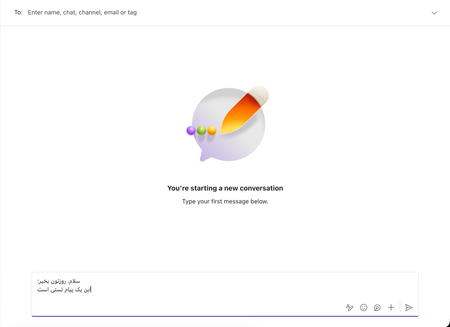
Support RTL Languages on MacOS
As now, It seems Microsoft teams on MacOS does not support RTL languages when texts are being typed. This makes bad feeling when users want to read the text they've typed. The issue becomes worst when the text contains English phrase (when the message is sent) As far as I remember, Skype did support RTL languages when the texts are being typed.405Views14likes2CommentsThe Next Phase For the New Version of Stream
We're glad to announce we'll be entering the next phase of our journey to the new version of Microsoft Stream in Q3 2021. In this phase, we're on track to start bringing new experiences for sharing, discovery, and video playback on top of the Microsoft 365 file experience.26KViews7likes15Comments
Windows 11 Global Mute (Windows + Alt + K) not working in New Microsoft Teams
Good morning, The old Microsoft Teams used to support the Global Mute shortcut within Windows 11. The upgraded version, New Microsoft Teams, no longer supports the Global Mute (Win + Alt + K) as far as I can tell. When I invoke the shortcut I get a message "No supported apps in use for mic mute". I know that there is a built-in keyboard shortcut within New Teams (Ctrl + Shift + M) but the issue with that shortcut is that Teams needs to be active. Is the Global mute going to be added eventually to New Teams?Solved14KViews6likes17Comments
Planner task comments no longer send email notifications – critical regression
This change removed a previously existing core functionality without providing an adequate replacement. With the new Planner experience, task comments no longer trigger automatic email notifications to assigned users. This breaks a critical communication mechanism that many teams relied on for reliable task coordination. As a result, assigned users are no longer consistently informed about updates, introducing a high risk of missed information and operational issues in day-to-day work. There is currently no supported or enforceable alternative to ensure users are notified. Previous behavior: Task comments triggered automatic email notifications Assigned users were reliably informed Communication was traceable and consistent Current behavior: No automatic email notifications No configuration to restore this @mentions required (manual, error-prone, not enforceable) Microsoft Support has confirmed that this is by design and cannot be reverted. From an enterprise perspective, this is not just a design change, but a regression of critical functionality without an equivalent replacement. Request: Please restore automatic email notifications for task discussions or provide a reliable, enforceable alternative for notifying assigned users. Question to the community: How are you handling this change in real-world scenarios? Switching tools? Enforcing @mentions? Moving communication out of Planner? Would appreciate hearing how others are dealing with this.1.7KViews5likes9CommentsTeams annotations interact with background
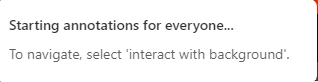
Hi so I've been talking to some of my team about the collaborative annotation features in teams and there's one thing that's stumped us. When you turn on annotation mode this popup appears: The only problem is that there is no button anywhere to "interact with background"? Based on https://m365admin.handsontek.net/click-through-collaborative-annotations-layer-in-teams-meetings/#:~:text=When%20users%20share%20their%20screen,stopping%20the%20existing%20annotation%20session. the feature was supposed to have been rolled out by mid-August, so what are we missing? Version is 1.6.00.22378 for what it's worth. Cheers!7.4KViews4likes6CommentsBackground Images within Announcement posts
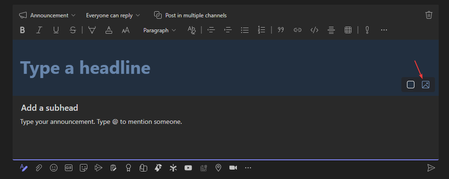
Hey!, I've found very little information online, but is there an announcement around Announcement background images? It appears that within new teams this feature is missing, but I can't see if this is going to make it back on the roadmap? Thanks!8.9KViews3likes5Comments
External Users as Co-Organizers
Is there any word on allowing External Participants/Users to be Co-Organizers on a teams session? We’re a B2B company that runs a high volume of corporate trainings for clients, and the inability for external users to have full co-organizer access in a clients sessions is the number one hurdle we have for adoption of teams, and a reason why we consistently advise against moving trainings to the platform. Many structured trainings and meetings are used to having third parties produce, support, or facilitate, and these functions require an “organizer” level permission to invite, troubleshoot, manage breakouts and sharing, pull reporting, etc. The current solution of requiring tenant logins isn’t practical, as most large organizations which comply with IT security protocols require significant internal screening and administration when issuing an internal credential. Host Keys, external hosts, and passed permissions exist on every other video conferencing and meeting platform (Zoom, WebEx, Adobe Connect, UMeet, Kaltura, etc). Teams seems unique in lacking this basic feature. Is there any insight on when we can expect this basic functionality? Is it on the roadmap? If not, is there a way we can get it there?5.9KViews3likes4Comments