outlook
51 Topics
Better way to view employees' schedules?
Howdy, y'all. I've just been hired into a new office, and as the only member of Gen Z to be employed, I've been summarily appointed to the media committee, which includes thinking through the ways that we communicate with one another effectively. The issue that's driving me up a wall at the moment is our calendar management. We have an Excel sheet saved as a tab within one of our Teams channels that lists every employee's status in the office for every day of the year. This is helpful for a couple of reasons: We work in healthcare and must have one person on-call at all times. There are two on-call shifts per day; one from 8 AM to 8 PM, and one from 8 PM to 8 AM. There must be a minimum number of staff people working during regular weekdays (that is, aside from the on-call staffer, we must also be able to see that there are at least a couple people aside from the on-call person who are in the office during a regular week, so that the office isn't completely empty around Christmas and so on). For this, we usually look at the row for the day of the month and the column for the employee's name, with the intersecting cell being filled in with the time of their shift. In addition to the two on-call shifts per day, one person will be designated as "substitute" for one 24-hour period. If either the AM or PM on-call person call out, the substitute will clock in to replace them. Further, there is a staffer who is designated as the support member for an entire week's time. Should the on-call person have questions or concerns, the support member will be able to answer their call at any time during the week. We typically have it color-coded so we know by taking a glance at the day who is on AM, who is on PM, who is substituting, and who is backup. This is an example: Staff A Staff B Staff C Staff D Staff E Staff F Staff G Friday 8/1 8a-8p 8a-4:30p 8a-4:30p 8p-8a 8a-4:30p 8a-4:30p 8a-4:30p Saturday 8/2 OFF 8a-8p 8p-8a OFF OFF OFF OFF Sunday 8/3 8p-8a OFF OFF 8a-8p OFF OFF OFF Monday 8/4 OFF 8p-8a 8a-4:30p OFF 8a-8p 8a-4:30p 8a-4:30p Tuesday 8/5 8a-8p OFF OFF 8p-8a 8a-4:30p 8a-4:30p 8a-4:30p Wednesday 8/6 8a-4:30p 8a-4:30p 8p-8a OFF 8a-8p 8a-4:30p 8a-4:30p KEY: AM on-call PM on-call Substitute Support Obviously, this way of keeping track of things is archaic and has led to chaos. Is there a better way somewhere in Teams/Outlook/SharePoint calendar, or in some other application that can connect to this workspace? We run basically everything in our department out of Teams274Views0likes1CommentMeeting Options are limited
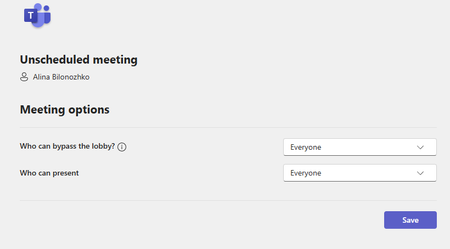
Hello, I have run into a problem of not having a full access to meeting options. I would like to schedule meetings for other people in the office where I do not necessarily have to attend. I would also like to assign other people as co-hosts so that they are able to admit people and have more control of the meeting. There should be settings of being able to let people come in without waiting in the waiting room as well, but I cannot seem to find it anywhere. Here is the attached screenshot: These are the only two options I get when clicking "Meeting Options". Additionally, whenever I set up a meeting, some people are not able to respond to it because they get an error of undeliverable response: "delivery has failed to these recipients or groups". What is the issue here? Does it have to do with how Outlook is set up? How can I change these limitations and errors? Thank you so much!502Views1like1Comment
How do I modify an organization contact only for myself?
I want to associate a nickname with a person in my organization, whose employee records live in Entra ID. To do this, I went into Outlook desktop (1.2024.1204.300), did a search for the person, and selected "Add to contacts". From there, I modified the newly created contact record's first name from, for example, "Margaret" to "Margaret (Peggy)". I also deleted the company and title fields that got auto-populated because I don't want to overwrite these values from whatever they might change to in the future. The only fields I should need are email address (which I expect it needs as the "key" to match my contact record to the person's underlying record in the organization) and the fields I want to overwrite, in this case first name. From here, I'd expect interactions with this user to show their updated name for me. It doesn't. Nothing works as expected. If I start a new email and type "peggy" into the "To" field, nothing comes up. If I type "margaret", she appears in the results without my name modification. Similarly, while in the Mail section of Outlook, if I do a search for "peggy", I get no results, even if I filter on People. However, in the People section of Outlook, if I do a search for "peggy", she does come up. So even within Outlook itself, there's a total disconnect between how Mail and People honor my contacts info. In Teams desktop (24295.605.3225.8804.), it's even worse, with there being no trace whatsoever of the contact's updated name. In the People section, "All contacts" shows nothing at all. I've manually clicked Mail > View > Sync in Outlook. I've tried manually closing both Outlook and Teams. I've waited 30 minutes. I've even confirmed via outlook.office.com that my contact is there and that the "new contacts" settings is on, but actually seeing the updated name when writing an email or sending a Teams chat isn't working at all. None of these time-consuming and frustrating steps should be necessary to begin with, but even then, it's all broken. Is this not a supported feature in M365?140Views0likes0Comments
Teams Notification when Outlook Email Sent
Hello, I am looking for a way to send a teams alert to a recipient when that recipient receives an email from a specific sender. Is there any way to do this? I've looked at Outlook rules and found nothing but I could've missed something. Thanks7.4KViews0likes1CommentSet Default Meeting Provider MS Teams in outlook 365
To set your default online meeting provider Microsoft Teams in Outlook for Windows, follow these steps: Select File > Options > Calendar. Under Calendar options, navigate to "Add online meeting to all meetings" and check the "Add Meeting Provider" option. Select the "Add online meeting to all meetings" checkbox. From the "Apply to this account" dropdown menu, choose the account for which you want to enable this setting. In the list of online meeting providers, select the default provider for your chosen account. Thats it...38KViews0likes5Comments
Hybrid Teams Meeting Location Not Updating/ Displaying both locations
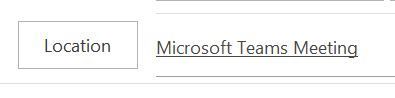
Sometimes when I schedule hybrid meetings in Outlook (Attendees can join through MsTeams or onsite in a meeting room) using the room finder tool, even when I get confirmation that the resource/meeting room is accepted as reserved, I run into these issues: 1. The onsite meeting room added shows as invited under "required", but is not listed under "location" and I have no drop down options to add it. 2. The location field updates to including both MsTeams and the booked meeting room and both can be seen when you open the invitation: but in calendar/week view only the MsTeams option shows as location: Instead of like this: It happens randomly and only on occasion, but it prevents invitees from knowing there is a room booked they can join if onsite so I'm hoping to find a solution to make sure both locations show from now on.1.7KViews0likes2CommentsWhere are my Loop components saved?
Hello, I'm sharing here a quick guide to understand where Microsoft Loops saves components in each case: - Loop components in Teams Meetings - Loop components in Outlook - Loop components in Teams Chat - Loop components in Teams Channel Meetings - In the Loop App - Loop components in Whiteboard - Loop Components in Word for the Web Hope you find this useful Transcripción1.2KViews0likes0CommentsNo Outlook calendar Teams invitation possible after upgrade to Teams 2.0
Dear all, we have our own tenant for MS Teams and since the update to Teams 2.0 from 1.0, users of Microsoft Outlook have problems with the Teams Add-in: 1. Problem 1: New invitiations to Teams meetings are not possible. When you create a new calendar entry and click on "Teams Meeting", nothing happens, the usual "Teams block" including a link to the Teams meeting doesn not appear, the decription field of the calendar entry will stay empty. 2. Problem 2: Existing Teams meeting cannot be changed. If you try to change an existing Teams meeting, that has been successfully create before the upgrade to Teams 2.0, e.g. you try to change date/time and click on "Send update", you get the error message "To schedula a Teams meeting, make sure you're signed in to Teams". Everyhting elese is wokring for the users, they can start Teams 2.0 (or switch back to 1.0) and use any other function in the Teams client. We have Exchange OnPrem and no ExchangeHybrid. Under Teams 1.0 everyhting worked fine including Microsoft Outlook. Windows 10 and Office 2016 are on the latest patch level, the Teams Add-in is registered and active in Outlook, we also tried to reinstall Teams, delte the Teams cache, re-register the TeamsAddin-DLL. Any idea?8.3KViews0likes2CommentsTeams meeting Add-In not displaying in Outlook
Hi, I recently detected problem on one of our workstations where both Teams and Outlook are installed and the Teams Meeting Add-In in the Outlook does not work. There are no Add-In buttons shown in Outlook's Calendar view and user is unable to create Teams meeting invitation. In the mail view however, online status of users in Teams is displayed and it is also possible to use the "IM" icon to initiate direct chat with the user. All Workstations are MS Office 2013 Std or Pro, connected to on-premise exchange server. All users have the same license added for Teams. The affected station had the add-in fully working until few days back when this has stopped working. I have tried the follwoign so far Roll back all recent updates Unistall / reinstall Teams Create new "test" user profile and login on this workstation. Checked .NET 4.8 and WebView2 are installed. Run .NET repair tool, Run Repair on WebView2 Create new Outlook profile Troubleshoot running MS SARA as per https://support.microsoft.com/en-gb/office/troubleshoot-the-teams-meeting-add-in-in-outlook-for-windows-d3f8819e-7993-43c7-a124-02b336273779 (It does re-register Add-In's DLL) Run repair on MS Office Uninstall and installed Office again All to no avail. The Add-in is loaded fine. The weird thing is, that ad-in seem to create blank "No label" entries in the Outlooks Calendar view ribbon. No menu is actually shown, perhaps as the group itself shwos No label, but these are visible when ribbon is customised. Creating custom group and adding those No label menu items in there however it makes these menu entries visible in the Ribbon and confirms these are indeed Add-in's entries when hovering mouse over. I'm at the end with ideas as to why this could be happening and what might possibly be causing Add-in not to work properly. woudl be grateful for your suggestions and ideas about this. Thansk and regards17KViews0likes5Comments
Can we restrict access to Manager's Outlook delegate so to not have access to a Teams Meeting chat?
Hello, we happened to discover this week that a Manager's Outlook delegate (that creates, manages many of the manager's Teams meetings) has the rights, and in fact is notified, whenever the meeting's chat feature is used and content is entered. The Manager's delegate is not inviting themselves to the meeting, though they show up as the Meeting Organizer (when viewed by other meeting participants, but not by the Manager themselves). In one way, I'm not surprised to become aware of this, though from another perspective, I agree with my Manager's comment that this isn't right. Note, we're aware that if the Manager uses Teams chat outside of the meeting (I.e. chatting directly with a participant, similar to using Teams chat without a meeting), then the delegate cannot see the chat and such that's an alternative. We're running Microsoft 365, Teams latest version 1 or 2, with a hybrid setup to 2016 Exchange server. -not that I believe this is a contributing factor1.7KViews0likes3Comments