outlook
33 Topics
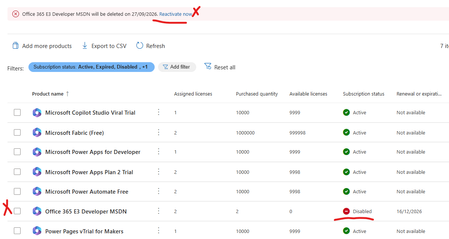
Error office 365 e3 developer license will be deleted on XXXXX. Currently disabled
My Office 365 E3 Developer has been marked for deletion and disabled today. No earlier comms from Micrsoft or any sort of messages.It just locked our my E3 Developer license has there a not supporting it any more. I wanted to try and backup/export my mail box and no luck - the option is greyed out. My SharePoint admin center has been blocked also can't backup any of my files. I'm just helpless.What a shame Microsoft What other plans can i move to and what should i do now since Teams and mail is not working. Can I at least get a a grace period. Any resources or advice would be appreciatedSolved1.1KViews1like17CommentsIs Office 365 E3 Developer free
Hi, My tenant had a license named "Office 365 E3 Developer" which allowed us to use Outlook / Exchange (among other Microsoft Office products). This license isn't from the Microsoft 365 Developer Program, which come with free licenses. This license costed CA$11.60 a month per user when we initially purchased it. On May 2, 2026 it still costs $11.60, but when I received my monthly invoice for this tenant, this license was free. I searched around to see whether this license became free recently, but I couldn't find any info on this. The links I found all say it's a paid license. I was wondering if there's any info on this to see why it became free? Or is it a mistake and Microsoft'll be charging us the next billing cycle? Jason538Views0likes1CommentLeadership of Outlook Newsletter
I’m requesting the ability to become the full administrator of Outlook newsletters not just in my organization, but across Microsoft 365. I want to manage templates, delivery settings, analytics, and permissions. My goal is to have broader control over how newsletters are created, customized, and distributed. I’m passionate about communication and want to help shape how newsletters work in Outlook. Please consider adding a role or feature that allows users like me to take ownership and lead newsletter strategy across organizations. I’ve seen cases where people used newsletters to share inappropriate content, including profanity and offensive language. Without proper moderation tools, this can damage professional communication and create serious issues. I want to help prevent misuse by having the ability to moderate, approve, or restrict newsletter content before it’s sent. I also want to contribute to improving the overall design and performance of the newsletter experience, making it more intuitive, professional, and reliable. Giving users like me full control over Outlook newsletters would improve communication quality, prevent abuse, and empower responsible leadership across organizations. If exclusive admin control isn’t granted, at minimum there should be a designated Admin role because without clear ownership, misuse and poor communication will continue unchecked. I’m ready to take on that responsibility and help shape the future of Outlook newsletters.296Views0likes1Comment
Extend M365 Archive Quota capacity
In my organization, we are currently on the O365 E5 License with default 100GB mailbox size per user and 1.5TB archive quota. However, due to organizational policy and regulatory requirements, we are expected to keep all the data from inception. Hence, the requirement for a solution to extend our archive size from 1.5TB. From the official Microsoft documentation, https://learn.microsoft.com/en-us/office365/servicedescriptions/exchange-online-archiving-service-description/exchange-online-archiving-service-description#archive-storage-quota the maximum expansion of the archive mailbox is 1.5TB. Is it possible to extend the archive storage to an Azure blob? Like an automated script that moves the data from the Archive mailbox for each user to the Azure blob or any other storage service that does not have storage size limitation. I am open to suggestions. Thanks1.1KViews1like2CommentsAdding Outlook add-ins and permissions
Wonderoig if someone can answer a question for me. I'll use the process in this link as context https://help.draftable.com/hc/en-us/articles/46382047949977-Configuring-Redline-in-Email-Outlook-with-Draftable In short when adding an Outlook Addin and selecting a group to assign the add-in too and the accepting the permission requests does this: Apply the permissions to ONLY those nominated users' mailboxes; or Applies the permissions to ALL mailboxes and applies "security" by limiting the users who can see the add-in I assume it does one of the two. Any ideas?395Views0likes2Comments
Multi Tenant Organization - one shared user not showing up in Global Address List
I set up a multitenant organization with two tenants. Overall it seems right, users can find each other and chat fairly seamlessly on teams, and shared users appear on the opposite global address list. However, one user is an exception. They appear on their home tenant's Global Address list, but not on the other tenant's (all other shared users appear to). They are members on the other tenant (as are the rest of the shared users), and are not set as hidden on a global address list anywhere I can see. I can't see anything different about them in any way. They were neither the first nor the last to be shared, and I have tried unsharing then sharing them again. They can however be found on teams by typing their name. Probably not related, but I will point out that the one other thing I have not managed to get working is a "chat" link on people's outlook directory listings. None of the shared users have one, despite being chatable with on teams. Any idea where I might look for the culprit?799Views0likes3Comments
MFA User Group
Hello everyone, I'm new to this group. My first exposure to MS365 Administration happened in October 2023 when a former MSP was paid to move my company's Exchange on-prem to the cloud. I'm putting a document together on how to setup MFA and generate app specific passwords to permit MS365 authentication between my ERP system and MS365 Outlook. During the conversion process the MSP created two security groups. MFA Users and MFA Exclusions. My question is, was this necessary as part of the conversion for say, place holders for accounts, or is this something I should be maintaining? Thank you in advance for any input.217Views0likes3Comments
Change language of Notification Mails for User submitted E-Mails
Hello, I couldnt really find anything regarding this topic, but is there any way to change the language of the E-Mails regarding this topic: https://learn.microsoft.com/en-us/defender-office-365/submissions-admin-review-user-reported-messages#notify-users-from-within-the-portal I know how to customize the E-Mails but the subject and general text are still in English and our customers are complaining about this.568Views0likes3Comments
Security Admin Center Tenant Allow/Block List Not Able to Block IPv4?
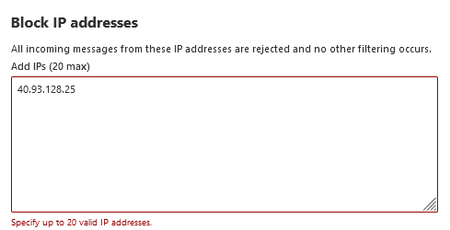
While using the Security Admin Center Tenant Allow/Block List we have been able to block specific email addresses and IPv6 IP addresses but are unable to block IPv4 IP addresses. We have tried both using the console and the CLI but have turned up unsuccessful both times when it comes to IPv4. A large majority of the phishing attempts that we encounter come from IPv4 addresses but we have been unable to block any of these. Will there ever be functionality for IPv4 within the Tenant Allow/Block list or is the only option to use conditional access policies? Also why is this enterprise tool only functional with IPv6 and without documentation stating that it does not work for IPv4?2.5KViews4likes6Comments
outlook 365 set categories in admin center possible?
Hello, We're using Office 365 we have problems on multiple iMacs with the Outlook app. The colors of the categories sometimes disappear en sometimes different colors are suddenly popping up. It's happening on older iMac as on new ones as well. After a fresh install sometimes it works again for a while but then they'll start disappearing again. Very annoying and more people seem to have the same problem. Now I want to set the categories in the office or exchange admin center, but I cannot find out where I could do this. Hopefully when we set the categories for the whole company, hopefully the problems won't come back again. I think it might have something do also with delegated mailboxes but all people using them have all the rights. We're using the legacy Outlook while the new Outlook does show only a very few of our IMAP folders Hopefull you can help us out here, thanks!561Views0likes3Comments