outlook on the web
697 Topics
Microsoft Sign In Loop
I am trying to sing into Microsoft 365, but every time I do, it takes me back to the login screen. I sing in with my outlook account, but I can't reach the applications. I can sign in on the browser, but not the applications on my computer. I have tried uninstalling and reinstalling M365, but the issue still persists89Views0likes1Comment
my account has been hacked and the hacker activated 2FA so I can't reset my password
as said in the title. I downloaded a malicious file that took over my discord and outlook account linked to it. I tried to reset the password but the hacker both changed the account linked to it in case I needed to change the password and activated 2FA so even when I try to reset the password from my main account it says it was ignored. I want to either find a way to recover my stolen account or delete it so the hacker wont have access to my personal information92Views0likes2Comments
Outlook 365 "forced categories" in FROM field
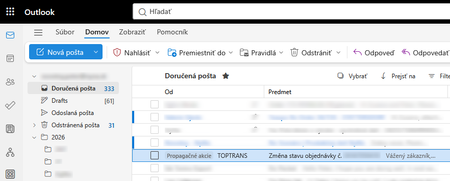
Outlook 365 got new "feature" that marks random e-mail with "forced category" named "Promotion" (on screenshot "Propagacne akcie"). On attached screenshot you can see fairly important e-mail about delivery of big packet I'm waiting for. Definitely this is not related to any promotion or advertising. This new "forced categories" do not exists in normal categories. They can not be deleted, changed, or hidden from view. Please note that what you normally understand as category is displayed in SUBJECT ("Predmet" on screenshot) field, but these "forced categories" are displayed in the FROM ("Od" on screenshot) field. This feature was implemented cca 1 or 2 weeks ago. Has anyone experienced situation like this? How to get rid of these "forced categories"? What I tried: 1. Checked categories in settings - category like this does not exists 2. Checked categories in settings - suggested categories switch does not exists 3. Tried to create rule to remove the "forced category", but rules ignore these "forced categories", they work only with standard categories (in the subject field) 4. Searched view menu if it can be changed to not display "forced categories", but there is no single switch about it. 5. Tried all available conversation view options 6. Disabled copilot398Views0likes5Comments
How to Recover Data from a Damaged or Corrupted OST File When Outlook Cannot Open It
Hi everyone, I have seen several cases where users still have an old OST file but cannot access the mailbox data inside it. This usually happens after an Outlook profile is removed, a Microsoft 365 or Exchange account is changed, a mailbox is no longer available, or the OST file becomes damaged or corrupted. One common misunderstanding is that an OST file can be opened on another computer in the same way as a PST file. However, an OST file is linked to the Outlook profile and mailbox that created it. If that connection is no longer available, Outlook may not be able to open the file normally. Before trying to recover the OST data, it is worth checking a few things: Is the original Microsoft 365 or Exchange mailbox still available? Can the Outlook profile be recreated and synchronized again? Is the issue related to the OST file itself or only the Outlook profile? Do you need the complete mailbox data or only specific folders/items? If the mailbox is still available, rebuilding the Outlook profile and allowing Outlook to create a new OST may be the better approach. However, if the mailbox no longer exists, the Outlook profile has been deleted, or the OST file is damaged and contains the only available copy of the mailbox data, recovery becomes a different process. In these situations, it is important to first check what information is still readable from the OST file. Scanning and previewing the mailbox data before export can help identify available folders, emails, attachments, contacts, and calendar items before creating a new PST file. A practical OST recovery workflow usually involves: Keeping a copy of the original OST file before making any changes. Checking whether the original mailbox can still be synchronized. Scanning the OST file to identify available mailbox items. Reviewing important folders and messages. Exporting the required data to PST. Validating the resulting PST in Outlook. A detailed overview of the OST to PST conversion process, including scanning, previewing, selecting mailbox items, and exporting recoverable data, is available here: https://www.edbmails.com/pages/ost-to-pst-converter.html One important point to remember is that recovery results depend on the condition and readability of the OST file. A conversion tool can help extract available mailbox information, but it cannot recreate data that is no longer present or readable inside the source file.206Views0likes1Comment
Getting the error "Password sign-in isn't available. Try another method"
This is more of a complaint and a vent than a question. I constantly get that infuriating Outlook (web) "error" message when trying to log in: "You've tried to sign in too many times with an incorrect account or password" or "Password sign-in isn't available. Try another method," even though my password was correct. Microsoft, stop forcing us to enable cookies or avoid private browsing just because you are incompetent at securing and scaling your systems. I don't have this problem with Gmail, and I'm thinking about closing my Outlook account. Please fix this error! Who was the genius who had the brilliant idea (100% sarcasm) to force me to open a different email account, find a code, and paste it just to log in, instead of using a method that is MUCH faster, easier, and more convenient for me—like simply typing in my password? I should be the one to decide the "level of protection my account has"; it might be an account with nothing important in it, so I have NO interest in 2FA or using codes sent to alternate email addresses, etc. I think this error stems simply from my refusal to allow Outlook to allow tracking of cookies and history, combined with terrible design where they block access if a high volume of traffic is detected from a single IP address. Hello!!! Most ISPs use IP pools to route hundreds or thousands of users to the internet; there is no way for us users to control that. But I repeat, that I don't deal with this kind of nonsense with other email services. And in case anyone kindly wants to offer suggestions to "resolve this" (which aren't real solutions anyway, just workarounds): I do NOT use VPNs; I always log in from home, from the same computer (nothing changes). I do not use—and will not install—an authenticator app for an email account that holds nothing important; it is a hassle to have to open an app or check an alternate email just to log into my account on a PC. Microsoft, one never expects anything good from you, yet you still manage to disappoint us. PS: Every time I run into this error, I send a message via the "Give Feedback" option; I do this repeatedly, hoping to flood your inbox with this complaint.407Views0likes2Comments
Intermittent “We can’t retrieve the calendar events right now” error in Outlook team calendars
We are receiving an increasing number of reports from users who are unable to view colleagues’ calendars in Outlook. The following error is displayed: “We can’t retrieve the calendar events right now. Wait a few minutes and try again.” The issue appears to be intermittent and inconsistent across Outlook clients: Some calendars work in Outlook on the web but not in New Outlook or Classic Outlook. Other calendars fail in OWA as well. A calendar may work temporarily and then fail again after restarting Outlook or switching between New and Classic Outlook. Some users first experienced the issue yesterday, while others have experienced it for more than a week. One affected user is a manager with nine direct reports. Outlook automatically displays these users under “Team: [Manager name]”. However, the number of visible team members changes after restarting Outlook or switching clients. For example, the group may contain all nine members at one point and only three at another. The Manager attribute and reporting structure have been verified in Active Directory/Entra ID and are correct for all team members. Our Service Desk has already tested the following without resolving the issue: -Outlook on the web, New Outlook and Classic Outlook -Removing and adding the affected calendars again -Adding calendars manually using the users’ primary SMTP addresses -Resetting the Outlook navigation pane -Resetting Outlook views -Creating a new Outlook profile -Verifying the users’ Manager attributes and reporting structure Because the issue also occurs intermittently in OWA and the membership of the automatically generated Manager’s Team Calendar changes, this does not appear to be limited to the local Outlook profile. Has anyone else experienced this recently? Could this be a known Exchange Online issue involving the automatically generated Manager’s Team Calendar, shared-calendar synchronization or mailbox-side calendar navigation data? Are there any additional diagnostics or supported methods for rebuilding the Manager’s Team Calendar configuration in Exchange Online?1.1KViews4likes3Commentscan't verify my outlook account while logging in on IOS mail app
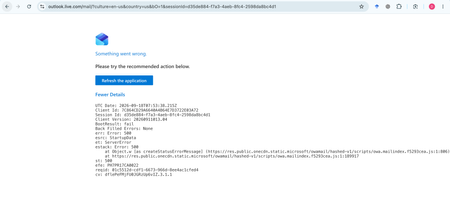
My Outlook.com mailbox cannot be opened on Outlook Web, macOS Mail, or iPhone Mail. Other accounts work normally. Outlook Web shows: HTTP 500, BootResult: fail, esrc: StartupData, et: ServerError. Please check the mailbox provisioning/backend status for my account.315Views0likes1CommentHow much of your Microsoft 365 environment can you actually see at once?
Not how many users you have. Not how many sites, teams, apps or flows you have. How much of it can you actually see connected together? I've been working across Microsoft 365 environments for a while, and I kept running into the same thing. There is no shortage of information. If anything, there is probably too much of it. Users, groups, permissions, SharePoint, Teams, Power Apps, Power Automate, Power BI, Dataverse, OneDrive, Exchange, Intune, licensing, configuration... It's all there. But when you're actually trying to understand how everything fits together, it can be a different story. You open one blade. Find something. Open another. Cross-check it. Go back. Open something else. Before long, you're jumping between different parts of the tenant trying to build the bigger picture in your head. And if you're working with larger environments, that gets difficult pretty quickly. The information isn't necessarily missing. The relationships between the information are what can be difficult to see. That got me thinking about a slightly different question: Instead of "where do I find this information?" "Show me what's connected to this." That's where VisibleState started. Start anywhere. Follow the connections. Imagine starting with a single user. Instead of seeing that user simply as a record with a list of properties, imagine being able to explore the relationships around them: User → Groups → SharePoint → Teams → Power Apps → Power Automate → Power BI → Dataverse → OneDrive → Exchange → Intune Then the questions become different: What does this user have access to? Is that access direct or coming through a group? What resources are connected to them? What depends on something they're associated with? Which licenses are involved? Are there relationships that look unusual? If something changes, what else might be affected? Those questions aren't necessarily about finding another piece of information. They're about putting information that already exists into context. A report can tell you that something exists. A connected view helps you understand what it is connected to. Illustrative example below — not a real customer environment. I'm not suggesting Microsoft 365 doesn't already give us this information Quite the opposite. Microsoft 365 already gives administrators an incredible amount of information and tooling. The thing I've been thinking about is what happens when you want to look across those boundaries. Sometimes I don't want another export. I don't want another list. I don't necessarily want another dashboard. I want to start with something I'm looking at and ask: "What's connected to this?" And then keep following the trail. That's the idea I'm exploring with VisibleState. The interesting part is what happens when you change the viewpoint The same relationships can be useful for completely different reasons. For example: Administrators may want to understand access, permissions and dependencies. Security and governance teams may want to find unusual relationships or exceptions. Compliance teams may need to understand who can access something and why. People managing multiple environments may want a consistent way to understand what's there without rebuilding the picture manually every time. Leadership may not need to see the graph at all. They may simply want to know what's important, what's exposed and what could be affected. It's still the same underlying environment. You're just looking at it from a different angle. And that's where I think things get interesting. Where I'm at with it VisibleState started as something I was building to make my own work easier. I was spending a lot of time investigating environments, tracing access and putting information together for reports. The individual tasks weren't necessarily difficult. It was the jumping between different places and reconstructing the bigger picture that took the time. So I started building something that would let me approach the environment through the relationships instead. It's grown quite a bit from where it started, and I'm continuing to build it. I'm not posting this as a product launch, and I'm not looking for people to sign up. I'm genuinely interested in whether the problem I'm seeing is familiar to other people working with Microsoft 365. So I'm curious... If you could start with any object in your Microsoft 365 environment and immediately see what it's connected to, where would you start? Would it be: Users and access Groups and permissions SharePoint and Teams Power Apps, Power Automate, Power BI and Dataverse Licensing and resources Governance and unusual relationships Something completely different Maybe you've already got a good way of doing this. Maybe you still find yourself jumping between different services and piecing things together manually. Or maybe I'm looking at the problem from the wrong direction. What's the one relationship in your Microsoft 365 environment that you wish you could see instantly?224Views0likes0Comments