outlook for windows
1428 Topics
Not receiving emails
Hi For 2 months I have been receiving progressively fewer emails. I have been through all the steps suggested (checking storage, rules, forwarding etc), and all these are OK. It's strange because some emails still get through, generally those from a private individual. The ones from big companies that I would normally receive eg phone supplier, utilities companies and reputable online retailers order confirmations or verification codes are not getting through. I've tried Microsoft support as I think it's a problem with their server for some reason blocking these emails, even though I've added them to my safe list, but they haven't been able to help. They keep sending me to the sender team, which tell me to go back to the other team! I'm fairly sure it's not a problem with the senders side, as there are so many different companies affected, the common denominator is my email account as the problem. Any ideas of a way I can fix this myself? Thanks34Views0likes1Comment
Outlook app is always out of sync
Why is my Outlook app always out of sync? When people send me emails it can take a few hours before they show up in the app, but when I go to the website or the app on my phone the emails are there right away. Even closing and restarting the app doesn't fix it. I just have to wait until the emails eventually show up. I had to switch back to using the browser to access my email.Solved145Views0likes3CommentsOutlook Not Able to Open Files in Desktop App
Hello all, I work in an enterprise environment, and I have now seen two occurances of this issue. Essentially, when a user receives an email in New Outlook with a direct attach file (Word, Excel, PDF in Acrobat, etc.), and they try to open them in the desktop app, it simply never opens. No error codes or anything, essentially just "it did not work, restart Outlook" if anything at all. Opening in the web apps works fine, opening them from Outlook (Classic) in the desktop app works fine, and downloading them directly allows them to be opened as well. I did some searching for this, and found some issues from 2023 that seemed similar, but none of that troubleshooting got anywhere. From everything I can see, it seems like a bad update, but I cannot say for sure. Has anybody seen this, or any ideas on a way to fix this?446Views2likes1Comment
Outlook.com Spam Filtering Regression — Missing Rule Conditions Prevent Safe User‑Level Mitigation
I’m a program manager working with data engineers in a large corporation, and I’ve used Microsoft Exchange professionally for over 30 years. I’m posting because Outlook.com’s spam filtering pipeline appears to have regressed significantly, and the current rule system no longer provides the necessary conditions for users to mitigate the issue themselves. Summary of the Issue Over the past several months, Outlook.com has begun allowing large volumes of spam across multiple categories — explicit content, romance scams, foreign‑language marketing, calendar spam, health spam, lotto scams, and unsolicited newsletters. This is not typical spam leakage; it suggests a failure or degradation in one or more layers of the filtering pipeline (content classification, sender reputation scoring, behavioral heuristics, or transport‑level filtering). Technical Problem Outlook.com previously offered rule conditions that allowed users to safely filter spam based on message behavior and metadata. These included: Message type (new vs. reply) Does not include (critical for safe filtering) Header includes Unsubscribe detection Cold sender / no prior conversation These conditions are no longer available in the current Outlook.com rule interface. The remaining conditions — primarily “includes” filters on subject, sender, or body — are insufficient for safe spam mitigation. Any attempt to delete spam using the current rule set risks deleting legitimate mail, because: All legitimate transactional mail contains “http” All receipts, confirmations, and alerts contain structured HTML Many legitimate first‑contact messages contain links There is no longer a way to exclude legitimate patterns (unsubscribe, structured headers, known senders, etc.) Impact Users cannot safely create rules that distinguish spam from legitimate mail. This leaves them with only two options: Allow spam to reach the inbox Move all messages containing “http” to Junk, which also captures legitimate mail This is a regression in Outlook.com’s functionality and user safety. It also disproportionately affects users who rely on Outlook.com for critical communications. Escalation I have already escalated this issue directly to Microsoft leadership: Satya Nadella (CEO) Brad Smith (President) Rajesh Jha (EVP, Experiences & Devices) Steve Chew (Corporate VP, Outlook & Exchange) Chris Capossela (Chief Customer Officer) I’m posting here to ensure visibility within the Outlook engineering and product teams, and to request confirmation that: This regression is known and being investigated The missing rule conditions will be restored Outlook.com’s spam filtering pipeline is being reviewed for failures in classification or reputation scoring No part of this functionality will be moved behind a paid tier Why This Matters Outlook.com has historically been a reliable consumer‑grade and professional‑grade mail platform. Removing advanced rule conditions without providing alternative filtering controls leaves users unable to protect themselves from high‑volume spam. This is a user safety issue, not a feature request. I’m asking the Outlook team to prioritize this regression and restore the rule capabilities that previously allowed safe and effective spam management. Thank you for your attention.152Views0likes2Comments
Outlook account cannot change from Exchange on home PC using Office Pro 2024 LTSC
On a home PC I would change protocols on a mistake I did several years ago when I used Exchange instead of Outlook on my Office Outlook App. I have followed the basics in that i have went into account using File>Account>Remove, Closed down App, Restarted, then readded account. Bug reappeared in that it autodiscovered Exchange. I then manually selected the pictogram of the Outlook (could not explicitly say Do NOT use Exchange) but still goes to Exchange. Attempted this three times as this is par for the course, but it stubbornly went to Exchange. I went to ost and deleted temp files etc but no joy. Does anyone have any insights into how to coax the client to use Outlook instead of Exchange to work with *@outlook.com?Solved117Views0likes2Comments
my account has been hacked and the hacker activated 2FA so I can't reset my password
as said in the title. I downloaded a malicious file that took over my discord and outlook account linked to it. I tried to reset the password but the hacker both changed the account linked to it in case I needed to change the password and activated 2FA so even when I try to reset the password from my main account it says it was ignored. I want to either find a way to recover my stolen account or delete it so the hacker wont have access to my personal information219Views0likes2Comments
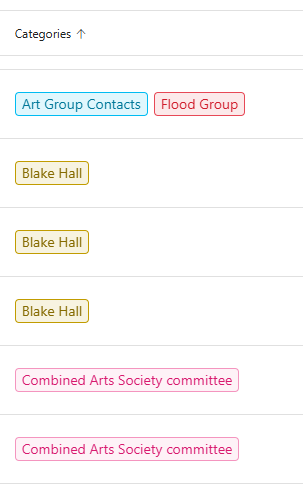
Use of Categories in the new Outlook for Mac: search in the category list and server-side rules
Categories are a useful way to tag emails in the Inbox by topic. They make it easier to group and find messages later, without having to move emails manually into topic-specific folders. However, when many categories have been created, assigning one to a message becomes inconvenient: the category list can be difficult to navigate, and I cannot search within the Categories menu. A search field in that menu would make it much easier to find and apply the right category. I also have a question about rules. In our company environment, Outlook connects to on-premises services, and server-side rules are important because they continue to run when I work from home without a VPN. In my experience, I cannot create a server-side rule that assigns a category. As a result, a rule that uses categories appears to run only when Outlook is open and connected. Could category assignment be added as an option for server-side rules in the new Outlook for Mac? And could a search function be added to the category picker? It would also be helpful to know whether these limitations depend on the Outlook version or the mailbox/server configuration.141Views0likes1Comment
What is the point of Categories in Outlook
Categories seem like a great thing in Outlook - you can categorise your contacts by adding tags and you can filter your contacts by the categories that you've entered: But then that's about all you can do with them. When you create a new email, and you press the "To" button, the dialogue that appears to select your contacts doesn't include categories, so you can't filter contacts by category: When you export your contacts, your categories aren't included in the export file. So, what's the point of categories in Outlook?169Views1like2CommentsOutlook unified all-account
Hi everyone. I have a problem with a new unified all-account feature in Outlook (Windows). Everything was working fine before activating unified inbox. I could have read emails from each inbox by going to each inbox. After unified all-account feature was activated I can see emails and their body only in main Gmail account. If I go to inbox for other email account, I can only see subject of the email and sender. Body is total empty. The same happens if I go to unified inbox. I can read all emails from main Gmail account, but emails from other email accounts are blank. Any idea what might causing this? Thank you in advance, Marko158Views0likes2CommentsMS Outlook 2024 LTSC automatically gets closed and later not getting open
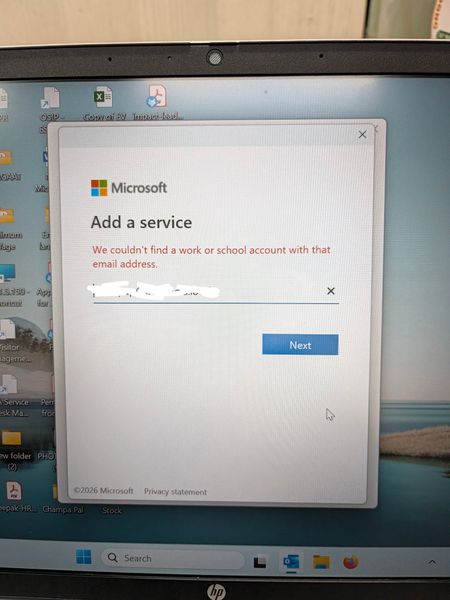
In Outlook 2024 LTSC, the application suddenly stops and closed automatically. Later troubleshooting, it is observed that it doesn't even open in safe mode. Tried to create a new profile where it is not able to search the user from exchange and automatically redirect to Microsoft 365 login page whereas our mail server works in exchange mode. Even after reinstalling the MS office 2024, it is not able to search the user and redirects to Microsoft 365 login page. What is the issue and resolution.466Views0likes2Comments